
Overview
Enterprise Key Management (EKM) uses a key that you control to encrypt and decrypt the data-encryption keys that protect your content. Your master key stays in OCI Vault. This setup applies to API projects.
OCI Object Storage configuration for Private Safety Processing (PSP) is separate. A storage bucket connection does not register an EKM key or a PSP recovery key.
For an overview of EKM, see: OpenAI Enterprise Key Management (EKM) Overview.
Before you begin
You need:
An OCI tenancy with permission to create a vault, manage keys, and create IAM policies.
Your OpenAI organization ID and an organization Admin API key. Project API keys cannot administer external keys.
For Admin API access requirements and scoped permissions, see: External Keys in the Management API.
Start with a new API project to verify the configuration before using it for production workloads.
Create an OCI vault and AES-256 key
In the OCI Console, select a commercial OCI region, then go to Identity & Security > Vault.
Create a vault in your chosen compartment, or open an existing vault. Wait until its state is Active.
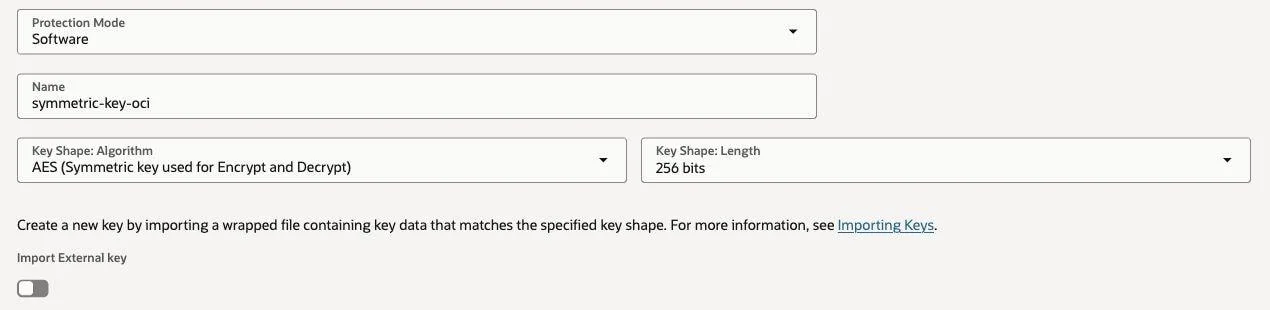
In the vault, go to Master encryption keys > Create Key, then configure these settings:
Key Shape: Algorithm: Select AES (Symmetric key used for Encrypt and Decrypt).
Key Shape: Length: Select 256 bits.
Protection Mode: Select HSM or Software, based on your organization's requirements.
Confirm that the key is Enabled. Copy the vault OCID and key OCID from their details pages, and record the region name, such as
us-ashburn-1.

Use the full vault and key OCIDs, not their display names. The key must belong to the registered vault, and both OCIDs must match the registered region. OCI commercial-realm OCIDs use oc1.
OCI cross-tenancy access requires both your tenancy and OpenAI's tenancy to subscribe to the chosen region.
Tag the key with your OpenAI organization ID
On the key's Tags tab, select Add tag. Set Namespace to None (freeform tag), then enter:
Tag key: Enter
openai_organization_id.Tag value: Enter your OpenAI organization ID, such as
org-EXAMPLE.

The tag belongs on the key. Its value must exactly match the organization that will register it with OpenAI.
Grant OpenAI access to the vault and key
OpenAI uses its production OCI identity to access your vault and key. Go to Identity & Security > Policies, select your tenancy's root compartment, and create a policy. In the manual editor, enter the statements below. Replace YOUR_VAULT_OCID and YOUR_AES_KEY_OCID with the OCIDs from your vault and key details pages. Keep OpenAI's tenancy and group OCIDs unchanged.
Define tenancy OpenAIEKM as ocid1.tenancy.oc1..aaaaaaaa4kzwe5jdr4gsxft7dfnwbnp3aozhxeskabsqo7czdkbp6fkh3uha
Define group OpenAIEKMProduction as ocid1.group.oc1..aaaaaaaaerxukyeaxwqtbsxasnp54mem3sfgyokzdk7s27o7yvepluynxi5q
Admit group OpenAIEKMProduction of tenancy OpenAIEKM to {VAULT_READ} in tenancy where target.vault.id = 'YOUR_VAULT_OCID'
Admit group OpenAIEKMProduction of tenancy OpenAIEKM to {KEY_READ, KEY_ENCRYPT, KEY_DECRYPT} in tenancy where target.key.id = 'YOUR_AES_KEY_OCID'
These statements grant vault metadata access and key metadata, encryption, and decryption access only to the specified resources. They do not grant key administration, key export, secret access, or bucket access. See Oracle's Vault IAM policy reference for the permissions and resource conditions.
Register the key with OpenAI
Send the following request with your organization Admin API key. Replace the example region and resource placeholders with your values.
curl https://api.openai.com/v1/organization/external_keys \
  -H "Authorization: Bearer $OPENAI_ADMIN_KEY" \
  -H "Content-Type: application/json" \
  -d '{
    "type": "oci",
    "purpose": "ekm",
    "name": "OCI EKM key",
    "region": "us-ashburn-1",
    "vault_ocid": "YOUR_VAULT_OCID",
    "key_ocid": "YOUR_AES_KEY_OCID"
  }'
Do not include key_version_ocid for EKM. OpenAI uses the current OCI key version when wrapping a new data-encryption key and preserves the version needed for decryption.
When you register the key, OpenAI checks that it can encrypt and decrypt with the key. If validation succeeds, the API returns HTTP 200 and an id such as extkey_EXAMPLE. Save this OpenAI registration ID, which is different from your OCI key OCID. Registering the key does not activate EKM on your project.
Create an API project using the registration
curl https://api.openai.com/v1/organization/projects \
  -H "Authorization: Bearer $OPENAI_ADMIN_KEY" \
  -H "Content-Type: application/json" \
  -d '{
    "name": "OCI EKM project",
    "external_key_id": "extkey_EXAMPLE"
  }'
This creates a new API project with EKM enabled. The response includes the project ID and its external_key_id. Use this project for workloads that should use your EKM key. For access requirements to enable EKM on an existing project, see: External Keys in the Management API.
Validate access and manage the key lifecycle
To recheck OCI access, call:
curl -X POST \
  -H "Authorization: Bearer $OPENAI_ADMIN_KEY" \
  https://api.openai.com/v1/organization/external_keys/extkey_EXAMPLE/validate
A successful response is HTTP 200 with {"status":"success"}. Retrieving the registration with GET returns its stored configuration; /validate checks OCI again.
To rotate key material, create a new OCI key version under the same AES key. Keep previous versions available for retained data. Rotation does not re-encrypt existing content, and previously wrapped data-encryption keys retain their original version.
Removing IAM permissions, disabling a key, or deleting it can prevent decryption. Cached data-encryption keys can delay the effect of access changes. For key lifecycle details, see: EKM key lifecycle guidance before revoking access. An EKM registration cannot be deleted while it is attached to an active project.
Use OCI for PSP recovery keys
For PSP recovery, create a separate RSA-3072 key. Give OpenAI permission to read the key's metadata and public key. Your own authorized OCI identity performs the private-key operations used for recovery. Selecting a recovery key does not change the project's EKM key, enable PSP, or configure PSP storage.
Follow Set up asymmetric keys — OCI Vault for the key settings, IAM policy, exact-version registration, and project selection. See Decrypt PSP records for the recovery workflow.
Troubleshooting
| Symptom | Check |
|---|---|
| Key registration is unauthorized | Confirm that you are using an organization Admin API key. Project API keys cannot administer external keys. |
| Vault or key validation fails | Confirm the region, full OCIDs, vault/key relationship, active vault, enabled key, and exact organization tag. |
| OCI denies access | Check the production OpenAI group and tenancy OCIDs, the IAM resource conditions, and the permissions for the intended purpose. |
| EKM reports an invalid key type | Use AES-256. RSA-3072 is for PSP recovery registrations. |
| PSP registration rejects the version | Supply an exact key-version OCID from the same key and region. A key OCID or latest is not a version. |
If a request fails, save its request ID and a sanitized error response. Include them when you contact OpenAI Support. Do not include API keys or private key material.