
Overview
A temporary chat stays out of your chat history and is not used to improve OpenAI models while it remains temporary. It can use existing memories, custom instructions, and plugins to personalize responses. Before the conversation begins, you can turn personalization off. You can also save the chat later as a regular chat.
Start a temporary chat
Open a new chat.
Select Temporary.
Choose Personalized or Unpersonalized before you send your first message.
Enter your message.

Memory and personalization
Before the conversation begins, choose how you want the temporary chat to respond:
Unpersonalized: Does not use memory, custom instructions, or plugins.
Personalized: Can use your existing memories, custom instructions, and plugins.
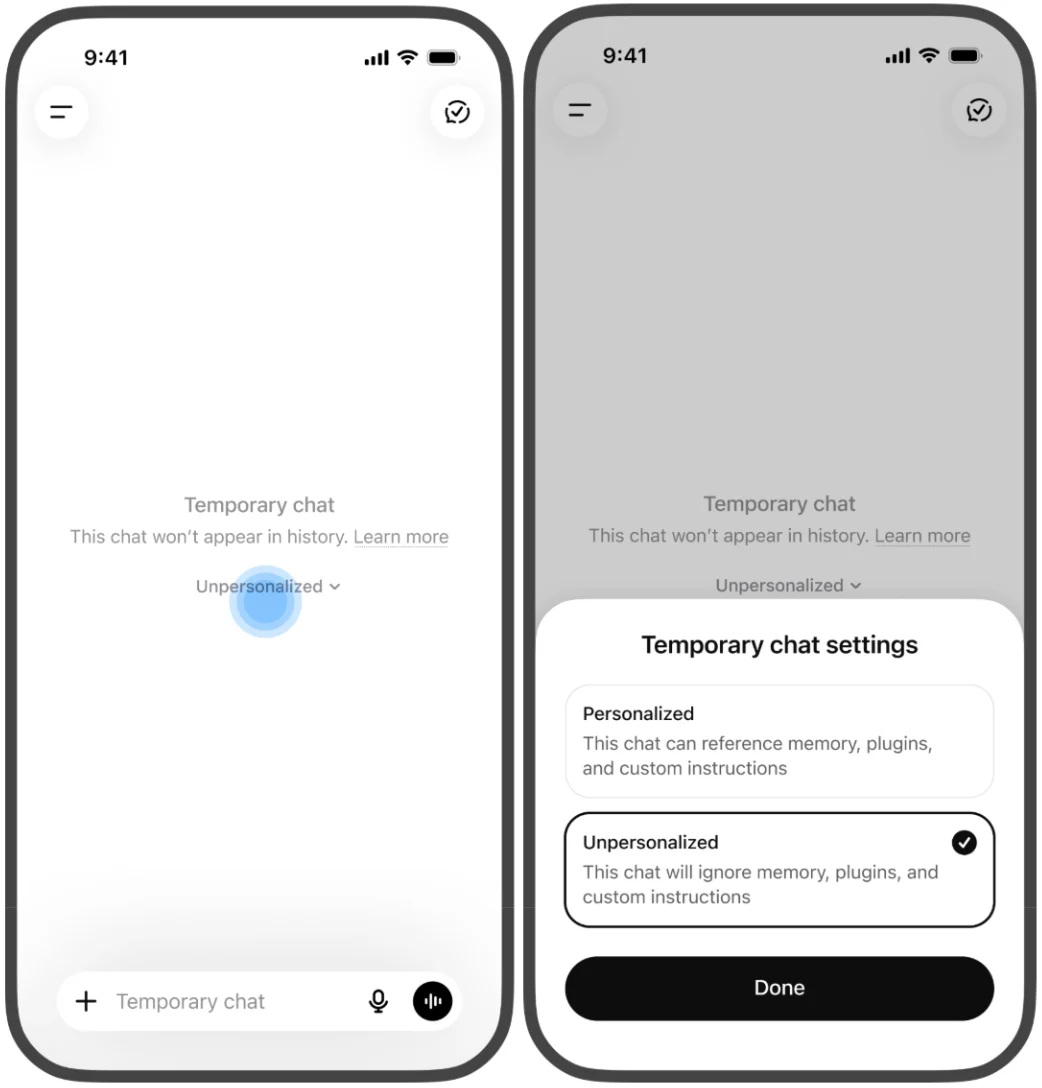
Neither option creates or updates memories while the chat remains temporary. You cannot change personalization after the conversation starts.
Your account and workspace restrictions take priority over the personalization choice for an individual temporary chat.
ChatGPT may still use information from prior conversations for limited safety and security purposes. Turning off memory and personalization features does not disable safety features that may use limited, safety-relevant context in rare, high-risk situations to help ChatGPT respond more safely.
For more information about safety context, see: Helping ChatGPT better recognize context in sensitive conversations.
Save a temporary chat
You can save a temporary chat to your chat history if you want to return to it later. Saving converts it into a regular chat, including when it started without personalization.
From that point forward, the saved chat follows your account’s personalization and model-improvement settings. If Memory is on, the saved conversation may be used to personalize future responses. Account and workspace restrictions still apply.
If you do not save a temporary chat, it will not appear in your history and cannot be reopened from history after you leave it.
If your temporary chat includes uploaded files, eligible files may also be saved to Library or Space when you save the chat, subject to availability and storage limits. For more information about saved files, see: Using Library to manage files in ChatGPT. For help finding saved files in Space, see: Getting started with Space in ChatGPT.
Model training and retention
A temporary chat is not used to improve OpenAI models while it remains temporary, whether or not you choose personalization. If you save it, your model-improvement setting applies.
OpenAI may keep a copy of a temporary chat for up to 30 days for safety purposes. Once saved as a regular chat, the conversation follows the retention rules for saved chats.
For more information about temporary chat retention, see: Chat and file retention in ChatGPT.
Temporary chat compared with regular chats
Temporary chat stays out of your history unless you save it. Regular chats stay in your chat history and follow your account’s personalization and data settings.
| Feature | Temporary chat | Regular chat |
| History | Stays out of history unless you save it as a regular chat. | Stays in your history until you delete it or a workspace retention policy removes it. |
| Return later | Save it as a regular chat to return to it from history. | Can be reopened from chat history or Search. |
| Personalization | Choose Personalized or Unpersonalized before the conversation begins. | Follows your account’s personalization settings. |
| Memory | Can use existing memories if personalized. Does not create or update memories while temporary. | Can use and create memories when Memory is enabled. |
| Model training | Is not used to improve models while temporary. Saved chats follow your model-improvement setting. | Follows your account’s model-improvement setting and workspace policy. |
| Retention | A copy may be kept for up to 30 days for safety purposes. | Follows saved-chat or workspace retention rules. |
| Best for | A conversation you do not want saved to history unless you choose to keep it. | A conversation you want to keep and return to later. |
Use temporary chat with GPTs and actions
You can use temporary chat with GPTs.
If a GPT uses actions, data sent to a third party through an action is governed by the recipient's privacy policy. The recipient may retain that data for longer than 30 days and may use it for other purposes.
Compliance API access
For eligible Enterprise customers, temporary chats are available through the Compliance API for 30 days, including when the workspace has a different custom retention period.
For more information about Compliance API access, see: OpenAI Compliance Platform for Enterprise and Edu customers.