
Admin API capabilities
The Admin API lets API Platform organization owners and security teams programmatically manage their API Platform organizations, enforce identity and access management policies, and support security and compliance requirements.
With the Admin API, they can:
List, create, retrieve, and delete invitations in an API Platform organization.
List, create, update, retrieve, and delete users in an API Platform organization.
Update user roles in an API Platform organization.
List, add, update, retrieve, and archive projects in an API Platform organization.
List, add, retrieve, and remove Users in a Project.
List, create, retrieve, and delete Service Accounts from a Project.
List, retrieve, and delete API Keys in a Project.
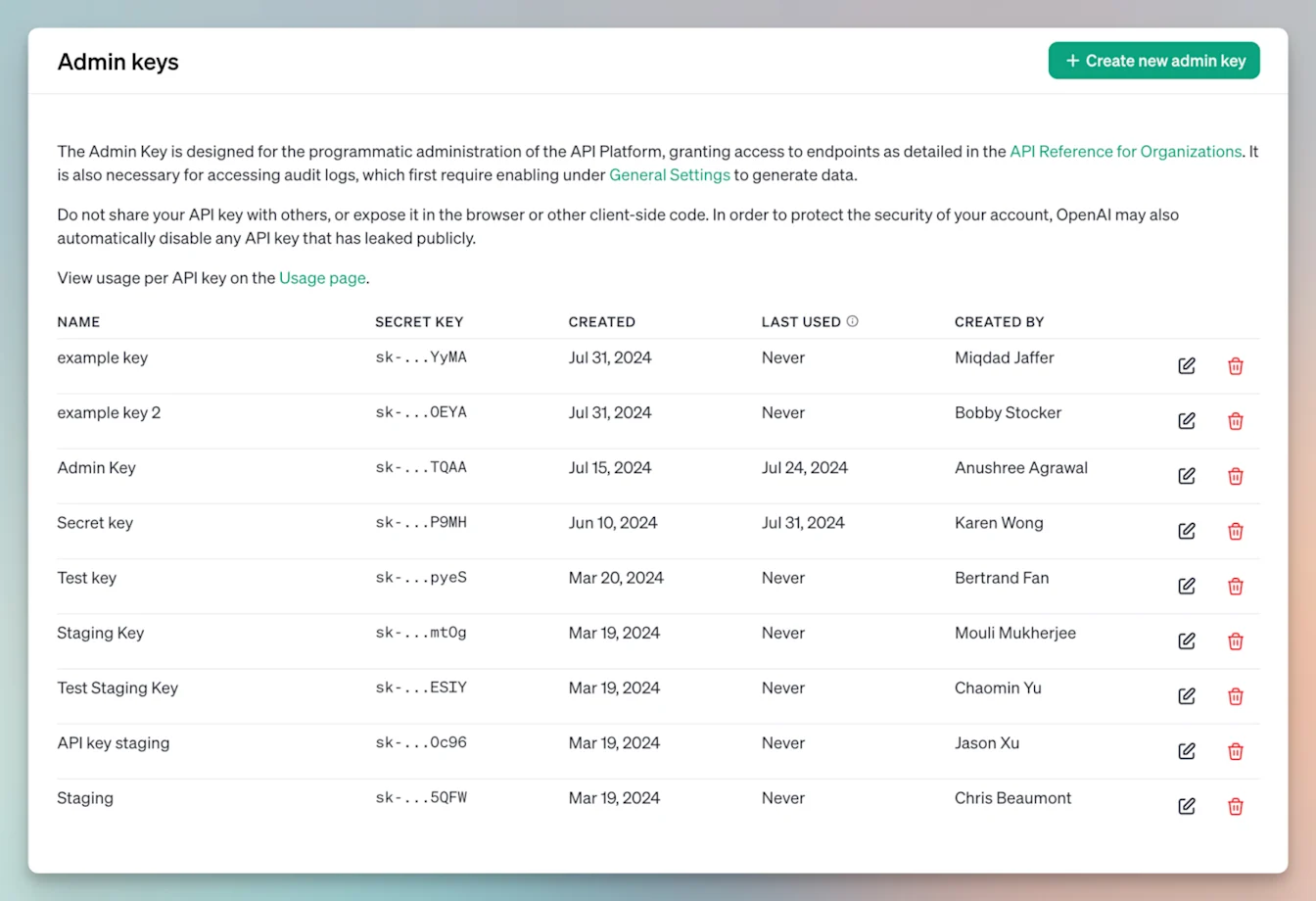
List, create, retrieve, and delete Admin keys in an API Platform organization.
How do I create an Admin key for an API Platform organization?
API Platform organization owners can create organization Admin keys in API Platform organization settings. Select Create new admin key, then choose the permissions required for your integration.
API Platform organization Admin keys are separate from ChatGPT workspace Admin keys created in Admin Console. For workspace keys, see: Managing Admin keys in Admin Console.
Visit our Admin API documentation to learn more.
Who can use Admin API keys?
Only API Platform organization owners can create organization Admin keys. Admin API keys can be used to authenticate Admin API requests with the required management scopes. Some Groups and Roles endpoints require scopes that are not included in Organization Administration. If a request returns a missing-scope error, review the endpoint’s required permissions and contact OpenAI Support before granting broader access.
Can I recover data I deleted with the Admin API?
Deleted data is not recoverable. This API does not provide the capability for deleting any data logged for audit or security within OpenAI. All authenticated requests to this API are logged for security and compliance purposes. When an item is deleted using this API, it is also removed from all internal search and retrieval indexes.
How long does OpenAI retain my data for once I delete it with the Admin API?
Data is retained internally for no greater than 30 days following a deletion request.
I lost my Admin API key - how do I recover it?
If an API key is lost, it cannot be recovered. We suggest deleting the previous key from your Admin Keys and creating a new one.
Audit logging capabilities
The Audit Logs API gives security teams an immutable record of administrative activity in API Platform organizations. These logs can help identify security issues, compliance risks, and gaps in operational procedures. You can track:
The lifecycle of API Keys — creation, updates, and deletion.
Account invitations — when the invitation was sent, accepted or deleted.
The lifecycle of Users and Service Accounts — creation, updates, deletions, role assignment and changes.
Login and logout failures.
Updates to API Platform organization settings.
The lifecycle of Projects — creation, updates, and archival.
How do I enable audit logging for my API Platform organization?
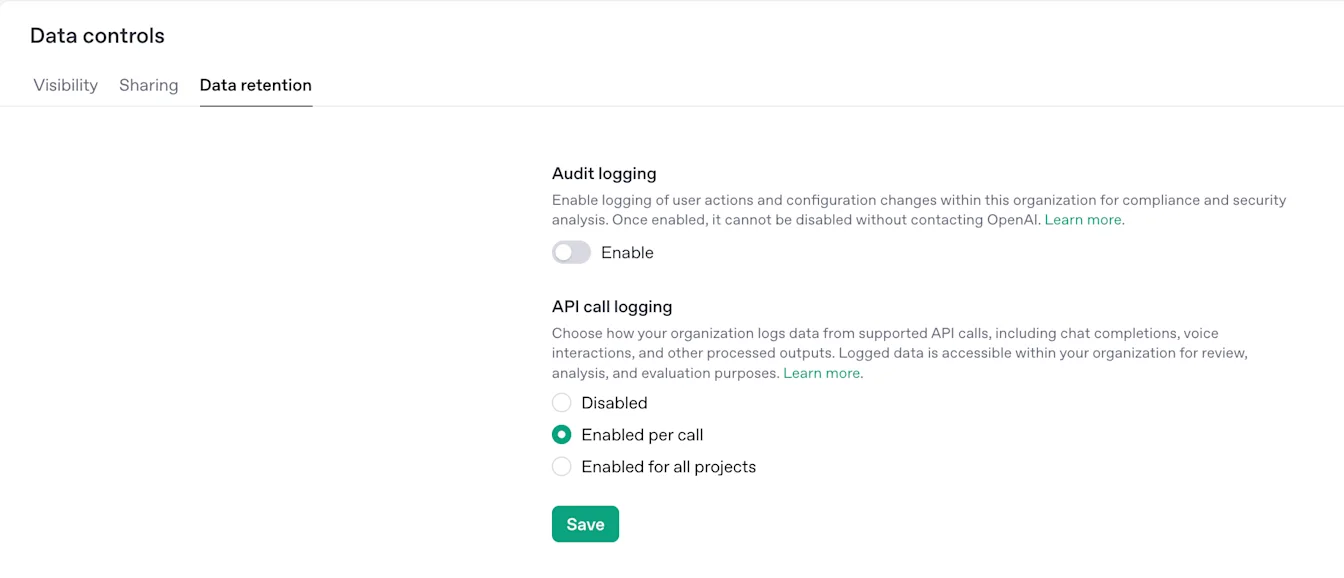
Once audit logging is enabled, it cannot be disabled in organization settings. An API Platform organization owner must contact OpenAI Support to request a change.
API Platform organization owners can enable audit logging in API Platform organization settings > Data controls > Data retention. Under Audit logging, select Enable and save your changes.
Visit our Audit logging documentation to learn more.
Who can use Audit log API keys?
Only API Platform organization owners can create an organization Admin key. To access audit logs, create a key with Audit Logs Scope set to Read and use it with the Audit Logs API. Audit logging must be enabled before audit log data is available.
Learn more about user roles in API Platform organizations.
How long are API Platform audit logs retained?
API Platform audit logs do not currently have a fixed retention period or configured TTL. OpenAI retains these audit logs on a best-effort basis for as long as they remain available, but does not guarantee permanent availability.
Because audit logs can be useful for long-term security, compliance, and administrative review, OpenAI does not automatically delete them after a short fixed window. Customers that need audit logs for their own retention, compliance, or eDiscovery policies should export and store copies in their own systems.
API Platform audit logs record administrative and organization-configuration events, such as changes to users, projects, API keys, service accounts, and organization settings. They are separate from API request and response customer content.
Does Zero Data Retention affect API Platform audit logs?
No. Zero Data Retention does not change the availability, retention behavior, or event contents of API Platform audit logs.
Zero Data Retention applies to customer content retention for API usage and abuse-monitoring controls. API Platform audit logs are administrative/configuration metadata about the organization and are available independently of whether Zero Data Retention is enabled.