
Overview
Deep research helps you accomplish complex online tasks by reasoning, researching, and synthesizing information into a documented report. It can work with uploaded files, search the public web or specific sites, and use enabled ChatGPT apps.
How deep research works
You describe the outcome you need.
Choose websites or uploaded files when needed. Eligible connected apps are available automatically when their permissions and workspace settings allow.
ChatGPT creates a proposed research plan. You can review and modify it before the research begins.
You can follow progress as it runs and interrupt at any time to refine the focus, including adjusting which sources it can access.
You get a structured report with citations or source links so you can verify the information.
Deep research is powered by the latest models for fast, accurate results. If you prefer, you can choose a legacy model for a deep research task.
When to use deep research
Use deep research for multi-step or in-depth questions that require combining and analyzing information from multiple sources, especially when you want explicit control over which sources are used.
For quick lookups or short conversations, standard chat may be faster.
Usage and limits
Deep research usage varies by plan. Your in-product usage counter shows your remaining tasks. For plans with a fixed monthly allowance, it resets every 30 days from the date of your first use.
Get started
Start a research task
You can start a deep research task by:
Typing /Deepresearch directly in a ChatGPT prompt
Selecting Deep research from the tools menu (+) in the ChatGPT prompt window
Selecting Deep research from the sidebar menu
Select a data source
Default
By default, deep research can access:
The public web
Files you upload
Connected apps
Deep research can use supported connected apps and data services that are available to your account. Depending on your plan, region, workspace settings, and the app’s capabilities, available sources can include document stores such as Google Drive or SharePoint and authenticated industry data services.
An app must be available for deep research and enabled for your workspace and role when applicable. When an app requires individual authorization, connect an account that can access the information you want to use. A supported administrator-managed source may be available without an individual connection.
App connections do not override provider permissions or workspace restrictions, and not every app or plugin supports deep research.
Deep research uses available read actions from connected apps. It does not use app write actions as part of research.
For instructions on connecting an app, see: Connecting and managing app accounts in ChatGPT.
For information about app authorization and workspace restrictions, see: Managing app permissions in ChatGPT.
Web sources you specify (specific sites)
To focus research on specific websites, go to Sites > Manage sites in the ChatGPT prompt window.
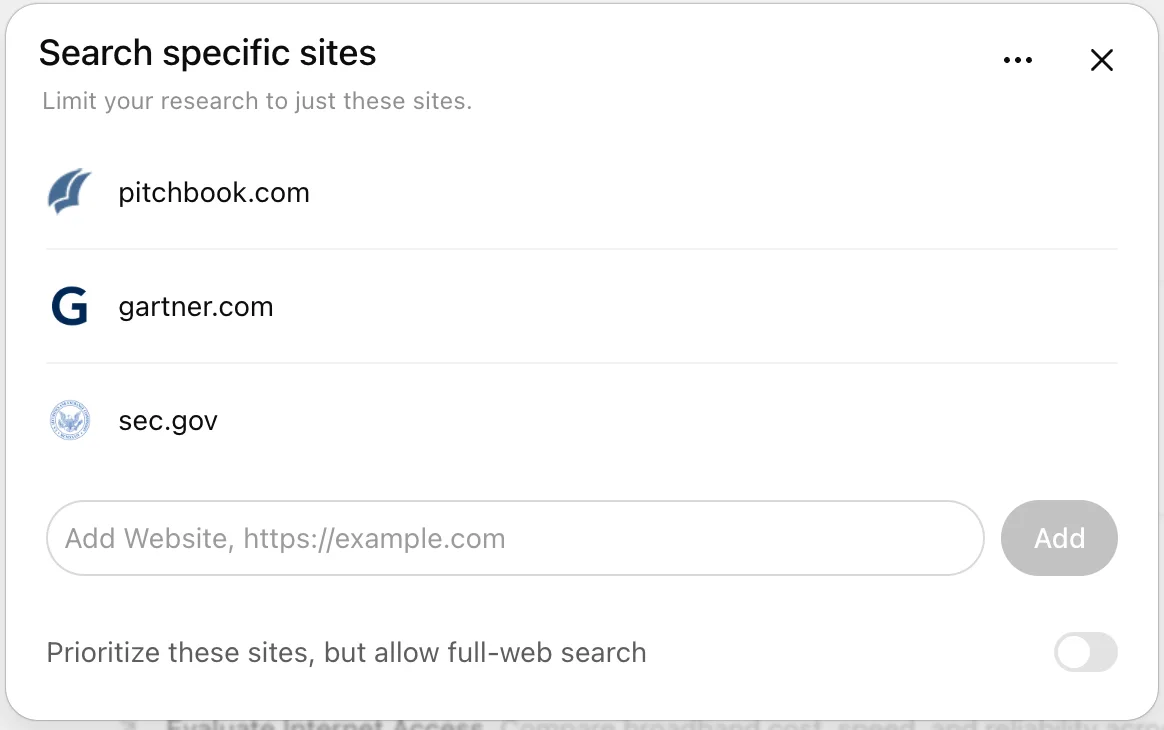
You can choose to restrict research to only the websites or domains you enter, or select Prioritize these sites, but allow full-web search to emphasize specific sources while still searching the broader web.
You can also enter websites as a comma-separated list.
Enter your prompt
A good deep research prompt clearly describes the question, desired outcome, and any relevant constraints.
Before research begins, ChatGPT may ask clarifying questions to confirm your goals. You can review and edit its proposed research plan so the report stays aligned with what you want to accomplish.
Download and review your results
All deep research outputs include citations or source links so you can verify the information.
Completed research opens in a fullscreen report view with:
A table of contents for navigating long reports
A sources used section for reference checking
An activity history showing how the research progressed
You can download completed reports for reuse or sharing in multiple formats, including Markdown, Word, and PDF.
Enterprise admin controls and data privacy
Role-based access control (RBAC)
For Enterprise and Edu workspaces, admins control access to deep research through role-based access control (RBAC).
Deep research respects workspace app enablement, role access, and connected-account permissions. An app appears as a research source only when it supports deep research and is available to the account and workspace. Enabling an app for a workspace does not guarantee that it supports deep research or that every member can access the same provider content.
For workspace administration, see: Admin controls, security, and compliance for plugins and apps.
Data privacy
Conversations using deep research follow the same data handling and privacy settings as regular ChatGPT conversations. You can manage retention and training preferences in your data controls. For more information, see: Chat and File Retention Policies in ChatGPT.
Compliance API
Deep research activity is detailed in the Conversation API, along with the conversation where the task was started.
For details about what’s included and how to locate it, see: Conversation API reference documentation.
FAQ
When should I use search vs deep research?
Use search for quick facts, and use deep research for depth and thoroughness.
Search quickly pulls recent web information and returns a short summary with links. Deep research takes more time to read and analyze many sources, then produces a detailed, documented report.
Does deep research work in all countries?
No. Availability depends on your plan and your country or territory.
What controls do I have while research is running?
You can edit the research plan before it starts, view progress in real time, interrupt the research to adjust focus, and update which sources the research can access.
Can I choose a different model for deep research?
Yes. Deep research is powered by the latest model by default, and you can continue using legacy models for deep research if you prefer.
How long will my deep research results be available?
Deep research results follow the retention policy for the conversation, including any applicable workspace retention settings. Deleting the chat also deletes its associated deep research outputs under that policy. For details, see: Chat and File Retention Policies in ChatGPT.
What if my task needs urgent answers?
If time is critical, use search or standard chat for faster responses and save deep research for in-depth analysis.
Which apps are available for deep research?
Only apps that support deep research and are available to your account can be used as research sources. Availability depends on your plan, region, workspace configuration, role access, and the permissions of your connected provider account. An app being available in ChatGPT or included in a plugin does not, by itself, mean it is available for deep research.
For an overview of app availability and capabilities, see: Connected apps in ChatGPT.
If an expected source is missing, see: Troubleshooting apps in ChatGPT.