
Overview
Deep research helps you accomplish complex online tasks by reasoning, researching, and synthesizing information into a documented report. It can work with uploaded files, search the public web or specific sites, and use enabled ChatGPT apps, all while keeping you in control.
How deep research works
You describe the outcome you need.
You choose which sources it can use (websites, uploaded files, and connected apps).
ChatGPT creates a proposed research plan. You can review and modify it before the research begins.
You can follow progress as it runs and interrupt at any time to refine the focus, including adjusting which sources it can access.
You get a structured report with citations or source links so you can verify the information.
Deep research is powered by the latest models for fast, accurate results. If you prefer, you can choose a legacy model for a deep research task.
When to use deep research
Use deep research for multi-step or in-depth questions that require aggregation and synthesis across multiple sources—especially when you want explicit control over which sources are used.
For quick lookups or short conversations, standard chat may be faster.
Usage & limits
Deep research usage varies by plan. Your in-product usage counter shows your remaining tasks. For plans with a fixed monthly allowance, it resets every 30 days from the date of your first use.
Getting started
Starting a task
You can start a deep research task by:
Typing /Deepresearch directly in a ChatGPT prompt
Selecting Deep research from the tools menu (+) in the ChatGPT prompt window
Selecting Deep research from the sidebar menu
Selecting a data source
Default
By default, deep research can access:
The public web
Files you upload
Connected apps
Deep research can pull from apps and data services you have access to—especially when credibility and traceability matter.
You can connect to your document stores, such as Google Drive or SharePoint, as well as authenticated industry data sources like FactSet, PitchBook, or Scholar Gateway.
Note: Deep research only uses read actions from connected apps. It does not use app write actions as part of research.
Web sources you specify (specific sites)
If you want deep research to focus on specific websites, you can manage this from the ChatGPT prompt window by selecting Sites → Manage sites.
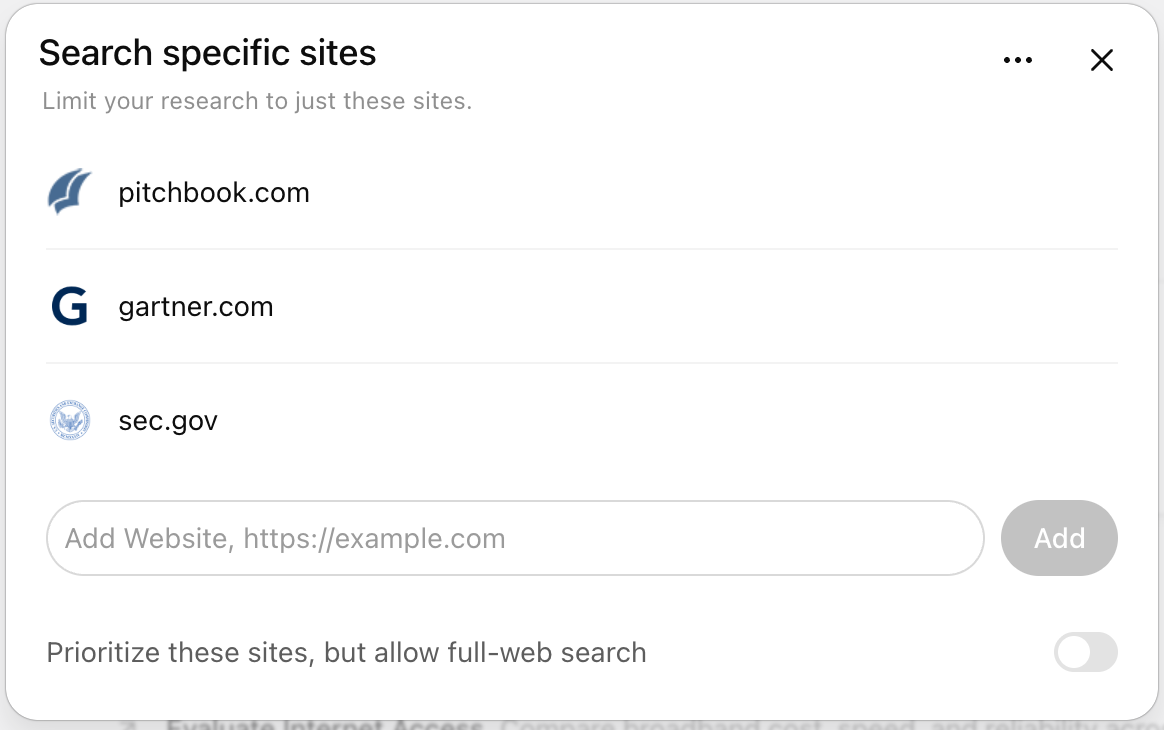
You can choose to restrict research to only the websites or domains you enter, or select Prioritize these sites, but allow full-web search to emphasize specific sources while still searching the broader web.
You can also enter a list of websites as a comma-separated list.
Enter your prompt
A good deep research prompt clearly describes the question, desired outcome, and any relevant constraints. Providing this context helps ChatGPT propose a research plan you can review and adjust before the research begins.
Deep research may ask clarifying questions to confirm your goals, alongside a research plan before it starts. You can review and edit that plan so the report stays aligned to what you’re trying to accomplish.
Download and review your results
All deep research outputs include citations or source links so you can verify the information.
Completed research opens in a fullscreen report view designed for review and reuse, includng:
A table of contents for navigating long reports
A sources used section for reference checking
An activity history showing how the research progressed
You can download completed reports for reuse or sharing in multiple formats, including Markdown, Word, and PDF.
Enterprise admin controls and data privacy
Role-based access control (RBAC)
For Enterprise, and Edu workspaces, admins control access to deep research through role-based access control (RBAC). For more information, please refer to our article: RBAC
Deep research respects the same app enablement controls as standard ChatGPT. Allowed apps are available for deep research, and disallowed apps are not.
Data privacy
Conversations using deep research follow the same data handling and privacy settings as regular ChatGPT conversations. You can manage retention and training preferences in your data controls. For more information, please refer to our article: Chat and File Retention Policies in ChatGPT
Compliance API
Deep research activity is detailed in the Conversation API, along with the conversation where the task was started.
For details on what’s included and how to locate it, see the Conversation API reference, please refer to the Conversation API reference documentation: https://chatgpt.com/admin/api-reference#tag/Conversations
FAQs
When should I use search vs deep research?
Use search for quick facts, and use deep research for depth and thoroughness.
Search quickly pulls recent web information and returns a short summary with links. Deep research takes more time to read and analyze many sources, then produces a detailed, documented report.
Does deep research work in all countries?
No. Availability depends on your plan and your country or territory.
What controls do I have while research is running?
You can edit the research plan before it kicks off, view progress in real time, interrupt the research to adjust focus, and update which sources the research can access.
Can I choose a different model for deep research?
Yes. Deep research is powered by the latest model by default, and you can continue using legacy models for deep research if you prefer.
How long will my deep research results be available?
Results remain in your conversation history unless you delete the chat. Deleting the chat also deletes associated deep research outputs.
What if my task needs urgent answers?
If time is critical, use search or standard chat for faster responses and save deep research for in-depth analysis.
Which apps are available for deep research?
All apps in ChatGPT are compatible with deep research. However, access to specific apps depends on your plan and workspace configuration.
App capabilities vary by plan. For more information, please refer to our article: Apps in ChatGPT.