
Overview
Enterprise Key Management (EKM) allows you to encrypt your customer content at OpenAI using keys managed by your own external Key Management System (KMS), available for both ChatGPT Enterprise and API.
OpenAI supports Bring Your Own Key (BYOK) encryption with external accounts in AWS KMS, Google Cloud (GCP), and Azure Key Vault.
At this time, EKM implementation is limited to Enterprise and Edu workspaces with a named OpenAI account representative.
How OpenAI EKM encryption works
Top-Level Flow
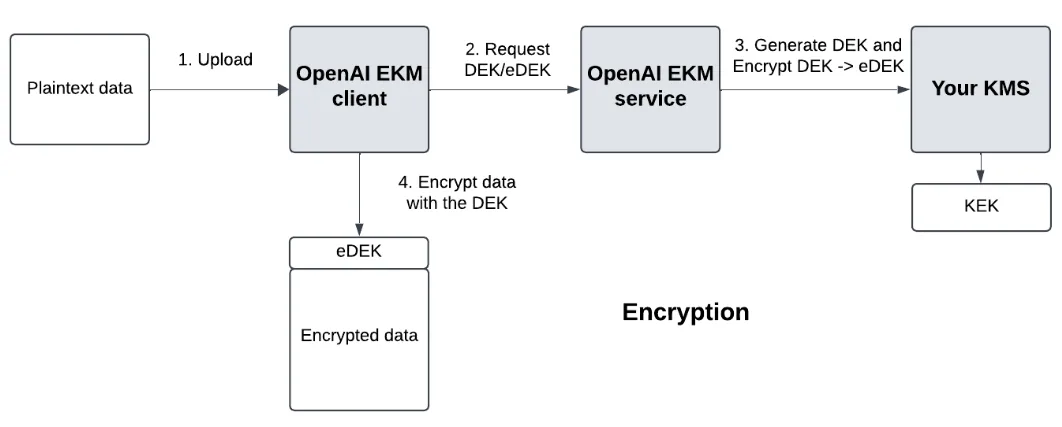
We generate a Data Encryption Key (DEK) for your cloud provider.
Your cloud KMS manages a master Key Encryption Key (KEK), either stored within your cloud or externally. The implementation is up to you.
We request an encryption of the DEK from your cloud, to get an encrypted DEK (eDEK). If your KEK is stored externally, your cloud just makes an extra hop to your external store, in a step that is opaque to OpenAI.
Encryption
Upon encryption, your data is encrypted with the DEK and the eDEK is stored as metadata on the file.
Decryption
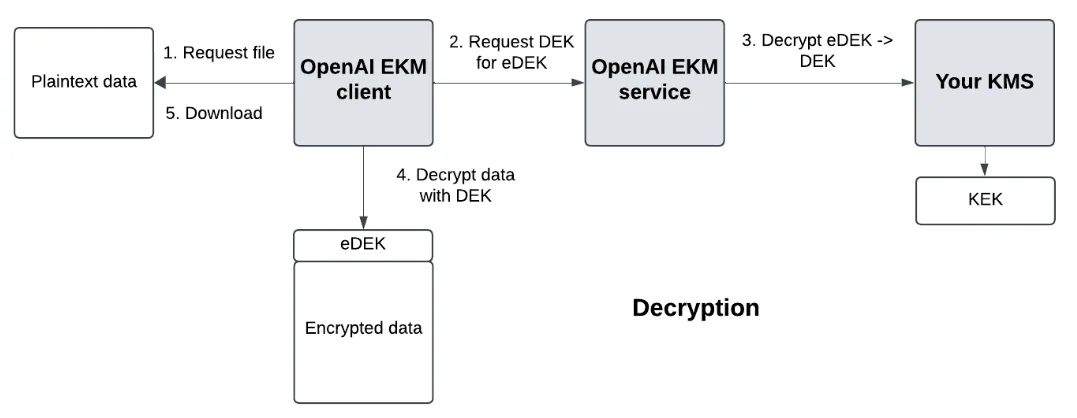
Upon decryption, we request the eDEK to be decrypted by your cloud KMS into the DEK, and we decrypt the data with the DEK.
Key Terms
Data Encryption Key (DEK) - the key that encrypts your data.
Encrypted Data Encryption Key (eDEK) - the encrypted DEK, generated by your KMS
Key Encryption Key (KEK) - the master key you manage that encrypts the DEK -> eDEK and decrypts eDEK -> DEK. This key always stays outside of OpenAI systems.
High-level requirements for implementation
In your cloud provider
Create a new key in your cloud KMS (Azure, AWS, or GCP)
Create a custom, limited policy with Encrypt/Decrypt permissions on the KMS
Create a trust policy (AWS), a workload identity (GCP) or a service principal (for Azure) for OpenAI
Assign OpenAI a role with the limited policy to access your KMS
In OpenAI platforms
ChatGPT Enterprise
Create a sandbox ChatGPT workspace for testing purposes.
API
In your OpenAI dashboard, create a new project where encryption will be applied.
Provider-specific functions
For AWS, OpenAI will:
Call AssumeRole with an ExternalID
For GCP, OpenAI will:
Call your STS endpoint from an OpenAI GCP account
Use the GCP access token to call encrypt/decrypt on your KMS.
For Azure, OpenAI will:
Request an access token for the vault of your Azure tenant
Use that access token to call encrypt/decrypt on your Key Vault.
Information you need from OpenAI
Authentication
You will need to recognize OpenAI’s federated identity tokens for AWS and GCP. For Azure, you will need to recognize OpenAI’s application id for its app registration.
Summary of authentication parameters
| OpenAI AWS principal | arn:aws:iam::790389265272:role/EnterpriseKeyManagement |
| OpenAI GCP service account id | 105900137572174660365 |
| OpenAI Azure application id | 20a14814-5ab7-4612-a671-1382b412bf93 |
Required information during implementation based on your cloud provider
For AWS, you must set up a trust policy that recognizes:
For GCP you must set up a workload identity that recognizes:
For Azure you must create a service principal in your Azure tenant for OpenAI’s app registration
Create one for OpenAI’s application client id: 20a14814-5ab7-4612-a671-1382b412bf9
You may do this by posting to the https://graph.microsoft.com/v1.0/servicePrincipals endpoint.
Authorization
You will need to create a policy that allows OpenAI’s identity to gain limited access to your KMS.
| AWS | GCP | Azure |
| kms:Decryptkms:Encrypt | cloudkms.cryptoKeyVersions.useToDecryptcloudkms.cryptoKeyVersions.useToEncrypt | Microsoft.KeyVault/vaults/keys/encrypt/actionMicrosoft.KeyVault/vaults/keys/decrypt/action |
Other
In Azure, for Key type (key encryption algorithm) select RSA, not EC.
Information OpenAI needs from you
Follow the instructions in this doc to register your KMS with OpenAI. Here is a summary of the parameters you will need to provide.
Auth-related
AWS
GCP
Azure
Tenant ID
| AWS | GCP | Azure | |
| Auth-related | Tenant ID | ||
| KMS-related | KMS ARN - (example: arn:aws:kms:REGION:ACCOUNT_NUMBER:key:KEY_UUID) | KMS Project ID (example: adjective-noun-12345) KMS key ring name KMS key name KMS key location (example: us-east1) | Vault URI (example: https://your-vault-name.vault.azure.net/) Key Name |
After you have registered your KMS with OpenAI, continue to follow the instructions in the doc to activate your EKM config on an API project. Create a new OpenAI API project for testing purposes.
Provider-specific implementation guides
For step-by-step guidance, see the corresponding links below. Please note these focus on the integration requirements with OpenAI, and are not intended to serve as a comprehensive guide to your full environment
Unsupported features if EKM is enabled
The following features are not available if EKM is enabled:
Features that are not generally available, including features in beta or alpha.