
AWS
Not authorized to perform: sts:AssumeRole
User: arn:aws:sts::xxxxx:assumed-role/EnterpriseKeyManagement/OpenAI-EKM-Service is not authorized to perform: sts:AssumeRole on resource: arn:aws:iam::xxxxx:role/xxxxxxVerify the principal and ExternalId in your trust policy
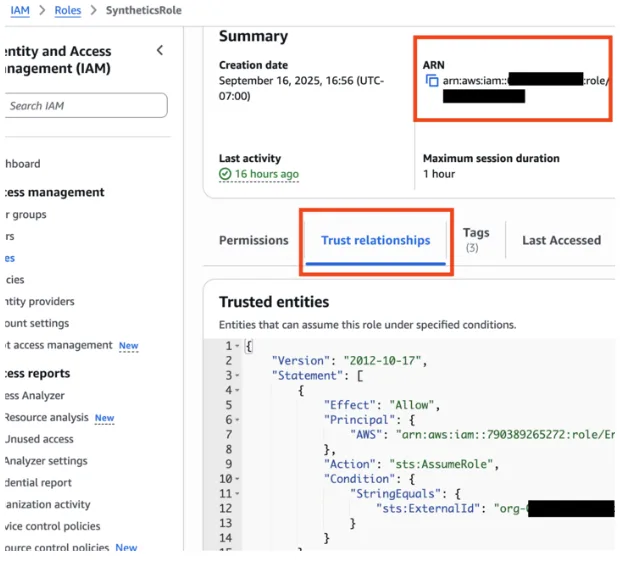
Make sure you have followed this section of the docs, including BOTH of recognizing OpenAI's principal and configuring an sts:ExternalId
If you did already put an sts:ExternalId, make sure that it is the same OpenAI organization ID that you are applying EKM to, not a different org like a personal org.
Verify trust policy association with role ARN
Verify that your trust policy has been properly saved to the role ARN you have provided
Also verify that you have supplied the correct role ARN. If your ARN is misspelled and does not exist, we will get the same error as if the role exists but denies permissions.
Not authorized to perform: kms:Encrypt on resource
User: xxxxx is not authorized to perform: kms:Encrypt on resourceMake sure that your IAM policy grants kms:Encrypt and kms:Decrypt to OpenAI's role.
If you have added a key policy as well, make sure that it also grants kms:Encrypt and kms:Decrypt to OpenAI's role.
GCP
Failed to acquire GCP STS token for audience
Failed to acquire GCP STS token for audience //iam.googleapis.com/projects/xxxxxxxxx/locations/global/workloadIdentityPools/xxxxxxx/providers/xxxxxxxxxx: {'error': 'invalid_request', 'error_description': 'Invalid value for \"audience\". This value should be the full resource name of the Identity Provider. See https://cloud.google.com/iam/docs/reference/sts/rest/v1/TopLevel/token for the list of possible formats.GCP is expecting an audience with the format
iam.googleapis.com/projects/xxxxxxxxx/locations/global/workloadIdentityPools/xxxxxxx/providers/xxxxxxxxxx
Make sure that you have supplied the correct parameters when registering your key with OpenAI using External Keys in the Management API
Ensure the workload_identity_project_number is your 12-digit GCP project number
Ensure the workload_identity_pool_id is correct
Ensure the workload_identity_provider_id is correct
The audience in ID token does not match the expected audience
Failed to acquire GCP STS token for audience //iam.googleapis.com/projects/xxxxxx/locations/global/workloadIdentityPools/xxxxxxx/providers/xxxxxxxx: {'error': 'invalid_grant', 'error_description': 'The audience in ID Token [xxxxx] does not match the expected audience xxxxxxx.'}Make sure that the audience field you supply when you register your config with OpenAI (External Keys in the Management API) is in one of your Allowed Audiences for your workload identity provider. We recommend using your OpenAI organization ID.
Azure
The client application is missing service principal
The client application xxxxx is missing service principal in the tenant xxxxx. See instructions here: https://go.microsoft.com/fwlink/?linkid=2225119Make sure that you have accurately followed creating the service principal as outlined in the OpenAI / Azure EKM Integration Instructions.
Caller is not authorized to perform action on resource
Caller is not authorized to perform action on resource. If role assignments, deny assignments or role definitions were changed recently, please observe propagation time.This same error can pop up for several reasons
You supplied the wrong key name or vault uri, or one that doesn't exist
You did not create a role with these data actions AND assign that role to OpenAI's service principal
Microsoft.KeyVault/vaults/keys/encrypt/action
Microsoft.KeyVault/vaults/keys/decrypt/action
Key name does not match pattern
"Invalid 'key_name': string does not match pattern. Expected a string that matches the pattern '^org-[0-9a-zA-Z-]*--[0-9a-zA-Z-]*$'."Please prefix your Key Vault key name with your OpenAI organization ID.
This is the best practice recommended by security to prevent your key vault key from being registered by a different user. We validate the org id matches upon key registration and on every request to your key vault.