
Event quality helps you understand whether the conversion information received from your selected data source is useful for measurement. Each pixel or data source has its own assessment. Your score and warnings highlight areas of your setup to review. They do not predict campaign performance or guarantee that a conversion will match to an ad.
Event quality refreshes daily using seven complete calendar days, with time allowed for recent events to arrive. After changing your setup, confirm that new events arrive as expected. Improvements can appear gradually as earlier events leave the assessment window. If a refresh is delayed, your previously available score remains visible until a newer assessment is available.
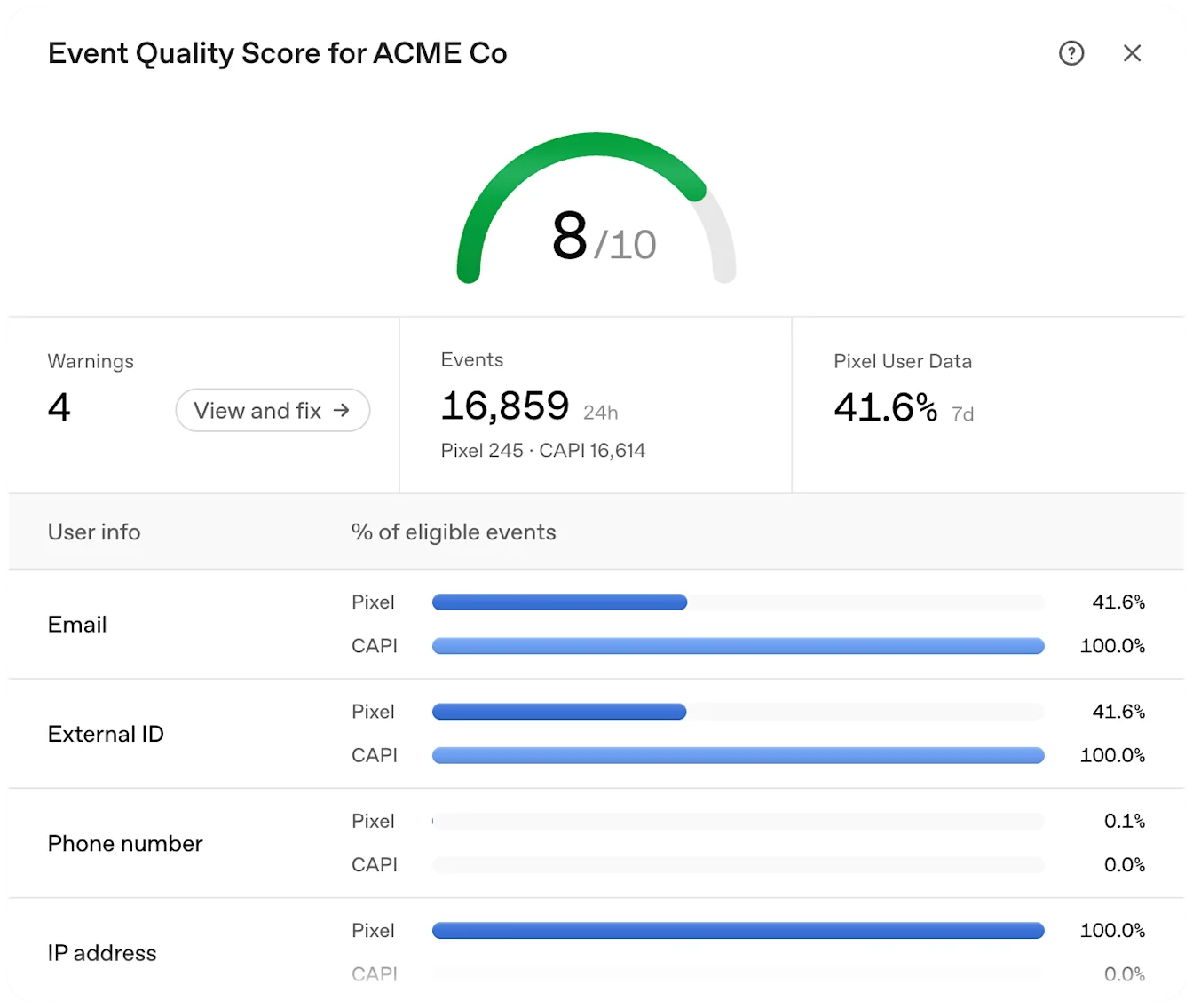
How to use warnings
Open the warnings for your selected data source and review each issue. Start with the issues you can verify in your integration, such as missing matching information, delayed server events, or repeated event firing. Use the guidance below to investigate the cause before changing your setup.
Only send information you are permitted to share and respect the person's privacy and consent choices. Use real customer information and real business actions. Do not send extra events, invent identifiers, or change event times to improve a score.
Limited email or customer ID information
What it means: We observed limited email or stable customer ID information on the conversion events eligible for this check. These identifiers can help connect events to the correct person. A low result can also reflect a processing or integration issue, so review what your integration is actually sending.
What to do:
Check that your eligible conversion events include an email address or your own stable customer identifier through the fields supported by your integration.
Keep the same customer identifier for the same person. Do not reuse a shared, placeholder, or default identifier for different people.
Follow your integration's normalization and hashing instructions. Check both browser and server implementations if you use both.
Test a completed conversion through your normal customer journey and confirm that the expected fields are present.
Ad click information is missing or cannot be connected
What it means: Some assessed conversions associated with an ad click did not include click information that could be connected to that same click. This check covers the clicked conversions we can assess; it does not measure every ad click or every customer journey.
What to do:
Preserve the oppref parameter when a person lands on your site from an ad, including through redirects and navigation.
If you send conversions through the Conversions API, pass the click information from that person's journey into the server event.
Test your full path, including tracking links, redirects, checkout, and any handoff between browser and server.
Do not reuse another person's click information or substitute a default value.
Conversions API events are delayed
What it means: Some assessed server events arrived too long after the recorded action, or their timing could not be assessed correctly. The check looks for receipt within one hour of the action.
What to do:
Send the event promptly after the actual business action is confirmed.
Check scheduled uploads, queues, failed requests, and retry delays.
Keep the original time of the action when retrying an event. Do not replace it with the upload time.
Verify timestamp format, units, and clock settings in your integration.
Conversion matches need review
What it means: Some potential conversion matches were removed during attribution checks. Causes can include repeated callbacks for the same action, inconsistent timing, or too many matches linked to the same ad view. This does not mean that the underlying business events were deleted or that every affected event was invalid.
What to do:
Check that a conversion fires after a real action, such as a confirmed order or completed registration.
Review repeated page loads, duplicate tags, callbacks, and retries that may send the same action more than once.
Use a consistent event ID for copies of the same action, including browser and server copies; use different IDs for distinct actions.
Preserve the action's original timestamp and investigate any mismatch with your business records.
If the events are accurate and the warning persists, contact support with the data source, affected event names, date range, and the checks you completed.
Many conversions are linked to the same ad interaction
What it means: The conversions we can assess are unusually concentrated on some ad clicks or views. A customer can legitimately complete multiple actions after one interaction, so this warning alone does not prove duplicate events or invalid activity.
What to do:
Check whether a page load, refresh, callback, or retry repeatedly sends the same business action.
Confirm that distinct actions have distinct event IDs and that retries preserve the original event ID.
Review whether conversion events fire at the intended stage of the customer journey.
If the pattern represents real repeat purchases or several legitimate steps, retain those events and document the behavior when asking support to review the warning.
Limited additional matching information
What it means: Eligible conversion events contain limited additional matching information. This check considers phone information, name and location information, and the combination of client IP address and user agent. It measures the presence of information, not whether a person was successfully matched.
What to do:
Where available and eligible to share, include phone information using your integration's supported field and formatting.
For name and location information, provide first and last name, postal code, and country for the same person. Follow the documented hashing and normalization requirements.
For server events, forward the real client's IP address and user agent when supported. Do not substitute your server's address or a generic user agent.
Keep sending eligible email or stable customer ID information as well.
Limited event types observed
What it means: We observed limited activity across the standard event groups used for this check: browsing, intermediate actions, and completed outcomes. Different businesses have different journeys, and not every stage applies. This check does not verify that your entire funnel is complete.
What to do:
Map the actual steps in your customer journey and identify the stages relevant to your business.
Check capture of applicable actions, such as viewing content; adding items, starting checkout, or submitting a lead; and completing an order, starting a trial, or booking an appointment.
Use a supported standard event when it accurately represents the action. Custom events are not included in this particular breadth check.
Test that each event fires only when its corresponding action occurs. Do not create artificial funnel stages to clear a warning.
Limited Pixel and Conversions API activity
What it means: We have not observed enough accepted activity from the supported Pixel SDK or Conversions API channels to assess their use positively. Installing an integration alone does not establish that events are arriving.
What to do:
Verify that your Pixel SDK sends browser events and your Conversions API integration sends confirmed server outcomes, where each fits your setup.
Check that requests are accepted and sent to the intended data source.
When both channels report the same action, use the same Pixel ID, event name, and event ID so copies can be recognized.
Keep distinct events for distinct actions and do not send outcomes before they occur.
Using both channels can provide complementary information. Channel activity by itself does not verify correct pairing or complete event capture.
Limited activity for a configured conversion goal
What it means: At least one configured conversion goal has very few or no received events during the assessment window. Other goals can have healthy activity while this warning appears. Received events for this check include events that were not matched to an ad.
What to do:
Compare the affected goal's event name and configuration with the events your integration sends.
Confirm that the event fires when the real action occurs and that recent events are received.
Review goals that are outdated or no longer represent actions you want to measure.
If the action is genuinely rare or recent demand is low, continue monitoring it. Low volume alone does not establish a setup defect.
Why a score or check may be unavailable
No configured conversion goals: Confirm that you have configured the conversion actions you want to measure and that your integration sends the corresponding events.
Not enough conversion activity: There may not be enough recent conversion activity to produce a useful score. Verify your setup and allow real activity to accumulate. This status is different from a score of zero.
Not enough attribution evidence: Some checks need observable connections between conversion events and ad clicks or views. You can be receiving events while this evidence is still limited. This does not mean that your business has no real conversions.
Limited information for a check: A particular check may need more eligible events or more observable activity. Missing information is not treated as a failed check, and it does not automatically produce an advertiser warning.
Data is still being processed: A score may be unavailable before the first assessment is ready or when the latest assessment is incomplete. A delayed daily refresh does not, by itself, remove an existing score. Return after processing completes. If the unavailable status persists, contact support.
After making a change, focus first on whether the integration now captures the correct actions and information. A score can change gradually as the assessment window moves, and no score guarantees matching, attribution, or campaign results.