
A Sponsored Business Agent lets people start a chat from an eligible ad in ChatGPT. They can ask about your products or services, compare options, or follow a link to your website. Ads do not influence ChatGPT’s answers.
Before you begin
Sponsored Business Agents are rolling out to eligible advertisers in Ads Manager over the coming weeks.
Build your agent
When your ad account has access, select Business agent > Agent builder in the Ads Manager sidebar. If you already have an agent in that account, open it to make changes.
Draft agent details with ChatGPT
Ask the ChatGPT Ads Manager plugin to help create a Sponsored Business Agent for your website. It can draft Business info and Guidelines from your site and any brand guide or FAQ you share.
“Help me create a Sponsored Business Agent for [website URL].”
Review the drafts, ask for edits, and paste each into its field in Agent builder. If Agent builder offers a draft based on your website, you can edit it or select Continue manually to start from scratch.
In Business info, describe what you offer, who it’s for, and where it’s available. Link to your product or service pages, privacy policy, and support.
In Guidelines, set the agent’s tone, when it should ask questions, and what to do if it can’t answer. Keep private business information, customer data, passwords, and payment details out of both fields.
For catalog recommendations, select an available product feed and check that it’s indexed.
Customize what customers see
Check your agent name and header color in Preview.
Write an agent tagline that tells customers in one sentence how the agent can help.
Add each optional conversation starter as a question customers can select.
Nova One example
Business info
“Nova One customers choose a finish and color when they order. Each product page lists the available combinations. Our returns policy explains which purchases qualify for a return.”
Guidelines
“Ask which colors or finishes the customer likes. Suggest an available combination and explain why it fits. For return questions, use our returns policy.”
Agent tagline
“Compare finishes and colors to find a look you like.”
Conversation starters
“Which finish would suit my style?”
“What’s your return policy?”
Test and publish your agent
Save your changes and try questions your customers might ask. Use Preview in Agent builder or select Test in ChatGPT when available. For Nova One, try these questions.
“I like neutral colors. Which finish would you suggest?” Check that the agent recommends an available option and explains why it fits.
“Can I return a customized order?” Check that the answer matches your return policy and links to it.
“Will you release a new color next month?” If you haven’t announced one, the agent should say it doesn’t have a confirmed date.
If an answer is inaccurate, update Business info. To change how the agent responds, edit Guidelines. Save your changes and try the same questions again. Publish your agent when the answers and links are accurate.
Add the agent to a campaign
To show your published agent in an ad, enable it on an eligible campaign. Publishing the agent alone does not start ad delivery.
In the ad account where you published your agent, choose a campaign with the Conversion optimization objective.
When you create or edit a conversion campaign, turn on Enable agent chats in campaign settings and confirm that your published agent is selected.
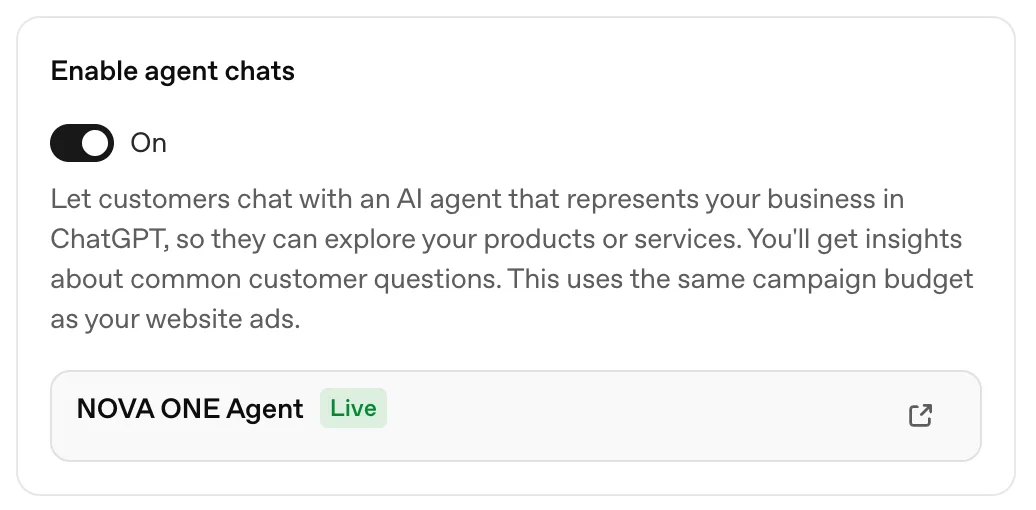
Review the campaign settings and save.
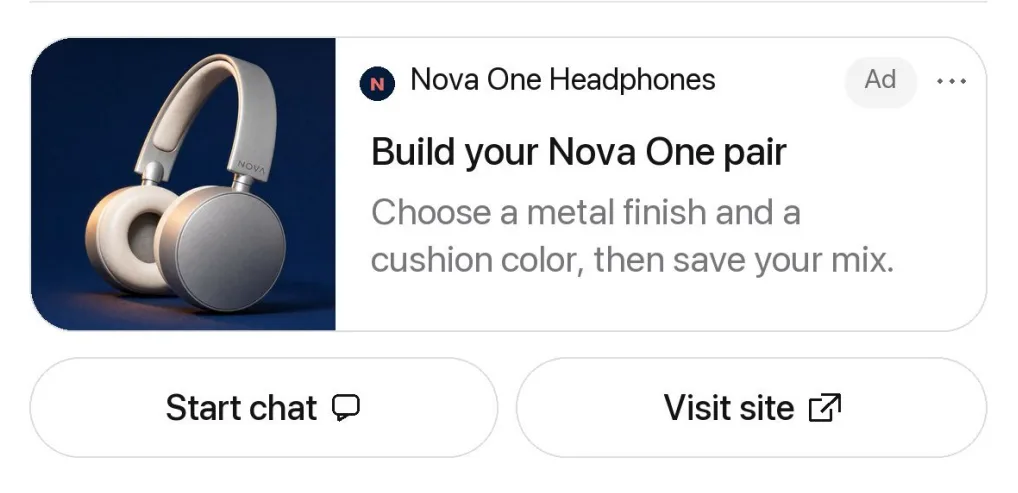
Customers can select Start chat to ask a question or Visit site to go to your website.
Once the campaign is running, you can review impressions and clicks in Ads Manager.
Frequently asked questions
Why don’t I see Agent builder in Ads Manager?
Agent builder is rolling out to eligible ad accounts. Check that you’ve selected the right ad account in Ads Manager. If Business agent still doesn’t appear in the sidebar, your OpenAI representative or Ads Manager support can confirm whether your account has access.
How do I claim my business in ChatGPT?
Go to Business Hub and select Add business. Search for your business, select its profile, and follow the prompts to verify that you’re authorized to manage it. OpenAI will email you after reviewing your claim.
Existing OpenAI Enterprise customers and advertisers can work with their OpenAI representative. Shopify merchants can select Shopify store, then Connect Shopify, or start in the Shopify admin.
Can I use the Business Agent I created in Business Hub for ads?
We’re working on linking Business Hub and Ads Manager so you can use the same agent for ads. Today, settings don’t sync between them. Open Agent builder in your eligible ad account and reuse your business information and guidelines there. If you already have a sponsored agent, edit it there. Test and publish your changes in Ads Manager.
How do I test my agent in ChatGPT?
In Agent builder, select Test in ChatGPT to open a test conversation. Try a conversation starter, then ask a follow-up a customer might ask. If the answer needs work, update Business info or Guidelines, save, and test again.
Why can’t I publish my agent?
Check the message in Agent builder. If it flags an instruction, make the required change in Guidelines, save, and try publishing again. If you’re still blocked, email Ads Support and include the error message.
Why don’t I see Enable agent chats?
Agent chats require the Conversion optimization campaign objective. Confirm you’re in the ad account where you published the agent.
Can I see what customers ask my agent?
Advertisers don’t receive individual chats or transcripts. Where available, the Insights tab in Ads Manager shows patterns across conversations, such as the questions customers ask most often. Once your agent has had more than 25 conversations, the insights agent can help you explore those patterns in more detail.
Am I billed separately for agent chats?
No. Your campaign’s billing settings apply to the ads that use your agent. There’s no separate charge for an agent conversation or for each message in a chat.
Can I bring my own agent?
No. For now, use Agent builder in Ads Manager to create your sponsored agent.
Can I connect my own plugin to a Sponsored Business Agent?
No. A Sponsored Business Agent can’t currently run your own plugin. You can use the ChatGPT Ads Manager plugin to draft the agent’s business information and guidelines.
Where can I get more support?
Contact your OpenAI sales representative or account team for help. If you don’t have an account team, email ads-support@openai.com.