
Audience: IT departments that admin the network for a company's WiFi -- and -- users of a company WiFi network.
Before troubleshooting network connectivity issues, you can begin by checking our Statuspage for the latest updates on any known, system-wide disruptions.
The following recommendations are intended for IT departments at companies whose employees will use ChatGPT on the web browser. As each company's IT setup is unique, the following steps are intended to act more as a broad range of guidelines.
OpenAI/ChatGPT domains to allowlist
OpenAI uses the following domains. Please make sure that they are not blocked on your company network, and that any web/URL filtering is not responding with unexpected content:
*.auth.openai.com
*.chatgpt.com
*.ct.sendgrid.net
*.intercom.io
*.intercomcdn.com
*.oaistatic.com
*.oaiusercontent.com
*.openai.com
*.oaistatsig.com
android.chat.openai.com
auth0.openai.com
cdn.openaimerge.com
cdn.platform.openai.com
cdn.workos.com
challenges.cloudflare.com
chat.openai.com
desktop.chat.openai.com
forwarder.workos.com
frontend-apps-multi-region.workos.com
humb.apple.com
images.workoscdn.com
ios.chat.openai.com
js.intercomcdn.com
js.stripe.com
o207216.ingest.sentry.io
o33249.ingest.sentry.io
rum.browser-intake-datadoghq.com
setup.auth.openai.com
setup.workos.com
tcr9i.chat.openai.com
workos.imgix.net
WebSocket requirements for ChatGPT and Codex
Some ChatGPT and Codex features use secure WebSocket connections in addition to standard HTTPS requests. If your organization blocks WebSocket traffic by default, some features may stall, disconnect, or fail to stream updates correctly.
Please allow WebSocket traffic over TCP port 443 and make sure your proxy, firewall, or secure web gateway permits the standard "Upgrade: websocket" handshake for the following destinations:
| Product area | Destination | Purpose |
|---|---|---|
| ChatGPT | wss://ws.chatgpt.com | Conversation updates and notifications |
| Codex | wss://chatgpt.com/ | Codex model sampling and streaming |
If your proxy or firewall cannot allowlist WebSocket traffic by URL path, allow WebSocket upgrades to chatgpt.com over TCP port 443 for Codex traffic.
For networks using TLS inspection, SSL decryption, web filtering, or proxy enforcement, confirm that these controls do not block, rewrite, or prematurely close the WebSocket handshake or the resulting long-running WebSocket connection. If sessions connect but later stall or disconnect, check idle timeout and maximum frame or message-size policies for WebSocket traffic.
Security software in a network
Beyond VPNs, the following are common security software known to be used by company network admins which may be set up to filter web traffic / proxy requests through your company network:
[McAfee] McAfee Web Gateway
[Cisco, formerly OpenDNS] Cisco Umbrella
[Broadcom] Symantec Cloud Secure Web Gateway (formerly Symantec Web Security Service)
[Palo Alto Networks] PAN-DB Private Cloud
[Zscaler] Zscaler Internet Access
[Sophos] Sophos Firewall Public Cloud
[Barracuda] Web Security Gateway
[Fortinet] Fortiguard URL Filtering Service
Commonly, you will need your security software to either:
Stop explicitly blocking ChatGPT
This goes for cookie interceptions as well
Start explicitly allowlisting the domains list above
When OpenAI Support reviews a potential network issue that includes a reproduction, screenshots, and a HAR (to inspect web/network traffic) something we always look for is if there's any network specific issues on the customer's side to isolate the source of the issue to the company network, where applicable.
How to debug failed uploads due to network settings
It's possible you may encounter an error such as this where there is some sort of network issue identified:

In this example it's likely the IT team in your company network needs to allowlist *.oaiusercontent.com to resolve the issue for the users of your company network either at the VPN or other network security software level.
ChatGPT Voice firewall settings
ChatGPT Voice connects to OpenAI servers over UDP port 3478. The current server IP address ranges are listed in chatgpt-voice.json.
Allowlisting those IP ranges for UDP traffic on port 3478 should resolve quality issues, stream interruptions, and other problems caused by a firewall blocking part of the traffic. If UDP access is not allowed, TCP port 443 can be used instead, although UDP is preferred. chatgpt-voice.json is updated on an ongoing basis when IP addresses change.
ChatGPT iOS error, “Unusual activity has been detected from your device. Try again later”
General debugging steps to start:
Log out / log back in the ChatGPT iOS app.
Uninstall / reinstall the ChatGPT iOS app.
Disable your VPN.
Update to the latest version of the iOS app in the App Store
Advanced debugging to try if the error persists:
Change your iOS DNS settings to 8.8.8.8 and 8.8.4.4 - use these instructions.
If there are still errors then open Safari browser and go to https://register.appattest.apple.com/. Open a Support conversation with us be sure to share a screenshot of the error you’re seeing i.e. “Safari can’t open the page because the address is invalid” or any other error you’re seeing.
If the error still doesn't go away then let us know in a Support request including confirmation you've tried each step above, are on the latest ChatGPT iOS app version, tried changing DNS using those linked instructions, and can share a screenshot of what you see in Safari going to https://register.appattest.apple.com/.
Troubleshooting SSL related errors on the macOS desktop app
On the macOS desktop client for ChatGPT you may encounter the error Network configuration issue including a message: "Looks like [certificate] is the wrong SSL certificate...".
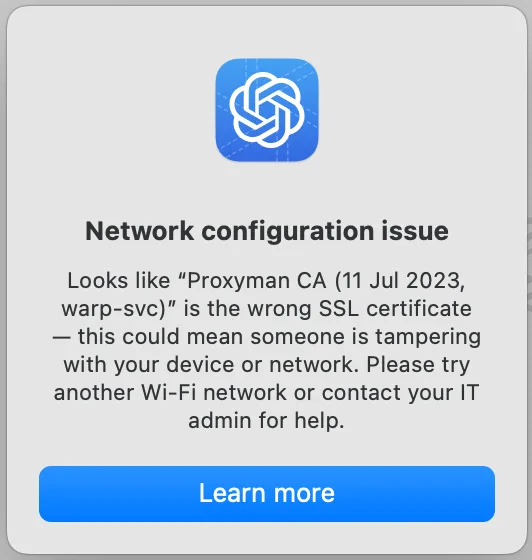
SSL inspection / decryption on your network may lead to SSL errors and disrupt access to the app. If possible, disable SSL inspection / decryption in your network for all public OpenAI domains.
Upgrade to the latest version of the macOS app and restart it.
If errors persist and you are in an environment where TLS inspection is mandated by corporate policy, please contact Support for further guidance.
If you’re currently blocked on the macOS desktop app, you can use ChatGPT on web as a workaround.
Troubleshooting Access Issues when using the macOS or iOS native apps with Cloudflare Zero Trust
For more details, please reference this help center article.
How do I know my network is the issue?
Both things below are critical to debugging and should always be checked:
Just your machine or the whole network? Does the error in ChatGPT only happen for just you on your machine - OR - is this happening for others in your company in your network?
Company WiFi network vs Cellular hotspot Does the error in ChatGPT go away if you switch from your company network WiFi to instead use a cellular network i.e. hotspot on your smartphone?