
Usa esta guía si administras un Espacio de trabajo de ChatGPT o usas ChatGPT Plus o Pro y quieres configurar el conector de Databricks Genie con OAuth integrado o con el cliente OAuth de tu organización.
OAuth integrado: cuando esté disponible en ChatGPT y habilitado para tu espacio de trabajo de Databricks, usa la conexión preconfigurada. No necesitas crear una aplicación OAuth ni ingresar un ID de cliente o un secreto de cliente. Sigue las instrucciones de la sección OAuth integrado que aparece más adelante.
Cliente OAuth personalizado: usa esta opción si OAuth integrado no está disponible o si tu organización requiere su propio cliente OAuth. Sigue las instrucciones de la sección Cliente OAuth personalizado que aparece más adelante.
Qué vas a configurar
Vas a crear una conexión de aplicación de Databricks para tu cuenta o Espacio de trabajo de ChatGPT. Ambas opciones requieren los datos del proveedor Databricks que se solicitan en ChatGPT y permisos para los recursos que planeas usar. Si usas un cliente OAuth personalizado, también prepara lo siguiente:
Una conexión de aplicación OAuth de Databricks creada en la consola de cuentas de Databricks.
El ID de cliente y el secreto de cliente OAuth de Databricks.
La URL de devolución de llamada exacta copiada de ChatGPT.
Los alcances de Databricks correspondientes a las funciones del conector que quieres habilitar.
Los datos del proveedor Databricks que solicite el proceso de configuración de ChatGPT, como el host del espacio de trabajo, el host de la cuenta, el ID de la cuenta o el almacén.
Antes de empezar
Necesitas:
Acceso de administrador o propietario de un Espacio de trabajo de ChatGPT, o una cuenta de ChatGPT Plus o Pro.
Para un cliente OAuth personalizado, acceso de administrador de la cuenta de Databricks. El acceso de administrador del espacio de trabajo puede ser suficiente para algunas tareas, pero las conexiones de aplicaciones personalizadas se configuran desde la consola de cuentas de Databricks. Para OAuth integrado, un administrador de Databricks debe verificar que la aplicación de ChatGPT esté disponible y habilitada para tu espacio de trabajo.
Para un cliente OAuth personalizado, la consola de cuentas de Databricks abierta en otra pestaña.
Para un cliente OAuth personalizado, la pantalla de conexión de Databricks Genie abierta en ChatGPT para poder copiar la URL de devolución de llamada exacta.
Haber decidido si la aplicación necesita acceso general a las API de Databricks o solo acceso a Databricks SQL.
Para un cliente OAuth personalizado, un lugar seguro donde gestionar el secreto de cliente de Databricks.
Si tu cuenta o espacio de trabajo de Databricks restringe el acceso mediante una lista de acceso de IP, controles de ingreso basados en el contexto, un firewall u otra política de red, la ayuda de un administrador de Databricks que pueda permitir los rangos de IP de salida actuales de los conectores de ChatGPT.
Para un cliente OAuth personalizado, copia la URL de devolución de llamada exacta que aparece en ChatGPT.
Valores que debes preparar
Para un cliente OAuth personalizado, la URL de devolución de llamada: cópiala del proceso de configuración del conector de ChatGPT.
Para un cliente OAuth personalizado, el ID de cliente OAuth de Databricks.
Para un cliente OAuth personalizado, el secreto de cliente OAuth de Databricks.
Para un cliente OAuth personalizado, los alcances de acceso de Databricks adecuados para las funciones de la aplicación, como Todas las API o SQL.
Los campos del espacio de trabajo o de la cuenta de Databricks que solicite el proceso de configuración de ChatGPT.
OAuth integrado
Primero asegúrate de cumplir los requisitos previos indicados arriba. Usa esta opción solo cuando OAuth integrado esté disponible en ChatGPT y habilitado para tu espacio de trabajo de Databricks.
Pide a un administrador de Databricks que verifique que la aplicación de ChatGPT esté disponible en la configuración de integraciones de aplicaciones de la consola de cuentas y habilitada para tu espacio de trabajo. Si la aplicación de ChatGPT no aparece en la consola de cuentas de Databricks, ponte en contacto con tu representante de cuenta de Databricks para preguntar si la función está disponible para tu cuenta.
En ChatGPT, cambia a la cuenta o al Espacio de trabajo donde debe estar disponible la aplicación. Ve a Configuración > Plugins para una configuración personal o a Configuración del Espacio de trabajo > Plugins como administrador o propietario para configurar un Espacio de trabajo.
Selecciona Databricks Genie y luego Agregar conexión de aplicación.
Ingresa el Nombre de host del espacio de trabajo (obligatorio) sin
https://ni una ruta de URL.Selecciona Continuar, inicia sesión en Databricks y revisa la solicitud de consentimiento.
Continúa con las secciones Conectar y probar y Gestionar el acceso que aparecen más adelante, incluidas las pruebas con miembros autorizados y las verificaciones de acceso al Espacio de trabajo.
Cliente OAuth personalizado
Primero asegúrate de cumplir los requisitos previos indicados arriba. Usa esta opción si OAuth integrado no está disponible o si tu organización requiere su propio cliente OAuth. Después de la configuración, completa las secciones Conectar y probar y Gestionar el acceso que aparecen más adelante.
Iniciar la configuración de OAuth personalizado en ChatGPT
En ChatGPT, cambia a la cuenta o al Espacio de trabajo donde debe estar disponible la aplicación.
Ve a Configuración > Plugins para una configuración personal o a Configuración del Espacio de trabajo > Plugins como administrador o propietario para configurar un Espacio de trabajo.
Selecciona Databricks Genie en Directorio.
Selecciona Agregar conexión de aplicación.
En el cuadro de diálogo Conectar Databricks Genie, busca la sección del cliente OAuth.
Copia la URL de devolución de llamada de ChatGPT. Mantén abierto este cuadro de diálogo.
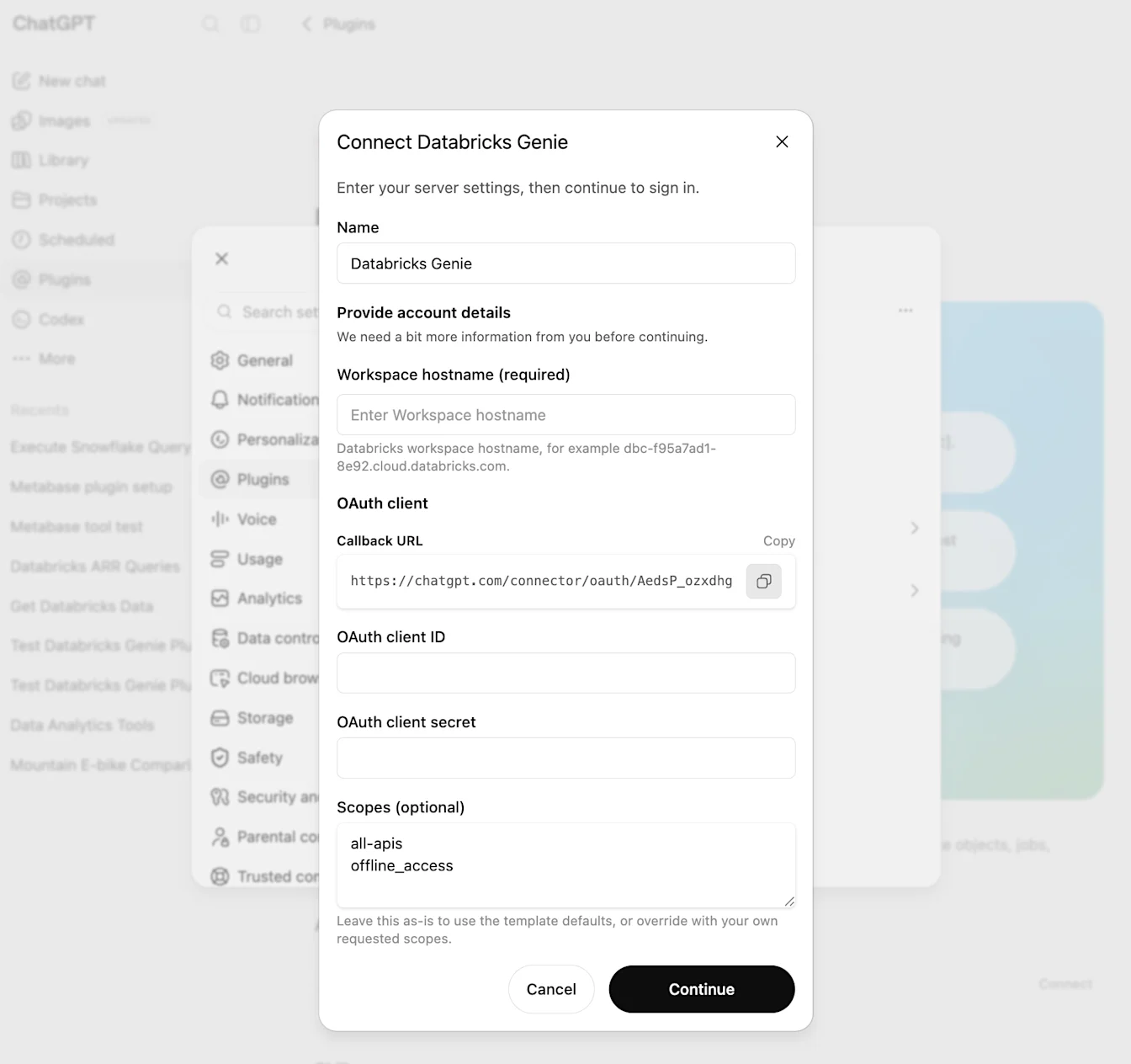
Ejemplo de URL de devolución de llamada:
https://chatgpt.com/connector/oauth/<callback_id>
No elimines el ID de devolución de llamada, no agregues una barra al final ni reemplaces la URL por una URL genérica de ChatGPT. La URL registrada en Databricks debe coincidir exactamente con la URL de devolución de llamada que aparece en ChatGPT.
Crear una conexión de aplicación OAuth personalizada en Databricks
Abre la consola de cuentas de Databricks correspondiente a tu cuenta de Databricks.
En la barra lateral izquierda, abre Configuración.
Abre la pestaña Conexiones de aplicaciones.
Selecciona Agregar conexión.
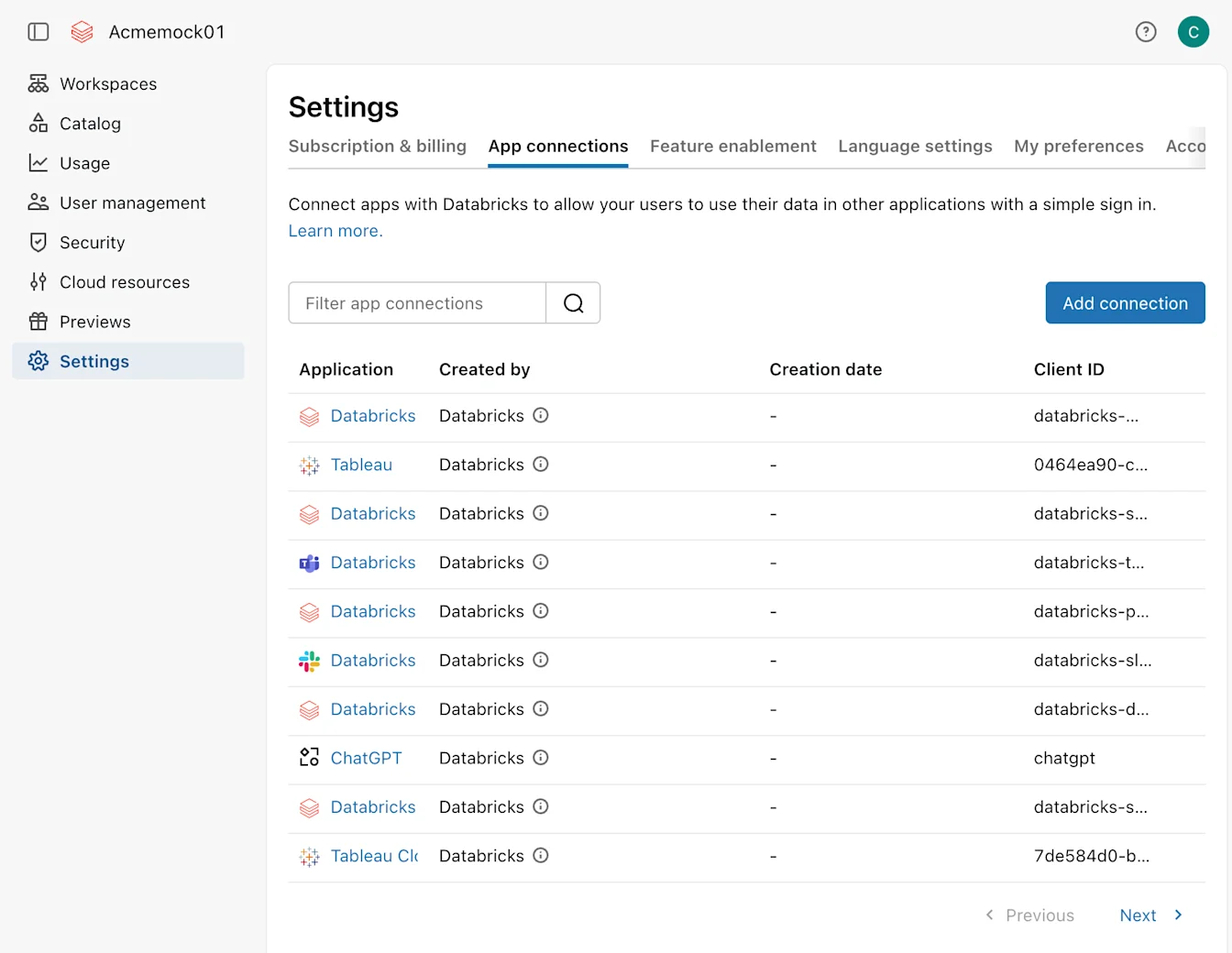
Ingresa un nombre para la aplicación, como Conector de Databricks para ChatGPT.
En URL de redirección, pega la URL de devolución de llamada exacta que copiaste de ChatGPT.
En Alcances de acceso, elige los alcances que necesita la aplicación.
Usa Todas las API para una aplicación de Databricks de uso general que necesite API de Databricks además de SQL.
Usa SQL solo para una aplicación limitada a las API de Databricks SQL.
Asegúrate de que todos los alcances que ingreses más adelante en ChatGPT estén habilitados en esta aplicación OAuth de Databricks. Databricks permite automáticamente openid, email, profile y offline_access para las aplicaciones creadas en la interfaz de usuario.
Mantén los tiempos de vida (TTL) de los tokens predeterminados de Databricks, a menos que tu organización tenga una política específica: 60 minutos para el token de acceso y 10 080 minutos para el token de actualización.
Activa Generar un secreto de cliente. ChatGPT necesita un cliente OAuth confidencial para este proceso.
Crea la conexión.
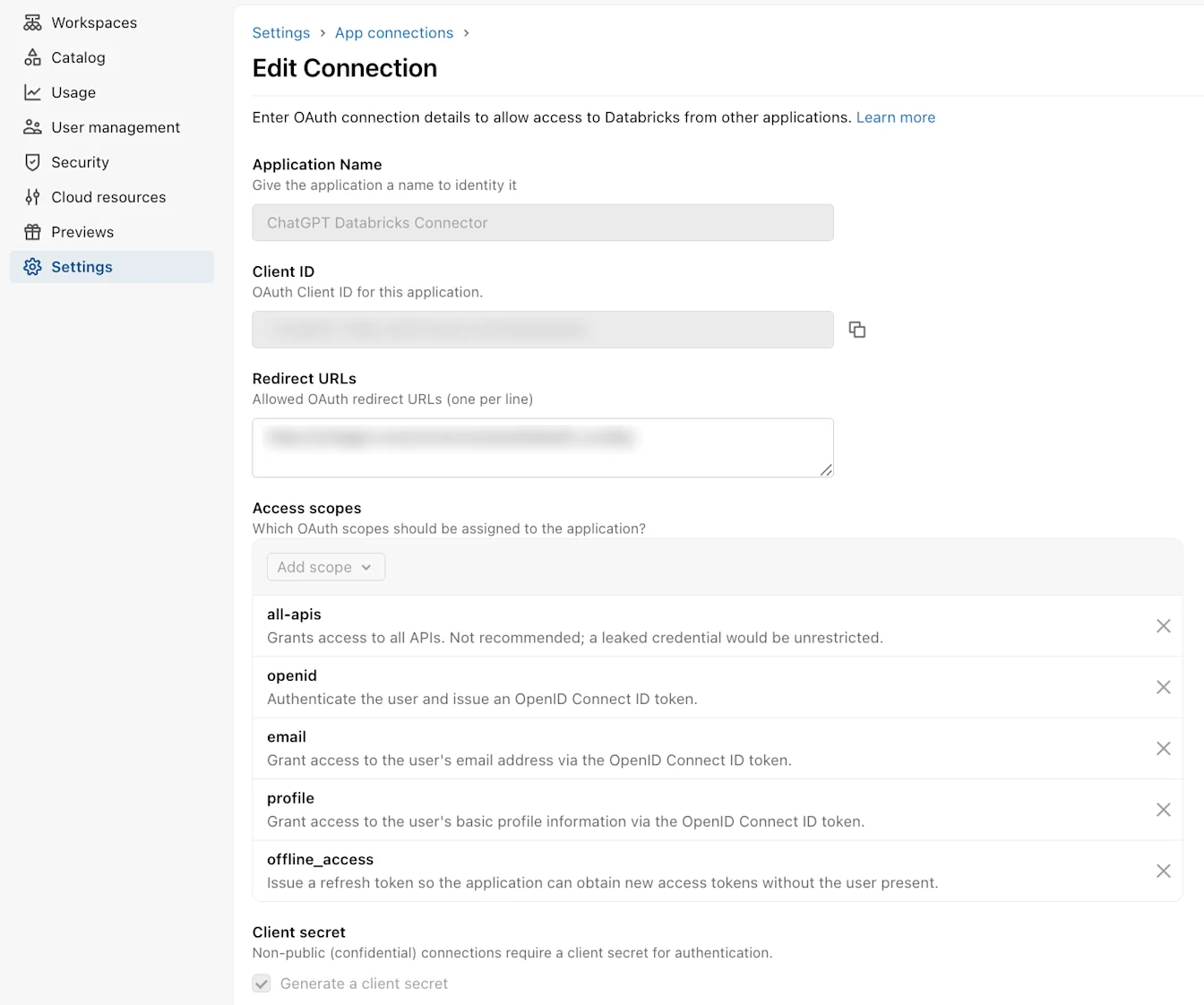
Copiar las credenciales de Databricks
En el cuadro de diálogo Conexión creada, copia el ID de cliente.
Copia el Secreto de cliente de inmediato y guárdalo de forma segura.
Si cierras el cuadro de diálogo antes de copiar el secreto, crea o rota las credenciales de la aplicación OAuth y usa el nuevo secreto.
Databricks muestra el secreto una sola vez. Trátalo como una credencial y no lo incluyas en capturas de pantalla, tickets de soporte, comentarios ni chats.
Finalizar la configuración de OAuth personalizado en ChatGPT
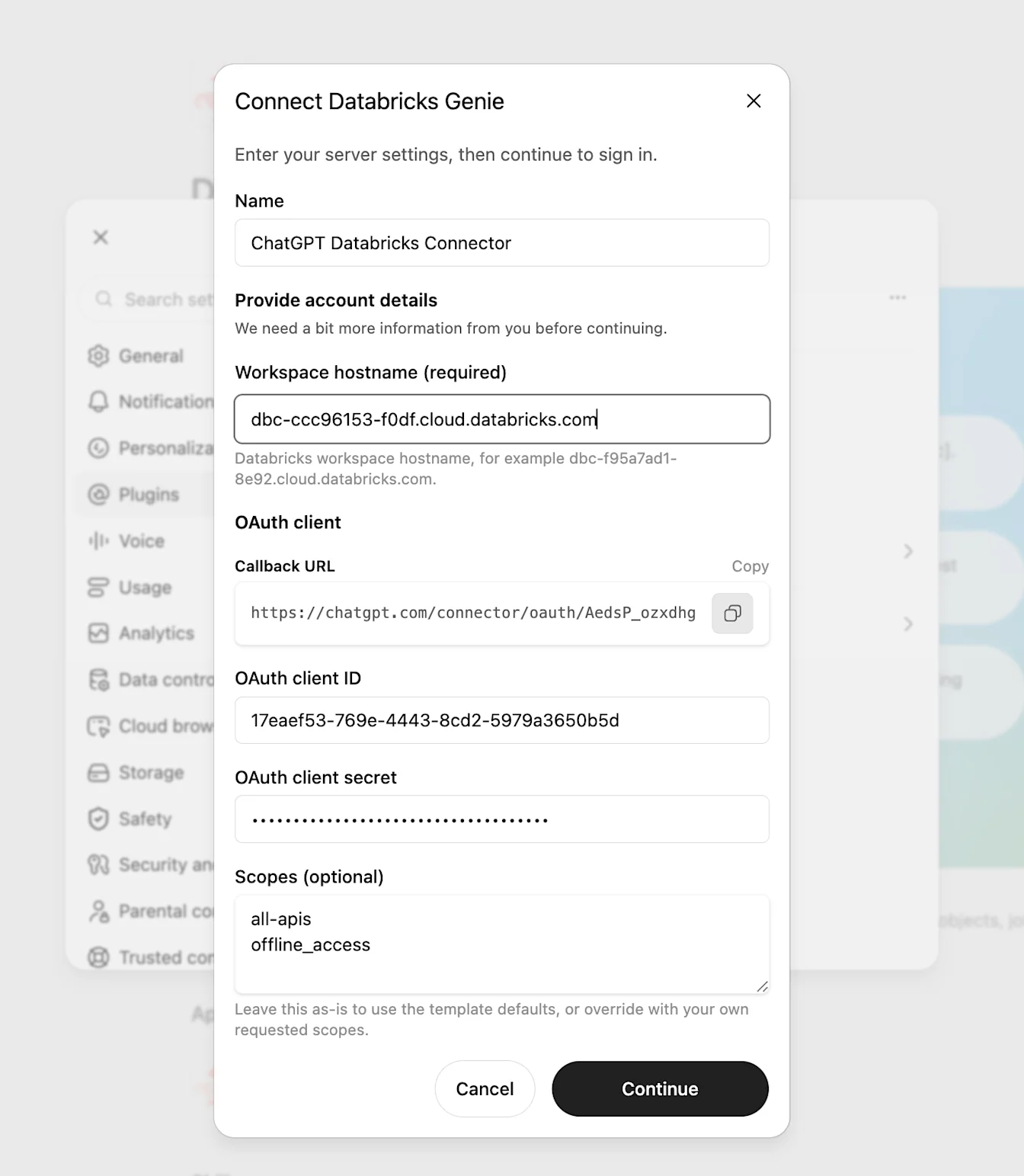
Vuelve al cuadro de diálogo Conectar Databricks Genie.
Ingresa el ID de cliente de Databricks en ID de cliente OAuth.
Ingresa el secreto de cliente de Databricks en Secreto de cliente OAuth.
En Alcances (opcional), ingresa los alcances necesarios para el punto de acceso y las funciones de Databricks que usa tu aplicación. Asegúrate de que coincidan con los alcances habilitados en la aplicación OAuth de Databricks.
Ingresa un alcance por línea o sepáralos con comas. Todos los alcances indicados en ChatGPT deben estar habilitados en la aplicación OAuth de Databricks.
Ingresa el Nombre de host del espacio de trabajo (obligatorio) sin https:// ni una ruta de URL. Completa los demás campos obligatorios del proveedor Databricks que aparezcan en el proceso de configuración.
Selecciona Continuar.
ChatGPT solicita exactamente los alcances ingresados en Alcances (opcional). No agrega automáticamente alcances más amplios de la plantilla.
Conectar y probar
Completa las siguientes pruebas de conexión y verificaciones de acceso con cualquiera de las dos opciones de OAuth.
Revisa los detalles, las acciones y la configuración de autenticación del conector.
Si administras un Espacio de trabajo, habilita el conector para ese Espacio de trabajo y configura quién puede usarlo según sus políticas.
Inicia el proceso de conexión desde ChatGPT con un usuario de prueba autorizado y luego inicia sesión en Databricks.
Confirma que el navegador abra la cuenta o el espacio de trabajo de Databricks que esperabas.
Revisa los alcances solicitados y luego selecciona Autorizar.
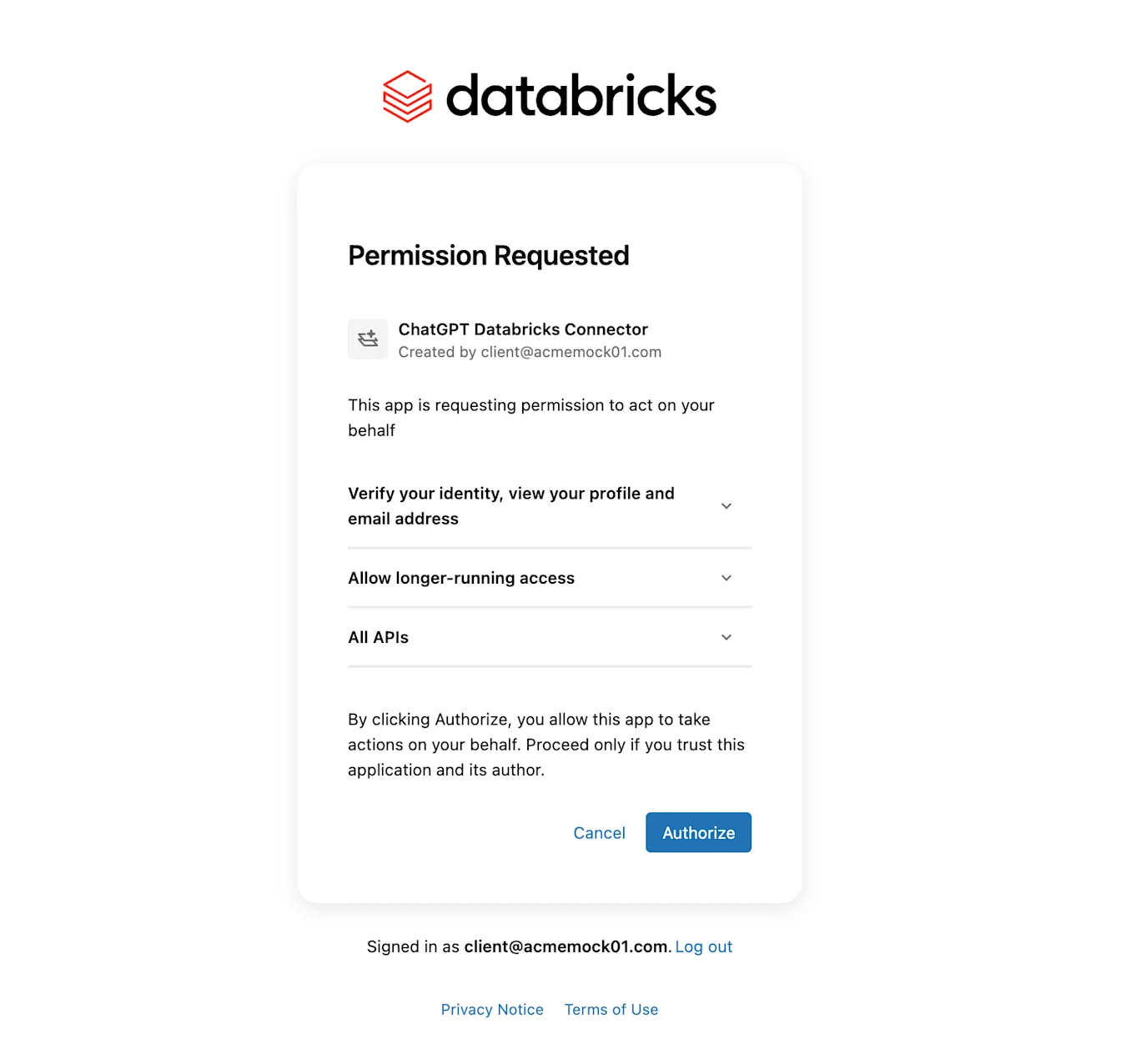
Verifica que el navegador vuelva a ChatGPT y que el conector aparezca como conectado.
Primero ejecuta una acción de lectura de bajo riesgo, como obtener información del usuario actual o consultar un recurso aprobado de Databricks SQL.
Si las acciones de escritura están habilitadas, haz una prueba con un flujo de trabajo de Databricks claramente de bajo riesgo antes de ampliar la implementación.
Si la configuración es para un Espacio de trabajo, pide a un miembro autorizado sin permisos de administrador que se conecte y repita la prueba de bajo riesgo.
Gestionar el acceso
Tanto Databricks como ChatGPT intervienen en el control de acceso.
En ChatGPT, los administradores del Espacio de trabajo gestionan la disponibilidad de la aplicación y cómo pueden usarla los miembros. En Business, los administradores deciden si la aplicación está habilitada para todo el Espacio de trabajo. Revisa los controles de administración de la aplicación de Databricks (Configuración del Espacio de trabajo > Aplicaciones) para:
Acceso de usuarios, para configurar qué roles del Espacio de trabajo pueden usar el conector en los Espacios de trabajo de Enterprise y Edu compatibles.
Control de acciones, para configurar qué acciones de Databricks están habilitadas.
Permisos de la aplicación, para configurar cuándo ChatGPT pide permiso a los miembros antes de usar el conector.
Estos permisos de la aplicación se aplican a las conversaciones de ChatGPT. Los agentes del Espacio de trabajo usan controles individuales que configura el creador de cada agente para determinar qué acciones de las aplicaciones están disponibles y cuándo se pide a los usuarios finales que las aprueben. Para conocer el comportamiento de los agentes, consulta: agentes del Espacio de trabajo de ChatGPT para Enterprise y Business.
En Databricks, los administradores gestionan qué usuarios pueden autorizar la aplicación OAuth y a qué recursos de Databricks pueden acceder esos usuarios. Los permisos del proveedor siguen vigentes después de habilitar la aplicación en ChatGPT.
Para conocer los controles de aplicaciones específicos de cada plan, consulta Controles de administración, seguridad y cumplimiento en las aplicaciones.
Solucionar problemas de configuración del conector de Databricks
El URI de redirección no coincide: si usas un cliente OAuth personalizado, confirma que el valor de URL de redirección en Databricks coincida exactamente con la URL de devolución de llamada que aparece en ChatGPT, incluidos la ruta y el ID de devolución de llamada. No elimines el ID de devolución de llamada, no agregues una barra al final ni uses otra URL de redirección de ChatGPT.
Falta el secreto: si usas un cliente OAuth personalizado, ten en cuenta que los secretos de Databricks se muestran una sola vez. Genera un nuevo secreto de cliente si no lo copiaste.
La aplicación OAuth no está disponible de inmediato: Databricks indica que las actualizaciones de las aplicaciones OAuth pueden tardar hasta 30 minutos en procesarse.
Alcance insuficiente o que no coincide: si usas un cliente OAuth personalizado, compara Alcances (opcional) en ChatGPT con Alcances de acceso en la aplicación OAuth de Databricks. Todos los alcances que solicite ChatGPT deben estar habilitados allí. Confirma que los alcances permitan usar el punto de acceso y las funciones que necesitas, incluido el acceso general a las API o el acceso solo a SQL, según corresponda.
Las acciones de SQL fallan: confirma el alcance SQL, la configuración del almacén y los permisos de Databricks.
Espacio de trabajo de ChatGPT incorrecto: crea y habilita el conector en el mismo Espacio de trabajo de ChatGPT donde los usuarios lo conectarán.
Cuenta o espacio de trabajo de Databricks incorrecto: confirma el valor de Nombre de host del espacio de trabajo (obligatorio), repite el proceso de inicio de sesión y verifica que Databricks abra la cuenta o el espacio de trabajo que esperabas.
Los usuarios no pueden conectarse: confirma que el usuario tenga acceso a Databricks y permiso para autorizar la aplicación OAuth. En Business, confirma que la aplicación esté habilitada para todo el Espacio de trabajo. En los Espacios de trabajo de Enterprise y Edu compatibles, confirma también que Acceso de usuarios en ChatGPT permita usar el conector.
La política de red de Databricks bloquea el conector: si Databricks solo permite determinadas IP de origen, un administrador de Databricks debe actualizar las listas de acceso de IP de la cuenta o del espacio de trabajo correspondientes, los controles de ingreso basados en el contexto, el firewall u otras reglas de red que gestione el cliente.
Permite las conexiones entrantes desde los rangos de IP de salida actuales de los conectores de ChatGPT.
Configura esta lista de permitidos en Databricks o en la capa de red que gestione el cliente. Esta lista es independiente de la lista de IP permitidas del Espacio de trabajo de ChatGPT.
Los rangos publicados pueden cambiar. Automatiza las actualizaciones a partir del JSON cuando sea posible.
No rotes el secreto de cliente ni cambies los alcances de OAuth para intentar evitar un bloqueo de red. Primero confirma si Databricks está rechazando las IP de origen del conector.