OpenAI
このページは機械翻訳されています。元の英語の記事を表示

Chatバーの起動方法

macOSアプリからChatGPTに何でもすぐに質問できます

更新日: 13 days ago

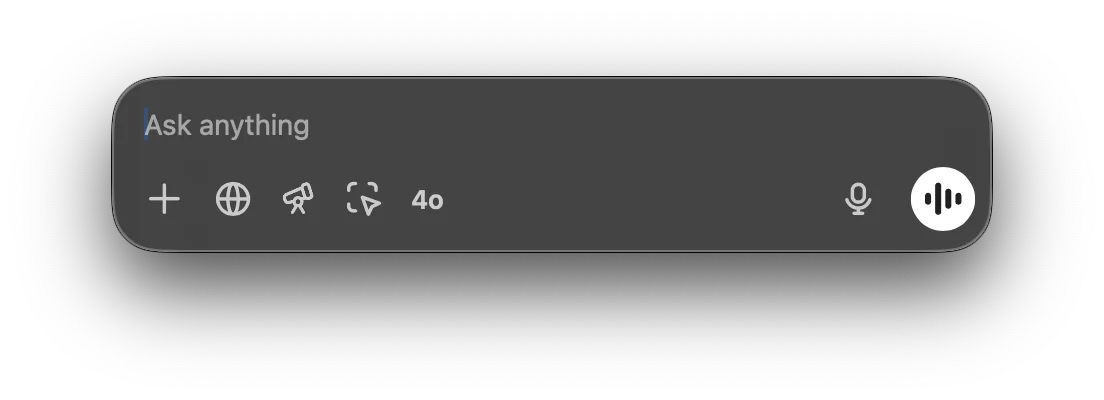
Chatバーを使うと、ChatGPTに何でもすぐに質問したり、ファイルをアップロードしたり、スクリーンショットを撮ったり、写真を撮ったりできます。デフォルトでは、キーボードでChatバーを開くには ⌥+Space: を押します。

Chat Bar input field with Ask anything placeholder and voice mode button

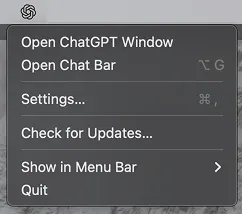
Chatバーのウィンドウはデスクトップ上の好きな場所にクリック&ドラッグで移動できます。また、メニューバーのアイコンからもChatバーを開けます。

ChatGPT desktop app menu with Open Chat Bar option

Chatバーから直接、ChatGPTとの新しい会話を開始できます。プロンプトを送信するには、矢印をクリックするかReturnキーを押します。

Chat Bar prompt field with a typed question and quick action icons including 4o and voice input

新しい会話を開始するとき、プラス(+)記号をクリックすると、ファイルや写真を添付したり、スクリーンショットを撮ったり、写真を撮ったりできます:\g

Chat Bar plus menu opened with Upload File, Upload Photo, and Take Screenshot options

CSVファイルのデータ分析を依頼して会話を開始したり、添付した画像についてランチャーから直接質問したりできます。

Chat Bar with data-report.csv attached and the prompt Can you summarize this report?

設定メニューでChatバーのショートカットを変更できます。

Chat Bar settings with the keyboard shortcut set to Option+Space

この記事は役に立ちましたか?