
Dienos biudžetas – tai vidutinė suma, kurią norite išleisti kampanijai per dieną per 7 dienų laikotarpį. Biudžeto savaitė trunka nuo sekmadienio iki šeštadienio pagal jūsų reklamos paskyros laiko juostą. Atskiromis dienomis išlaidos gali būti didesnės arba mažesnės už pasirinktą biudžetą. Jei kai kuriomis dienomis skelbimų rodymui išleidžiama mažiau nei numatyta dienos biudžete, nepanaudotos sumos gali būti išleistos vėliau per tą patį 7 dienų laikotarpį. Tai padeda „ChatGPT“ reklamoms atsižvelgti į įprastus kasdienius skelbimų rodymo svyravimus ir toliau reguliuoti išlaidų tempą pagal taikomą 7 dienų išlaidų ribą.
Kas keičiasi
Dienos biudžetas nurodo vidutinę sumą, kurią norite išleisti per dieną per 7 dienų laikotarpį.
Tai reiškia, kad atskiromis dienomis išlaidos gali būti didesnės arba mažesnės už dienos biudžetą. Jei kai kuriomis dienomis kampanijai išleidžiama mažiau, nepanaudota suma gali būti išleista vėliau per tą patį 7 dienų laikotarpį. Jei kai kuriomis dienomis išleidžiama daugiau, „ChatGPT“ reklamos į tai atsižvelgia reguliuodamos skelbimų rodymo tempą likusią laikotarpio dalį.
Kaip veikia dienos biudžetai
Nustatydami dienos biudžetą, pasirenkate vidutinę sumą, kurią norite išleisti kampanijai per dieną.
Didžiausia dienos išlaidų suma yra du kartus didesnė už dienos biudžetą. Jei dienos biudžetą pakeičiate dienai jau prasidėjus, didžiausia tos dienos išlaidų suma apskaičiuojama pagal didžiausią bet kuriuo tos dienos metu galiojusią dienos biudžeto sumą.
Didžiausia 7 dienų išlaidų suma yra septynis kartus didesnė už dienos biudžetą. Jei dienos biudžetą pakeičiate savaitei jau prasidėjus, 7 dienų išlaidų riba apskaičiuojama proporcingai laikui nuo paskutinio biudžeto pakeitimo iki artimiausio sekmadienio 00.00 val. pagal jūsų reklamos paskyros laiko juostą.
Pavyzdys:
Jei kampanija vykdoma 7 dienas, o vidutinis dienos biudžetas yra 100 $, bendra kampanijos skelbimų rodymo išlaidų riba yra 700 $.
Kai kuriomis dienomis kampanijai gali būti išleista daugiau nei 100 $, o kitomis – mažiau nei 100 $. Per visas 7 kampanijos dienas mokėtina suma už skelbimų rodymą neviršys 700 $.
Kas keičiasi esamose kampanijose
Po šio atnaujinimo esamoms kampanijoms automatiškai bus taikomi vidutiniai dienos biudžetai. Kampanijų nereikia kurti iš naujo, pristabdyti ar redaguoti.
Jūsų biudžetų sumos ir kampanijų nustatymai nesikeis. Pagrindinis skirtumas – nuo šiol dienos biudžetas bus laikomas vidutine dienos suma per 7 dienų laikotarpį.
Ką matysite Reklamų tvarkytuvėje
Kuriant arba redaguojant kampaniją, Reklamų tvarkytuvėje bus rodomos didžiausios dienos ir 7 dienų išlaidų sumos, atitinkančios pasirinktą dienos biudžetą.
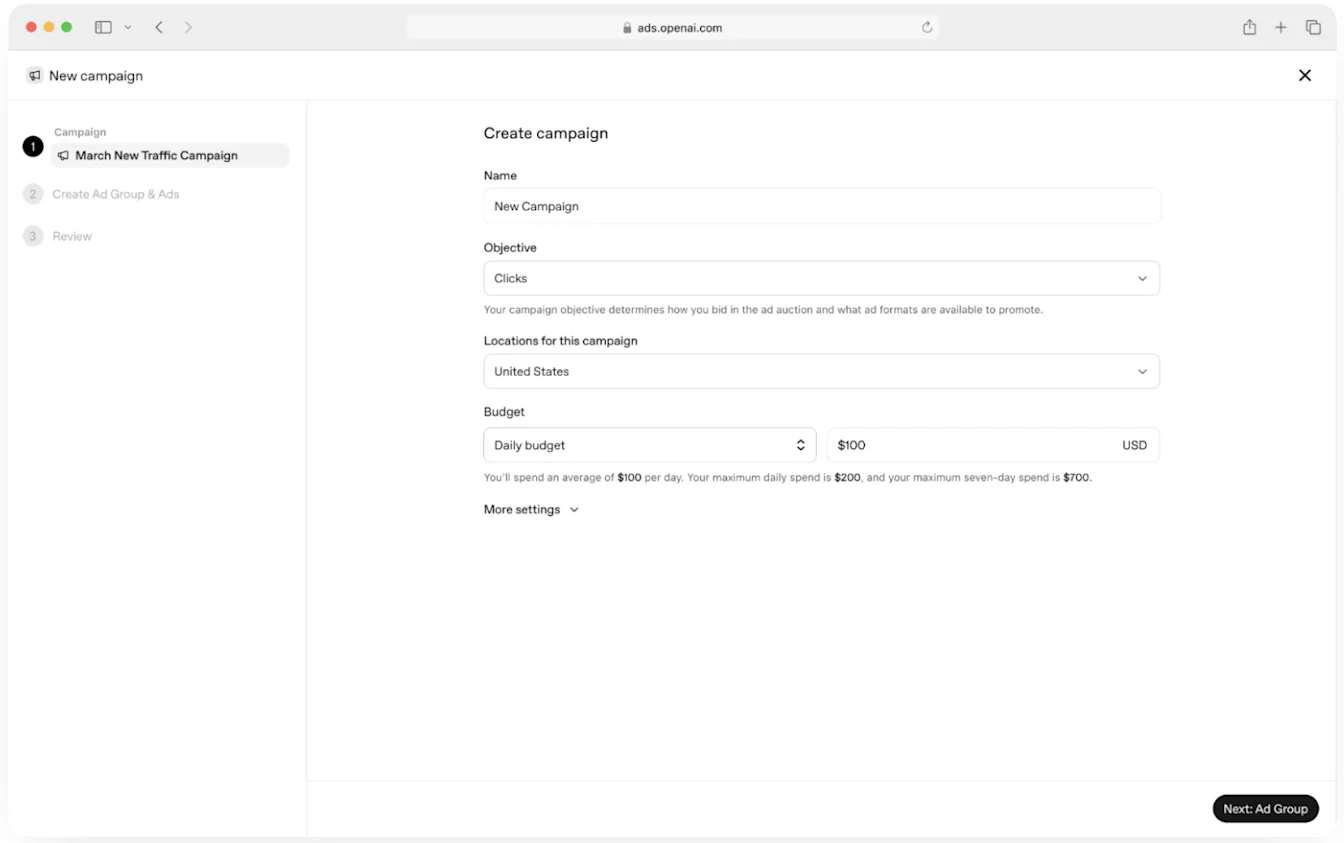
Šį lauką naudokite taip pat, kaip ir dabar nustatydami dienos biudžetą: įveskite vidutinę sumą, kurią norite išleisti kampanijai per dieną.
Ką svarbu žinoti
Jūsų biudžetų sumos nesikeičia.
Esamos kampanijos bus atnaujintos automatiškai.
Atskirų dienų išlaidos gali skirtis, tačiau kampanijų išlaidų tempas ir toliau bus reguliuojamas pagal bendrą kampanijos biudžetą.
Reklamų tvarkytuvėje ir toliau bus naudojamas pavadinimas Dienos biudžetas, o kuriant kampaniją bus rodomos taikomos išlaidų ribos.
Dažnai užduodami klausimai
Ar dėl to pasikeis mano kampanijos biudžetas?
Ne. Jūsų biudžeto suma nesikeičia, o esamos kampanijos bus atnaujintos automatiškai.
Ar dienos išlaidos gali viršyti mano dienos biudžetą?
Taip. Už atskirą dieną jums gali būti priskaičiuota iki dviejų kartų didesnė suma nei pasirinktas dienos biudžetas. Tačiau per atitinkamą 7 dienų laikotarpį kampanijos išlaidos neviršys septynis kartus didesnės sumos nei dienos biudžetas.
Kas nutinka, jei dienos biudžetą pakeičiu dienai jau prasidėjus?
Jei dienos biudžetą pakeičiate dienai jau prasidėjus, didžiausia tos dienos išlaidų suma apskaičiuojama pagal didžiausią bet kuriuo tos dienos metu galiojusią dienos biudžeto sumą.
Pavyzdžiui, jei nustatytas 100 $ dienos biudžetas ir vėliau tą dieną jį padidinate iki 110 $, didžiausia tos dienos išlaidų suma gali siekti 220 $, t. y. dvigubai daugiau nei didžiausias tą dieną galiojęs biudžetas.
Kaip taikoma 7 dienų išlaidų riba, jei biudžetą pakeičiu savaitės viduryje?
Jei dienos biudžetą pakeičiate savaitei jau prasidėjus, 7 dienų išlaidų riba apskaičiuojama proporcingai laikui nuo paskutinio biudžeto pakeitimo iki artimiausio sekmadienio 00.00 val. pagal jūsų reklamos paskyros laiko juostą.
Kas nutinka, jei kampanijos pabaigos data nenustatyta?
Kol kampanija aktyvi, taikomos tos pačios dienos ir 7 dienų išlaidų ribos.
Ar turiu atnaujinti esamas kampanijas?
Ne. Esamos kampanijos, kurioms nustatyti dienos biudžetai, bus atnaujintos automatiškai.
Ar galiu pakeisti dienos biudžetą?
Taip. Dienos biudžeto sumą galite pakeisti Reklamų tvarkytuvėje. Pakeitus biudžetą gali pasikeisti taikomos dienos ir 7 dienų išlaidų ribos.
Kodėl negaliu sumažinti dienos biudžeto?
Mažiausias kampanijos dienos biudžetas priklauso nuo rinkos ir valiutos. JAV standartinė mažiausia suma JAV doleriais yra 25 $.
Kampanijų, kurioms nustatytas dienos biudžetas ir fiksuoti kainos pasiūlymai, dienos biudžetas taip pat turi būti ne mažesnis už didžiausią faktinį kainos pasiūlymą už įvykį visose atitinkamose nearchyvuotose skelbimų grupėse, įskaitant taikomas kainos pasiūlymų korekcijas pagal auditoriją. Šis su kainos pasiūlymais susijęs apribojimas netaikomas kampanijoms, kuriose kainos pasiūlymai teikiami automatiškai arba biudžetas nustatomas visam kampanijos laikotarpiui.
Jei norite nustatyti dienos biudžetą, mažesnį už esamą skelbimų grupės kainos pasiūlymą ar pakoreguotą faktinį kainos pasiūlymą, pirmiausia sumažinkite kiekvieną nesuderinamą kainos pasiūlymo ribą arba taikomą korekciją taip, kad pasiūlymas neviršytų norimo dienos biudžeto. Tada išsaugokite naują kampanijos dienos biudžetą.
Pavyzdžiui, jei faktinis skelbimų grupės kainos pasiūlymas yra 250,50 $, negalite nustatyti mažesnio nei 250,50 $ tos kampanijos dienos biudžeto, kol nesumažinsite kainos pasiūlymo. Tai nereiškia, kad visoje platformoje taikoma 250 $ minimali riba.
Kur galiu pamatyti savo išlaidų ribas?
Kuriant arba redaguojant kampaniją, Reklamų tvarkytuvėje bus rodomas jūsų dienos biudžetas ir taikomos didžiausios dienos bei 7 dienų išlaidų sumos.