
As of December 17, 2025, we are renaming connectors to apps to present a more unified experience. The term now includes both apps that feature interactive UI and connectors that help you search and reference your information in ChatGPT. We are not removing any existing functionality; previously enabled connectors and company knowledge will continue to work as before.
Overview
Company knowledge lets ChatGPT use your organization’s context from apps to give answers specific to your company and projects—with clear citations back to the original sources.
Get organization-specific answers that help you plan, decide, and act
Works across your installed apps (browse the app directory)
Users authenticate their own apps; admins can manage access and enable apps for the workspace
Use custom apps built with MCP built for your organization to leverage company-specific data (search/fetch functionality only)
Enterprise/Edu admins/owners can control access to apps using RBAC.
Apps can include capabilities such as search, interactive UI, and writes. See the Apps SDK for more info.
You need to enable at least one app for company knowledge to operate.
Note: Company knowledge is currently available on ChatGPT Web. It is not supported for the ChatGPT desktop apps (Windows and macOS) or mobile apps (Android and iOS).
---
Availability and requirements
Plans: Available on ChatGPT Business and Enterprise/Edu
Prerequisites:
For Enterprise/Edu users, admins/owners must enable apps for your workspace before teams can use company knowledge. For Business users, app are enabled by default.
Apps need to have File Search capability to be included in Company Knowledge.
Apps must have the search and fetch actions to be eligible. Learn more.
End users must sign in to each app the first time they use Company knowledge (depending on the app, an admin/owner may enroll them on their behalf)
---
How it works
Start a new or existing conversation in ChatGPT.
If you’re starting a new conversation, select company knowledge under the message composer to enable it for that chat. If you're already in an existing conversation, you need to use the "+" button (tools menu) to choose company knowledge.
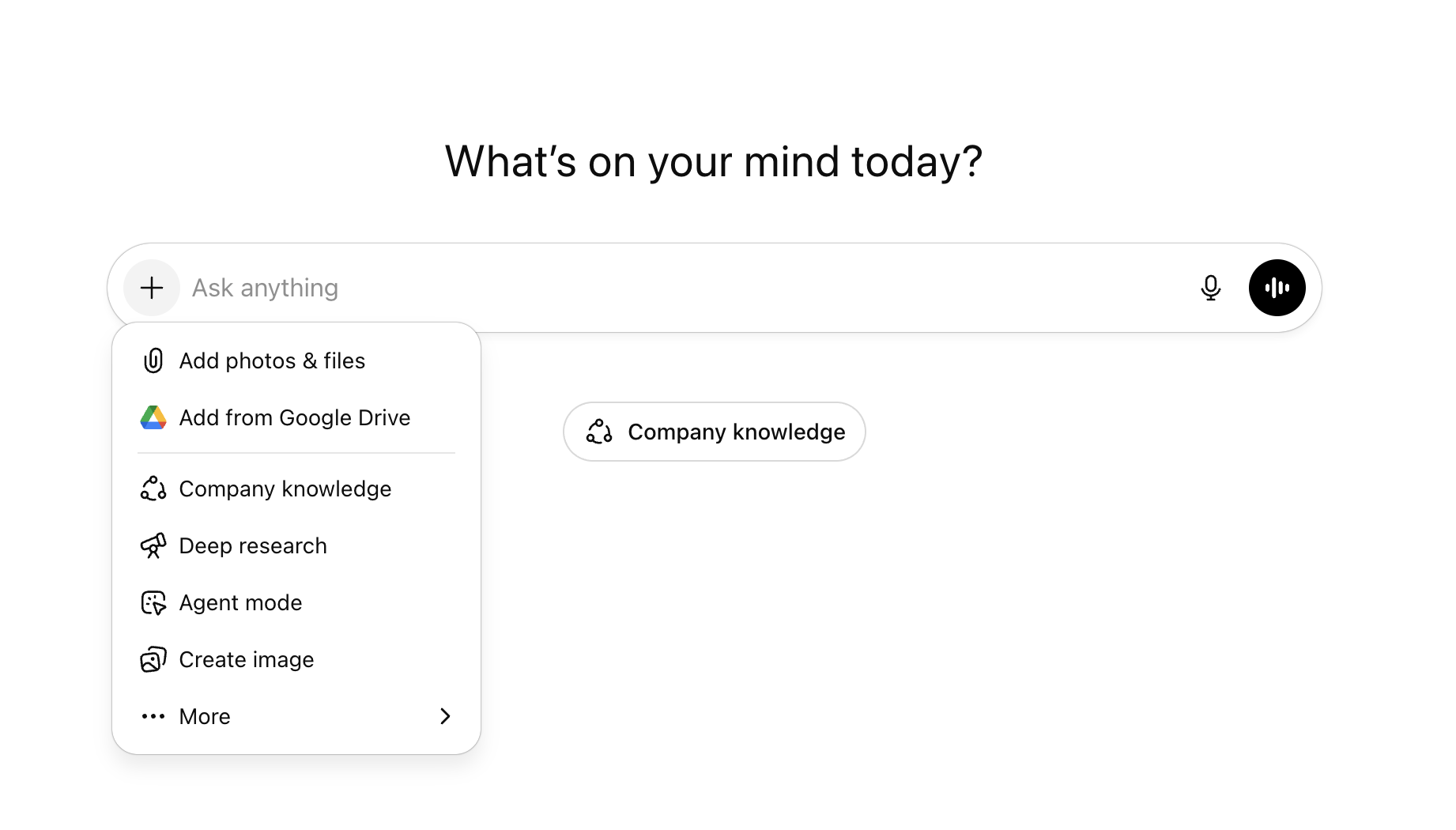
Once you add in company knowledge, choose what apps you want to include in the search. Apps that are eligible and connected appear with toggles, so you can pick particular apps to direct your search. If you recently connected or disconnected an app and the list does not update right away, wait a few minutes before trying again.
You can connect to more company knowledge eligible apps by clicking Connect more (note: available apps depend on admin/owner permissions and enablement).
Ask your question (for example: “Summarize this account’s latest feedback and risks”).
ChatGPT searches your connected apps and returns an answer with citations and links so you can verify sources.
If company knowledge isn’t selected, ChatGPT may still use apps automatically as part of the default experience.
---
App Setup / Enablement
Company knowledge depends on enabled apps. See steps below for general notes on app enablement. For more information, refer to apps in ChatGPT
Admins/owners can enable the apps required for their workspace in Workspace settings.
To filter apps that are eligible for Company Knowledge, click the Filter button in Workspace Settings -> Apps -> Enabled, and enable the File Search checkbox.
Note that for Business plans, apps are enabled by default, and for Enterprise/Edu plans, apps are disabled by default.
Users can then enable desired apps by browsing the app directory from Settings > Apps, completing any required OAuth. Enabled apps are then used as sources for company knowledge.
If you're using a custom app developed for your workspace, review this article for more info.
Enterprise admins/owners can use RBAC to further control access to apps.
---
Security, safety, and data considerations
Company knowledge respects your existing permissions—ChatGPT can only access what each user is already allowed to view. Each app used in company knowledge can be controlled by admins/owners, and requires users to connect through OAuth.
Enterprise/Edu admins and owners can manage access to individual apps (which company knowledge leverages) using RBAC and group-level permissions and can require SSO and SCIM for account and user provisioning.
---
Compliance
Company knowledge leverages apps, which are covered by the compliance API. Learn more in our Help Center article: Admin controls, security, and compliance in apps.
---
Limitations and known behaviors
You need to manually turn on company knowledge in each new conversation
When company knowledge isn’t selected, ChatGPT may still use apps automatically as part of the default experience
If a specific app has Write actions available and enabled, these won't be available when app is called via Company Knowledge (with Company Knowledge option specifically selected), since Company Knowledge is optimized for information retrieval. Please select the app specifically in ChatGPT to use Write actions (e.g. create a Calendar invite).
---
FAQ
Who can use company knowledge?
Anyone on ChatGPT Business and Enterprise/Edu.
Do admins need to enable anything before users can start?
Yes. Admins must enable apps for the workspace. For Enterprise and Edu, apps are defaulted off unless already configured by an admin.
Is company knowledge enabled for everyone?
Yes, so long as a given user has at least one app enabled.
Do users need to sign in to each app?
Yes. Users authenticate each app in their own settings the first time they use company knowledge, with the exception of admin-managed apps ("Deploy to your team") which can be setup by enterprise admins. Read more: apps in ChatGPT.
Does Company knowledge respect our existing permissions?
Yes. ChatGPT can only access what each user is already allowed to view.
How are permissions enforced?
Company knowledge respects existing permissions in your connected apps. Users only see what they already have access to.
Does OpenAI train on our data?
Company knowledge uses apps to obtain information. Read: apps in ChatGPT
Will responses show where information came from?
Yes. Answers include citations and links back to the original sources so you can verify.
Which apps are supported?
Company knowledge works with connected apps. See apps in ChatGPT for more information. Availability may vary by organization based on admin settings. Additionally, for an app to be eligible for company knowledge, it must support the File search capability (typically, the app must support the search and fetch actions. Learn more).
While the app needs search and fetch to be eligible for use in company knowledge, the app can use any read-only method to search and fetch data.
Does it work with custom apps built in developer mode?
You can use custom apps built with search/fetch functionality with company knowledge - write mode is not supported.
Where do answers come from and can I verify them?
Answers are based on your connected apps. Responses include citations and links back to sources so you can check the details.
Is data residency supported?
Company knowledge uses enabled apps, and data residency support is different by app. Certain apps like Slack are supported across data residency regions. Apps with sync are supported for workspaces with data residency in the United States, Europe (EEA + Switzerland), and Japan; Google Drive and GitHub apps with sync are supported in all currently supported data residency regions. Learn more about apps security, admin controls, and compliance.
Are there any geo restrictions?
The partner app may have geo restrictions. If restricted, connect button for the app in the app directory will be disabled.