
28 พฤษภาคม 2026
การควบคุมและความสามารถใหม่สำหรับ ChatGPT workspace agents
เรากำลังทยอยเปิดตัวความสามารถใหม่ด้านโมเดล การดูแลระบบ การเข้าถึงแอป และการตอบกลับสำหรับ ChatGPT workspace agents ใน Enterprise และ Edu
ตอนนี้ workspace agents รองรับ:
GPT-5.5 และการควบคุมความพยายามในการให้เหตุผล: เมื่อสร้างเอเจนต์ ผู้สร้างสามารถเลือก GPT-5.5 และตั้งค่าความพยายามในการให้เหตุผลที่เอเจนต์ใช้ได้ เรายังได้ปรับปรุงความเร็วในการตอบกลับของเอเจนต์ทั้งหมดด้วย
สิทธิ์การเผยแพร่ตามบทบาท: ผู้ดูแลระบบเวิร์กสเปซสามารถควบคุมได้ว่าบทบาทใดสามารถเผยแพร่เอเจนต์ไปยังไดเรกทอรีเวิร์กสเปซที่แชร์ได้
การตั้งค่าเอเจนต์แบบมีคำแนะนำ: ตอนนี้ ChatGPT จะถามคำถามในการตั้งค่าเพื่อช่วยให้ผู้ใช้สร้างเอเจนต์ที่มีประโยชน์ได้รวดเร็วยิ่งขึ้น
เอาต์พุตเสียง: ตอนนี้เอเจนต์สามารถสร้างไฟล์เสียงเป็นส่วนหนึ่งของการตอบกลับได้
ตอบกลับเธรด Slack ได้ฉลาดขึ้น: เอเจนต์ที่ใช้ใน Slack สามารถตอบกลับข้อความติดตามที่เกี่ยวข้องในเธรดได้หลังจากการ mention ครั้งแรก ผู้สร้างสามารถเลือกได้ว่าเอเจนต์จะตอบกลับข้อความในเธรดที่เกี่ยวข้อง หรือจะตอบเฉพาะเมื่อถูก mention เท่านั้น
เทมเพลตแอปสำหรับ GitHub Enterprise, Snowflake และ Databricks
ตอนนี้ผู้ดูแลระบบและเจ้าของเวิร์กสเปซในแพ็กเกจ Enterprise และ Edu สามารถใช้เทมเพลตแอป ChatGPT เพื่อสร้างแอปเฉพาะเวิร์กสเปซสำหรับ GitHub Enterprise, Snowflake และ Databricks ได้ เทมเพลตแอปมีขั้นตอนการตั้งค่าแบบมีคำแนะนำสำหรับการกำหนดค่าเฉพาะผู้ให้บริการ เช่น ข้อมูลรับรอง OAuth, callback URLs, รายละเอียด webhook, managed MCP server URLs และการควบคุมการเข้าถึงระดับเวิร์กสเปซ ก่อนที่ผู้ดูแลระบบจะเผยแพร่แอปให้สมาชิก
ใช้คู่มือการตั้งค่าใหม่เพื่อทำความเข้าใจขั้นตอนทั่วไปของเทมเพลตแอปและขั้นตอนเฉพาะผู้ให้บริการสำหรับแต่ละเทมเพลต: เทมเพลตแอป ChatGPT, เทมเพลตแอป GitHub Enterprise, เทมเพลตแอป Snowflake และ เทมเพลตแอป Databricks
หลังจากเผยแพร่แล้ว ผู้ดูแลระบบสามารถจัดการแอปที่สร้างขึ้นได้จาก Workspace settings > Apps > Enabled ซึ่งรวมถึงการเข้าถึงตามบทบาท การควบคุม action และการยืนยัน action
May 22, 2026
Workspace agents are now generally available in ChatGPT Business, Enterprise, and Edu.
Workspace agents help teams get more done together across tools. They can own entire workflows on their own, follow team processes, and be shared across your team so people can build once and use together.
We’ve also added new admin controls and visibility:
Agent builders can set safeguards on which actions agents can take for each app enabled in their workspace.
Business, Enterprise, and Edu admins can view workspace agent activity and usage in the
.
We’ve extended the free period for workspace agents until July 6, 2026. Credit-based pricing will begin on that date. (edited)
21 พฤษภาคม 2026
อัปเดต Codex: goal mode, การปรับปรุงเบราว์เซอร์, การใช้งานระยะไกลแบบล็อก, การวิเคราะห์สำหรับผู้ดูแลระบบ และสถานะการแชร์ปลั๊กอิน
ตอนนี้ Codex มอบวิธีเพิ่มเติมให้ผู้ใช้ Enterprise และ Edu ทำงานไปสู่เป้าหมายระยะยาวและทำซ้ำในเบราว์เซอร์ได้ ขณะที่ผู้ดูแลระบบที่มีสิทธิ์จะได้รับการวิเคราะห์การใช้งานที่อัปเดต:
Appshots ในแอป macOS ช่วยให้ผู้ใช้แนบหน้าต่างแอปเข้ากับเธรด Codex ด้วยปุ่มลัด รวมถึงภาพหน้าจอและข้อความที่พร้อมใช้งาน วันนี้ Appshots พร้อมใช้งานสำหรับบัญชี ChatGPT Edu ส่วนการรองรับบัญชี ChatGPT Enterprise จะตามมาเร็ว ๆ นี้
Goal mode พร้อมใช้งานทั่วไปแล้วในแอป Codex, ส่วนขยาย IDE และ CLI เพื่อให้ผู้ใช้กำหนดผลลัพธ์และเกณฑ์ความสำเร็จ แล้วปล่อยให้ Codex ทำงานไปสู่เป้าหมายนั้นต่อได้
คำอธิบายประกอบในเบราว์เซอร์ภายในแอป รองรับการให้ข้อเสนอแนะด้านสไตล์ได้แม่นยำยิ่งขึ้นสำหรับงานบนเบราว์เซอร์และงานฟรอนต์เอนด์
การใช้คอมพิวเตอร์แบบล็อก ช่วยให้ผู้ใช้ให้ Codex ทำงานต่อจากระยะไกลและอย่างปลอดภัยได้หลังจาก Mac ถูกล็อก โดยขึ้นอยู่กับข้อจำกัดตามภูมิภาคที่มีอยู่ ผู้ดูแลระบบและเจ้าของสามารถปิดฟีเจอร์นี้ได้โดยตั้งค่า
remote_computer_use = falseในการตั้งค่า Policies & Configurations ใน Codex cloud ดู configuration reference เพื่อดูรายละเอียดเพิ่มเติมการปรับปรุง browser-use เพิ่มโหมด annotation ขั้นสูง การดึง asset ที่เร็วขึ้น บริบท JavaScript แบบอ่านอย่างเดียว ความสะดวกในการใช้งานการจัดกลุ่มแท็บ ลดความรกจากแท็บส่วนขยาย Chrome และปรับปรุงความน่าเชื่อถือ
ตอนนี้ global admin console มี Codex analytics สำหรับผู้ดูแลระบบ Enterprise แล้ว โดยมีผู้ใช้ที่ใช้งานอยู่ เครดิตและ tokens เธรดและ turns ตารางคะแนนผู้ใช้ การใช้ปลั๊กอิน จำนวนบรรทัดโค้ดที่ยอมรับ การใช้โมเดล และ UI ที่สอดคล้องกับคอนโซล
การแชร์ปลั๊กอิน ช่วยให้ทีมแชร์ปลั๊กอินที่สร้างในเครื่องกับสมาชิกในเวิร์กสเปซได้จากแอป Codex การแชร์ปลั๊กอินถูกปิดไว้เป็นค่าเริ่มต้นสำหรับ ChatGPT Enterprise - โปรดติดต่อผู้ติดต่อบัญชี OpenAI ของคุณเพื่อดูรายละเอียดเกี่ยวกับวิธีเปิดใช้งานฟีเจอร์นี้ สำหรับบัญชี ChatGPT Edu การแชร์ปลั๊กอินจะเปิดใช้งานเป็นค่าเริ่มต้น
ดูข้อมูลเพิ่มเติม: Goal mode, การใช้คอมพิวเตอร์แบบล็อก, คำอธิบายประกอบในเบราว์เซอร์ภายในแอป และ การแชร์ปลั๊กอิน
Workspace agents พร้อมใช้งานทั่วไปแล้วใน ChatGPT Business, Enterprise และ Edu
Workspace agents ช่วยให้ทีมทำงานร่วมกันข้ามเครื่องมือได้มากขึ้น เอเจนต์สามารถดูแลเวิร์กโฟลว์ทั้งหมดได้ด้วยตัวเอง ปฏิบัติตามกระบวนการของทีม และแชร์ข้ามทีมของคุณ เพื่อให้คนหนึ่งสร้าง แล้วทุกคนใช้งานร่วมกันได้
เรายังได้เพิ่มการควบคุมสำหรับผู้ดูแลระบบและการมองเห็นใหม่ ๆ:
ผู้สร้างเอเจนต์สามารถตั้งค่าการป้องกันเกี่ยวกับ action ที่เอเจนต์สามารถทำได้สำหรับแต่ละแอปที่เปิดใช้งานในเวิร์กสเปซ
ผู้ดูแลระบบ Business, Enterprise และ Edu สามารถดู activity และการใช้งานของ workspace agent ได้ใน
เราได้ขยายช่วงใช้ฟรีสำหรับ workspace agents ออกไปจนถึงวันที่ 6 กรกฎาคม 2026 ราคาแบบอิงเครดิตจะเริ่มในวันดังกล่าว
18 พฤษภาคม 2026
นำป้าย Beta ออกจาก Apps Directory และขั้นตอนสร้างแอป
เราได้นำป้าย Beta ออกจาก Apps Directory ใน ChatGPT บนเว็บและเดสก์ท็อป รวมถึงจากขั้นตอนสร้างแอปแบบใหม่
นี่เป็นเพียงการอัปเดตป้ายกำกับเท่านั้น ไม่ได้เปลี่ยนประสบการณ์ของ Apps Directory เวิร์กโฟลว์การสร้างแอป ความสามารถของ dev mode หรือคำแนะนำด้านความเสี่ยงที่สูงขึ้นสำหรับ dev mode ที่มีอยู่เดิม
15 พฤษภาคม 2026
แอป Microsoft Teams พร้อมการซิงก์ที่ผู้ดูแลระบบจัดการใน ChatGPT
ตอนนี้ แอป Microsoft Teams พร้อมการซิงก์ที่ผู้ดูแลระบบจัดการ พร้อมใช้งานสำหรับเวิร์กสเปซ ChatGPT Enterprise และ Edu ที่มีสิทธิ์แล้ว เจ้าของและผู้ดูแลระบบสามารถเชื่อมต่อ Microsoft Teams เพียงครั้งเดียวสำหรับทั้งเวิร์กสเปซ เพื่อให้ ChatGPT อ้างอิงข้อความ Teams ที่รองรับและข้อมูลเมตาของบทสนทนาที่สมาชิกมีสิทธิ์เข้าถึงอยู่แล้วได้
เจ้าของและผู้ดูแลระบบสามารถเปิดใช้การซิงก์จาก Workspace settings → Apps เลือกเนื้อหา Teams ที่จะรวมด้วยตัวเลือกขอบเขตและตัวกรองป้ายกำกับความละเอียดอ่อนของ Microsoft Purview แบบไม่บังคับ จากนั้นปรับใช้ผ่าน Deploy to your team ประสบการณ์แบบซิงก์เป็นแบบอ่านอย่างเดียว อาจใช้เวลาสักระยะกว่าจะเติมข้อมูลครบหลังการตั้งค่า และยังคงแยกจากแอป Microsoft Teams แบบบริการตนเองทั่วไป
14 พฤษภาคม 2026
Codex remote access และ access tokens สำหรับระบบอัตโนมัติ
ตอนนี้ Codex รองรับการเข้าถึงจากระยะไกลผ่านแอปมือถือ ChatGPT แล้ว ช่วยให้ผู้ใช้เชื่อมต่อกับงานที่ใช้เวลานาน ตอบคำถาม เปลี่ยนทิศทางการทำงาน อนุมัติการดำเนินการ ตรวจทานผลลัพธ์ และสลับระหว่างโฮสต์ที่เชื่อมต่ออยู่ได้ ขณะที่ Codex ยังคงทำงานต่อบน Mac host พื้นฐานหรือสภาพแวดล้อมระยะไกลที่เชื่อมต่ออยู่ ประสบการณ์บนมือถือจะแสดงสถานะสดจากสภาพแวดล้อมนั้น รวมถึงบริบทของโปรเจกต์ การอนุมัติ ภาพหน้าจอ เอาต์พุตจากเทอร์มินัล diff และผลการทดสอบ เวิร์กสเปซ Enterprise ยังสามารถใช้ Codex access tokens สำหรับเวิร์กโฟลว์ภายในเครื่องที่เชื่อถือได้และไม่โต้ตอบ ซึ่งต้องการอัตลักษณ์ของเวิร์กสเปซ ChatGPT และการควบคุมระดับองค์กรโดยไม่ต้องลงชื่อเข้าใช้ผ่านเบราว์เซอร์
หากต้องการลองใช้งาน ให้อัปเดตทั้งแอปมือถือ ChatGPT และแอป Codex บน macOS การตั้งค่าบนมือถืออาจต้องใช้การเข้าถึง Remote Control ที่เปิดใช้งานในเวิร์กสเปซ และอาจมีขั้นตอน SSO, การยืนยันตัวตนหลายปัจจัย หรือ passkey
นอกจากนี้ access tokens ยังพร้อมใช้งานสำหรับเวิร์กสเปซ ChatGPT Enterprise โดยผู้ดูแลระบบสามารถจัดการความพร้อมใช้งานในระดับเวิร์กสเปซ สมาชิกที่มีบทบาทที่ได้รับอนุญาตสามารถสร้าง token ของตนเองได้ และส่วนควบคุมด้านธรรมาภิบาลจะแสดงกิจกรรมของ access token ในจุดที่พร้อมใช้งาน
Remote control ถูกปิดไว้เป็นค่าเริ่มต้น และผู้ดูแลระบบ/เจ้าของสามารถเปิดใช้งานได้จาก Workspace settings
ดูข้อมูลเพิ่มเติมได้ใน Remote connections, Access tokens, Admin setup และ Governance
7 พฤษภาคม 2026
ChatGPT Workspace Agents รองรับเวิร์กสเปซ Enterprise ที่มี EKM แล้ว
ตอนนี้ ChatGPT workspace agents พร้อมใช้งานสำหรับเวิร์กสเปซ ChatGPT Enterprise ที่มี Enterprise Key Management (EKM) และมีสิทธิ์แล้ว
Workspace agents ช่วยให้องค์กรสร้างและใช้งานเอเจนต์สำหรับงานที่ทำซ้ำได้และเวิร์กโฟลว์ทางธุรกิจข้ามแอปที่เชื่อมต่ออยู่ รวมถึง ChatGPT และ Slack เอเจนต์สามารถสร้างจากเทมเพลตหรือเริ่มจากศูนย์ ดูตัวอย่างก่อนเผยแพร่ แชร์ภายในเวิร์กสเปซ และรันตามกำหนดเวลาได้
ตอนนี้เวิร์กสเปซ EKM ที่มีสิทธิ์สามารถสร้างและใช้ workspace agents เชื่อมต่อเครื่องมือและแอปที่รองรับ เพิ่ม skills, files และ custom MCP servers ตั้งเวลารันซ้ำ ใช้เอเจนต์ในช่อง Slack ที่เชื่อมต่อ และดูประวัติเวอร์ชันกับการวิเคราะห์ได้
Workspace agents ยังคงปิดไว้เป็นค่าเริ่มต้น ผู้ดูแลระบบสามารถเปิดใช้งานการสร้าง การเผยแพร่ และการใช้งานใน Slack สำหรับเวิร์กสเปซที่มีสิทธิ์ได้ผ่านการควบคุมสำหรับผู้ดูแลระบบ
6 พฤษภาคม 2026
ChatGPT สำหรับ Intune บน iOS และ iPadOS
เราได้เพิ่ม ChatGPT สำหรับ Intune ลงใน Apple App Store แล้ว ChatGPT สำหรับ Intune เป็นแอป iOS แยกต่างหากสำหรับองค์กร ChatGPT Enterprise ที่จัดการ mobile access management ผ่าน Microsoft Intune และ Microsoft Entra แอปนี้ช่วยให้ทีม IT ใช้นโยบายการปกป้องแอปของ Microsoft และนโยบาย Conditional Access กับประสบการณ์ ChatGPT บนมือถือใน iOS และ iPadOS ได้
ChatGPT สำหรับ Intune พร้อมใช้งานเฉพาะสำหรับบัญชี Enterprise เท่านั้น และต้องมีการ onboarding ขององค์กรกับ OpenAI ก่อนใช้งาน เจ้าของและผู้ดูแลระบบ Enterprise ควรติดต่อผู้อำนวยการดูแลบัญชี OpenAI ของตนเพื่อเริ่ม onboarding จากนั้นกำหนดค่า Microsoft Entra และ Intune ที่จำเป็นก่อนการเปิดตัว
เมื่อ onboarding เสร็จแล้ว ผู้ใช้สามารถดาวน์โหลดแอปจาก Apple App Store และลงชื่อเข้าใช้ด้วยการยืนยันตัวตน Microsoft ระดับองค์กร เรียนรู้เพิ่มเติมได้ใน การตั้งค่า ChatGPT สำหรับ Intune
เลือกโมเดลใน ChatGPT ได้ง่ายขึ้น
เรากำลังทำให้การเลือกโมเดลที่เหมาะสมก่อนส่งข้อความเป็นเรื่องง่ายขึ้น ตอนนี้การเลือกโมเดลปรากฏใน composer แล้ว เพื่อให้คุณค้นหาและสลับโมเดลได้จากที่เดียวกับที่เขียนคำสั่ง
เรายังกำลังย้ายการควบคุมระดับความพยายามในการคิดเข้าไปไว้ในตัวเลือกโมเดลด้วย เมื่อคุณเลือกโมเดล Thinking หรือ Pro คุณจะสามารถเลือกระดับความพยายามในการคิดได้โดยตรงจากตัวเลือกโมเดล
Analytics และ Agents ในคอนโซลผู้ดูแลระบบส่วนกลาง
ตอนนี้คอนโซลผู้ดูแลระบบส่วนกลางมีส่วน Analytics และ Agents ใหม่แล้ว Analytics ช่วยให้ผู้ดูแลระบบเห็นภาพรวมแบบรวมของการนำไปใช้และการใช้งาน พร้อมมุมมองแนวโน้มสำหรับผู้ใช้ที่ใช้งานอยู่และกิจกรรมข้อความ รวมถึงรายละเอียดเชิงลึกสำหรับ GPTs, โปรเจกต์, skills, ผู้ใช้, การโต้ตอบกับเครื่องมือ, การโต้ตอบกับ connectors และสถานะของเวิร์กสเปซ
Agents ช่วยให้ผู้ดูแลระบบเห็นภาพรวมแบบรวมของ workspace agents ทั่วทั้งองค์กร ผู้ดูแลระบบสามารถเปิดเอเจนต์เพื่อดูรายละเอียด เช่น Agent ID, กิจกรรมล่าสุด, แอปที่เชื่อมต่อ, ไฟล์ความจำ, ตารางเวลา และการวิเคราะห์ของเอเจนต์ เช่น ผู้ใช้ที่ไม่ซ้ำและจำนวนการรันตามช่วงเวลา หรือเข้าไปที่ Builder เพื่อแก้ไขได้ เจ้าของเวิร์กสเปซสามารถเข้าถึงมุมมองเหล่านี้ได้จากคอนโซลผู้ดูแลระบบส่วนกลาง เรียนรู้เพิ่มเติม
5 พฤษภาคม 2026
ChatGPT สำหรับ Excel และ Google Sheets
ตอนนี้ ChatGPT สำหรับ Excel และ Google Sheets พร้อมใช้งานทั่วโลกสำหรับเวิร์กสเปซ Enterprise, Edu และ K-12 โดยนำแถบด้านข้าง ChatGPT ที่ออกแบบมาสำหรับสเปรดชีตโดยเฉพาะมาสู่ Excel และ Google Sheets สำหรับการสร้าง อัปเดต อธิบาย และตรวจทานสเปรดชีตหลายแท็บ ฟีเจอร์นี้รองรับ Skills และแอปในจุดที่พร้อมใช้งาน เพื่อให้งานสเปรดชีตยึดโยงกับไฟล์ ระบบ และแหล่งข้อมูลที่ได้รับอนุมัติ
ลูกค้า Enterprise, Edu และ K-12 จะได้ทดลองใช้งานฟรีจนถึงวันที่ 2 มิถุนายน 2026; หลังจากนั้นการใช้งานจะเป็นไปตามเครดิตและเงื่อนไขการใช้งาน ประสบการณ์นี้รองรับการควบคุมระดับเวิร์กสเปซ รวมถึง RBAC, ถิ่นที่อยู่ของข้อมูลและ inference residency ในจุดที่พร้อมใช้งาน, Enterprise Key Management และความครอบคลุมของ Compliance API ผู้ดูแลระบบสามารถเปิดใช้ ChatGPT สำหรับ Excel และ Sheets ได้จากการตั้งค่าเวิร์กสเปซ เรียนรู้เพิ่มเติม
30 เมษายน 2026
อัปเดตการซิงก์ SharePoint ที่ผู้ดูแลระบบจัดการ
เรากำลังย้าย คำขอ scope ของแอป ChatGPT SharePoint จาก delegated scopes เป็น Microsoft application scopes สำหรับตัวเลือกการซิงก์ “Deploy to your team” ที่ผู้ดูแลระบบจัดการ การย้ายนี้ช่วยให้ ChatGPT ซิงก์เนื้อหา SharePoint ที่เลือกและประเมินสิทธิ์ของ SharePoint รวมถึงสมาชิกของกลุ่มไซต์ SharePoint แบบเดิม โดยไม่ต้องพึ่งพาเฉพาะไฟล์ที่มองเห็นได้โดยผู้ดูแลระบบที่ตั้งค่าเสร็จสิ้นเท่านั้น นอกจากนี้ ผู้ดูแลระบบและเจ้าของยังสามารถกำหนดค่าป้ายกำกับ Microsoft Purview sensitivity ได้จากการตั้งค่าแอป
scope ใหม่เหล่านี้จะต้องได้รับการอนุมัติจากผู้ดูแลระบบ Microsoft Entra เพื่อให้ชุดฟีเจอร์ใหม่นี้เริ่มใช้งานได้ ผู้ดูแลระบบและเจ้าของสามารถยืนยันตัวตนแอป SharePoint ใหม่ได้อย่างสะดวกโดยไปที่ Workspace Settings > Apps และค้นหาข้อความแจ้ง “Reconnect SharePoint for better syncing” ที่ด้านบนของมุมมอง หรือค้นหาแอป SharePoint แล้วคลิกปุ่ม ‘Re-auth required’ เพื่อรับชุดฟีเจอร์ใหม่ สิ่งนี้ช่วยหลีกเลี่ยงการต้องตัดการเชื่อมต่อแล้วเชื่อมต่อใหม่ ซึ่งจะทำให้ต้องซิงก์ดัชนีอีกครั้ง
เรียนรู้เพิ่มเติมเกี่ยวกับแอป SharePoint ใน ChatGPT และดูคำถามที่พบบ่อยสำหรับตัวเลือกการซิงก์ที่ผู้ดูแลระบบจัดการเพื่อดูข้อมูลเพิ่มเติม
22 เมษายน 2026
ChatGPT Workspace Agents สำหรับ Enterprise และ Business
ChatGPT workspace agents กำลังทยอยเปิดตัวในช่วงไม่กี่สัปดาห์ข้างหน้าให้กับเวิร์กสเปซ ChatGPT Business และ Enterprise
Workspace Agents ช่วยให้องค์กรสร้างและใช้งานเอเจนต์สำหรับงานที่ทำซ้ำได้และทำให้เวิร์กโฟลว์ทางธุรกิจเป็นอัตโนมัติโดยใช้แอปที่เชื่อมต่ออยู่ทั้งหมดของคุณ และสามารถทำงานได้ใน ChatGPT และ/หรือ Slack Workspace agents สามารถสร้าง ดูตัวอย่างก่อนเผยแพร่ แชร์ภายในเวิร์กสเปซ และรันตามกำหนดเวลาได้
ตอนนี้เวิร์กสเปซที่มีสิทธิ์สามารถ:
สร้างเอเจนต์จากเทมเพลตหรือเริ่มจากศูนย์
เชื่อมต่อเอเจนต์กับเครื่องมือและแอป เช่น Google Drive, Google Calendar, Slack และ SharePoint
เพิ่ม skills, files และ custom MCP servers
แชร์เอเจนต์แบบส่วนตัว ผ่านลิงก์ หรือในไดเรกทอรีเวิร์กสเปซ
ตั้งเวลารันซ้ำใน ChatGPT
ใช้เอเจนต์ในช่อง Slack ที่เชื่อมต่ออยู่
ดูประวัติเวอร์ชันและการวิเคราะห์สำหรับเอเจนต์
ผู้ดูแลระบบเวิร์กสเปซยังสามารถจัดการการเข้าถึงการสร้างเอเจนต์ การเผยแพร่ และการใช้งานใน Slack ผ่านการควบคุมสำหรับผู้ดูแลระบบได้ ChatGPT workspace agents จะปิดไว้เป็นค่าเริ่มต้นเมื่อเปิดตัว และผู้ดูแลระบบสามารถเปิดใช้งานสำหรับเวิร์กสเปซที่มีสิทธิ์ได้
หมายเหตุ: ChatGPT workspace agents จะยังไม่พร้อมใช้งานสำหรับเวิร์กสเปซ ChatGPT Enterprise ที่มี EKM ในช่วงเปิดตัว
ถิ่นที่อยู่ของข้อมูลสำหรับแอปที่มีการซิงก์ในญี่ปุ่น
ตอนนี้แอปทั้งหมดที่มีการซิงก์รองรับถิ่นที่อยู่ของข้อมูลภายในภูมิภาคในญี่ปุ่นสำหรับเวิร์กสเปซ ChatGPT Enterprise/Edu ก่อนหน้านี้ ในญี่ปุ่น ถิ่นที่อยู่ของข้อมูลสำหรับแอปที่มีการซิงก์จำกัดอยู่แค่ Google Drive และ GitHub การเปิดตัวนี้ขยายการรองรับถิ่นที่อยู่ของข้อมูลในญี่ปุ่นไปยัง sync connectors ทั้งหมด เรียนรู้เพิ่มเติมเกี่ยวกับถิ่นที่อยู่ของข้อมูล
9 เมษายน 2026
GPT-5.3 Instant mini ใน ChatGPT
วันนี้ เรากำลังเปิดตัว GPT-5.3 Instant Mini ใน ChatGPT โมเดลนี้มาแทน GPT-5 Instant Mini ในฐานะโมเดลสำรองที่ผู้ใช้จะได้รับเมื่อถึงลิมิตการใช้งาน GPT-5.3 Instant เนื่องจากทำหน้าที่เป็นโมเดลสำรอง จึงจะไม่แสดงในตัวเลือกโมเดล
เมื่อเทียบกับ GPT-5 Instant Mini แล้ว GPT-5.3 Instant Mini ให้ความรู้สึกเป็นธรรมชาติมากกว่าในการสนทนา พร้อมการเขียนที่ดีขึ้นและการรับรู้บริบทที่แข็งแกร่งยิ่งขึ้นตลอดการแชต โมเดลนี้ทำผลงานได้ดีกว่า GPT-5 Instant Mini ในหลากหลายกรณีการใช้งาน
ควบคุมการค้นพบกลุ่ม SCIM ในขั้นตอนการแชร์
ตอนนี้เจ้าของเวิร์กสเปซสามารถควบคุมได้ว่ากลุ่มที่จัดการด้วย SCIM จะสามารถค้นหาเจอได้ในขั้นตอนการแชร์ เช่น โปรเจกต์และ GPTs หรือไม่ มีการตั้งค่าใหม่ Discoverable by workspace users อยู่ภายใต้ Identity & provisioning > Directory Sync (SCIM) และเปิดใช้งานเป็นค่าเริ่มต้นเพื่อคงพฤติกรรมเดิมไว้
เมื่อการตั้งค่านี้ถูกปิด:
กลุ่มที่จัดการด้วย SCIM จะไม่ปรากฏอีกต่อไป ในขั้นตอนการแชร์
หากโปรเจกต์หรือ GPT ถูกแชร์กับกลุ่มที่จัดการด้วย SCIM อย่างน้อยหนึ่งกลุ่มอยู่แล้ว กลุ่มเหล่านั้นจะถูกลบออกจากรายการแชร์ในครั้งถัดไปที่มีการอัปเดตโปรเจกต์หรือ GPT
การตั้งค่านี้ช่วยลดการแชร์เกินโดยไม่ตั้งใจ และทำให้การแชร์แบบอิงกลุ่มยังคงสอดคล้องกับนโยบายการเข้าถึงที่จัดการจากส่วนกลาง
สำหรับข้อมูลเพิ่มเติม โปรดดู: คำถามที่พบบ่อยเกี่ยวกับการผสานรวม SCIM
8 เมษายน 2026
การดำเนินการกับกล่องจดหมายและปฏิทินที่แชร์ของ Outlook
ตอนนี้แอป Outlook Email และ Calendar สำหรับ ChatGPT รองรับเวิร์กโฟลว์ Outlook แบบมอบหมายสิทธิ์เพิ่มเติมสำหรับทีมแล้ว ด้วยสิทธิ์ Microsoft ที่เหมาะสม ผู้ใช้สามารถขอให้ ChatGPT แสดงรายการและอ่านข้อความในกล่องจดหมายที่แชร์ เรียกดูโฟลเดอร์ของกล่องจดหมายที่แชร์ ทำเครื่องหมายข้อความในกล่องจดหมายที่แชร์ว่าอ่านแล้วหรือยังไม่ได้อ่าน ย้ายข้อความที่แชร์ และส่งอีเมลข้อความธรรมดาจากหรือในนามของกล่องจดหมายที่แชร์ได้ ChatGPT ยังสามารถสร้าง อัปเดต ตอบกลับ ยกเลิก ลบ และแนบไฟล์ขนาดเล็กกับกิจกรรมในปฏิทิน Outlook ที่แชร์ได้อีกด้วย
เจ้าของเวิร์กสเปซและผู้ดูแลระบบควรตรวจสอบสิทธิ์ Microsoft Entra, การเข้าถึง RBAC และการควบคุม action ของแอป Outlook ก่อนเปิดใช้งาน action ที่เพิ่งเพิ่มเข้ามา ผู้ใช้ที่เคยเชื่อมต่อ Outlook มาก่อนอาจต้องเชื่อมต่อใหม่หลังจากเวิร์กสเปซเปิดใช้งาน action ใหม่; อาจต้องได้รับการอนุมัติจาก Microsoft Entra ด้วย เรียนรู้เพิ่มเติม
2 เมษายน 2026
ที่นั่ง Codex แบบใหม่ใน ChatGPT Enterprise
เรากำลังเปิดตัวประเภทที่นั่งใหม่สำหรับ ChatGPT Enterprise: ที่นั่ง Codex ที่อิงตาม flexible pricing ที่นั่ง Codex ให้สิทธิ์เข้าถึง Codex เท่านั้น - ไม่รวมการเข้าถึงเวิร์กสเปซ ChatGPT และไม่มีค่าใช้จ่ายคงที่ต่อผู้ใช้ต่อเดือน การใช้ Codex ต้องใช้ เครดิตเวิร์กสเปซ ในขณะที่ที่นั่ง ChatGPT มาตรฐานยังคงรวม ChatGPT และ Codex พร้อมการเข้าถึงพื้นฐาน และ flexible pricing แบบเลือกใช้สำหรับการใช้งานเกินลิมิตการใช้งานที่รวมอยู่
อ่านเพิ่มเติมเกี่ยวกับที่นั่ง Codex และพฤติกรรมของประเภทที่นั่งได้ที่นี่ สำหรับการจัดการสมาชิก, การจัดสรรด้วย SCIM และวิธีเปลี่ยนประเภทที่นั่งของสมาชิก โปรดดู การจัดการสมาชิก ประเภทที่นั่ง บทบาท และการเข้าถึงใน ChatGPT Enterprise
เรายังได้อัปเดต Codex Rate Card แล้ว เวิร์กสเปซ ChatGPT Enterprise ใหม่ใช้อัตราแบบอิง token ขณะที่เวิร์กสเปซ Enterprise ที่มีอยู่เดิม และเวิร์กสเปซ ChatGPT Edu, ChatGPT for Teachers และ ChatGPT for Healthcare ใหม่/เดิม จะยังคงใช้อัตราแบบข้อความรุ่นเดิม จนกว่าจะมีการย้ายระบบ หากคุณมีคำถามเกี่ยวกับอัตราใหม่หรือช่วงเวลาการย้ายระบบ โปรดติดต่อผู้แทน OpenAI ของคุณ
27 มีนาคม 2026
อัปเดตแอป Box, Notion, Linear และ Dropbox
เรากำลังทยอยเปิดตัวแอป Box, Notion, Linear และ Dropbox เวอร์ชันอัปเดตใน ChatGPT Enterprise และ Edu การอัปเดตเหล่านี้เพิ่ม action ใหม่ของแอป รวมถึงความสามารถในการเขียนใหม่ในจุดที่รองรับ และนำประสบการณ์แอปล่าสุดมาไว้ใน ChatGPT
แอปใหม่จะถูกปิดไว้เป็นค่าเริ่มต้น และผู้ดูแลระบบ/เจ้าของเวิร์กสเปซสามารถตรวจสอบแอปและ action ของแอปได้ใน Workspace settings > Apps เพื่อเปิดใช้งานสิ่งที่สอดคล้องกับความต้องการของเวิร์กสเปซ action ใหม่ (เช่น action สำหรับการเขียน) อาจเกี่ยวข้องกับขอบเขตที่อัปเดต — ผู้ดูแลระบบ/เจ้าของควรตรวจสอบหน้าของแอป Box, Notion, Linear และ Dropbox เพื่อดูรายละเอียด และอนุญาตขอบเขตที่จำเป็น ผู้ใช้ใหม่อาจไม่สามารถเชื่อมต่อแอปเหล่านี้ได้จนกว่าจะผ่านการอนุญาตขอบเขต หรือมีการเปิด/ปิด action ให้สอดคล้องกับขอบเขตที่ได้รับอนุญาต
สมาชิกที่เคยเชื่อมต่อแอปเหล่านี้มาก่อนอาจต้องเชื่อมต่อแอปใหม่หลังจากผู้ดูแลระบบตรวจสอบ เพื่อเริ่มใช้ประสบการณ์ที่อัปเดตแล้ว
เพิ่มแหล่งข้อมูลเข้าโปรเจกต์ของคุณได้จากทุกที่
ตอนนี้โปรเจกต์ช่วยให้สร้างฐานความรู้ที่มีชีวิตได้ง่ายขึ้น ด้วยการเพิ่มแหล่งข้อมูลจากแอป บทสนทนา และข้อความแบบรวดเร็ว คุณสามารถวางลิงก์ไปยังช่อง Slack หรือไฟล์หรือโฟลเดอร์ใน Google Drive เพื่อเพิ่มเป็นแหล่งข้อมูลของโปรเจกต์ได้โดยตรง บันทึกคำตอบ ChatGPT ที่มีประโยชน์ลงในโปรเจกต์เพื่อให้ผลลัพธ์ที่ดีนำกลับมาใช้เป็นความรู้ได้ และวางบันทึก บรีฟ หรือเอกสารอ้างอิงลงในโปรเจกต์ได้โดยตรง
ในเวิร์กสเปซ Enterprise และ Edu การเข้าถึงแอปจะเป็นไปตามการควบคุมของเวิร์กสเปซ ผู้ดูแลระบบและเจ้าของสามารถจัดการความพร้อมใช้งานของแอปได้ใน Workspace settings > Apps และสามารถใช้ RBAC เพื่อกำหนดการเข้าถึงแอปให้กับบทบาทเฉพาะ เรียนรู้เพิ่มเติมเกี่ยวกับโปรเจกต์ใน ChatGPT
26 มีนาคม 2026
ปลั๊กอินใน Codex
ตอนนี้ Codex มีไดเรกทอรีปลั๊กอินที่คัดสรรแล้ว ซึ่งช่วยให้ผู้ใช้ค้นพบ ติดตั้ง และใช้เวิร์กโฟลว์แบบแพ็กเกจที่สร้างจากแอปและ skills ได้โดยตรงใน Codex ปลั๊กอินเป็นชุดติดตั้งสำหรับเวิร์กโฟลว์ Codex ที่ใช้ซ้ำได้ ทำให้แชร์การตั้งค่าเดียวกันข้ามโปรเจกต์หรือทีมได้ง่ายขึ้น ปลั๊กอินสามารถรวม skills, การผสานรวมแอปแบบไม่บังคับ และการกำหนดค่า MCP server ไว้ในที่เดียว เรียนรู้เพิ่มเติม
การเข้าถึงปลั๊กอินเป็นไปตามการควบคุมแอประดับเวิร์กสเปซ ผู้ดูแลระบบ Enterprise และ Edu สามารถจัดการแอปที่เปิดใช้งานได้ใน Workspace settings → Apps และสามารถใช้ RBAC เพื่อกำหนดการเข้าถึงแอปให้กับบทบาทเฉพาะ
25 มีนาคม 2026
การรวม Google Drive connector
file connectors ของ Google ใน ChatGPT ตอนนี้ถูกรวมไว้ภายใต้ Google Drive แล้ว มอบประสบการณ์แอปเดียวสำหรับการโต้ตอบกับ Google Docs, Sheets และ Slides ของคุณบน Google Drive
Google Drive actions ใหม่จะปิดไว้เป็นค่าเริ่มต้นสำหรับเวิร์กสเปซ Enterprise/Edu ผู้ดูแลระบบ/เจ้าของสามารถตรวจสอบและจัดการ action ได้จาก Workspace settings > Apps ค้นหารายการ Google Drive แล้วคลิก Manage actions
ผู้ใช้เดิมของแอป Google Drive, Docs, Sheets และ Slides จะไม่ได้รับผลกระทบ — แอปที่เชื่อมต่อไว้ก่อนหน้ายังคงใช้งานได้ หลังจากผู้ดูแลระบบ/เจ้าของเปิดใช้งาน action ใหม่แล้ว ผู้ใช้เดิมอาจเชื่อมต่อแอป Google Drive ใหม่เพื่อเริ่มใช้ action ใหม่ภายใน ChatGPT ผู้ใช้ใหม่สามารถเชื่อมต่อเฉพาะแอป Google Drive เพื่อใช้ action ของ Docs, Sheets และ Slides ได้ โดยไม่ต้องเชื่อมต่อแอปแยกต่างหาก
ผู้ดูแลระบบ Google Workspace อาจต้องอนุมัติขอบเขต Google ใหม่ที่สอดคล้องกับ action ของแอปอีกครั้ง — ไม่เช่นนั้น ผู้ใช้อาจพบข้อผิดพลาดการเชื่อมต่อเมื่อพยายามเชื่อมต่อ อ่านเพิ่มเติม
20 มีนาคม 2026
อัปเดตแบบสำรวจผลกระทบในการวิเคราะห์เวิร์กสเปซ
ChatGPT Edu
ตอนนี้แบบสำรวจผลกระทบพร้อมใช้งานสำหรับ ChatGPT Edu เพิ่มเติมจาก Enterprise แล้ว โดยมีชุดคำถามเฉพาะสำหรับ Edu
การส่งออก
ตอนนี้สามารถส่งออกผลลัพธ์แบบสำรวจผลกระทบได้แล้ว
แบบสำรวจที่ผู้ดูแลระบบสร้าง
ตอนนี้เจ้าของเวิร์กสเปซสามารถเปิดแบบสำรวจที่ผู้ดูแลระบบสร้าง ได้จากแท็บ Impact แบบสำรวจเหล่านี้ช่วยให้เจ้าของเวิร์กสเปซเรียกใช้แบบสำรวจผลกระทบสำหรับเวิร์กสเปซของตนได้ตามต้องการ ต่างจากแบบสำรวจที่ OpenAI สร้างซึ่งมีกำหนดเวลาเป็นประจำ
โปรดทราบว่าในขณะนี้ยังไม่รองรับการกำหนดชุดคำถามและคำตอบเอง
การเปลี่ยนวันเริ่มแบบสำรวจ
ตอนนี้แบบสำรวจผลกระทบที่ OpenAI สร้างจะเริ่มในวันที่ 31 มีนาคม 2026 หรือหลังจากนั้น แทนวันที่ 26 มีนาคม 2026 ที่เคยแจ้งไว้ก่อนหน้า
หากต้องการดูข้อมูลเพิ่มเติมเกี่ยวกับแบบสำรวจผลกระทบ โปรดดู: การจัดการแบบสำรวจผลกระทบในการวิเคราะห์เวิร์กสเปซ
19 มีนาคม 2026
ประกาศเลิกใช้งานโหมดการหาข้อมูลเชิงลึกแบบเดิม
โหมดการหาข้อมูลเชิงลึกแบบเดิมจะถูกลบออกในวันพฤหัสบดีที่ 26 มีนาคม 2026 การเปลี่ยนแปลงนี้มีผลเฉพาะโหมดเดิมเท่านั้น ประสบการณ์การหาข้อมูลเชิงลึกปัจจุบันจะไม่เปลี่ยนแปลง
บทสนทนาและผลลัพธ์ย้อนหลังจะยังเข้าถึงได้
หากต้องการเรียนรู้เพิ่มเติมเกี่ยวกับการหาข้อมูลเชิงลึก โปรดดู: การหาข้อมูลเชิงลึกใน ChatGPT
18 มีนาคม 2026
GPT-5.4 mini ใน ChatGPT
เรากำลังทยอยเปิดตัว GPT-5.4 mini ใน ChatGPT GPT-5.4 mini พร้อมใช้งานสำหรับผู้ใช้ Free และ Go ผ่านฟีเจอร์ “Thinking” ในเมนู + สำหรับผู้ใช้กลุ่มอื่นทั้งหมด GPT-5.4 mini จะพร้อมใช้งานในฐานะโมเดลสำรองเมื่อถึงลิมิตการใช้งาน GPT-5.4 Thinking
สำหรับผู้ใช้ Plus, Pro และผู้ใช้แบบชำระเงินอื่น ๆ GPT-5.4 mini จะถูกใช้เป็นโมเดลสำรองสำหรับ GPT-5.4 Thinking เมื่อถึงลิมิตการใช้งาน ช่วยให้ยังเข้าถึงความสามารถด้านการให้เหตุผลได้ต่อเนื่องในช่วงที่มีการใช้งานสูง ลูกค้า Enterprise จะยังคงมีตัวเลือกให้ตั้งค่า Auto routing เป็น GPT-5.4 mini ตามค่าเริ่มต้นได้ หากต้องการ
GPT-5.4 mini จะไม่ปรากฏเป็นโมเดลที่เลือกได้ในตัวเลือกโมเดล เรียนรู้เพิ่มเติมได้ในบล็อกโพสต์ของเรา
17 มีนาคม 2026
อัปเดตตัวเลือกโมเดลใน ChatGPT
เราได้ทำให้ตัวเลือกโมเดลง่ายขึ้น เพื่อให้เลือกระดับการให้เหตุผลที่เหมาะสมได้ง่ายขึ้น
ผู้ใช้ในบัญชี Plus, Pro, Business, Enterprise และ Edu จะเห็นชุดตัวเลือกโมเดลตามแพ็กเกจของตน ซึ่งรวมถึง:
Instant – คำตอบรวดเร็วสำหรับคำถามในชีวิตประจำวัน
Thinking – การให้เหตุผลที่ลึกขึ้นสำหรับงานที่ซับซ้อนกว่า
Pro – โมเดลการให้เหตุผลที่ล้ำหน้าที่สุด
สามารถเข้าถึงฟังก์ชัน Auto ได้โดยคลิก Configure ในเมนูตัวเลือกโมเดลแล้วเลือก “Auto-switch to thinking.” การตั้งค่านี้จะเปิดโดยอัตโนมัติหากแชตล่าสุดของคุณตั้งค่าเป็น Auto
กำหนดค่าการตั้งค่าขั้นสูงเพิ่มเติม
หากคุณต้องการควบคุมมากขึ้น ให้คลิก Configure เพื่อ:
เปิดหรือปิด การสลับอัตโนมัติ ระหว่าง Instant และ Thinking
เข้าถึง legacy models
ตั้งค่า ระดับความพยายามในการคิด เมื่อเลือก Thinking หรือ Pro
เรายังทำให้ เมนูลองใหม่ ง่ายขึ้นด้วย ทำให้สร้างคำตอบใหม่ด้วยโมเดล Thinking หรือ Pro ได้ง่ายขึ้นโดยคลิกจุดสามจุดใต้คำตอบ
13 มีนาคม 2026
Write actions สำหรับแอป Google และ Microsoft ใน ChatGPT
เราได้อัปเดตขอบเขตและ action ในแอป Google และ Microsoft ใน ChatGPT ให้รองรับ write actions แล้ว ตอนนี้คุณสามารถใช้แอปอย่าง Microsoft Outlook email ให้ร่างอีเมลให้คุณ ใช้ Google docs และ sheets เพื่อสร้างสเปรดชีตหรือเอกสาร หรือตั้งค่าการประชุมโดยใช้แอปปฏิทินที่เกี่ยวข้องได้
Write actions จะยังคงถูกปิดไว้เป็นค่าเริ่มต้นจนกว่าผู้ดูแลระบบเวิร์กสเปซจะเปิดใช้งานใน Settings > Apps > Manage actions แยกตามแอป สำหรับแอป Microsoft ลูกค้าบางรายอาจต้องได้รับการอนุมัติจากผู้ดูแลระบบ Microsoft Entra สำหรับขอบเขตที่อัปเดตก่อน จึงจะให้ผู้ใช้ใหม่เชื่อมต่อได้สำเร็จ ดูข้อมูลเพิ่มเติมในศูนย์ช่วยเหลือ: Apps in ChatGPT, แอป Microsoft Outlook สำหรับ ChatGPT, แอป Microsoft Calendar สำหรับ ChatGPT และ แอป Microsoft Teams สำหรับ ChatGPT
12 มีนาคม 2026
การวิเคราะห์เวิร์กสเปซ
ประสบการณ์ analytics ที่ปรับโฉมใหม่ในชื่อ Workspace analytics พร้อมใช้งานแล้วสำหรับ ChatGPT Enterprise และ Edu Workspace analytics ซึ่งมาแทนที่ User analytics นำเสนอการวิเคราะห์ระดับเวิร์กสเปซเพื่อช่วยให้ผู้ดูแลระบบเข้าใจการนำไปใช้ การมีส่วนร่วม และวิธีที่ทีมใช้ ChatGPT ทั่วทั้งองค์กร
ไฮไลต์สำคัญ:
ประสบการณ์ analytics ที่ปรับโฉมใหม่: อัปเดตภาพและการนำทาง รวมถึงแท็บใหม่ที่แสดงข้อมูลเชิงลึกเกี่ยวกับวิธีที่ทีมใช้ ChatGPT และผลลัพธ์ที่ได้รับ
การเปรียบเทียบกับ benchmark: เปรียบเทียบตัวชี้วัดการนำไปใช้และการมีส่วนร่วมกับค่ามัธยฐานของอุตสาหกรรม
Impact: ทำความเข้าใจผลลัพธ์ที่ผู้ใช้รายงานเอง เช่น ประสิทธิภาพการทำงาน เวลาที่ประหยัดได้ คุณภาพงาน และความพึงพอใจในการทำงาน ผ่านแบบสำรวจที่ส่งให้ผู้ใช้
หมายเหตุ: แท็บ Impact จะเปิดใช้งานเฉพาะเวิร์กสเปซ Enterprise (ไม่ใช่ Edu) เมื่อเปิดตัว
Task insights: ดูรูปแบบการทำงานแบบรวมใน ChatGPT รวมถึงหมวดหมู่งานและหัวข้อบทสนทนา
นอกจากนี้ ผู้ใช้ประเภทใหม่ analytics viewer ยังช่วยให้สมาชิกเวิร์กสเปซที่ได้รับมอบหมายสามารถดู workspace analytics ได้เช่นเดียวกับเจ้าของและผู้ดูแลระบบเวิร์กสเปซ
หมายเหตุ: Task Insights และแบบสำรวจผลกระทบที่แจกจ่ายให้ผู้ใช้ เปิดใช้งานเป็นค่าเริ่มต้น ผู้ดูแลระบบและเจ้าของเวิร์กสเปซสามารถเลือกไม่ใช้หนึ่งหรือทั้งสองฟีเจอร์นี้ได้ เวิร์กสเปซ จะมีเวลาประมาณ 2 สัปดาห์ นับจากการเปิดตัวครั้งแรกในการเลือกไม่ใช้ ก่อนที่แบบสำรวจอาจถูกส่งให้ผู้ใช้
สำหรับข้อมูลเพิ่มเติมและภาพรวมของฟีเจอร์ Workspace analytics โปรดดู: Workspace analytics สำหรับ ChatGPT Enterprise และ Edu
สำหรับแนวทางในการนำข้อมูลเชิงลึกเหล่านี้ไปใช้จริง (playbooks, enablement motions, champion programs) โปรดดูคู่มือ Academy ของเรา: คู่มือ workspace analytics ของ ChatGPT Enterprise
11 มีนาคม 2026
อัปเดต scope สำหรับแอป Microsoft
เราได้อัปเดต scope ที่ร้องขอโดยแอป Outlook Calendar, Outlook Email, Microsoft SharePoint และ Microsoft Teams เพื่อรองรับ action เพิ่มเติม ผู้ดูแลระบบ Microsoft Entra จะต้องตรวจสอบและอนุมัติ scope แอปที่อัปเดตก่อนที่ผู้ใช้ใหม่จะเชื่อมต่อได้ — มิฉะนั้น ผู้ใช้อาจพบปัญหาการเชื่อมต่อ
โปรดทราบว่า scope ใหม่จะไม่ได้ทำให้ action ใหม่สำหรับแอปเหล่านี้ (รวมถึง write actions ใด ๆ) พร้อมใช้งานหรือเปิดใช้งานโดยอัตโนมัติ ผู้ดูแลระบบและเจ้าของเวิร์กสเปซจะต้องตรวจสอบ action ของแอปที่พร้อมใช้งานโดยค้นหารายการแอปใน Workspace settings > Apps แล้วคลิก Manage actions
action ใหม่ เมื่อพร้อมใช้งาน จะถูกปิดไว้เป็นค่าเริ่มต้น — ผู้ดูแลระบบ/เจ้าของสามารถตรวจสอบแล้วเปิดใช้งานได้หากเหมาะสมกับเวิร์กสเปซของตน
ยุติโมเดล GPT-5.1
ตั้งแต่วันที่ 11 มีนาคม 2026 เป็นต้นไป โมเดล GPT-5.1 จะไม่พร้อมใช้งานใน ChatGPT อีกต่อไป
ซึ่งมีผลกับ GPT-5.1 Instant, GPT-5.1 Thinking และ GPT-5.1 Pro บทสนทนาที่มีอยู่ซึ่งใช้ GPT-5.1 จะดำเนินต่อโดยอัตโนมัติบนโมเดลปัจจุบันที่สอดคล้องกัน: GPT-5.3 Instant, GPT-5.4 Thinking หรือ GPT-5.4 Pro
6 มีนาคม 2026
Skills เบต้าสำหรับ ChatGPT Enterprise และ Edu
เรากำลังเปิดตัว Skills ซึ่งเป็นวิธีใหม่ที่ช่วยให้ทีมเปลี่ยนเวิร์กโฟลว์ที่พิสูจน์แล้วให้เป็นคำสั่งที่ใช้ซ้ำได้ ซึ่ง ChatGPT สามารถนำไปใช้โดยอัตโนมัติ Skills กำหนดว่าจะใช้เวิร์กโฟลว์เมื่อใด ขั้นตอนที่ต้องทำ และรูปแบบของผลลัพธ์ เพื่อให้ทีมได้ผลลัพธ์ที่สม่ำเสมอโดยไม่ต้องพิมพ์คำสั่งเดิมซ้ำในทุกคำสั่ง
สามารถแชร์ Skills ข้ามทั้งเวิร์กสเปซได้ และจะถูกนำไปใช้ในบทสนทนาโดยอัตโนมัติเมื่อเกี่ยวข้อง สำหรับ Enterprise และ Edu ผู้ดูแลระบบสามารถจัดการว่าใครสร้าง แชร์ และติดตั้ง skills ได้ด้วยการควบคุมตามบทบาท ขณะนี้ Skills ยังอยู่ในช่วงเบต้าและถูกปิดไว้เป็นค่าเริ่มต้นสำหรับเวิร์กสเปซ Enterprise และ Edu ผู้ดูแลระบบสามารถเปิดใช้งานได้ทุกเมื่อ
4 มีนาคม 2026
แอป Codex บน Windows
แอป Codex พร้อมใช้งานบน Windows แล้วสำหรับเวิร์กสเปซ ChatGPT Enterprise และ Edu ที่มี Codex รวมอยู่ด้วย สมาชิกสามารถรันเอเจนต์ Codex หลายตัวพร้อมกันจากเดสก์ท็อป Windows ได้ โดยมี worktree แบบแยกและ diff ที่ตรวจสอบได้ ซึ่งยังทำงานร่วมกับ Codex ใน CLI และ IDE ได้
ผู้ดูแลระบบไม่จำเป็นต้องตั้งค่าสิทธิ์แยกเฉพาะสำหรับแอปนี้ สิทธิ์ Codex Local ยังคงใช้ควบคุมการใช้งานในเครื่อง และสิทธิ์ Codex Cloud ใช้ควบคุมงานบนคลาวด์ที่มอบหมายจากแอปและส่วนใช้งาน Codex บนคลาวด์อื่น ๆ ดูข้อมูลเพิ่มเติม: การใช้ Codex กับแพ็กเกจ ChatGPT ของคุณ
3 มีนาคม 2026
อัปเดต GPT-5.3 Instant
GPT‑5.3 Instant ให้คำตอบที่แม่นยำขึ้น ผลลัพธ์ที่ละเอียดและสอดคล้องกับบริบทมากขึ้นเมื่อค้นหาเว็บ และลดจุดตันที่ไม่จำเป็น ข้อควรระวังที่มากเกินไป และถ้อยคำที่ฟันธงเกินไปซึ่งอาจรบกวนการไหลลื่นของบทสนทนา GPT-5.3 Instant ถูกปิดไว้เป็นค่าเริ่มต้นสำหรับเวิร์กสเปซ ChatGPT Enterprise และ Edu โดยผู้ดูแลระบบสามารถเปิดใช้งานได้ผ่าน ตัวสลับ Early Model Access ในการตั้งค่าเวิร์กสเปซส่วน “Models”
การอัปเดตนี้มุ่งเน้นไปที่ส่วนของประสบการณ์ ChatGPT ที่ผู้คนสัมผัสได้ทุกวัน ได้แก่ น้ำเสียง ความเกี่ยวข้อง และความลื่นไหลของบทสนทนา ปัญหาเหล่านี้มีความละเอียดอ่อนและอาจไม่ปรากฏชัดใน benchmark เสมอไป แต่เป็นตัวกำหนดว่า ChatGPT จะให้ความรู้สึกว่ามีประโยชน์หรือน่าหงุดหงิด GPT‑5.3 Instant สะท้อนความคิดเห็นของผู้ใช้ในด้านเหล่านี้โดยตรง
27 กุมภาพันธ์ 2026
อัปเดต ChatGPT บนเว็บและ Android: แก้ไขคำสั่งรูปภาพ แชร์ได้เร็วขึ้น และบทสนทนาลื่นไหลยิ่งขึ้น
เว็บ
แก้ไขข้อความที่มีรูปภาพได้ ตอนนี้คุณแก้ไขข้อความที่มีไฟล์แนบรูปภาพได้แล้ว จึงไม่ต้องเริ่มใหม่เมื่อต้องการปรับคำสั่งหรือสร้างผลลัพธ์ใหม่
เปิดผลการค้นหาในแท็บใหม่ ตอนนี้การกด Cmd+คลิกในแผงค้นหาจะเปิดผลลัพธ์ในแท็บใหม่ ทำให้สำรวจต่อได้ง่ายขึ้นโดยไม่เสียตำแหน่งเดิม
แชร์ได้เร็วขึ้น การแชร์แชตตอนนี้ง่ายและเร็วขึ้น ด้วยเมนูแชร์ที่โหลดไวกว่าเดิม
ส่งออกภาพจาก Code Blocks ตอนนี้ผังงาน ไดอะแกรม และการแสดงข้อมูลเป็นภาพที่สร้างใน Code Blocks สามารถส่งออกเป็นรูปภาพเพื่อใช้งานซ้ำได้ง่าย
Android
เลื่อนไปยังข้อความล่าสุดอัตโนมัติ บทสนทนาที่มีอยู่ตอนนี้จะเลื่อนไปด้านล่างโดยอัตโนมัติ เพื่อให้คุณกลับมาใช้งานต่อได้ทันที
การทำงานในแถบด้านข้างเร็วขึ้น การใช้งานแถบด้านข้าง เช่น การเปลี่ยนชื่อแชต ตอนนี้เร็วและตอบสนองไวขึ้น
ปรับปรุงภาพแสดงการป้อนด้วยเสียง ตอนนี้การป้อนด้วยเสียงมีอินเทอร์เฟซที่ชัดเจนและเรียบง่ายขึ้น ซึ่งยังคงแสดงข้อความของคุณและอัปเดตขณะคุณพูด
คีย์บอร์ดเปิดอัตโนมัติเมื่อแนบไฟล์ ตอนนี้คีย์บอร์ดจะเปิดโดยอัตโนมัติหลังจากคุณแนบไฟล์ ช่วยให้พิมพ์ข้อความต่อได้อย่างลื่นไหล
แก้ไขบั๊ก
แก้ไขข้อผิดพลาดการสตรีมข้อความที่เพิ่มขึ้นใน GPT-5.2 Thinking
แก้ไขอาการปุ่มโหมดเสียงกะพริบเมื่อเปิดบทสนทนา
การทำงานในแถบด้านข้างบนเว็บมือถือจะไม่ค้างขณะเลื่อนอีกต่อไป
23 กุมภาพันธ์ 2026
โปรเจกต์: แท็บ Chats และ Sources
เรากำลังอัปเดตโปรเจกต์ด้วยเลย์เอาต์แบบแท็บใหม่ เพื่อให้คุณเข้าถึงแหล่งข้อมูลควบคู่กับแชตได้ง่าย:
ตอนนี้โปรเจกต์มีสองแท็บ: Chats และ Sources
ไฟล์โปรเจกต์ได้ถูกย้ายจาก Project settings ไปอยู่ในแท็บ Sources
ตอนนี้ไฟล์ใน Sources สามารถจัดเรียงตาม ใหม่สุด, เก่าสุด หรือเรียงตามตัวอักษรได้
20 กุมภาพันธ์ 2026
ถิ่นที่อยู่ของข้อมูลสำหรับแอป Google Drive และ GitHub ที่มีการซิงก์
ตอนนี้แอป Google Drive และ GitHub ที่มีการซิงก์รองรับถิ่นที่อยู่ของข้อมูลภายในภูมิภาคสำหรับ ChatGPT Enterprise/Edu ในทุกภูมิภาคถิ่นที่อยู่ของข้อมูลที่รองรับ ก่อนหน้านี้ ถิ่นที่อยู่ของข้อมูลสำหรับแอปเหล่านี้รองรับเฉพาะในสหรัฐอเมริกาเท่านั้น การเปิดตัวนี้ครอบคลุมทั้งการซิงก์แบบ user-auth และ workspace-auth ของ Google Drive เรียนรู้เพิ่มเติมเกี่ยวกับถิ่นที่อยู่ของข้อมูล
19 กุมภาพันธ์ 2026
ยุติโมเดล GPT-5 รุ่นเดิม
ตามที่ประกาศไว้ก่อนหน้านี้ เราก็กำลังยุติ GPT-5 (Instant และ Thinking) เช่นกัน ตามที่ประกาศไว้ก่อนหน้านี้ ขณะนี้ยังไม่มีการเปลี่ยนแปลง API สำหรับรายละเอียด โปรดดูบล็อกโพสต์และศูนย์ช่วยเหลือของเรา
Interactive Code Blocks ใน ChatGPT
เราได้ปรับปรุง Code Blocks ใน ChatGPT ให้โต้ตอบได้มากขึ้น
คุณสามารถเขียน แก้ไข และดูตัวอย่างโค้ดของคุณใน ChatGPT ได้ครบ จบใน
ที่เดียว:
เขียนและแก้ไขข้อความในบรรทัดได้โดยตรง
ดูตัวอย่างไดอะแกรมและมินิแอปได้โดยตรงในแชต
ตรวจสอบโค้ดในมุมมองแบบแบ่งหน้าจอ
10 กุมภาพันธ์ 2026
อัปเดตสำหรับ deep research
เรากำลังปรับปรุง deep research ใน ChatGPT เพื่อช่วยสร้างรายงานที่แม่นยำและน่าเชื่อถือมากขึ้น พร้อมการควบคุมที่มากขึ้น ตอนนี้คุณสามารถโฟกัสการวิจัยไปที่เว็บไซต์เฉพาะและชุดแอปที่เชื่อมต่ออยู่จำนวนมากขึ้นในฐานะแหล่งข้อมูลที่เชื่อถือได้
จุดเริ่มต้นในแถบด้านข้างที่ออกแบบใหม่และมุมมองรายงานแบบเต็มหน้าจอช่วยให้เริ่ม ตรวจสอบ และจัดการงานวิจัยในที่เดียวได้ง่ายขึ้น สร้างและแก้ไขแผนการวิจัยก่อนเริ่มต้น และติดตามความคืบหน้าพร้อมความสามารถในการปรับทิศทางระหว่างการทำงาน
สำหรับเวิร์กสเปซ Enterprise และ Edu การอัปเดตนี้จะไม่เปลี่ยนแปลง role-based access controls (RBAC) หรือการกำหนดค่า deep research เริ่มต้นในปัจจุบันของคุณ
สำหรับข้อมูลเพิ่มเติม โปรดดูบทความในศูนย์ช่วยเหลือของเรา: Deep research ใน ChatGPT
2 กุมภาพันธ์ 2026
เปิดตัวแอป Codex
วันนี้เราเปิดตัวแอป Codex สำหรับ MacOS ซึ่งเป็นศูนย์บัญชาการสำหรับจัดการเอเจนต์เขียนโค้ดหลายตัวพร้อมกัน แอปนี้ช่วยให้คุณรันงานระยะยาวและงานเบื้องหลัง ตรวจสอบ diff ที่สะอาดจาก worktree แบบแยก ดูความคืบหน้าและการตัดสินใจของเอเจนต์ และเรียกใช้สกิลกับระบบอัตโนมัติที่นำกลับมาใช้ซ้ำได้
แอป Codex ใช้การควบคุมสำหรับผู้ดูแลระบบแบบเดียวกับ Codex local และ Codex cloud ต้องเปิดใช้งาน Codex local ก่อน สมาชิกจึงจะใช้แอป Codex ได้ ผู้ดูแลระบบ/เจ้าของสามารถควบคุมการเข้าถึง Codex ได้จาก Workspace settings -> Permissions & roles, ด้วย RBAC และสามารถใช้ compliance API เพื่อจัดการและบันทึกการใช้งาน Codex
ในช่วงเวลาจำกัด ผู้ใช้ Enterprise/Edu ที่ไม่ได้ใช้ flexible pricing จะได้รับลิมิตการใช้งาน Codex เพิ่มเป็น 2 เท่า ผู้ใช้ Enterprise/Edu ที่ใช้ flexible pricing มีสิทธิ์รับโปรโมชันพิเศษ ติดต่อฝ่ายขายเพื่อดูข้อมูลเพิ่มเติม
เริ่มต้นได้ด้วยการดาวน์โหลดแอป macOS และเรียนรู้เพิ่มเติมเกี่ยวกับ Codex
30 มกราคม 2026
โมเดลเพิ่มเติมสำหรับ GPTs ที่มี custom actions
ตอนนี้ GPTs ที่มี custom actions สามารถใช้โมเดลได้มากขึ้นในตัวเลือกโมเดล รวมถึง GPT-5.2 Instant และ GPT-5.2 Thinking โมเดลตระกูล o และ Pro ไม่รองรับสำหรับ custom actions ความพร้อมใช้งานของโมเดลขึ้นอยู่กับสิ่งที่ผู้ดูแลระบบของคุณเปิดใช้งานสำหรับเวิร์กสเปซ
ก่อนหน้านี้ GPTs ที่มี custom actions สามารถใช้ได้เฉพาะ GPT-4o, GPT-4.1 และ GPT-5 Instant
18 ธันวาคม 2025
เปิดตัวไดเรกทอรีแอปใน ChatGPT
ตอนนี้คุณสามารถเรียกดูและเพิ่มแอปที่ได้รับอนุมัติได้ใน ไดเรกทอรีแอป ใหม่ แอปช่วยให้คุณทำงานกับเครื่องมือและข้อมูลของคุณได้โดยตรงภายในการสนทนา ตั้งแต่ประสบการณ์เชิงโต้ตอบในแชต ไปจนถึงการเชื่อมต่อที่ปลอดภัยซึ่งทำให้ ChatGPT ค้นหาและอ้างอิงข้อมูลจากบริการของบุคคลที่สามได้
ในการอัปเดตนี้ ตัวเชื่อมต่อจะแสดงในไดเรกทอรีในรูปแบบแอปแล้ว ทำให้จัดการเครื่องมือทั้งหมดของคุณในที่เดียวได้ง่ายขึ้น การอ้างอิงทั่วทั้งศูนย์ช่วยเหลือได้รับการอัปเดตให้สอดคล้องกับคำศัพท์ใหม่นี้แล้ว
สำหรับ ChatGPT Enterprise และ Edu แอปจะถูกปิดไว้เป็นค่าเริ่มต้น ผู้ดูแลระบบและเจ้าของสามารถควบคุมว่าแอปใดบ้างที่พร้อมให้ผู้ใช้ใช้งานได้ด้วยการควบคุมการเข้าถึงตามบทบาท และกำหนดได้ว่าแต่ละแอปได้รับอนุญาตให้ทำงานใดผ่าน workspace settings
แอปพร้อมใช้งานสำหรับผู้ใช้ ChatGPT ที่เข้าสู่ระบบทุกคน โดยความพร้อมใช้งานและฟังก์ชันการทำงานจะแตกต่างกันไปตามแพ็กเกจและภูมิภาค บางแอปหรือความสามารถอาจไม่พร้อมใช้งานในบางภูมิภาค (รวมถึง EEA, GB หรือสวิตเซอร์แลนด์) หรืออาจต้องใช้แพ็กเกจบางระดับ
นอกจากนี้ นักพัฒนาสามารถส่งแอปเพื่อรับการตรวจสอบและเผยแพร่ในไดเรกทอรีแอปได้ ทำให้แอปที่ผ่านการอนุมัติพร้อมใช้งานสำหรับผู้ใช้ ChatGPT ในวงกว้างขึ้น
December 15, 2025
Apps & connectors admin UI refresh
We’ve refreshed the Apps & connectors section in Workspace settings for admins and owners with a clearer layout: tabs for Enabled, Available, and Draft; a streamlined list view; search and filters; and bulk actions like selecting multiple apps to manage roles or disable. Enabling actions, including sync where supported, now live directly in each connector’s listing.
Available to ChatGPT Enterprise/edu admins in Workspace settings. Note that Apps and connectors are disabled by default for Enterprise/Edu plans - enable connectors from the Available tab, setup sync, RBAC, and configure MCP actions (depending on app/connector).
Read more about apps and connectors.
December 11, 2025
GPT-5.2 in Early Access for Enterprise
This week, we’re rolling out GPT-5.2, the most capable model series yet for professional knowledge work with improved work artifact creation like spreadsheets, tool use and longer context retrieval. As with GPT-5.1, we’re continuing to improve our main models for everyone on a regular basis to make them more useful and enjoyable to use.
We’re releasing GPT-5.2 to Enterprise and Edu workspaces in Early Access, meaning you can turn it on now for your workspace in admin settings, where you can also manage access to legacy models. We’ll be transitioning custom GPTs to GPT-5.2 on January 12, 2026, and we recommend GPT creators switch as early as possible. Learn more about custom GPTs.
The credits for GPT-5.2 will remain the same as GPT-5. See the current ChatGPT rate card for pricing information.
The ChatGPT Compliance API is now part of the OpenAI Compliance Logs Platform
The OpenAI Compliance Logs Platform is a new, unified way for enterprises to export observability and compliance data via immutable, time-windowed JSONL log files. The Compliance Logs Platform is also now available with Audit, Auth, and Codex logs.
It helps deliver improved reliability, minutes-level latency, and a single ingestion pattern across multiple log categories, including the brand-new ChatGPT Audit & Authentication Logs and Codex Usage Logs. These logs make it possible to audit changes made to workspaces, track authentication activities, and understand Codex usage. Learn more.
December 3, 2025
Adding the Atlassian Rovo MCP connector
We’re adding Atlassian Rovo to our list of MCP connectors, which brings in your Jira, Compass, and Confluence information to bring relevant project context into your chats. This connector enables you to take supported write actions in Jira right from ChatGPT — such as creating issues and triggering workflows—based on what you request and on patterns identified in your project data. All actions are initiated, approved and completed directly in chat.
Admins can review actions and other basic information about the connectors in Workspace settings → Apps, and set user permissions using RBAC. Users can add the Atlassian Rovo from Settings → Apps & Connectors.
The Atlassian Rovo connector is available to Enterprise, Edu, Business, Pro and Plus customers with connectors enabled for their workspace.
November 25, 2025
Model updates for Enterprise and Edu
GPT-5.1 Instant is now live in the model picker for ChatGPT Enterprise and Edu workspaces, and GPT-5.1 Auto and GPT-5.1 Thinking are no longer available as Early Access options.
GPT-5.1 Pro is now available in Early Access for Enterprise and Edu. Admins and owners can enable access in your workspace's settings. GPT-5.1 Pro is intended for more complex tasks where more reasoning is helpful.
New custom GPTs created in Enterprise and Edu will begin using GPT-5.1 as the default model. Existing custom GPTs are unchanged, and creators can still select a different model (depending on what’s enabled for the workspace and role).
November 24, 2025
New MCP connectors available today
We’re rolling out a new set of MCP access connectors built by partners and reviewed by OpenAI, including Amplitude, Fireflies, Vercel, Monday.com, Stripe, Hex, Egnyte, Alpaca, BioRender, Semrush, and Jam.dev. This is available to Enterprise, Edu, Business, Pro and Plus customers with connectors enabled for their workspace. These connectors expand the set of tools customers can bring into ChatGPT and will be followed by additional connectors on a rolling basis.
The connectors released today are access connectors, which fetch content when a user asks a question, built using MCP. Admins continue to govern access to connectors using RBAC. Connectors remain default off for Enterprise plans, and default on for Business plans.
Admins can review Actions and other basic information about these connectors in Workspace settings → Apps.
November 19, 2025
Custom connectors in company knowledge
Starting today, company knowledge will support custom MCP connectors with search/fetch functionality. Custom connectors fitting this criteria that are enabled for your organization will appear in the company knowledge experience for allowed users, giving your team a more complete, accurate, and company-specific context when using the feature.
Admins/owners can continue to manage access to custom connectors through RBAC in Workspace settings.
Learn more about company knowledge and custom MCP connectors.
November 12, 2025
GPT-5.1 in ChatGPT
We’re updating GPT-5 to GPT-5.1 Instant and GPT-5.1 Thinking, making answers both smarter and more conversational. GPT-5.1 Instant now uses light adaptive reasoning for tougher questions while staying fast, and GPT-5.1 Thinking adapts its thinking time more precisely for complex tasks with clearer, less jargony responses.
GPT-5.1 Auto continues to route each query to the best model, and GPT-5 models remain available for three months under the Legacy models dropdown so you can compare and transition at your own pace.
Please note that access to GPT-5.1 is by default disabled for ChatGPT Enterprise workspaces. Admins and owners can enable access in their workspace settings.
November 13, 2025
Apps & Apps SDK now available to Enterprise/Edu plans
ChatGPT Enterprise/Edu customers will now have access to ChatGPT apps. Apps include interactive interfaces – like presentations, maps, and playlists – that respond to natural language and adapt to your conversation. You can start with a bulleted outline and ask Canva to turn it into a professional presentation, or turn a rough sketch into a FigJam diagram—all without leaving ChatGPT.
Our pilot partners—like Figma, Canva, Booking.com, Coursera, Expedia, Spotify, and Zillow—will be available to Enterprise/Edu customers in markets where their services are offered, starting in English, with more apps coming.
You can also build your own apps with the Apps SDK, then test and deploy it for your team using developer mode. Get started in the docs. Learn more: Apps in ChatGPT and the Apps SDK and Build with the Apps SDK
Synced Connector Updates
ChatGPT Enterprise/Edu workspaces can now use ChatGPT connectors for Azure Boards, Basecamp, and Zoho CRM These connectors deliver faster, higher-quality answers–especially for knowledge-heavy prompts like strategy summaries, policy lookups, and internal research.
For Enterprise/Edu workspaces, connectors are disabled by default— admins and owners can enable specific connectors at any time from their Workspace connectors settings, and configure connector access through RBAC. Individual users can connect enabled connectors they want to use from Settings > Apps & Connectors. Once enabled, ChatGPT will automatically reference the indexed content when relevant. Learn more about how to use connectors here.
November 6, 2025
Custom connector action controls
Admins and Owners can now enable or disable individual actions for custom connectors (e.g., to allow read but not write) and manually refresh actions to pick up developer updates. This brings finer control over what connectors can do in ChatGPT and a simple review path when new connector capabilities are added. Find these controls in Workspace Settings → Connectors → Manage actions or during publish.
Available to ChatGPT Enterprise and Edu workspaces using custom connectors. Toggles apply at the workspace level; new actions are disabled by default until approved and modified actions keep their prior state. To use Refresh, an admin/owner must connect to the connector as a user.
Learn more about these controls in our Help Center article.
October 27, 2025
Synced Connector Updates
Enterprise and Edu workspaces can now use ChatGPT connectors for Aha!, Asana, ClickUp, GitLab Issues, Help Scout, Teamwork.com, and Zoho Desk. Synced connectors deliver faster, higher-quality answers – especially for knowledge-heavy prompts like strategy summaries, policy lookups, and internal research.
Admins and Owners can enable connectors from their Workspace connectors settings, and can configure user access using RBAC. Connectors remain off by default until an Admin or Owner turns them on. Individual users can connect enabled connectors they want to use from Settings > Apps & Connectors. Once enabled, ChatGPT will automatically reference the indexed content when relevant. Learn more about how to use connectors here.
October 23, 2025
Company knowledge in ChatGPT
Company knowledge is a new way to bring together context from all your connected tools for answers that know your business, with citations and links back to sources from your apps (for example: Slack, SharePoint, Google Drive, GitHub, Notion, HubSpot, Zendesk, Azure DevOps, Asana, and more).
Company knowledge respects your existing company permissions, so ChatGPT only has access to what each user is already authorized to view. It follows the role-based permissions admins have set for each connector. OpenAI never trains on your data by default. Learn more about OpenAI's enterprise-grade security, compliance, and data privacy programs.
Admins enable connectors for the workspace and can manage access with RBAC. At least one connector must be enabled for a user to see company knowledge.
To use it, start a chat, select company knowledge under the message composer, and ask your question to see cited results from approved connectors. Learn more in our Help Center article.
October 17, 2025
Build, upload, and publish MCP connectors in ChatGPT [Beta]
We’re rolling out full Model Context Protocol (MCP) support with developer mode so your organization can build, test, and publish MCP-powered connectors with read/write capabilities that let ChatGPT take action in your tools. Kick off workflows, create project management tasks, update your CRM, or combine connectors for more complex orchestrations.
Admins can review and publish connectors to the workspace, and use RBAC to control who can develop, test, and use each connector. Build your own MCP connector, or upload trusted third party connectors.
Learn more in our Help Center article.
October 16, 2025
Updated Workspace settings
We’ve updated Workspace settings to make administration clearer and faster. A new General tab now centralizes workspace customization (name, logo, appearance, and workspace-wide instructions) and adds an AI policy modal you can configure to remind users of your organization’s AI policies on a recurring basis.
We’ve also streamlined navigation by combining Identity & provisioning with IP allowlists into a new Identity & access tab, and by renaming Settings & permissions to Permissions & roles.
See What workspace settings can I control for my workspace for details.
Enterprise Key Management (EKM)
Enterprise Key Management (EKM) is now available for Enterprise and Edu customers. This capability allows organizations to encrypt all customer content using their own external Key Management System (KMS), giving organizations greater control over data security and compliance.
EKM supports integrations with Google Cloud Platform (GCP), Amazon Web Services (AWS), and Microsoft Azure.
Read our OpenAI Enterprise Key Management (EKM) Overview to get started.
Note that EKM will be initially available for ChatGPT Enterprise and Edu workspaces, and will be available for the OpenAI API in the coming weeks.
October 13, 2025
Introducing the ChatGPT app & connector for Slack
We’re rolling out two new ways to bring Slack and ChatGPT together: a connector that brings your Slack context into ChatGPT, and a ChatGPT app for Slack – an integration that enables you to chat with ChatGPT from inside Slack.
With the ChatGPT app for Slack, you can chat one-on-one with ChatGPT in a dedicated Slack sidebar – a space to ask questions, summarize long threads into action items, draft replies, and search messages and files you already have access to. Chats you start in Slack also appear in your ChatGPT sidebar, so it’s easy to pick up later from web or mobile. Semantic search is supported for Slack customers with AI enabled on Business+ or Enterprise+ plans; all other plans use keyword search.
With the ChatGPT connector for Slack, you can securely bring in context from your Slack channels and DMs, making responses more helpful Available in chat, Deep Research, and Agent Mode. Admins can enable the connector from their Workspace connectors settings, and can configure user access by RBAC. Users can enable the connector from Settings > Apps & Connectors.
Both app and connector are available to Plus, Pro, Business and Enterprise/Edu customers. Additionally, the ChatGPT app for Slack requires a paid Slack account; availability and workspace installation may depend on your Slack workspace settings.
Installing the app requires the connector to be enabled for your account.
Visit the ChatGPT app for Slack page to get started with installation.
We additionally added the Intercom synced connector, which allows you access and interact with your Intercom data—including conversations, tickets, and help center content.
October 9, 2025
Connector Updates
Enterprise and Edu workspaces can now use an admin-managed sync connector for SharePoint. Admins authenticate once and deploy at workspace scale—choosing to sync all sites or specific folders via a file picker—while ChatGPT enforces existing SharePoint permissions. Users are matched by email and only see files they already have access to, with no per-user setup required. Connections can be enabled, updated, or removed at any time. Read more in our SharePoint Connector Help Center article.
We’re also adding Notion and Linear as synced connectors, so teams can securely bring Notion pages and Linear issues/discussions into Chat for fast answers and summaries.
All three connectors are managed in ChatGPT workspace Admin connectors settings in the Synced connectors section (RBAC supported). Once enabled, ChatGPT will automatically reference the indexed content when relevant.
October 6, 2025
Updates to Codex
We’re rolling out new Codex capabilities to help teams work and build better: Codex now works in Slack, and supports programmatic control through the Codex SDK. We’ve also added new admin controls and analytics so workspace admins can manage Codex Cloud environments, set safe defaults for CLI/IDE usage, and monitor usage with improved dashboards. Additionally, Codex rates have been updated.
For more information, review our Help Center article on Codex, and the Codex developer documentation.
October 3, 2025
GPT-5 Auto routing control for reasoning
Enterprises on flexible pricing can now adjust how GPT-5 Auto handles reasoning requests. When enabled, these requests will route to GPT-5 Thinking Mini instead of GPT-5 Thinking.
If your workspace or custom roles have GPT-5 Thinking enabled, members can still manually select it from the model picker at any time.
Learn more about how to enable this setting in ChatGPT Enterprise and Edu - Models & Limits.
September 25, 2025
Introducing project sharing
Today, we’re announcing an update to projects in ChatGPT. Now you can share projects with teammates in your workspace, adding files and instructions together to guide ChatGPT’s responses toward a shared goal. Members can chat with the project’s context to stay on the same page as new information gets added and create work that stays consistent in tone.
Shared projects are ideal for ongoing work like client management, content creation, reporting, and research.
Invite members in your workspace by individual email, group email, or shared link. Add/remove project members, set project access permissions, create new chats, add/remove files, and allow members to bring existing chats into the project. Memory is project-only, ensuring sensitive data stays safely within the project.
For more information, see our help center article on project sharing.
Note: Shared projects include a 4-week early access period until October 23, 2025. They’re off by default during this time. You can enable access for specific roles anytime with role-based access controls (RBAC), or keep the feature off for your entire workspace in Settings. If you take no action, the feature turns on for everyone when early access ends, following any RBAC settings you’ve set. Learn more here.
September 15, 2025
Updates to Codex
We’re adding GPT-5-codex, a GPT-5 variant optimized for agentic coding in Codex. It’s available everywhere you use Codex: default for cloud tasks and code review, and selectable for local workflows via the Codex CLI and IDE extension. Use GPT-5-codex for coding-focused work in Codex, or Codex-like environments; use GPT-5 for general, non-coding tasks. Please review the announcement blog for more information.
Note: GPT-5-Codex is not currently supported in ChatGPT or the API.
To learn more about Codex, visit the developers site as well as our general help article: Using Codex with your ChatGPT plan.
September 4, 2025
Website blocking for ChatGPT agent
Enterprise and Edu workspace owners can now request to block specific websites or entire domains (including all subdomains) from ChatGPT agent browsing and actions.
If you would like a blocklist set up for your workspace, contact your OpenAI Account Director or Customer Success Manager.
If you do not have an account team, please contact OpenAI Support.
Learn more about website blocking in ChatGPT agent.
September 3, 2025
Sharepoint sync connector
Enterprise and Edu workspaces can now use the Sharepoint synced connector, which enables workspace members to securely ask questions and get answers directly from their OneDrive and SharePoint files. Connections can be created, deleted, or modified at any time. Once enabled, ChatGPT will automatically reference your SharePoint content when relevant.
ChatGPT Enterprise workspace Admins must enable access to the Sharepoint connector and the Sharepoint sync connector in their workspace’s Admin connectors settings. Once this is enabled, each user can connect their individual account by signing in to SharePoint through an OAuth flow. Admins can further configure access settings with RBAC.
Learn more about setting up the Sharepoint synced connector for your workspace.
IP allowlisting
Enterprise and Edu workspaces can now enable IP allowlisting to control which IP addresses can access ChatGPT and the Compliance API. When enabled, only users from the IPs you specify will be allowed access. Any request from an unlisted IP will be blocked, even if the user has valid credentials.
This feature applies to all ChatGPT endpoints, including authenticated file downloads and Compliance API keys. For Compliance API traffic, IP Allowlisting is always enforced and cannot be turned off.
Note: IP Allowlisting is specific to ChatGPT. It does not apply to the API Platform (platform.openai.com)
Workspace owners and admins can manage allowlists in a new tab in Workspace Settings entitled IP allowlist.
Learn how to set up and manage IP allowlisting in our article: IP allowlisting for ChatGPT
August 28, 2025
GitHub connector access for Enterprise and Edu
Enterprise and Edu workspaces globally can now use the GitHub synced connector and chat connector in ChatGPT, in addition to the GitHub deep research connector.
The synced connector pre‑indexes your organization’s GitHub repositories, enabling faster and higher‑quality contextual responses about code, commits, and pull requests—making it the recommended option for improved quality.
For detailed setup steps, including how to exclude certain repositories, see Connecting GitHub to ChatGPT. Access to connectors can be managed through ChatGPT’s RBAC controls for connectors.
Learn more about connectors.
RBAC for connectors
Role-based access controls (RBAC) now extend to connectors. Enterprise and Edu workspaces can assign connector access directly to custom roles, giving admins greater flexibility when managing permissions across teams.
For a walkthrough on how to configure RBAC for connectors, please refer to our article here: Admin Controls, Security, and Compliance in Connectors
Learn more about RBAC.
Gmail, Google Calendar, and Google Contacts connectors in ChatGPT
Gmail, Google Calendar, and Google Contacts are now available to connect and use in chat. Once you enable them, ChatGPT will automatically reference them when relevant, making it faster and easier to bring information from these tools into your conversations without having to manually select them each time.
If you already have Gmail or Google Calendar enabled for deep research, you can now also use them in chat. To use them in deep research, you will still need to enable each connector separately and select it every time you start a new deep research request.
Learn more about connectors.
August 27, 2025
Updates to Codex
Starting today, Codex works with you everywhere you build—in your terminal or IDE, on the web, in GitHub, and even from the ChatGPT iOS app. Your ChatGPT account connects it all, so you can work seamlessly between your local environment and Codex’s cloud without losing state.
We’re excited to introduce the latest Codex updates:
IDE Extension: The new extension brings codex into VS Code, Cursor, and other VS Code forks, so that you can seamlessly preview local changes and edit code
Sign in with ChatGPT: Available in both the IDE and CLI, eliminating API key setup and providing access directly through your existing ChatGPT plan
Seamless Local ↔ Cloud Handoff: Developers can pair with Codex locally and then delegate tasks to the cloud to execute asynchronously without losing state
Upgraded Codex CLI: Refreshed UI, new commands, and bug fixes
Code reviews in GitHub: Set up Codex to automatically review new PRs in a repo, or mention @codex in PRs to get reviews and suggested fixes
Additionally, all product information and updates for Codex moving forward will be announced on our new site: developers.openai.com/codex. The Codex Enterprise Admin Guide is also now available on this site: developers.openai.com/codex/chatgpt-enterprise
We invite you to explore the site for more details on these new features, as well as guides on how to get started.
To learn more about Codex, visit the new developers site as well as our general help article Using Codex with your ChatGPT plan.
August 22, 2025
Project-only memory
An improvement to projects is now available. When creating a project, users have the option to enable project-only memory.
With project-only memory enabled, ChatGPT can use other conversations in that project for additional context, and won’t use your saved memories from outside the project to shape responses. Additionally, it won’t carry anything from the project into future chats outside of the project.
This creates a focused, self-contained space, which is useful for long-running or sensitive work where you want ChatGPT to stay anchored to that project’s tone, context, and history.
Note:
Personal Memory must be enabled to utilize this feature.
Settings -> Personalization -> Memory
Workspace Memory must be enabled to utilize this feature.
Workspace owners can enable this by Workspace Settings -> Memory
This feature will initially only be available on the ChatGPT website and Windows app. Support for mobile (iOS and Android) and macOS app will follow in the coming weeks.
Learn more about memory in projects.
August 14, 2025
Study Mode
Study mode is now available to ChatGPT Enterprise users. Study mode works with any model available in ChatGPT on iOS, Android, web, and desktop.
Study mode is a new learning experience in ChatGPT designed to help you build a deeper understanding of any topic. When you turn it on, ChatGPT will ask interactive questions to understand your goals and skill level, then work with you to reach the answer together.
With Study mode enabled, ChatGPT can:
Guide understanding with Socratic-style questions.
Break concepts into easy to follow sections starting simple and adding complexity as you progress.
Personalize responses based on your past chats if memory is on, using examples and tips tailored to you.
Check your understanding with open-ended prompts and feedback.
Work with your materials by referencing images or PDFs you upload.
You can enable study mode at any time by selecting Tools in the prompt window and choosing Study and learn from the drop‑down menu or go to chatgpt.com/studymode.
Study mode is powered by custom system instructions and can have some inconsistent behavior and mistakes across conversations. We plan on training this behavior directly into our main models once we’ve learned what works best through iteration and user feedback.
August 12, 2025
GPT-5
GPT-5 in ChatGPT is our next flagship model and the new default for all logged-in users. It simplifies ChatGPT to a single auto-switching system that brings together the best of our previous models into a smart, fast model.
ChatGPT Enterprise and Edu workspaces have flexibility in how legacy models are made available. Workspace admins can enable additional legacy models (GPT-4.1, GPT-4.5, OpenAI o3, o3-pro, and o4-mini) for the entire workspace in their admin settings. These models consume credits, so availability is controlled at the admin level.
Learn more about ChatGPT Enterprise limits.
August 11, 2025
Additional connectors
Now connect even more tools in ChatGPT for useful, relevant responses in chat.
Microsoft Teams, Outlook email and calendar connectors are now available to search by chat in addition to deep research.
To enable, visit Settings → Connectors→ Connect on the application. Note that connectors are still in beta and defaulted off for Enterprise & Edu plans. Admins can enable them for their workspace in Settings.
Learn more about connectors.
August 8, 2025
ChatGPT agent
ChatGPT agent is now available for Enterprise and Edu plans. This was previously made available to Plus, Pro, and Team users on July 17, 2025.
ChatGPT agent allows ChatGPT to complete complex online tasks on your behalf. It seamlessly switches between reasoning and action—conducting in-depth research across public websites, uploaded files, and connected third-party sources (like email and document repositories), and performing actions such as filling out forms and editing spreadsheets—all while keeping you in control.
Learn more in the ChatGPT agent FAQ.
August 6, 2025
Study Mode
Study mode is now available to ChatGPT Edu users. Study mode works with any model available in ChatGPT on iOS, Android, web, and desktop.
Study mode is a new learning experience in ChatGPT designed to help you build a deeper understanding of any topic. When you turn it on, ChatGPT will ask interactive questions to understand your goals and skill level, then work with you to reach the answer together.
With Study mode enabled, ChatGPT can:
Guide understanding with Socratic-style questions.
Break concepts into easy to follow sections starting simple and adding complexity as you progress.
Personalize responses based on your past chats if memory is on, using examples and tips tailored to you.
Check your understanding with open-ended prompts and feedback.
Work with your materials by referencing images or PDFs you upload.
You can enable study mode at any time by selecting Tools in the prompt window and choosing Study and learn from the drop‑down menu or go to chatgpt.com/studymode.
Study mode is powered by custom system instructions and can have some inconsistent behavior and mistakes across conversations. We plan on training this behavior directly into our main models once we’ve learned what works best through iteration and user feedback.
July 24, 2025
Canva and Notion connectors
Enterprise and Edu users can now connect to Canva and Notion for both chat search and deep research.
Learn more about connectors, as well as about controls, security, and compliance for admins.
Chat search for HubSpot and custom connectors (MCP)
Enterprise and Edu users can now utilize chat search with HubSpot and custom connectors (MCP) in addition to deep research.
Learn more about connectors, as well as how to create a custom connector using MCP.
July 17, 2025
New role-based access controls ('RBAC') in Admin Settings
Starting today, new role-based access controls will begin rolling out to Enterprise/Edu workspaces.
Workspace Owners will gain RBAC functionality within chatgpt.com/admin/settings where they can:
Set a default role for members who do not have one or more Custom Roles assigned
Create custom roles with granular permissions that override the workspace default role
Assign one or multiple Custom Roles to Groups
View and manage Custom Roles in a centralized tab
All of our supported countries should have access to this feature.
For all details see our RBAC help article.
June 24, 2025
Priority Processing in the API
We’re launching Priority processing for Enterprise API users. Priority processing offers the same premium latency and uptime SLAs as Scale Tier, but with flexible pay-as-you-go pricing and no provisioning requirements. It’s designed for latency-sensitive, user-facing workloads where consistently fast response times are important.
At launch, Priority processing is available for the following models:
GPT-4o, GPT-4o mini
GPT-4.1, GPT-4.1 mini, GPT-4.1 nano
o3
o4-mini
Enterprise customers can select Priority processing on a per-request basis using the service_tier="priority" parameter. Usage is billed separately from Scale Tier commitments. Ramp rate limits apply to protect performance during rapid traffic increases.
Learn more about Priority processing and read our FAQ.
Project file limit increased
Projects for Enterprise and Edu users now support up to 40 uploaded files, increased from the previous limit of 20.
June 18, 2025
Record mode in ChatGPT macOS desktop app
Capture meetings, brainstorms, or voice notes.
ChatGPT will transcribe, summarize, and turn them into helpful outputs like follow-ups, plans, or even code.
Available on the macOS desktop app only
Record mode will be disabled by default for all Enterprise and Edu workspaces, and must be enabled by a workspace owner under Workspace Settings -> Record.
Learn more about ChatGPT Record.
Note that record mode rolled out Team users on June 4. Today, it is also enabled for Enterprise and Edu plans.
OpenAI o3-pro replaces o1-pro in model picker
OpenAI o3-pro will replace o1-pro in the model picker for ChatGPT Enterprise and Edu users. o3-pro is our latest pro model, delivering stronger performance across complex science, programming, business, and education queries.
Supports browsing, Python, file analysis, and image reasoning
Does not support image generation, canvas, or temporary chats. Continue to use GPT-4o, o3, or o4-mini for those features
Learn more about o3-pro.
Adding More Capabilities to Projects
We’re adding several updates to projects in ChatGPT to help you do more focused work.
Deep research and voice mode support
Sharing chats from projects
Starting a new project directly from a chat
Upload files and access model selector on mobile
Learn more about projects in ChatGPT.
Note these improvements rolled out to Plus, Pro, and Team users on June 12. Today, they are also enabled for Enterprise and Edu plans.
Custom GPTs support all models
Custom GPTs without actions will support all available models in ChatGPT. GPT creators can define a recommended model for their GPT, and users will have the option to switch models while using it.
GPTs with custom actions will continue to support GPT-4o and GPT-4.1 only.
Learn more about GPTs.
June 16, 2025
Expanded Model Support for Custom GPTs
Enterprise and Edu users can now choose from the full set of ChatGPT models (GPT-4o, o3, o4-mini and more) when building Custom GPTs—making it easier to fine-tune performance for different tasks, industries, and workflows. Creators can also set a recommended model to guide users.
Key details:
GPTs without Custom Actions can use the model picker to select from all models available to the user.
GPTs with Custom Actions currently support GPT-4o and 4.1
Available on web
June 4, 2025
Connectors in ChatGPT (Beta)
Customers can now enable connectors to bring internal tools and content into ChatGPT.
Supported connectors: Google Drive, SharePoint, Dropbox, and Box
Real-time access with in-line citations
Admins control connector access in Admin Settings (off by default)
Learn more about Connectors in ChatGPT.
Connectors in deep research (Beta)
Use connectors in Deep Research to generate long-form, cited responses that include your company’s internal tools.
Supported connectors: Google Drive, SharePoint, Dropbox, Box, Outlook, Gmail, Google Calendar, Linear, GitHub, HubSpot, and Teams
Combines internal + web sources for synthesis
Learn more about Connectors in ChatGPT.
Google Drive synced connector
The synced connector indexes your organization’s Drive content in advance, enabling fast and high quality contextual responses.
Semantic search across Docs, Slides, Sheets, and more in ChatGPT
Supports o4-mini, o3, and GPT-4o
Admin scoping by user
Learn more about the Google Drive synced connector.
Custom connectors via Model Context Protocol (Beta)
Admins can now build and deploy custom connectors to proprietary systems using Model Context Protocol (MCP).
Requires a remote MCP server
Available only in deep research
Admin-published connectors appear in the connector list for all users
Learn more about building custom connectors with MCP.
New flexible pricing for ChatGPT Enterprise plans
Flexible pricing for Enterprise plans introduces credit-based access to advanced ChatGPT models and features. Enterprise workspaces purchase a shared credit pool at the contract level. All users in a workspace draw from this pool when using advanced features. There are no individual rate limits. All users retain unlimited access to core ChatGPT models and features.
May 29, 2025
Web Composer UI Changes
We’re streamlining the composer. Instead of separate buttons for “Search”, “Deep research”, and more, you’ll now see a single Tools dropdown in the lower-left corner.
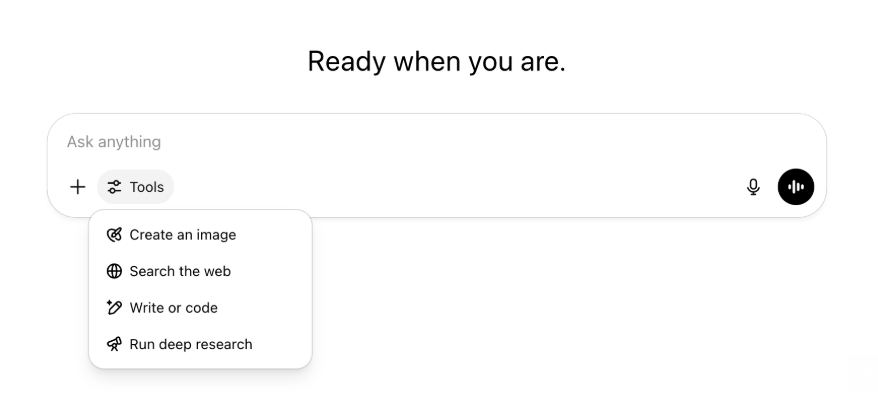
All the same capabilities and tools are still there—just tidier and easier to access in one menu.
May 22, 2025
Releasing GPT-4.1 in ChatGPT
Since its launch in the API in April, GPT-4.1 has become a favorite among developers—by popular demand, we’re making it available directly in ChatGPT.
GPT-4.1 is a specialized model that excels at coding tasks. Compared to GPT-4o, it's even stronger at precise instruction following and web development tasks, and offers an alternative to OpenAI o3 and OpenAI o4-mini for simpler, everyday coding needs.
Starting today, Enterprise and Edu users can access GPT-4.1 via the "more models" dropdown in the model picker. GPT-4.1 has the same rate limits as GPT-4o for paid users.
Introducing GPT-4.1 mini, replacing GPT-4o mini, in ChatGPT
GPT-4.1 mini is a fast, capable, and efficient small model, delivering significant improvements compared to GPT-4o mini—in instruction-following, coding, and overall intelligence. GPT-4.1 mini replaces GPT-4o mini in the model picker under "more models" for paid users, and will serve as the fallback model for free users once they reach their GPT-4o usage limits. Rate limits remain the same.
Evals for GPT-4.1 and GPT-4.1 mini were originally shared in the blog post accompanying their API release. They also went through standard safety evaluations. Detailed results are available in the newly launched Safety Evaluations Hub.
May 15, 2025
Export Deep Research as PDF
You can now export your deep research reports as well-formatted PDFs—complete with tables, images, linked citations, and sources.
To use, click the share icon and select 'Download as PDF.' It works for both new and past reports.
Mobile UI Composer Consolidation (iOS/Android)
We've removed the row of individual tool icons from the mobile composer and replaces it with the new sliders‑style icon to open the Skills menu; tapping that button opens a bottom‑sheet menu where users can choose tools like Create an image or Search the web.
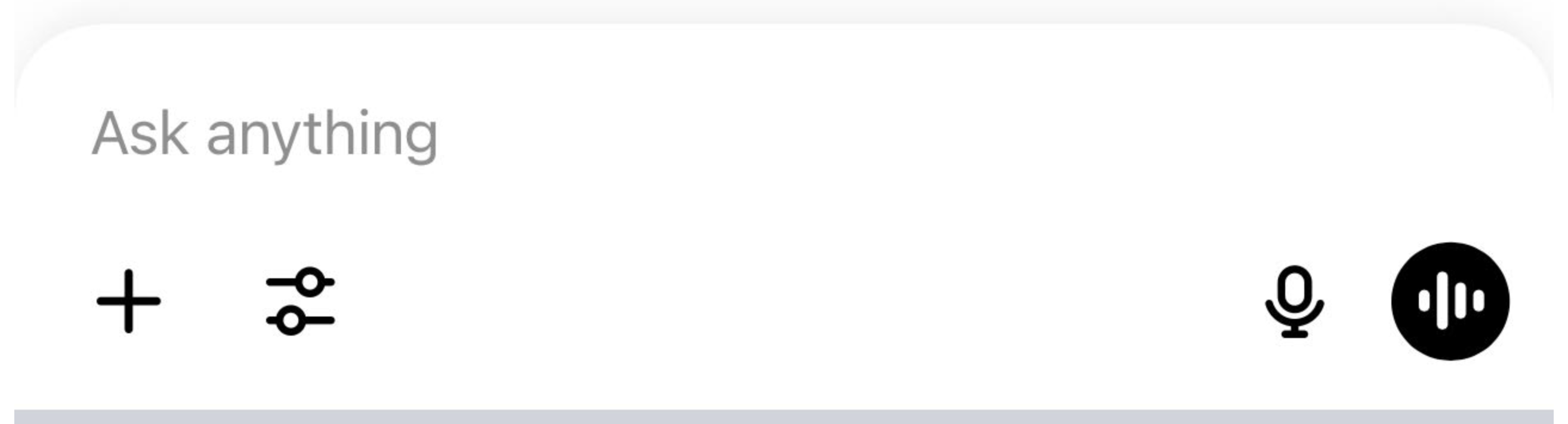
No tools are deprecated—access is simply consolidated to clear space and reduce on‑screen clutter.
May 8, 2025
User Analytics in ChatGPT - GA
The revamped User Analytics dashboard can be accessed in the Manage workspace console in the Analytics tab. It provides more comprehensive data on usage, adoption, and engagement than the original analytics tab.
This improved dashboard gives Admins a high-level view of how ChatGPT is being used across your organization—use it to track adoption and engagement, understand usage patterns for top tools and GPTs, and identify use cases and user trends.
See User Analytics for ChatGPT Enterprise and Edu and Compliance API vs User Analytics in ChatGPT Enterprise/Edu.
May 2, 2025
4o Image Generation in GPTs
GPTs can now leverage ChatGPT’s image-generation capabilities to produce images on demand for users.
GPT creators can enable "4o Image Generation" in the Configure section of the GPT editor, under Capabilities.
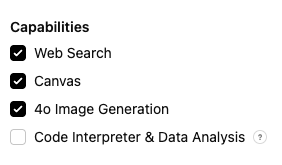
May 1, 2025
Deep research
Users that reach their monthly limit (10 tasks/month) with the standard deep research model will now receive 15 additional requests automatically for that month with our lightweight, cost-effective version until the monthly limit resets.
Learn more about deep research.
Tasks in o3 and o4-mini
You can now create scheduled tasks that enable ChatGPT to run automated prompts and proactively reach out to you on a scheduled basis with o3 and o4-mini. The “ChatGPT with Schedules Tasks” option in the model selector has been removed.
Learn more about scheduled tasks in ChatGPT.
April 24, 2025
o3 and o4-mini
With the introduction of o3 and o4-mini / o4-mini-high, they will supersede o1 and o3-mini / o3-mini-high respectively within ChatGPT.
OpenAI o3 is our most powerful reasoning model that pushes the frontier across coding, math, science, visual perception, and more. It sets a new SOTA on benchmarks including Codeforces, SWE-bench (without building a custom model-specific scaffold), and MMMU. It’s ideal for complex queries requiring multi-faceted analysis and whose answers may not be immediately obvious. It performs especially strongly at visual tasks like analyzing images, charts, and graphics. In evaluations by external experts, o3 makes 20 percent fewer major errors than OpenAI o1 on difficult, real-world tasks—especially excelling in areas like programming, business/consulting, and creative ideation. Early testers highlighted its analytical rigor as a thought partner and emphasized its ability to generate and critically evaluate novel hypotheses—particularly within biology, math, and engineering contexts.
OpenAI o4-mini is a smaller model optimized for fast, cost-efficient reasoning—it achieves remarkable performance for its size and cost, particularly in math, coding, and visual tasks. It is the best-performing benchmarked model on AIME 2024 and 2025. In expert evaluations, it also outperforms its predecessor, o3‑mini, on non-STEM tasks as well as domains like data science. Thanks to its efficiency, o4-mini supports significantly higher usage limits than o3, making it a strong high-volume, high-throughput option for questions that benefit from reasoning.
April 10, 2025
ChatGPT images
Image generation in GPT-4o is now available to all users as the default image generator in ChatGPT. Users who prefer to continue with DALL·E can still access it through the DALL·E GPT.
You can generate images with ChatGPT by simply asking the model to create an image with the details you want, or by selecting the Create image option in the composer. Learn more.
March 31, 2025
User Analytics in ChatGPT - public beta
The revamped User Analytics dashboard can be accessed in the Manage workspace console in the Analytics tab. It provides more comprehensive data on usage, adoption, and engagement than the original analytics tab.
This improved dashboard gives Admins a high-level view of how ChatGPT is being used across your organization—use it to track adoption and engagement, understand usage patterns for top tools and GPTs, and identify use cases and user trends.
See User Analytics for ChatGPT Enterprise and Edu (public beta) for details.
March 20, 2025
Shared Projects Update
We’re holding off on launching shared projects with View and Edit access so that we can work on a more collaborative version that will be valuable to users.
March 13, 2025
Coding with Work with Apps on macOS
When working with IDEs, you can ask ChatGPT to edit open files directly—no copy-pasting required. When you ask for an edit, ChatGPT will generate a diff that you can review and apply, and there’s also an option to automatically apply edits. Diffs are easy to revert in the ChatGPT UI, or by using CMD+Z in your editor.
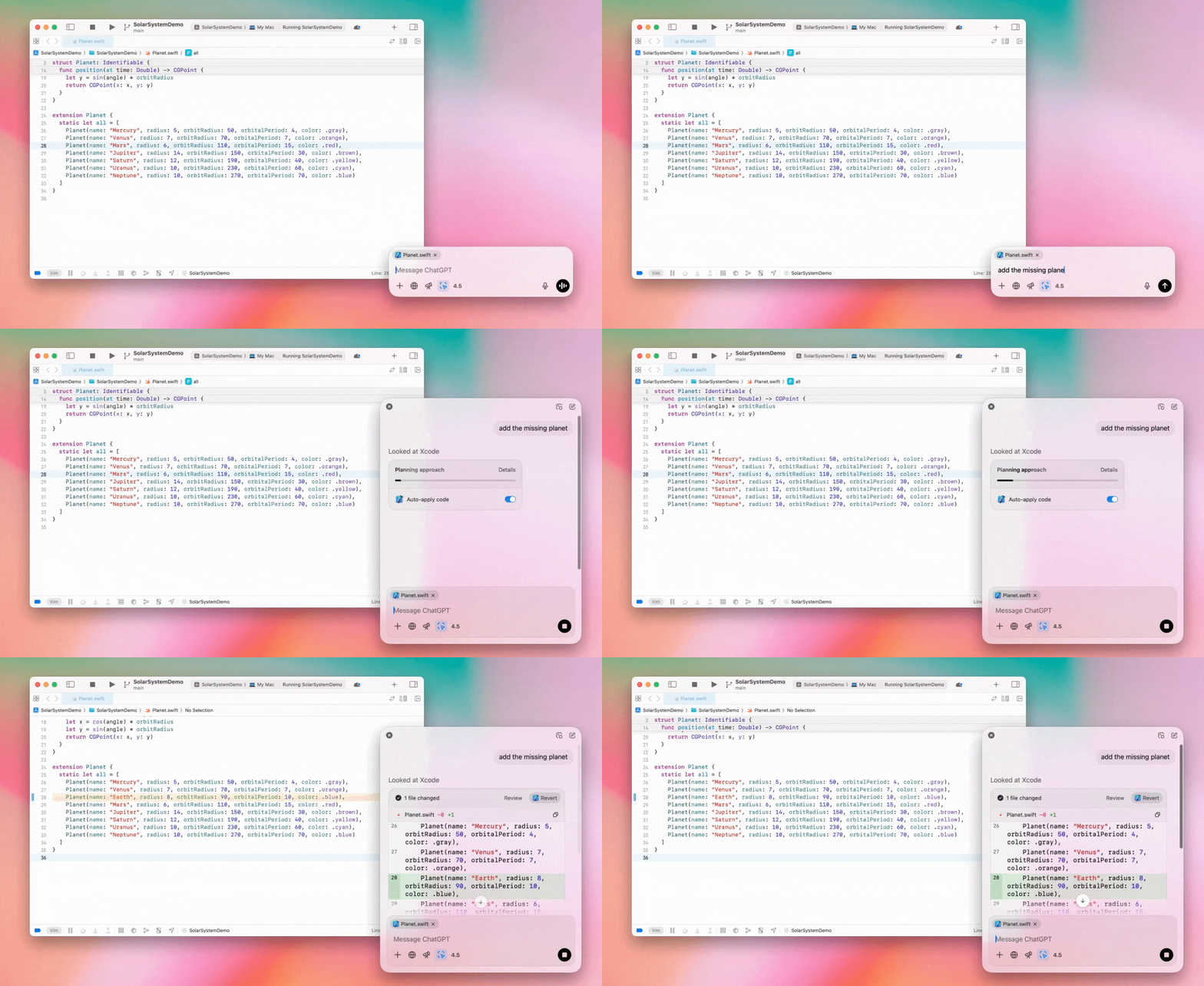
Enterprise admins can flip the "Work with Apps" toggle off in their Admin Settings to disable this functionality for their workspace members.
GPT-4.5 in ChatGPT
As of March 13, 2025, users in Enterprise and Edu plans will now be able to use our GPT-4.5 model in ChatGPT!
See GPT-4.5 in ChatGPT for details.
March 10, 2025
Deep research in Compliance API ChatGPT
As of March 10th, 2025, for Enterprise customers using the Compliance API your options include:
Search for the "deep research global prompt".
Look for the tool name in the response look for
{"tool_name":"deep_research"}.
February 25, 2025
Deep research in ChatGPT
In ChatGPT deep research is now available to users on the Enterprise plan.
Deep Research allows ChatGPT to agentically and asynchronously browse the web to complete your professional or personal work.
Enterprise, and Edu users will have 10 deep research queries per month.
See our Deep research FAQ for details.
February 13, 2025
o1 pro mode and o3-mini in ChatGPT
In ChatGPT o1 pro mode is now available to Enterprise and o3-mini to Enterprise Edu!
o3-mini: OpenAI o3-mini has replaced o1-mini in the model picker. It’s more cost effective and offers higher rate limits at lower latency. It’s a reasoning model, making it a great choice for coding, STEM, and logical problem-solving tasks. o3-mini shows its chain of thought, and can browse the web.
o1 pro mode: Also available in the model picker this week is o1 pro mode. Designed for accuracy and depth, it excels in research, engineering, business, and law—ideal for professionals tackling highly complex challenges. O1 pro mode will take longer to think through a problem. So responses can take some time. Due to its computational intensity, each user is limited to five queries per month. For most tasks, o1, o3-mini, or GPT-4o will remain optimal choices.
Re: File Uploads
Images, docs, and pdfs are supported in the o1, o3-mini, and o3-mini-high models. No spreadsheets (csv/excel).
Only images are supported in o1 pro mode. No docs/pdf and no spreadsheets (csv/excel).
Canvas Sharing
ChatGPT Enterprise and Edu users can now share a Canvas asset such as rendered React/HTML code, document, or code with another user, similar to how you share a conversation. You can do this from the Canvas toolbar when Canvas is open.
For more details about the canvas feature in ChatGPT, check out the following Help Center article!
January 23, 2025
Projects
Projects are now available for all paid plans including Enterprise and Edu.
See Using projects in ChatGPT for details.
January 16, 2025
Visual Retrieval (PDFs) for ChatGPT Enterprise
ChatGPT Enterprise now supports reading and understanding visuals (images, graphs, diagrams, etc.) embedded in PDF files. Users can upload a PDF, and ChatGPT can interpret the text and any visual elements within that file.
For details see Visual Retrieval with PDFs FAQ.
December 12, 2024
o1
Starting today, all ChatGPT Enterprise customers will be able to access o1 through the model selector, replacing o1-preview.
o1 can now be used to reason about image uploads, opening up new applications by analyzing and explaining visual representations with more detail and accuracy. We have also trained the model to be more concise in its thinking, resulting in faster response times than o1-preview.
December 11, 2024
Apple Intelligence with ChatGPT
ChatGPT admins can now enable and disable access to Apple Intelligence from their workspace admin settings, under Connections.
If this setting is toggled off, users cannot select their ChatGPT Enterprise/Edu workspace when logging in with their OpenAI credentials.
December 10, 2024
Canvas
Today we made Canvas available in 4o by default for all users, Free and Paid. Additionally, we launched a number of new capabilities for canvas, including:
Canvas in GPTs: Canvas can now be used with GPTs when enabled in the GPT creator. This toggle will be enabled for newly created GPTs by default.
Python code execution: You can now execute Python code in a canvas. ChatGPT will take a pass on fixing bugs in your code and provide comments on errors. Please note that executing Python can make external network requests, and Enterprise workspace admins can disable Python code execution by toggling the Canvas code execution setting in their Admin settings. This is turned off by default for all Enterprise accounts.
Canvas shortcut: You can now paste content into ChatGPT and instantly open it in canvas via a shortcut in the upper right corner of the composer.
Canvas in Toolbox: Canvas has been added as an option in the toolbox.
Workspace admins can now use the Compliance API to get, list, and delete canvas text documents.
Please note that the Admin Setting to disable canvas has been removed, as this feature is now out of beta. If this was previously disabled, we will continue to honor that setting. Please contact support@openai.com if you would like to update this setting for your Enterprise/Edu workspace
December 3, 2024
Work with Apps on macOS
ChatGPT can now read content from your coding apps, bringing you smarter, more accurate answers tailored to your work by using Work with Apps on macOS. Learn more about Work with Apps on macOS.
Enterprise admins can flip the "Work with Apps" toggle off in their Admin Settings to disable this functionality for their workspace members.
November 22, 2024
Updates to the ChatGPT Web experience
We are rolling out the following updates over the next two weeks to all ChatGPT users.
Sidebar redesign
New floating mode added with soft dismiss behavior
Recent conversations are now limited in the sidebar, with an unlimited infinite scroll flyout for all conversations
Recent GPTs & Pinned GPT's are now displayed below conversations
Settings are now always in the bottom of the sidebar
A small settings icon was added in larger viewports when the sidebar is not open
New transitions were added to create a more immersive feel
Other updates for ChatGPT on Web
The core underpinnings of the site were revamped, offering much better support for a larger variety of devices and sizes
Initiating a new conversation now scrolls it into view at the top of the screen
Initiating a new conversation no longer auto scrolls to the bottom while the message is generating
The sidebar when pinned can now stay open with an active Canvas if enough space is available
A new composer bar layout now fades content underneath it as you scroll with an updated look & feel
The new chat button has been moved to the left of the Model Picker to be easier to access
The system icon in conversations has been removed to make additional horizontal space
Dall-E focused view has an updated layout
GPT Creator has an updated layout
Improved Mobile Web Experience
The experience with the on-screen keyboard on mobile devices has been greatly improved across iOS & Android devices
The new sidebar is always in floating mode and auto closes when switching threads
We no longer focus the composer on mobile web when switching conversations
An issue causing scroll to get stuck in certain situations should be resolved
November 20, 2024
Update to GPT-4o
We’ve updated GPT-4o for ChatGPT users on all paid tiers. This update to GPT-4o includes improved writing capabilities that are now more natural, audience-aware, and tailored to improve relevance and readability. This model is also better at working with uploaded files, providing deeper insights and more thorough responses.
November 19, 2024
Advanced Voice for ChatGPT Web
Starting today, we’re beginning to roll out Advanced Voice Mode on web (already available on mobile and desktop apps). Users can now start a voice chat on chatgpt.com on their desktop and have real-time, natural conversations with ChatGPT while doing tasks like, planning, writing, and brainstorming.
November 14, 2024
Windows App
The improved Windows app is now available through the Microsoft Store for ChatGPT Enterprise and Edu workspaces. ChatGPT users that are familiar with our experience on the web can seamlessly integrate the Windows app into anything they’re doing on their computer.
User access to the ChatGPT Windows app will follow your IT admin’s policies for apps in the Microsoft Store. In the coming weeks, IT admins will also have the option to deploy the app to employee devices via MDM/MAM, rather than allowing direct downloads from the Store.
As with any ChatGPT Enterprise experience, user chat history is secure and will not be used to improve OpenAI's services.
Learn more about the ChatGPT Windows app.