
ChatGPT Go is a low-cost subscription plan with expanded access to ChatGPT features.
Note: ChatGPT Go is now available in all ChatGPT supported countries.
What's included
Everything included in the Free plan, and:
Expanded access to ChatGPT tools: Get higher usage limits for eligible features than on the Free plan.
Extended access to image generation: Create more images for work or play.
Extended access to file uploads: Analyze and work with more documents, spreadsheets, and other files.
Extended access to advanced data analysis: Use tools like Python for data exploration and problem-solving more often.
Longer memory for more personalized responses: Keep conversations flowing with a larger context window.
Access to projects, tasks, custom GPTs, and Library, subject to current feature availability and storage limits.
Use your ChatGPT Go plan in supported apps and sites through Sign in with ChatGPT, subject to plan limits and partner eligibility.
Some advanced products and higher-tier features may require Plus or another eligible plan.
Usage is subject to plan limits, abuse guardrails, and temporary restrictions during high demand.
We may start testing ads in ChatGPT Go in the future. Learn more about ads in our Help Center FAQ.
Note: API usage is not included and billed independently. See API pricing for more details.
Availability
ChatGPT Go is available in all countries ChatGPT is supported in. All purchases are in USD - we offer a local currency billing in a limited set of countries (see: Multi-currency billing). Subscription prices can be found in the ChatGPT pricing page. Note that we may adjust pricing over time as we learn from early use and gather feedback.
Subscriptions are billed automatically monthly, and can be canceled anytime.
Sign up for ChatGPT Go
Sign in to ChatGPT.
Select your profile icon, then select Upgrade Plan.
Select Try Go.
Usage limits
Free and Go users both have unlimited everyday text chats. ChatGPT Go includes higher limits for eligible features such as image generation, file uploads, and data analysis. Usage remains subject to abuse-prevention safeguards.
Billing and invoices
You can manage your subscription, view invoices, and cancel your plan by:
Sign in to ChatGPT.
Select your profile icon, then select Settings.
Select Account.
If you subscribed on chatgpt.com and billing or payment controls are missing, sign in to the same ChatGPT account in a different browser, then try opening your billing settings again.
Refunds and cancellations
If you would like to cancel your subscription, see: How do I cancel my ChatGPT subscription?
If you believe you were incorrectly charged or would like to request a refund, you can request a refund.
Update tax information
For information on updating your Tax ID or VAT ID, see: Updating billing information, Tax ID, and VAT ID.
Data privacy
OpenAI may use conversations to improve model performance and safety. You can opt out of having your data used for training at any time. If you would like to do so, see: Data Controls FAQ
For more information, see our Privacy Policy and Terms of Use.
FAQ
Is there an annual plan available?
Currently, we do not support annual billing or the option to pay for multiple months in advance for ChatGPT Go, Plus, or Pro subscriptions.
What payment method can I use to pay for ChatGPT Go?
Payment methods vary by country. See: Multi-currency billing
How is ChatGPT Go different from Plus?
ChatGPT Go includes unlimited everyday text chats and higher limits than Free for eligible features such as image generation, file uploads, and data analysis.
Are reasoning models included with ChatGPT Go?
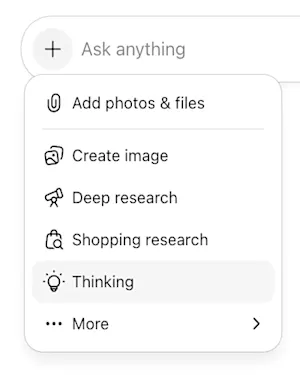
Yes. ChatGPT Go users can access Think on the web and in the ChatGPT mobile app. On mobile, select Think harder from the + menu. Think uses GPT-5.6 Luna. ChatGPT Go does not include GPT-5.6 Sol.
I’m already a ChatGPT Plus or Pro subscriber, can I switch to Go?
Yes - to manage or change your subscription, you can:
Sign in to ChatGPT.
Select your profile icon, then select Settings.
Select Account.
Can I use legacy models such as 4o with ChatGPT Go?
No. Access to legacy models is not included with the ChatGPT Go subscription.
Will I be refunded if I switch to ChatGPT Go from Pro or Plus?
No. Your current plan will remain active until the end of your billing cycle. At that time, your account will switch to Go, and you will be charged the Go rate moving forward.
Is access to apps included?
The Plugins Directory is available, but installing or using a specific plugin, app, or template depends on your plan, workspace, role, and surface. Some capabilities require Plus or higher.
I upgraded to ChatGPT Go but I do not see it in my account
If you subscribed to ChatGPT Go through the App Store or Play Store, it may take a few minutes for the upgrade to appear in the ChatGPT app. If your subscription isn’t showing, wait a few minutes and restart the app.
Is access to voice mode included?
Yes. Voice mode is included with the same usage limits as the Free tier.