
As part of a commitment to a safer, more transparent AI ecosystem, OpenAI uses provenance signals to help people understand whether content was generated with an OpenAI model.
Provenance signals can provide useful information about origin, but they do not guarantee that content is accurate, unedited, legally owned, or presented in the correct context.
OpenAI’s provenance signals
Which provenance signals does OpenAI use?
OpenAI uses different provenance signals for different content types.
| Content type | Provenance signals | Notes |
|---|---|---|
| Images | Content Credentials and SynthID watermarks | Images generated with ChatGPT, Codex, or the OpenAI API include both signals. |
| Audio | SynthID watermarks | Audio generated by ChatGPT or the OpenAI API includes an inaudible watermark embedded in the audio itself. |
| Text | textGrain watermarks (EU only) | In the EU, ChatGPT-generated text includes an invisible change to the randomness used in the model’s word choices to comply with the EU AI Act. API customers globally can turn on text watermarks to text outputs, from their project or organization settings. |
| Video | Content Credentials | Sora is discontinued. Learn more. |
Coverage may vary by product, model, export path, file type, and when the content was created. API outputs are covered except for models planned for imminent deprecation, including gpt-image-1, gpt-image-1.5, and sora-2.
Why do some content types use multiple signals?
When technically feasible, OpenAI combines metadata and watermarks so that each can address the other’s limitations. Metadata can carry detailed information, but platforms, editing tools, and file conversions may remove it. Watermarks carry less context, but because they are embedded in the generated content itself, they may survive some transformations that remove metadata.
How robust are provenance signals against content modifications?
SynthID watermarks for images and audio, and textGrain watermarks for text, are designed to withstand common changes. Depending on the content type, these can include light edits, copying and pasting, cropping, or screenshots. More extensive changes—such as heavy image cropping, file compression, substantial paraphrasing, or translation—can make a watermark undetectable. After extensive changes, describing the result as “OpenAI-generated” may also be less meaningful.
Content Credentials, developed by the Coalition for Content Provenance and Authenticity, can be lost through everyday actions, such as taking a screenshot or converting a file. When they remain available, they can provide more detail about a file’s origin and history than a watermark alone.
Where technically possible, we use both methods to make provenance information more likely to survive changes to the content.
What are Content Credentials and what do they enable?
Content Credentials attach information about a file’s origin and history, such as which tool created it and when. They use an open standard developed by the Coalition for Content Provenance and Authenticity (C2PA), which is why they are sometimes called “C2PA metadata.”
Content Credentials help people verify where content came from. They are used for more than AI-generated content: camera manufacturers, news organizations, and others also use the standard to certify the source and history of their media. Learn more about C2PA.
What is SynthID and what does it enable?
SynthID is an invisible watermarking technology developed by Google DeepMind that embeds a signal directly into generated media. Unlike metadata, the signal is part of the content itself and may persist through some edits or transformations. SynthID provides an additional provenance signal alongside C2PA metadata. For example, if metadata is removed from a file, an embedded watermark may still provide a signal that the content was generated with supported OpenAI tools. Learn more about SynthID.
Why are you watermarking text outputs?
We’re implementing text watermarking for ChatGPT users in the EU to comply with the EU AI Act, and in line with our commitments under the EU Code of Practice on Transparency of AI-Generated Content, which OpenAI along with several other major AI providers have signed.
What is textGrain and what does it enable?
textGrain is OpenAI’s text watermarking technology. It subtly adjusts how the model randomly chooses between possible words or word pieces as it writes. Across a passage, these choices create a pattern that a detector can look for, even after some edits.
The watermark is part of the wording itself and is not visible to readers. It does not add hidden characters, invisible spaces, or unusual punctuation. Text watermarking supports compliance with the EU AI Act requirement to mark generated text.
OpenAI’s verification tools
How can I check whether content was generated with OpenAI tools?
You can visit openai.com/verify to check whether a supported image or audio file, contains provenance signals associated with content generated or exported by OpenAI tools. After you upload a supported file, the tool will look for supported OpenAI provenance signals, such as a SynthID watermark or a trusted C2PA manifest associated with OpenAI. If the tool finds a supported OpenAI provenance signal, it indicates that the content was likely generated by an OpenAI model.
Developers and organizations can also use OpenAI’s Content Provenance API to check images and audio for OpenAI provenance signals and integrate verification into their own applications or workflows. Organizations with a qualifying use case can apply for increased limits.
For text, consistent with our obligations under the EU AI Act, organizations with a qualifying use case, such as academic and research organizations studying text provenance, detection reliability, or how people understand provenance results, are able to apply for text detector access. We will review applications from qualified organizations on a case by case basis and follow up as appropriate with updates or requests for additional information. Our approach to access may evolve as we learn more and improve the technology.
We’re currently partnering with a limited group of researchers, including John Thickstun, Assistant Professor of Computer Science at Cornell University, Martin Vechev, Professor of Computer Science at ETH Zurich and Scientific Director of INSAIT, and researchers at the Kempelen Institute of Intelligent Technologies (KInIT), to better understand the technology’s capabilities and limitations and inform improvements to text watermarking.
Who qualifies for higher verification limits, and are checks billed?
Content Provenance API checks are currently free and subject to usage limits. The higher-limit program focuses on qualifying public-interest provenance projects; routine commercial fraud checks are outside its current scope. Organizations with a qualifying use case can apply for increased limits, but submitting an application does not guarantee approval. The public API remains available under its default limits, including for smaller evaluations. Consult the Content Provenance API documentation for current usage limits.
What do verification results mean?
If a signal is detected via openai.com/verify or OpenAI’s Content Provenance API, it means the uploaded content contains a supported provenance signal associated with OpenAI. The tool does not confirm that the content is accurate, unedited, legally owned, or presented in the correct context. It also does not identify who created the content or why it was created.
If no signal is detected, it means the tool did not find OpenAI issued provenance signals in the uploaded file. The content could still have been generated or exported by OpenAI if:
The content was created before provenance signals were available.
The content came from an unsupported product, model, export path, or file type.
Metadata was stripped during upload, download, editing, conversion, or sharing.
A watermark was degraded by compression, cropping, noise, edits, format conversion, or other transformations.
An audio clip is too short or has been significantly modified.
How can I get the most reliable verification result?
Upload one supported file at a time and, when possible, use the original exported file. For images, avoid cropping or converting the file before checking it. For audio, clips between 10 and 60 seconds generally produce the best results. Even when no signal is detected, consider the file’s source and context before drawing a conclusion.
Do results show my prompt or personal information?
Provenance signals do not include details about the user, organization, or prompt.
What happens to content that I verify using openai.com/verify or the Content Provenance API?
Content uploaded into openai.com/verify, or submitted to our Content Provenance API for verification, is only processed to check for supported provenance signals. Content is not stored unless legally required and is not used to train OpenAI models.
Can OpenAI detect content generated with other AI tools?
Our content provenance tools are designed to detect supported provenance signals associated with content generated by OpenAI models or exported by OpenAI tools. They are not designed to detect content generated by other AI models, and they may also not detect OpenAI-generated content if the relevant signal is missing, unsupported, or degraded.
How watermarking works
Do watermarks determine authorship, ownership, or legal responsibility?
No. A watermark is evidence that an OpenAI model likely generated or processed the content. On its own, it does not establish who authored or owns the content, whether disclosure was required, or who is legally responsible. It also does not tell you whether the model was editing content that a user uploaded.
Do watermarks indicate the extent to which an OpenAI model was involved?
No. The detector reports whether it found a watermark. Finding one is evidence that an OpenAI model likely generated or processed the content, but it does not show whether the model generated some or all of it, or how much a person contributed.
How does text watermarking work?
Text watermarking creates a secret pattern in the model’s choices of words and word pieces, called “tokens,” as it writes.
At each step, the model assigns a likelihood to each possible next token. The watermarking system creates several adjusted sets of those likelihoods, each favoring different choices according to a secret key. The sets are balanced so that, when averaged together, they match the model’s original likelihoods. The key selects which set to use, and the model then makes a fresh random choice from that set.
A detector with the same key and matching settings can later check whether the text follows the secret pattern more often than would be expected by chance.
Do text watermarks apply to factual text and user-provided text?
Text watermarking depends on the model having different ways to say something. There is less flexibility when an answer must be very factual or precise, such as the answer to a math problem, or when the model is asked to reproduce supplied text without changing it. In these cases, the model has less room to change its wording without a noticeable difference, so the watermark may not be detected.
Do text watermarks apply to short answers and code?
Short passages usually do not contain enough text for reliable watermark detection. Code is also harder to watermark because there are fewer plausible choices for what comes next than in ordinary prose.
To account for these limitations, the EU AI Act Code of Practice on the Transparency of AI-Generated Content does not require watermarks in outputs shorter than 200 tokens—about 150 words in English—or in code snippets.
How does text-watermark detection vary by language?
Detection rates vary by language, and some languages are currently easier to detect than others. We can adjust the strength of the watermark to improve detection in languages where the signal is weaker.
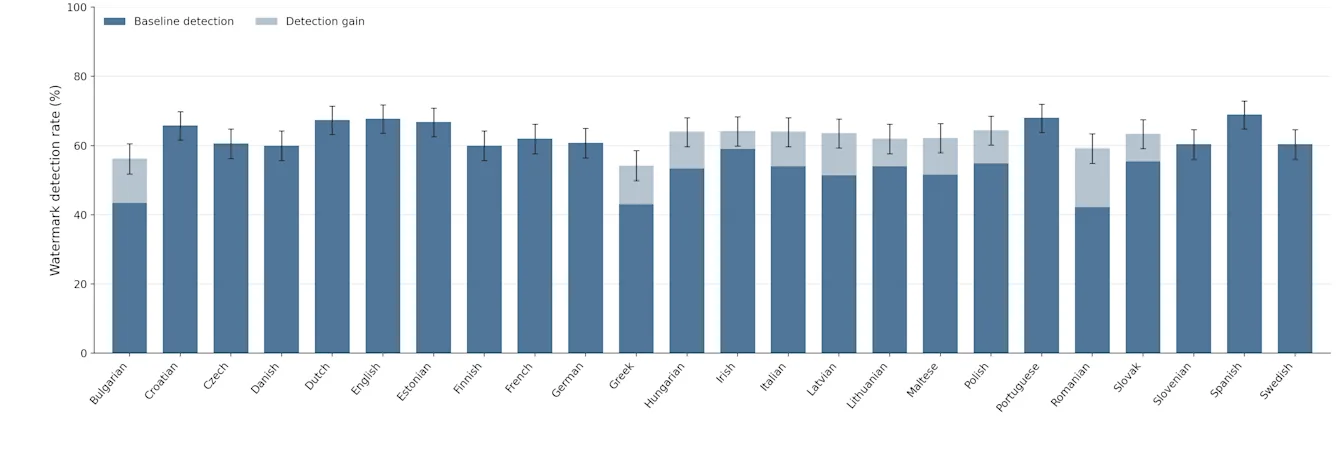
This chart evaluates detection rate across all 24 official EU languages. We first generated 500 synthetic English prompts spanning diverse topics, then translated them into the other 23 languages. At 1% false-positive rate, Spanish has the highest detection rate (69.0%), while Romanian has the lowest (42.2%). Our watermark has an adjustable strength parameter—a “knob” that strengthens or weakens the watermark signal for different domains. By using this knob, we were able to increase the strength for languages with detection rates below 60%; the light blue portions of the bars show the resulting gains.
Do text watermarks reduce model quality?
From our testing, they do not. Across the benchmarks we use to assess Astra, our latest frontier model, performance differences with and without watermarking fall within the noise we typically observe across evaluation runs. Prior tests in ChatGPT also showed no change in thumbs-down rates or other product measures from introducing watermarking.
Do text watermarks reduce model speed?
Text watermarking has a negligible impact on the speed of our models.
How do OpenAI’s text watermarks differ from third party AI detection tools?
Third party detection tools like Pangram typically use classifiers to identify AI-generated text from patterns such as word choice. That approach analyzes the text after generation rather than detecting an embedded signal. The EU AI Act specifically requires a signal to be embedded in generated text.
Why are you using your own text watermarks instead of using TextSeal or SynthID?
We developed our own text-watermarking method, called textGrain, to give us more control than SynthID or TextSeal over the balance between watermark detectability and the variety of responses generated from the same prompt. In our tests, our approach correctly identified a similar or higher share of watermarked text samples than SynthID for text. We plan to release textGrain as open-source technology so others can build on it and help improve text watermarking.
Does text watermarking add hidden characters, extra tokens, or visible changes?
No. Text watermarking changes the statistical pattern of word choices; it does not insert hidden characters or add watermark-only tokens. The watermark is not visible to readers, and copying and pasting the text does not introduce hidden material.
Guidance for customers
I’m an API customer, how do I turn on text watermarks?
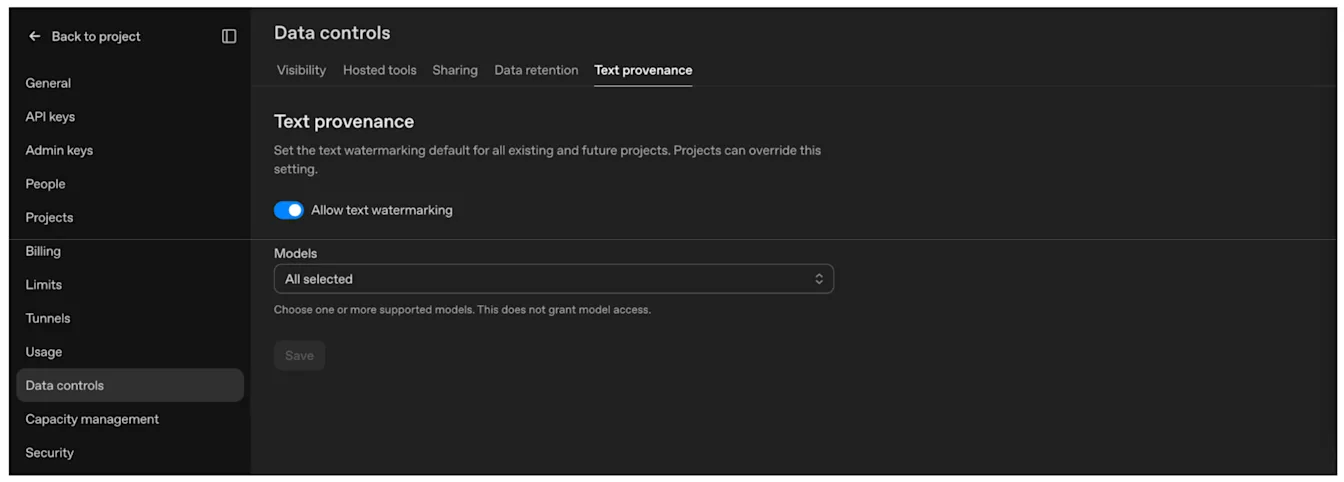
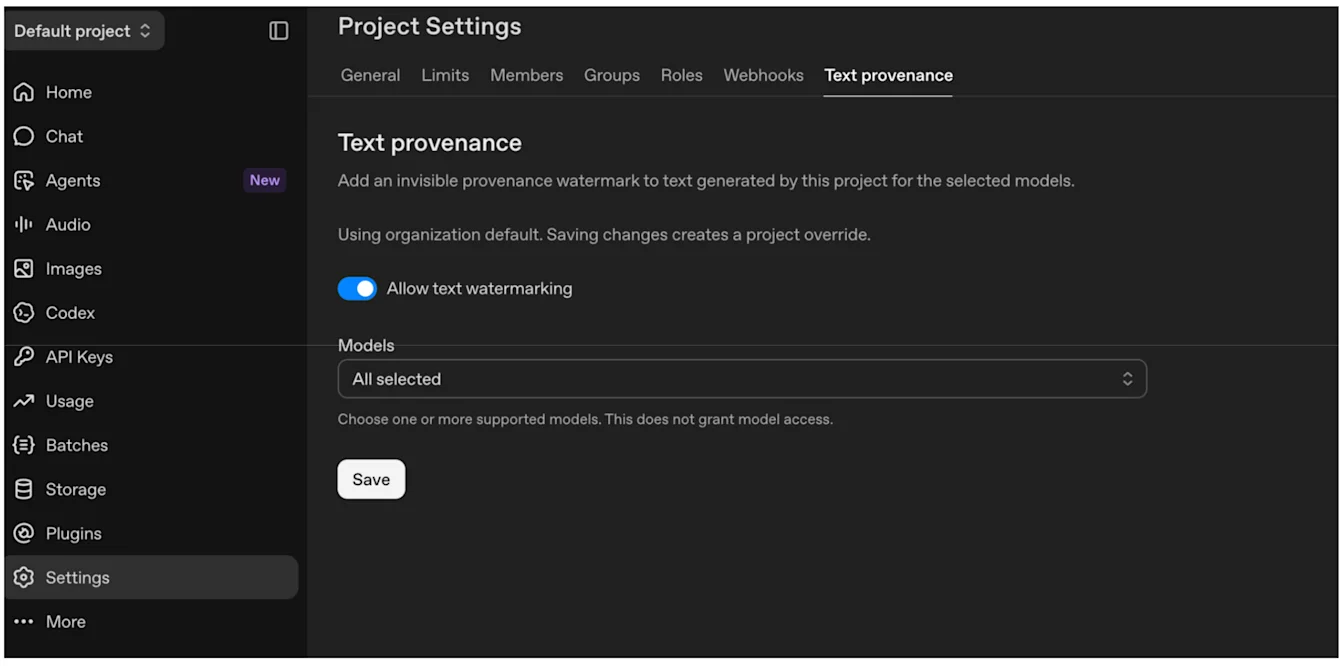
Customers of the OpenAI API can activate text watermarking for a specific project via Settings, or broadly for their entire org via Organization settings. Customers can, in each case, select which model(s) receive a text watermark. Once enabled for a supported model, OpenAI adds the watermark during text generation. Customers do not need to add a separate marking to each response.
Turn on Allow text watermarking, select your models, then select Save.
Organization default: Organization settings → Data controls → Text provenance.
Project override: Project Settings → Text provenance.
Which models can I activate watermarks for?
From Settings and Organization settings, customers can see the list of models that is currently available for watermarking. Over the coming weeks, we will be extending coverage to all legacy models.
Does enabling text watermarks also give me access to the text detector?
No. Text detector access is currently limited to approved research and academic organizations working to improve how reliably text watermarking works, how easy it is to use, and how clearly the technology and its results can be explained. This is consistent with our commitments under the EU AI Act Code of Practice on the Transparency of AI-Generated Content.
Will signals remain attached to content after I transform it?
They may, but it depends on the signal and the changes you make.
For supported images and audio keep an original copy and use the Content Provenance API to test representative files after editing, conversion, and publishing. For images, cropping, adding noise, converting to JPEG, and taking screenshots may make signals harder to detect. You can test text in this way only if your organization has approved access to the text detector.
Where your file format and workflow support it, preserve existing C2PA metadata and include Content Credentials in the files you produce. You can also consider adding your own markings to make provenance information more durable or useful. See the C2PA technical documentation for implementation details.
For text, the watermark is part of the model’s word choices. If you preserve the wording, the signal is expected to remain when you reuse the text, without additional integration work. Substantial rewriting, paraphrasing, or translation can make detection less reliable. Even unchanged wording does not guarantee a detectable watermark, especially in short passages or text with little room for different word choices.
I access OpenAI’s models through a Cloud service. Do those outputs also contain provenance signals?
We are working with all our Cloud and distribution providers to ensure provenance signals including watermarks are embedded in all eligible outputs including image, audio and text. Availability may vary by output and by partner.
Do provenance signals replace visible AI labels or other disclosures?
No. Watermarks and C2PA metadata provide information that software can read. They do not replace visible labels, banners, or other notices that may be required.
Whether you need an additional disclosure depends on how and where you use the content. OpenAI cannot advise you on your specific legal obligations; your legal team should assess the requirements for your use.
I have more questions related to the EU AI Act
Please submit an EU AI Act inquiry and we’ll get back to you.