
Overview
Data controls let you choose whether your conversations help train OpenAI models. You can also use them to export data, manage shared links, and manage other data settings available to your account.
Available controls depend on whether you are signed in, your plan, and your workspace settings.
Find your data controls
Open Settings and select Data controls to manage the options available to your account.
The privacy center explains your privacy options and helps you find the settings that manage them. You can still manage those settings from the Settings menu in ChatGPT.
Turn off Improve the model for everyone
On personal workspaces with ChatGPT Free, Plus, or Pro, data sharing is enabled by default. You can turn off Improve the model for everyone and keep your chat history.
Trusted Access on personal accounts
Trusted Access programs like Daybreak Blue support more sensitive work. During Daybreak sessions on your personal account, we may use content from your interactions to improve our models even when “Improve the model for everyone” is off. This helps us to strengthen safeguards against cyber misuse. Your “Improve the model for everyone” setting still applies to your other activity when not in a Trusted Access session (see “Accessing Daybreak”).
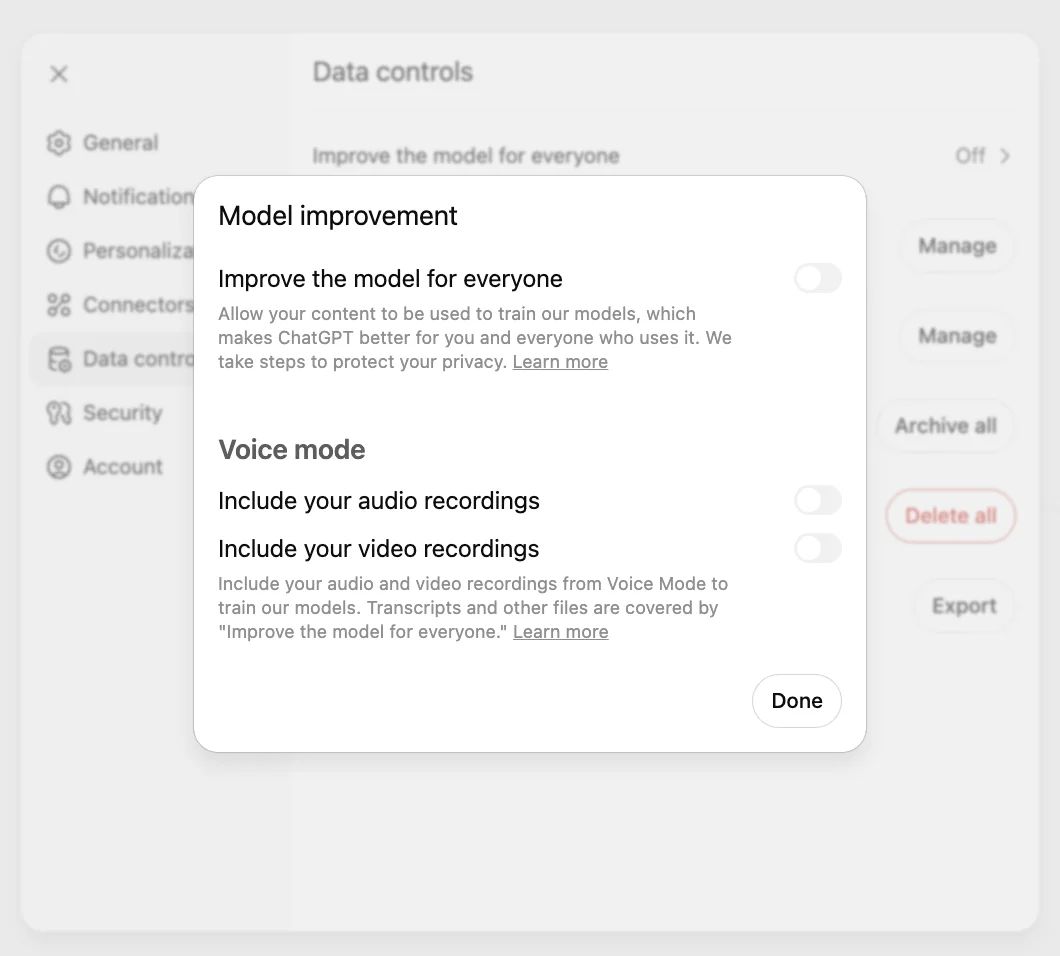
Voice mode has a separate control for sharing data for model training. The Privacy Portal has more information about your privacy options.
Web (signed in)
Open your account menu.
Select Settings.
Select Data controls.
Select Improve the model for everyone, turn it off, and select Done.
iOS and Android
Open the sidebar.
Select your profile icon to open Settings.
Select Data controls.
Turn off Improve the model for everyone.
When you’re signed in, Improve the model for everyone applies to your account across web and mobile devices.
Signed-out use
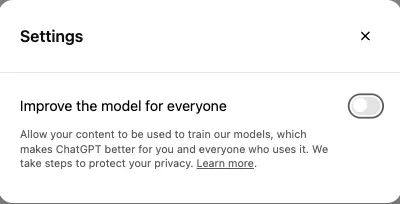
When using ChatGPT without signing in, open Settings and turn off Improve the model for everyone. Your choice is saved in that browser.
Manage model training for Codex tasks
Codex has a separate Include environments setting in Codex settings that controls whether additional context from your Codex environments can be used to train OpenAI models. Changing your ChatGPT setting or opting out through the Privacy Portal does not change that setting.
What happens to saved chats
Turning off Improve the model for everyone does not delete or hide saved chats.
Regular chats remain in history.
Archived chats remain archived.
When Locked chats is available for your account, locked chats remain saved but are hidden from the regular sidebar, Search, recents, notifications, and previews. Your Improve the model for everyone setting and applicable workspace policies continue to apply.
Project chats remain in their projects.
Archiving a chat does not change whether it can be used to train OpenAI models. Your Improve the model for everyone setting continues to apply.
Temporary chat
While they remain temporary, these chats:
do not appear in your chat history
do not create or update memories
are not used to improve OpenAI models
may be retained for up to 30 days for safety purposes
Before the conversation begins, choose whether the temporary chat is personalized. A personalized temporary chat can use existing memories, custom instructions, and plugins, subject to your account and workspace settings. You can turn personalization off when you start the chat.
If you save a temporary chat, it becomes a regular chat in your history and follows your account’s personalization and model-improvement settings.
For more information about temporary chat, see: Temporary chat in ChatGPT.
Export your data
Signed-in ChatGPT Free, Go, Plus, and Pro users can request a copy of their data from ChatGPT settings. You can also use the OpenAI Privacy Portal.
Self-service data export is not available for ChatGPT Business, Enterprise, or ChatGPT for Healthcare workspaces and should be directed to the workspace owner. Eligible ChatGPT Edu workspaces may allow exports when an administrator enables them.
For more data export instructions and availability, see: Exporting your ChatGPT history and data.
Delete your account
Signed-in ChatGPT Free, Go, Plus, and Pro users can delete their account from their ChatGPT settings. Deleting your OpenAI account is permanent and affects its associated data and subscriptions. Self-service account deletion is not available in managed workspaces and should be directed to the workspace owner. Contact your organization for help with a managed account.
For account-deletion instructions and important billing information, see: Deleting your ChatGPT account.
Memory and safety context
Memory controls how ChatGPT personalizes responses. Model-training controls determine whether eligible content can be used to improve OpenAI models. These are separate settings.
Turning off memory or personalization does not disable safety features that may use limited, safety-relevant context in rare, high-risk situations to help ChatGPT respond more safely.
For more information about Memory, see: Memory in ChatGPT.
Managed workspaces
By default, OpenAI does not use content from ChatGPT Business, Enterprise, Edu, or ChatGPT for Healthcare workspaces to train its models.
By default, OpenAI also does not use inputs and outputs provided through the API Platform to train its models.
Managed workspaces can also have organization-level retention, Memory, compliance, and access settings.
Your organization’s privacy, retention, and access policies still apply.
For more information about enterprise privacy, see: Enterprise privacy at OpenAI.
Ads controls
Where ads are available, separate controls can determine how ads are personalized.
For more information about ads, see: Ads in ChatGPT.
FAQ
Can I change the Improve the model for everyone setting?
Yes, when the setting is available for your account. Parent or guardian settings and workspace controls may limit whether you can change it.
Does turning off model training delete my chats?
No. Delete a chat or your account separately when you want to remove content.
What happens if I submit feedback after opting out of training?
If you choose to provide feedback, such as selecting thumbs up or thumbs down on a response, the entire conversation associated with that feedback may be used to train OpenAI models. For more information, see: How your data is used to improve model performance.