
May 28, 2026
አዲስ መቆጣጠሪያዎች እና ችሎታዎች ለChatGPT workspace agents
ለChatGPT workspace agents በEnterprise እና Edu ውስጥ አዲስ model፣ admin፣ app access እና response capabilities እያቀረብን ነው።
Workspace agents አሁን የሚደግፉት፦
GPT-5.5 እና reasoning effort controls: agent ሲገነቡ፣ creators GPT-5.5 መምረጥ እና agent የሚጠቀምበትን reasoning effort ማዘጋጀት ይችላሉ። በagents መካከል የresponse speed ንም አሻሽለናል።
Role-based publishing permissions: Workspace admins ወኪሎችን ወደ shared workspace directory ማተም የሚችሉትን ሚናዎች መቆጣጠር ይችላሉ።
Guided agent setup: ChatGPT አሁን ተጠቃሚዎች ጠቃሚ agents በፍጥነት እንዲፈጥሩ የsetup ጥያቄዎችን ይጠይቃል።
Speech output: Agents አሁን እንደ responseቸው አካል audio files መፍጠር ይችላሉ።
ይበልጥ ብልህ የSlack thread replies: በSlack ውስጥ የሚጠቀሙ agents ከመጀመሪያው mention በኋላ በthread ውስጥ ላሉ ተዛማጅ follow-up messages ምላሽ መስጠት ይችላሉ። Creators agent ለrelevant thread messages ይመልስ ወይስ ሲጠቀስ ብቻ እንደሚመልስ መምረጥ ይችላሉ።
App templates ለGitHub Enterprise፣ Snowflake እና Databricks
በEnterprise እና Edu plans ላይ ያሉ workspace admins እና owners አሁን ለGitHub Enterprise፣ Snowflake እና Databricks ለworkspace-specific apps ለመፍጠር የChatGPT app templates መጠቀም ይችላሉ። App templates እንደ OAuth credentials፣ callback URLs፣ webhook details፣ managed MCP server URLs እና workspace access controls ያሉ provider-specific configuration በadmin ለmembers ወደ ማተም ከመሄዱ በፊት የመመሪያ ያለው setup flow ይሰጣሉ።
አጠቃላይ app-template flow እና ለእያንዳንዱ template የprovider-specific steps ለመረዳት አዲሶቹን setup guides ይጠቀሙ፦ ChatGPT app templates፣ GitHub Enterprise app template፣ Snowflake app template እና Databricks app template።
ከpublication በኋላ፣ admins resulting app ን ከWorkspace settings > Apps > Enabled ማስተዳደር ይችላሉ፣ role access፣ action controls እና action confirmation ጨምሮ።
May 22, 2026
Workspace agents are now generally available in ChatGPT Business, Enterprise, and Edu.
Workspace agents help teams get more done together across tools. They can own entire workflows on their own, follow team processes, and be shared across your team so people can build once and use together.
We’ve also added new admin controls and visibility:
Agent builders can set safeguards on which actions agents can take for each app enabled in their workspace.
Business, Enterprise, and Edu admins can view workspace agent activity and usage in the
.
We’ve extended the free period for workspace agents until July 6, 2026. Credit-based pricing will begin on that date. (edited)
May 21, 2026
የCodex ዝማኔዎች፦ goal mode፣ browser improvements፣ remote locked use፣ admin analytics እና plugin sharing status
Codex አሁን ለEnterprise እና Edu ተጠቃሚዎች ወደ ረዥም ጊዜ ግቦች ለመስራት እና በbrowser ውስጥ ለማደጋገም ተጨማሪ መንገዶችን ይሰጣል፣ ሲሆን ብቁ admins የተዘመኑ usage analytics ያገኛሉ፦
በmacOS app ውስጥ ያሉ Appshots users በhotkey የapp window ወደ Codex thread ማያያዝ ያስችላቸዋል፣ screenshot እና ያለ ጽሑፍ ጨምሮ። Appshots ለChatGPT Edu accounts ዛሬ ይገኛሉ፣ ለChatGPT Enterprise accounts ድጋፍ በቅርቡ ይመጣል።
Goal mode በCodex app፣ IDE extension እና CLI ላይ በአጠቃላይ ይገኛል፣ ስለዚህ users ውጤት እና success criteria መወሰን እና Codex ወደዚያ እንዲቀጥል መፍቀድ ይችላሉ።
In-app browser annotations ለbrowser-based እና frontend work ይበልጥ ትክክለኛ styling feedback ይደግፋሉ።
Locked computer use users ከMac ተቆልፎ በኋላም በአሁኑ ያሉ የክልል ገደቦች ስር Codex እንዲቀጥል በremote እና በደህና ያስችላቸዋል። Admins እና owners ይህን ባህሪ በCodex cloud ውስጥ ባለው Policies & Configurations setting ውስጥ
remote_computer_use = falseበማዘጋጀት ማጥፋት ይችላሉ። ለተጨማሪ ዝርዝር configuration reference ይመልከቱ።Browser-use improvements advanced annotation mode፣ ፈጣን asset extraction፣ read-only JavaScript context፣ tab grouping usability፣ ያነሰ Chrome extension tab clutter እና reliability improvements ይጨምራሉ።
global admin console አሁን ለEnterprise admins Codex analytics ያካትታል፣ active users፣ credits and tokens፣ threads and turns፣ user leaderboards፣ plugin usage፣ accepted lines of code፣ model usage እና console-aligned UI ጨምሮ።
Plugin sharing teams በCodex app በኩል በlocal የተገነቡ plugins ን ከworkspace members ጋር እንዲጋሩ ያስችላል። Plugin sharing ለChatGPT Enterprise በነባሪነት ተሰናክሏል - ባህሪውን እንዴት ማንቃት እንደሚቻል ለዝርዝር የOpenAI account contactዎን ያነጋግሩ። ለChatGPT Edu accounts፣ plugin sharing በነባሪነት ተንቅቷል።
ተጨማሪ ይወቁ፦ Goal mode፣ locked computer use፣ in-app browser annotations፣ እና plugin sharing።
Workspace agents አሁን በChatGPT Business፣ Enterprise እና Edu ውስጥ በአጠቃላይ ይገኛሉ።
Workspace agents ቡድኖች በመሳሪያዎች መካከል በአንድነት ተጨማሪ ስራ እንዲያከናውኑ ያግዛሉ። ሙሉ workflows በራሳቸው ሊያስተዳድሩ ይችላሉ፣ የቡድን ሂደቶችን መከተል ይችላሉ፣ እና ሰዎች አንድ ጊዜ ገንብተው በአንድነት እንዲጠቀሙ በቡድንዎ ውስጥ ሊጋሩ ይችላሉ።
እንዲሁም አዲስ admin controls እና visibility ጨምረናል፦
Agent builders በworkspaceቸው ውስጥ ለነቁት እያንዳንዱ app ላይ agents ሊወስዱት የሚችሉትን actions ላይ safeguards ማዘጋጀት ይችላሉ።
Business፣ Enterprise እና Edu admins የworkspace agent activity እና usage በ
ለworkspace agents ነጻ ጊዜውን እስከ July 6, 2026 ድረስ አራዝመናል። በcredit-based pricing በዚያ ቀን ይጀምራል።
May 18, 2026
Beta label ከApps Directory እና app creation flow ተወግዷል
በweb እና desktop ላይ ባለው የChatGPT Apps Directory እና ከአዲሱ app creation flow ላይ Beta label አስወግደናል።
ይህ የlabeling ዝማኔ ብቻ ነው። የApps Directory ተሞክሮውን፣ app creation workflowsን፣ dev mode capabilitiesን ወይም ለdev mode ያለውን ነባር elevated-risk guidance አይቀይርም።
May 15, 2026
Microsoft Teams app ከadmin-managed sync ጋር በChatGPT
የMicrosoft Teams app with admin-managed sync አሁን ብቁ ለሆኑ የChatGPT Enterprise እና Edu የስራ ቦታዎች ይገኛል። ባለቤቶች እና አስተዳዳሪዎች Microsoft Teams ን ለworkspace አንድ ጊዜ ማገናኘት ይችላሉ ስለዚህ ChatGPT አባላት አስቀድመው መዳረሻ ያላቸውን የተደገፉ Teams messages እና conversation metadata ማጣቀስ ይችላል።
ባለቤቶች እና አስተዳዳሪዎች sync ን ከWorkspace settings → Apps ማንቃት፣ በscope picker እና አማራጭ Microsoft Purview sensitivity label filter ምን ዓይነት Teams content እንደሚካተት መምረጥ፣ ከዚያም በDeploy to your team በኩል ማሰማራት ይችላሉ። synced experience በread only ነው፣ ከsetup በኋላ ሙሉ በሙሉ ለመሞላት ጊዜ ሊወስድ ይችላል፣ እና ከመደበኛ self-service Microsoft Teams app የተለየ ሆኖ ይቆያል።
May 14, 2026
የCodex remote access እና access tokens ለautomation
Codex አሁን ከChatGPT mobile app የremote access ይደግፋል፣ ይህም users ከረዥም ጊዜ የሚሄድ ስራ ጋር ተገናኝተው እንዲቆዩ፣ ጥያቄዎችን እንዲመልሱ፣ execution እንዲመሩ፣ actions እንዲያጽድቁ፣ outputs እንዲገመግሙ እና Codex በታች ባለው Mac host ወይም connected remote environment ውስጥ ሥራውን ሲቀጥል በconnected hosts መካከል እንዲቀያየሩ ያስችላል። mobile experience ከዚያ environment በቀጥታ ሁኔታ ያሳያል፣ project context፣ approvals፣ screenshots፣ terminal output፣ diffs እና test results ጨምሮ። Enterprise workspaces እንዲሁም browser sign-in ሳያስፈልግ የChatGPT workspace identity እና enterprise controls የሚፈልጉ trusted፣ non-interactive local workflows ለCodex access tokens መጠቀም ይችላሉ።
ለመሞከር፣ ሁለቱንም ChatGPT mobile app እና Codex app በmacOS ላይ ያዘምኑ። Mobile setup workspace-enabled Remote Control access ሊፈልግ ይችላል እና SSO፣ multi-factor authentication ወይም passkey steps ሊያካትት ይችላል።
በተጨማሪም፣ access tokens ለChatGPT Enterprise workspaces ይገኛሉ፣ admins የworkspace-level availability ማስተዳደር ሲችሉ፣ members በተፈቀዱ ሚናዎች የራሳቸውን tokens መፍጠር እና governance surfaces በሚገኙበት ቦታ access token activity እንዲያንጸባርቁ ያስችላሉ።
Remote control በነባሪነት ጠፍቷል፣ እና Admins/owners ከWorkspace settings ማንቃት ይችላሉ።
በRemote connections፣ Access tokens፣ Admin setup እና Governance ውስጥ ተጨማሪ ይወቁ።
May 7, 2026
ChatGPT Workspace Agents አሁን EKM ያላቸውን Enterprise workspaces ይደግፋሉ
ChatGPT workspace agents አሁን Enterprise Key Management (EKM) ላላቸው ብቁ የChatGPT Enterprise የስራ ቦታዎች ይገኛሉ።
Workspace agents ድርጅቶች ለተደጋጋሚ ተግባሮች እና በconnected apps ላይ ለbusiness workflows ወኪሎችን እንዲገነቡ እና እንዲጠቀሙ ያስችላቸዋል፣ ChatGPT እና Slack ጨምሮ። Agents ከtemplates ወይም ከዜሮ ሊፈጠሩ፣ ከመታተማቸው በፊት ሊታዩ፣ በworkspace ውስጥ ሊጋሩ እና በመርሃ ግብር ሊሰሩ ይችላሉ።
ብቁ የEKM workspaces አሁን workspace agents መፍጠር እና መጠቀም፣ የተደገፉ tools እና apps ማገናኘት፣ skills፣ files እና custom MCP servers መጨመር፣ ተደጋጋሚ runs በመርሃ ግብር ማዘጋጀት፣ agents በconnected Slack channels መጠቀም፣ እና version history እና analytics ማየት ይችላሉ።
Workspace agents በነባሪነት ጠፍተው ይቆያሉ። Admins ለብቁ workspaces የagent ግንባታ፣ ህትመት እና Slack usage በadmin controls በኩል ማንቃት ይችላሉ።
May 6, 2026
ChatGPT ለIntune ለiOS እና iPadOS
ChatGPT ለIntune ን ወደ Apple app store ጨምረናል። ChatGPT ለIntune በMicrosoft Intune እና Microsoft Entra በኩል mobile access management ለሚያስተዳድሩ የChatGPT Enterprise ድርጅቶች የተለየ iOS app ነው። app የIT teams Microsoft app protection policies እና Conditional Access policies በiOS እና iPadOS ላይ ባለው የChatGPT mobile experience ላይ እንዲተገብሩ ያስችላል።
ChatGPT ለIntune ለEnterprise accounts ብቻ ይገኛል እና ከመጠቀም በፊት ከOpenAI ጋር የorganizational onboarding ይፈልጋል። Enterprise owners እና admins onboarding ለመጀመር የOpenAI account directorቸውን ማነጋገር አለባቸው፣ ከዚያም rollout በፊት የሚያስፈልጉትን Microsoft Entra እና Intune settings ማዋቀር አለባቸው።
አንዴ onboarding ከተጠናቀቀ፣ ተጠቃሚዎች app ን ከApple App Store ማውረድ እና በenterprise Microsoft authentication መግባት ይችላሉ። በSetting up ChatGPT for Intune ውስጥ ተጨማሪ ይወቁ።
ቀላል የmodel selection በChatGPT
መልእክት ከመላክዎ በፊት ትክክለኛውን ሞዴል መምረጥ ቀላል እንዲሆን እያደረግን ነው። model selection አሁን በcomposer ውስጥ ይታያል፣ ስለዚህ promptዎን የሚጽፉበት ተመሳሳይ ቦታ ላይ ሞዴሎችን ማግኘት እና መቀየር ይችላሉ።
thinking effort controls ን ወደ model picker እየወሰድን ነው። Thinking ወይም Pro model ሲመርጡ፣ የthinking effort ደረጃን በቀጥታ ከmodel picker መምረጥ ይችላሉ።
Analytics እና Agents በglobal admin console
global admin console አሁን አዲስ Analytics እና Agents areas ያካትታል። Analytics ለadmins ስለ adoption እና usage የተዋሃደ እይታ ይሰጣል፣ ለactive users እና message activity የtrend views ጨምሮ እንዲሁም ለGPTs፣ projects፣ skills፣ users፣ tool interactions፣ connector interactions እና workspace health ዝርዝር እይታዎች አሉት።
Agents ለadmins በመላው ድርጅት workspace agents ላይ የተዋሃደ እይታ ይሰጣል። Admins Agent ID፣ የቅርብ ጊዜ እንቅስቃሴ፣ connected apps፣ memory files፣ schedules እና እንደ unique users እና runs over time ያሉ agent analytics ያሉ ዝርዝሮችን ለመገምገም agent ሊከፍቱ ወይም ለማርትዕ ወደ Builder ሊገቡ ይችላሉ። Workspace Owners እነዚህን እይታዎች ከglobal admin console ሊደርሱባቸው ይችላሉ። ተጨማሪ ይወቁ።
May 5, 2026
ChatGPT ለExcel እና Google Sheets
ChatGPT ለExcel እና Google Sheets አሁን በዓለም አቀፍ ደረጃ ለEnterprise፣ Edu እና K-12 የስራ ቦታዎች ይገኛል፣ በExcel እና Google Sheets ውስጥ ለብዙ-ትር spreadsheets መገንባት፣ ማዘመን፣ ማብራራት እና መገምገም በspreadsheet-native የChatGPT sidebar ያመጣል። የspreadsheet ስራ በተፈቀዱ files፣ systems እና data sources ላይ የተመሰረተ እንዲሆን Skills እና apps በሚገኙበት ቦታ ይደግፋል።
Enterprise፣ Edu እና K-12 ደንበኞች እስከ June 2, 2026 ድረስ ነጻ preview አላቸው፤ ከዚያ በኋላ usage በcredits እና usage terms ይከተላል። ተሞክሮው RBAC፣ data and inference residency በሚገኙበት ቦታ፣ Enterprise Key Management እና Compliance API coverage ጨምሮ workspace controls ይደግፋል። Admins ChatGPT ለExcel እና Sheets ከworkspace settings ማንቃት ይችላሉ። ተጨማሪ ይወቁ።
April 30, 2026
ዝማኔዎች ወደ admin-managed SharePoint sync
ለadmin-managed "Deploy to your team" sync option የChatGPT SharePoint app scope requests ን ከdelegated scopes ወደ Microsoft application scopes, እየሸጋገርን ነው። ይህ ሽግግር ChatGPT የተመረጠ የSharePoint content እንዲያመሳስል እና የSharePoint permissions እንዲገመግም፣ legacy SharePoint site group membership ጨምሮ፣ setup ያጠናቀቀው admin የሚያየው ፋይሎች ላይ ብቻ ሳይመሰረት ያግዛል። በተጨማሪም፣ admins እና owners ከapp settings ውስጥ Microsoft Purview sensitivity labels ማዋቀር ይችላሉ።
ይህ አዲስ scopes አዲሱ የባህሪ ስብስብ ንቁ ለመሆን በMicrosoft Entra admin መጽደቅ ያስፈልጋቸዋል። Admins እና owners ወደ Workspace Settings > Apps, በመሄድ እና በview አናት ላይ ያለውን "Reconnect SharePoint for better syncing" prompt በማግኘት፣ ወይም SharePoint app ፈልገው 'Re-auth required' የሚለውን ቁልፍ በመጫን አዲሱን የfeature set ለማግኘት SharePoint app ን በቀላሉ እንደገና ማረጋገጥ ይችላሉ። ይህ index እንደገና እንዲመሳሰል የሚያደርግ disconnect እና reconnect ማድረግን ይከላከላል።
ስለ SharePoint app in ChatGPT ተጨማሪ ይወቁ፣ እና ስለ admin-managed sync option ተጨማሪ መረጃ ለማግኘት FAQ ይመልከቱ።
April 22, 2026
ChatGPT Workspace Agents ለEnterprise እና Business
ChatGPT workspace agents በሚቀጥሉት ጥቂት ሳምንታት ውስጥ በቀስታ ለChatGPT Business እና Enterprise የስራ ቦታዎች እየወጡ ነው።
Workspace Agents ድርጅቶች ለተደጋጋሚ ተግባሮች ወኪሎችን እንዲገነቡ እና እንዲጠቀሙ እና business workflows ን ሁሉንም connected appsዎን በመጠቀም እንዲያስኬዱ ያስችላቸዋል እና በChatGPT እና/ወይም Slack ውስጥ ሊሰሩ ይችላሉ። Workspace agents ሊፈጠሩ፣ ከመታተማቸው በፊት ሊታዩ፣ በworkspace ውስጥ ሊጋሩ እና በመርሃ ግብር ሊሰሩ ይችላሉ።
ብቁ workspaces አሁን የሚችሉት፦
agents ከtemplates መፍጠር ወይም ከዜሮ መገንባት።
agents ን እንደ Google Drive፣ Google Calendar፣ Slack እና SharePoint ያሉ tools እና apps ጋር ማገናኘት።
skills፣ files እና custom MCP servers መጨመር።
agents ን በግል፣ በlink ወይም በworkspace directory ውስጥ መጋራት።
ተደጋጋሚ runs በChatGPT ውስጥ በመርሃ ግብር ማዘጋጀት።
agents በconnected Slack channels ውስጥ መጠቀም።
ለagents version history እና analytics ማየት።
Workspace admins እንዲሁም ወደ agent building፣ publishing እና Slack usage መዳረሻ በadmin controls በኩል ማስተዳደር ይችላሉ። ChatGPT workspace agents በlaunch ጊዜ በነባሪነት ጠፍተዋል፣ እና admins ለብቁ workspaces ማንቃት ይችላሉ።
ማስታወሻ፦ ChatGPT workspace agents በlaunch ጊዜ EKM ላላቸው ChatGPT Enterprise የስራ ቦታዎች አይገኙም።
የውሂብ ነዋሪነት ለapps with sync በJapan
ሁሉም apps with sync አሁን ለChatGPT Enterprise/Edu የስራ ቦታዎች በJapan ውስጥ in-region data residency ይደግፋሉ። ከዚህ ቀደም፣ በJapan ውስጥ ለapps with sync የውሂብ ነዋሪነት በGoogle Drive እና GitHub ብቻ የተገደበ ነበር። ይህ launch የJapan data residency support ወደ ሁሉም sync connectors ያራዝማል። ስለ data residency ተጨማሪ ይወቁ።
April 9, 2026
GPT-5.3 Instant mini በChatGPT
ዛሬ፣ በChatGPT ውስጥ GPT-5.3 Instant Mini እየለቀቅን ነው። ተጠቃሚዎች ለGPT-5.3 Instant የተመን ገደባቸውን ሲደርሱ የሚደርሱትን GPT-5 Instant Mini እንደ fallback model ይተካል። እንደ fallback ስለሚያገለግል፣ በmodel picker ውስጥ አይታይም።
ከGPT-5 Instant Mini ጋር ሲነጻጸር፣ GPT-5.3 Instant Mini በውይይት ውስጥ ይበልጥ ተፈጥሯዊ ይሰማል፣ በጠንካራ ጽሁፍ እና በchat በሙሉ የተሻለ contextual awareness ጋር። በተለያዩ use cases ላይ GPT-5 Instant Mini ን ይበልጣል።
በsharing flows ውስጥ የSCIM group discoverability ይቆጣጠሩ
Workspace owners አሁን በprojects እና GPTs ያሉ sharing flows ውስጥ SCIM-managed groups ሊገኙ እንደሚችሉ መቆጣጠር ይችላሉ። አዲስ ቅንብር Discoverable by workspace users በIdentity & provisioning > Directory Sync (SCIM) ስር ይገኛል እና ያለውን ባህሪ ለማስጠበቅ በነባሪነት ተንቅቷል።
ይህ ቅንብር ሲጠፋ:
SCIM-managed groups በsharing flows ውስጥ ከእንግዲህ አይታዩም ።
project ወይም GPT አስቀድሞ ከአንድ ወይም ከብዙ SCIM-managed groups ጋር ተጋርቶ ከሆነ፣ project ወይም GPT በሚቀጥለው ጊዜ ሲዘምን እነዚያ groups ከsharing list ይወገዳሉ።
ይህ ቅንብር ድንገተኛ oversharing ለመቀነስ ሊረዳ ይችላል እና group-based sharing ከcentralized managed access policies ጋር እንዲስማማ ያረጋግጣል።
ለተጨማሪ መረጃ፣ ይመልከቱ፦ SCIM Integration FAQ።
April 8, 2026
Outlook shared mailbox እና shared calendar actions
የOutlook Email እና Calendar apps ለChatGPT አሁን ለቡድኖች የበለጠ delegated Outlook workflows ይደግፋሉ። በትክክለኛው Microsoft permissions፣ ተጠቃሚዎች ChatGPT ን የshared mailbox messages እንዲዘርዝር እና እንዲያነብ፣ የshared mailbox folders እንዲያስስ፣ shared mail እንደ read ወይም unread እንዲምልክት፣ shared messages እንዲያንቀሳቅስ እና plain-text email ከshared mailbox ወይም በእሱ ምትክ እንዲልክ መጠየቅ ይችላሉ። ChatGPT እንዲሁም በshared Outlook calendars ላይ ባሉ events ላይ መፍጠር፣ ማዘመን፣ ምላሽ መስጠት፣ መሰረዝ፣ ማጥፋት እና ትንሽ ፋይሎች ማያያዝ ይችላል።
Workspace owners እና admins አዲስ የተጨመሩ actions ከማንቃታቸው በፊት Microsoft Entra permissions፣ RBAC access እና የOutlook app's action controls መገምገም አለባቸው። ከዚህ ቀደም Outlook ያገናኙ ተጠቃሚዎች workspace አዲሶቹ actions ካነቃ በኋላ እንደገና ማገናኘት ሊያስፈልጋቸው ይችላል፤ Microsoft Entra approval ሊያስፈልግም ይችላል። ተጨማሪ ይወቁ።
April 2, 2026
አዲስ የCodex seats በChatGPT Enterprise
ለChatGPT Enterprise አዲስ seat type እያስተዋወቅን ነው፦ በCodex seat ላይ የተመሰረተ flexible pricing። Codex seats ወደ Codex ብቻ መዳረሻ ይሰጣሉ - ChatGPT workspace access አያካትቱም፣ እና በተጠቃሚ በወር ቋሚ ወጪ የላቸውም። Codex መጠቀም workspace credits ይፈልጋል፣ ሲሆን መደበኛ ChatGPT seats ChatGPT እና Codex ን በbaseline access እና ከተካተቱ rate limits በላይ ለusage አማራጭ flexible pricing ከማካተት ጋር መቀጠላቸውን ይቀጥላሉ።
ስለ Codex seat እና seat-type behavior እዚህ ተጨማሪ ያንብቡ። ለmember management፣ SCIM provisioning እና የmember seat type እንዴት መቀየር እንደሚቻል ለማወቅ Managing members, seat types, roles and access in ChatGPT Enterprise ይመልከቱ።
እንዲሁም Codex Rate Card አዘምነናል። አዲስ የChatGPT Enterprise workspaces token-based rates ይጠቀማሉ፣ ሲሆን ነባር Enterprise እና አዲስ/ነባር ChatGPT Edu፣ ChatGPT for Teachers እና ChatGPT for Healthcare workspaces እስከ migration ድረስ በlegacy message-based rates ላይ ይቀጥላሉ። ስለ አዲሶቹ rates ወይም migration timing ጥያቄዎች ካሉዎት፣ የOpenAI ተወካይዎን ያነጋግሩ።
March 27, 2026
የተዘመኑ Box፣ Notion፣ Linear እና Dropbox apps
በChatGPT Enterprise እና Edu ውስጥ የተዘመኑ Box፣ Notion፣ Linear እና Dropbox apps እያቀረብን ነው። እነዚህ ዝማኔዎች አዲስ app actions ይጨምራሉ፣ ድጋፍ ባለበት ቦታ አዲስ write capabilities ጨምሮ፣ እና የቅርብ ጊዜ app experience ወደ ChatGPT ያመጣሉ።
አዲሶቹ apps በነባሪነት ተሰናክለዋል፣ እና workspace admins/owners በWorkspace settings > Apps ውስጥ app እና የapp's actions መገምገም ይችላሉ እነዚያም ከworkspace needsቸው ጋር የሚስማሙትን ለማንቃት። አዲስ actions (እንደ write actions ያሉ) updated scopes ሊያካትቱ ይችላሉ - admins/owners ለዝርዝር መረጃ የBox፣ Notion፣ Linear እና Dropbox app pages መመልከት እና የሚፈለጉትን scopes ማጽደቅ አለባቸው። አዲስ ተጠቃሚዎች scope authorizations እስካልተሟሉ ወይም actions ከተፈቀዱ scopes ጋር በሚስማማ ሁኔታ እስካልነቁ/እስካልጠፉ ድረስ እነዚህን apps ማገናኘት ላይችሉ ይችላሉ።
ከዚህ ቀደም እነዚህን apps ያገናኙ አባላት የተዘመነውን experience ለመጠቀም ከadmin review በኋላ app ን እንደገና ማገናኘት ሊያስፈልጋቸው ይችላል።
ከማንኛውም ቦታ ወደ projectsዎ sources ያክሉ
Projects አሁን ከapps፣ conversations እና quick text inputs ውስጥ sources በመጨመር living knowledge base መገንባትን ያቀላሉ። የSlack channel ወይም Google Drive file ወይም folder አገናኝ በቀጥታ እንደ project source ለመጨመር መለጠፍ ይችላሉ፣ ጠንካራ outputs እንደገና ሊጠቀሙባቸው የሚችሉ እውቀት እንዲሆኑ ጠቃሚ የChatGPT ምላሾችን ወደ projectዎ ማስቀመጥ ይችላሉ፣ እና notes፣ briefs ወይም reference material በቀጥታ ወደ project መለጠፍ ይችላሉ።
በEnterprise እና Edu የስራ ቦታዎች፣ app access የworkspace controls ን ይከተላል። አስተዳዳሪዎች እና ባለቤቶች app availability በWorkspace settings > Apps ማስተዳደር ይችላሉ፣ እና በRBAC የapp access ን ለተወሰኑ ሚናዎች መመደብ ይችላሉ። ስለ projects in ChatGPT ተጨማሪ ይወቁ።
ማርች 26፣ 2026
Plugins in Codex
Codex አሁን users በቀጥታ በCodex ውስጥ ከapps እና skills የተገነቡ packaged workflows እንዲያገኙ፣ እንዲጫኑ እና እንዲጠቀሙ የሚያስችል curated plugins directory ያካትታል። Plugins እንደገና ለመጠቀም የCodex workflows የሚጫኑ bundles ናቸው፣ ይህም በprojects ወይም teams መካከል ተመሳሳይ setup ማጋራትን ያቀላል። Plugins skills፣ optional app integrations እና MCP server configurations በአንድ ቦታ ማሸግ ይችላሉ። ተጨማሪ ይወቁ።
የPlugin access የworkspace app controls ን ይከተላል። Enterprise እና Edu admins enabled apps ን በWorkspace settings → Apps ውስጥ ማስተዳደር ይችላሉ፣ እና በRBAC የapp access ን ለተወሰኑ ሚናዎች መመደብ ይችላሉ።
ማርች 25፣ 2026
Google Drive connector unification
Google የፋይል connectors በChatGPT ውስጥ አሁን በGoogle Drive ስር ተዋህደዋል፣ ይህም በGoogle Drive ውስጥ ካሉት Google Docs፣ Sheets እና Slides ጋር ለመገናኘት አንድ የapp ተሞክሮ ይሰጣል።
አዲሶቹ Google Drive actions ለEnterprise/Edu የስራ ቦታዎች በነባሪነት ጠፍተዋል። Admins/owners actions ን ከWorkspace settings > Apps. መገምገም እና ማስተዳደር ይችላሉ። የGoogle Drive ግቤትን ያግኙ እና Manage actions. ን ይጫኑ።
የቀድሞ Google Drive፣ Docs፣ Sheets እና Slides apps ተጠቃሚዎች አይነኩም - ቀድሞ የተገናኙ apps ሥራቸውን ይቀጥላሉ። አዲሶቹ actions በadmins/owners ከነቁ በኋላ፣ የቀድሞ ተጠቃሚዎች አዲሶቹን actions በChatGPT ውስጥ መጠቀም ለመጀመር የGoogle Drive app ን እንደገና ሊያገናኙ ይችላሉ። አዲስ ተጠቃሚዎች Docs፣ Sheets እና Slides actions ለመጠቀም የተለዩ apps ማገናኘት ሳያስፈልጋቸው Google Drive app ብቻ ማገናኘት ይችላሉ።
Google Workspace admins ከapp actions ጋር የሚዛመዱትን Google scopes እንደገና ማጽደቅ ሊያስፈልጋቸው ይችላል - አለበለዚያ ተጠቃሚዎች ሲገናኙ የconnection errors ሊያጋጥሟቸው ይችላል። ተጨማሪ ያንብቡ።
ማርች 20፣ 2026
በworkspace analytics ውስጥ የተጽዕኖ ዳሰሳ ዝማኔዎች
ChatGPT Edu
የተጽዕኖ ዳሰሳዎች አሁን ለChatGPT Edu ከEnterprise በተጨማሪ ይገኛሉ፣ ለEdu የተለየ የጥያቄ ስብስብ ጋር።
ወደ ውጭ ላክ
የተጽዕኖ ዳሰሳ ውጤቶች አሁን ወደ ውጭ ሊላኩ ይችላሉ።
በአስተዳዳሪ የተፈጠሩ ዳሰሳዎች
የስራ ቦታ ባለቤቶች አሁን ከImpact ትር ውስጥ Admin-created ዳሰሳ ማስጀመር ይችላሉ። እነዚህ ዳሰሳዎች የስራ ቦታ ባለቤቶች ለስራ ቦታቸው በፈለጉበት ጊዜ የተጽዕኖ ዳሰሳ እንዲነሱ ያስችላሉ፣ ከመደበኛ መርሃ ግብር የOpenAI ዳሰሳዎች በተለየ።
እባክዎ ብጁ የጥያቄ እና መልስ ስብስቦች በዚህ ጊዜ እንደማይደገፉ ልብ ይበሉ።
የዳሰሳ የመጀመሪያ ቀን ለውጥ
በOpenAI የተፈጠሩ የተጽዕኖ ዳሰሳዎች አሁን ቀደም ሲል ከተገለጸው ማርች 26፣ 2026 ፋንታ በማርች 31፣ 2026 ወይም ከዚያ በኋላ ይጀምራሉ።
ስለ ተጽዕኖ ዳሰሳዎች ተጨማሪ ለማወቅ፣ ይመልከቱ፦ በworkspace analytics ውስጥ የተጽዕኖ ዳሰሳዎችን ማስተዳደር።
ማርች 19፣ 2026
የቀድሞው ጥልቅ ምርምር ሁነታ ስለሚቋረጥ ማስታወቂያ
የቀድሞው ጥልቅ ምርምር ሁነታ ሐሙስ፣ ማርች 26፣ 2026 ይወገዳል። ይህ ለውጥ የቀድሞውን ሁነታ ብቻ ይነካል፤ የአሁኑ የጥልቅ ምርምር ተሞክሮ ሳይቀየር ይቆያል።
ታሪካዊ ውይይቶችና ውጤቶች ተደራሽ ሆነው ይቆያሉ።
ስለ ጥልቅ ምርምር ተጨማሪ ለማወቅ፣ ጥልቅ ምርምር በChatGPTን ይመልከቱ።
ማርች 18፣ 2026
GPT-5.4 mini በChatGPT
GPT-5.4 mini በChatGPT ውስጥ እያቀረብን ነው። GPT-5.4 mini ለFree እና Go users በ+ menu ውስጥ ባለው “Thinking” ባህሪ በኩል ይገኛል። ለሌሎች ሁሉም ተጠቃሚዎች፣ GPT-5.4 mini ለGPT-5.4 Thinking እንደ የተመን ገደብ fallback ይገኛል።
ለPlus፣ Pro እና ሌሎች paid users፣ GPT-5.4 mini የGPT-5.4 Thinking የተመን ገደቦች ሲደርሱ እንደ fallback ይጠቀማል፣ ይህም በከፍተኛ usage ወቅት ወደ reasoning capabilities መዳረሻ እንዲቀጥል ያግዛል። Enterprise ደንበኞች ከፈለጉ Auto routing ን ወደ GPT-5.4 mini እንደ ነባሪ ለማቀናበር አማራጭ ያቆያሉ።
GPT-5.4 mini በmodel picker ውስጥ ሊመረጥ የሚችል ሞዴል ሆኖ አይታይም። በእኛ blog post ውስጥ ተጨማሪ ይወቁ።
ማርች 17፣ 2026
በChatGPT ውስጥ የmodel picker ዝማኔዎች
ትክክለኛውን የማመዛዘን ደረጃ ለመምረጥ ቀላል እንዲሆን model picker ን አቀላልነው።
በPlus፣ Pro፣ Business፣ Enterprise እና Edu መለያዎች ላይ ያሉ ተጠቃሚዎች እንደ እቅዳቸው የሚወሰኑ የሞዴል አማራጮችን ያያሉ፣ እነዚህም የሚያካትቱት፦
Instant – ለዕለታዊ ጥያቄዎች ፈጣን ምላሾች
Thinking – ለውስብስብ ተግባሮች ይበልጥ ጥልቅ ማመዛዘን
Pro – በጣም የላቁ የማመዛዘን ሞዴሎች
የAuto ተግባር በmodel picker menu ውስጥ Configure በመጫን እና "Auto-switch to thinking.” በመምረጥ ሊደረስበት ይችላል። የመጨረሻ ውይይትዎ በAuto ከተቀናበረ ይህ ቅንብር በራስ-ሰር ይበራል።
ይበልጥ የላቁ ቅንብሮችን ያዋቅሩ
ተጨማሪ ቁጥጥር ከፈለጉ፣ Configure ን ይጫኑ ለ፦
በInstant እና Thinking መካከል automatic switching ማብራት ወይም ማጥፋት
ወደ legacy models መድረስ
Thinking ወይም Pro ሲመረጥ thinking effort ማዘጋጀት
እንዲሁም በresponse በታች ያሉትን ሶስት ነጥቦች በመጫን ምላሾችን በThinking ወይም Pro models እንደገና ለማመንጨት ቀላል እንዲሆን retry menu ን አቀላልነው።
ማርች 13፣ 2026
Write actions ለGoogle እና Microsoft Apps በChatGPT
በChatGPT ውስጥ በGoogle እና Microsoft apps ውስጥ ያሉ scopes እና actions የwrite actions ድጋፍ እንዲካተት አዘምነናል። አሁን እንደ Microsoft Outlook email ያሉ apps ኢሜይሎችን እንዲያቀናብሩልዎ፣ Google docs እና sheets spreadsheets ወይም docs እንዲፈጥሩ፣ ወይም በየcalendar apps አማካኝነት ስብሰባዎችን እንዲያዘጋጁ መጠቀም ይችላሉ።
Write actions workspace admins በSettings > Apps > Manage actions ውስጥ በapp ደረጃ እስኪያነቁአቸው ድረስ በነባሪነት ተሰናክለው ይቆያሉ። ለMicrosoft apps፣ አንዳንድ ደንበኞች አዲስ ተጠቃሚዎች በተሳካ ሁኔታ ከመገናኘታቸው በፊት ለupdated scopes የMicrosoft Entra admin approval ሊፈልጉ ይችላሉ። በHelp Center ውስጥ ተጨማሪ ይወቁ፦ Apps in ChatGPT፣ Microsoft Outlook app for ChatGPT፣ Microsoft Calendar app for ChatGPT፣ እና Microsoft Teams app for ChatGPT።
March 12, 2026
Workspace analytics
Workspace analytics ተብሎ የተሰየመ የታደሰ analytics experience አሁን ለChatGPT Enterprise እና Edu ይገኛል። User analytics ን የሚተካው Workspace analytics አስተዳዳሪዎች በድርጅታቸው ውስጥ adoption፣ engagement እና ቡድኖች ChatGPT እንዴት እንደሚጠቀሙ እንዲረዱ የworkspace-level analytics ያስተዋውቃል።
ቁልፍ ድምቀቶች፦
የታደሰ analytics experience: ቡድኖች ChatGPT እንዴት እንደሚጠቀሙ እና የሚያቀርበውን ውጤት ላይ ግንዛቤ የሚሰጡ አዲስ ትሮችን ጨምሮ የተዘመኑ visuals እና navigation።
Benchmark comparisons: የadoption እና engagement metrics ን ከኢንዱስትሪ መካከለኛ ጋር ያነጻጽሩ።
Impact: እንደ productivity፣ የተቆጠበ ጊዜ፣ የስራ ጥራት እና የስራ እርካታ ያሉ በራሳቸው የተገለጹ ውጤቶችን ለተጠቃሚዎች በሚላኩ ዳሰሳዎች ይረዱ።
ማስታወሻ፦ Impact ትር በመልቀቅ ጊዜ ለEnterprise workspaces (Edu አይደለም) ብቻ ይነቃል።
Task insights: የtask categories እና conversation topics ጨምሮ በChatGPT ውስጥ የስራ የተሰበሰቡ ንድፎችን ይመልከቱ።
በተጨማሪም፣ አዲስ user type የሆነው analytics viewer የተመደቡ የworkspace አባላት ከworkspace owners እና admins ጋር አብረው workspace analytics እንዲመለከቱ ያስችላል።
ማስታወሻ፦ Task Insights እና ለተጠቃሚ የሚተላለፉ impact surveys በነባሪነት ተንቅተዋል። Workspace admins እና owners ከአንዱ ወይም ከሁለቱም ባህሪያት መውጣት ይችላሉ። Workspaces ዳሰሳዎች ለተጠቃሚዎች ሊላኩ ከመጀመራቸው በፊት ከመጀመሪያ ልቀት ጀምሮ ወደ 2 ሳምንት የሚጠጋ ጊዜ ይኖራቸዋል ለመውጣት።
ለተጨማሪ መረጃ እና ለWorkspace analytics ባህሪ አጠቃላይ እይታ፣ ይመልከቱ፦ Workspace analytics for ChatGPT Enterprise and Edu።
እነዚህን ግንዛቤዎች እንዴት operationalize እንደሚያደርጉ (playbooks፣ enablement motions፣ champion programs) መመሪያ ለማግኘት የAcademy guide ይመልከቱ፦ ChatGPT Enterprise workspace analytics guide።
ማርች 11፣ 2026
Updated scopes ለMicrosoft apps
በOutlook Calendar፣ Outlook Email፣ Microsoft SharePoint እና Microsoft Teams apps የሚጠየቁትን scopes ለተጨማሪ actions ድጋፍ አዘምነናል። Microsoft Entra admins አዲስ ተጠቃሚዎች ከመገናኘታቸው በፊት updated app scopes ን መገምገም እና መጽደቅ አለባቸው - አለበለዚያ ተጠቃሚዎች የconnection issues ሊያጋጥሟቸው ይችላል።
አዲሶቹ scopes ለእነዚህ apps አዲስ actions (ማንኛውንም write actions ጨምሮ) በራስ-ሰር እንደማያቀርቡ (ወይም እንደማያነቁ) ልብ ይበሉ። Workspace admins እና owners app entry በWorkspace settings > Apps ውስጥ በማግኘት እና ከዚያም Manage actions በመጫን ያሉትን app actions መገምገም አለባቸው።
አዲስ actions ሲገኙ በነባሪነት ተሰናክለዋል - admins/owners ለworkspaceቸው ተስማሚ ከሆነ እርምጃዎችን መገምገም እና ከዚያ ማንቃት ይችላሉ።
GPT-5.1 models ማሰናበት
ከMarch 11, 2026 ጀምሮ፣ GPT-5.1 models በChatGPT ውስጥ ከእንግዲህ አይገኙም።
ይህ GPT-5.1 Instant፣ GPT-5.1 Thinking እና GPT-5.1 Pro ያካትታል። GPT-5.1 የተጠቀሙ ነባር ውይይቶች በራስ-ሰር በተዛማጅ current model ይቀጥላሉ፦ GPT-5.3 Instant፣ GPT-5.4 Thinking ወይም GPT-5.4 Pro።
ማርች 6፣ 2026
Skills beta ለChatGPT Enterprise እና Edu
Skills ን እያስተዋወቅን ነው፣ ይህም ቡድኖች የተረጋገጡ workflows ን ChatGPT በራስ-ሰር ሊተገብራቸው ወደሚችሉ እንደገና ሊጠቀሙባቸው የሚችሉ instructions ለመቀየር አዲስ መንገድ ነው። Skills አንድ workflow መቼ መጠቀም እንደሚገባ፣ የሚከተሉት ደረጃዎች እና የውጤቱ ቅርጸት ይወስናሉ—ስለዚህ ቡድኖች በእያንዳንዱ እርምጃ ውስጥ ተመሳሳይ instructions ሳይደግሙ ወጥ የሆኑ outputs ያገኛሉ።
Skills በworkspace ውስጥ ሊጋሩ እና ተዛማጅ ሲሆኑ በውይይት ውስጥ በራስ-ሰር ሊተገበሩ ይችላሉ። ለEnterprise እና Edu፣ አስተዳዳሪዎች ማን skills መፍጠር፣ መጋራት እና መጫን እንደሚችል በrole-based controls ማስተዳደር ይችላሉ። Skills በአሁኑ ጊዜ በbeta ውስጥ ናቸው እና ለEnterprise እና Edu የስራ ቦታዎች በነባሪነት ጠፍተዋል። አስተዳዳሪዎች በማንኛውም ጊዜ ማንቃት ይችላሉ።
ማርች 4፣ 2026
የCodex መተግበሪያ በWindows ላይ
የCodex መተግበሪያ አሁን Codex ን ለሚያካትቱ የChatGPT Enterprise እና Edu የስራ ቦታዎች በWindows ላይ ይገኛል። አባላት ከWindows desktop surface ብዙ የCodex ወኪሎችን በትይዩ ማስኬድ ይችላሉ፣ ከተለዩ worktrees እና ሊገመገሙ የሚችሉ diffs ጋር፣ እነዚህም ከCLI እና IDE ውስጥ ካለው Codex ጋር ተኳኋኝ ይቆያሉ።
አስተዳዳሪዎች ለመተግበሪያው የተለየ የመተግበሪያ ፈቃድ ማዋቀር አያስፈልጋቸውም። የCodex Local ፈቃዶች አካባቢያዊ አጠቃቀምን መቆጣጠር ይቀጥላሉ፣ እና የCodex Cloud ፈቃዶች ከመተግበሪያው እና ከሌሎች በደመና ላይ ያሉ የCodex ገጽታዎች የተላለፉ የደመና ተግባሮችን ይቆጣጠራሉ። ተጨማሪ ይወቁ፦ Codex ን ከእርስዎ ChatGPT እቅድ ጋር መጠቀም።
ማርች 3፣ 2026
GPT-5.3 Instant ዝማኔ
GPT‑5.3 Instant የበለጠ ትክክለኛ መልሶችን፣ ድሩን ሲፈልግ የበለጠ ሀብታም እና ሁኔታ-ተስማሚ ውጤቶችን ያቀርባል፣ እና የውይይት ፍሰትን ሊያቋርጡ የሚችሉ አላስፈላጊ መጨረሻ የሌላቸው መንገዶችን፣ ማስጠንቀቂያዎችን እና እጅግ አዋጅ የሆነ አገላለጽን ይቀንሳል። GPT-5.3 Instant ለChatGPT Enterprise እና Edu የስራ ቦታዎች በነባሪነት ጠፍቶ ነው - አስተዳዳሪዎች በ workspace settings ውስጥ ባለው “Models” ክፍል ላይ በEarly Model Access toggle ማንቃት ይችላሉ።
ይህ ዝማኔ ሰዎች በየቀኑ የሚሰማቸውን የChatGPT ተሞክሮ ክፍሎች ላይ ያተኩራል፦ ቃና፣ ተዛማጅነት እና የውይይት ፍሰት። እነዚህ ሁልጊዜ በbenchmarks ላይ የማይታዩ ነገር ግን ChatGPT አጋዥ ወይስ የሚያስከፋ እንደሆነ የሚቀርጹ ጥቃቅን ችግሮች ናቸው። GPT‑5.3 Instant በእነዚህ አካባቢዎች የተጠቃሚ አስተያየትን በቀጥታ ያንጸባርቃል።
ፌብሩዋሪ 27፣ 2026
የChatGPT ዌብ እና Android ዝማኔዎች፦ የምስል እርምጃዎችን ያርትዑ፣ ፈጣን ያጋሩ፣ እና የተሻሉ ውይይቶች
ዌብ
ምስሎች ያሉባቸውን መልእክቶች ያርትዑ። አሁን የምስል አባሪዎችን የሚያካትቱ መልእክቶችን ማርትዕ ይችላሉ፣ ስለዚህ እርምጃዎን ለማስተካከል ወይም ውጤቶችን እንደገና ለማመንጨት ከዜሮ መጀመር አያስፈልግም።
የፍለጋ ውጤቶችን በአዲስ ትር ይክፈቱ። በፍለጋ ፓነሉ ውስጥ Cmd+click አሁን ውጤቶችን በአዲስ ትር ይከፍታል፣ ይህም ቦታዎን ሳያጡ ማሰስን ያቀላል።
ፈጣን ማጋራት። ውይይቶችን ማጋራት አሁን የበለጠ ቀላል እና ፈጣን ሆኗል፣ ፈጥኖ በሚጫን የማጋራት ምናሌ ጋር።
ከCode Blocks ምስላዊ ውጤቶችን ያውጡ። በCode Blocks ውስጥ የተፈጠሩ flowcharts፣ diagrams እና data visualizations አሁን ለቀላል ዳግም አጠቃቀም እንደ ምስሎች ሊወጡ ይችላሉ።
Android
ወደ የመጨረሻው መልእክት ራስ-ሰር መንሸራተት። ነባር ውይይቶች አሁን በራስ-ሰር ወደ ታች ይንሸራተታሉ፣ ስለዚህ ወዲያውኑ መቀጠል ይችላሉ።
ፈጣን የጎን አሞሌ እርምጃዎች። እንደ ውይይቶችን እንደገና መሰየም ያሉ የጎን አሞሌ ግንኙነቶች አሁን ፈጣን እና በተሻለ ምላሽ ሰጪ ሆነዋል።
የተሻሻሉ የdictation ምስላዊዎች። Dictation አሁን ጽሑፍዎን የሚያሳይ እና ሲናገሩ የሚዘምን የበለጠ ግልጽ እና የተስተካከለ በይነገጽ አለው።
ፋይሎችን ሲያያይዙ የቁልፍ ሰሌዳው በራስ-ሰር ይከፈታል። አሁን ፋይል ካያያዙ በኋላ የቁልፍ ሰሌዳው በራስ-ሰር ይከፈታል፣ ይህም መልእክትዎን በቀላሉ እንዲቀጥሉ ያግዛል።
የሳንካ ማስተካከያዎች
በGPT-5.2 Thinking ውስጥ የጨመሩ የመልእክት ዥረት ስህተቶች ተስተካክለዋል
ውይይት ሲከፈት በVoice Mode ቁልፍ ላይ የሚፈጠር ብልጭታ ተስተካክሏል
በሞባይል ዌብ ላይ ያሉ የጎን አሞሌ እርምጃዎች ሲንሸራተቱ ከእንግዲህ አይጣበቁም
ፌብሩዋሪ 23፣ 2026
Projects: Chats እና Sources tabs
ከውይይቶችዎ ጎን ለጎን sources በቀላሉ እንዲደርሱ በአዲስ tabbed layout እያዘመንን projects ነው፦
Projects አሁን ሁለት tabs አሏቸው፦ Chats እና Sources
Project files ከProject settings ወደ Sources tab ተዛውረዋል።
በSources ውስጥ ያሉ files አሁን በNewest፣ Oldest ወይም Alphabetical ሊደረደሩ ይችላሉ።
February 20, 2026
የውሂብ ነዋሪነት ለGoogle Drive እና GitHub apps with sync
Google Drive እና GitHub apps with sync አሁን ለChatGPT Enterprise/Edu በሁሉም የተደገፉ የውሂብ ነዋሪነት ክልሎች in-region data residency ይደግፋሉ። ከዚህ ቀደም፣ ለእነዚህ apps የውሂብ ነዋሪነት በUS ውስጥ ብቻ ይደገፍ ነበር። ይህ launch የGoogle Drive user-auth sync እና workspace-auth sync ሁለቱንም ያካትታል። ስለ data residency. ተጨማሪ ይወቁ
ፌብሩዋሪ 19፣ 2026
GPT-5 legacy models ማሰናበት
ቀደም ሲል እንደተገለጸው፣ GPT-5 (Instant እና Thinking) ንም እያሰናበትን ነው፣ ቀደም ሲል እንደተገለጸው። በዚህ ጊዜ የAPI ለውጦች የሉም። ለዝርዝር መረጃ፣ blog post እና Help Center ይመልከቱ።
Interactive Code Blocks in ChatGPT
Code Blocks በChatGPT ውስጥ ይበልጥ ተግባራዊ እንዲሆኑ አሻሽለናል።
codeዎን በChatGPT ውስጥ በአንድ
ቦታ መጻፍ፣ ማርትዕ እና ማሳየት ይችላሉ፦
text በin-line መጻፍ እና ማርትዕ
diagrams እና mini apps በቀጥታ በchat ውስጥ ማሳየት
code በsplit-screen views መገምገም
February 10, 2026
ዝማኔዎች ወደ deep research
ይበልጥ ትክክለኛ፣ የሚታመኑ ሪፖርቶችን በበለጠ ቁጥጥር ለማመንጨት ለdeep research በChatGPT ውስጥ ማሻሻያዎችን እያስተዋወቅን ነው። አሁን ምርምርን በተወሰኑ ድር ጣቢያዎች እና እንደ የታመኑ ምንጮች ባለ ትልቅ የconnected apps ስብስብ ላይ ማተኮር ይችላሉ።
እንደገና የተነደፈ sidebar entry point እና fullscreen report view ምርምርን በአንድ ቦታ ማስጀመር፣ መገምገም እና ማስተዳደርን ያቀላል። research plan ከመጀመሩ በፊት ይፍጠሩ እና ያርትዑ፣ እንዲሁም mid-run አቅጣጫ የማስተካከል ችሎታ ጋር ሂደቱን ይከታተሉ።
ለEnterprise እና Edu የስራ ቦታዎች፣ ይህ ዝማኔ ያሉትን role-based access controls (RBAC) ወይም ነባሪ deep research configuration አይቀይርም።
ለተጨማሪ መረጃ፣ እባክዎ የhelp center ጽሑፋችንን ይመልከቱ፦ Deep research in ChatGPT
ፌብሩዋሪ 2፣ 2026
የCodex መተግበሪያን ማስተዋወቅ
ዛሬ ለ MacOS የCodex መተግበሪያን እያቀረብን ነው፣ በትይዩ የሚሰሩ ብዙ የኮዲንግ ወኪሎችን ለማስተዳደር የትዕዛዝ ማዕከል ነው። መተግበሪያው የረጅም ጊዜ እና የጀርባ ተግባሮችን እንዲያስኬዱ፣ ከተለዩ worktrees የተጣሩ diffs እንዲገመግሙ፣ የወኪል ሂደትን እና ውሳኔዎችን እንዲያዩ፣ እንዲሁም እንደገና ሊጠቀሙባቸው የሚችሉ skills እና automations እንዲያስኬዱ ያስችላል።
የCodex መተግበሪያው እንደ Codex local እና Codex cloud ተመሳሳይ የአስተዳዳሪ መቆጣጠሪያዎችን ይከተላል። አባላት የCodex መተግበሪያውን ለመጠቀም Codex local መንቃት አለበት። አስተዳዳሪዎች/ባለቤቶች የCodex መዳረሻን ከWorkspace settings -> Permissions & roles፣ በRBAC መቆጣጠር ይችላሉ፣ እንዲሁም የCodex አጠቃቀምን ለማስተዳደር እና ለመመዝገብ compliance API መጠቀም ይችላሉ።
ለተወሰነ ጊዜ፣ ተለዋዋጭ ዋጋ የሌላቸው Enterprise/Edu ተጠቃሚዎች 2x የCodex የተመን ገደብ ያገኛሉ። ተለዋዋጭ ዋጋ ያላቸው Enterprise/Edu ተጠቃሚዎች ልዩ ማስተዋወቂያ ይገባቸዋል፣ ተጨማሪ ለማወቅ ሽያጭን ያነጋግሩ ።
ጃንዋሪ 30፣ 2026
ለcustom actions ያላቸው GPTs ተጨማሪ ሞዴሎች
custom actions ያላቸው GPTs አሁን GPT-5.2 Instant እና GPT-5.2 Thinking ጨምሮ በmodel picker ውስጥ ተጨማሪ ሞዴሎችን መጠቀም ይችላሉ። o-series እና Pro models ለcustom actions አይደገፉም። የmodel availability በadminዎ ለworkspaceዎ ምን እንደነቃ ይወሰናል።
ከዚህ ቀደም፣ custom actions ያላቸው GPTs GPT-4o፣ GPT-4.1 እና GPT-5 Instant ብቻ መጠቀም ይችሉ ነበር።
ዲሴምበር 18 2025
በChatGPT ውስጥ የመተግበሪያ ማውጫን ማስተዋወቅ
አሁን በአዲሱ የመተግበሪያ ማውጫ ውስጥ የተፈቀዱ መተግበሪያዎችን ማሰስ እና መጨመር ይችላሉ። መተግበሪያዎች ከመሳሪያዎችዎ እና ውሂብዎ ጋር በቀጥታ በውይይት ውስጥ እንዲሰሩ ያስችላሉ—ከበውይይት ውስጥ ተግባራዊ ተሞክሮዎች እስከ ደህንነቱ የተጠበቀ ግንኙነቶች ድረስ፣ ይህም ChatGPT ከሶስተኛ ወገን አገልግሎቶች መረጃ እንዲፈልግ እና እንዲጠቅስ ያስችለዋል።
እንደዚህ ያለው ማዘመን አካል ሆኖ፣ connectors አሁን በማውጫው ውስጥ እንደ መተግበሪያዎች ይታያሉ፣ ይህም ሁሉንም መሳሪያዎችዎን በአንድ ቦታ ማስተዳደርን ያቀላል። በየእገዛ ማዕከል ውስጥ ያሉ ማጣቀሻዎች ይህን አዲስ ቃላት እንዲያንጸባርቁ ተዘምነዋል።
ለChatGPT Enterprise እና Edu፣ መተግበሪያዎች በነባሪነት ተሰናክለዋል። አስተዳዳሪዎች እና ባለቤቶች በሚና-ተኮር የመዳረሻ መቆጣጠሪያዎች ተጠቃሚዎች የሚያገኙትን መተግበሪያዎች መቆጣጠር እና እያንዳንዱ መተግበሪያ ሊወስድ የሚፈቀድለትን እርምጃ በworkspace settings ማቀናበር ይችላሉ።
መተግበሪያዎች ለሁሉም የገቡ የChatGPT ተጠቃሚዎች ይገኛሉ፣ ነገር ግን መገኘታቸው እና ተግባራቸው እንደ እቅድ እና ክልል ይለያያል። አንዳንድ መተግበሪያዎች ወይም ችሎታዎች በተወሰኑ ክልሎች (EEA፣ GB ወይም ስዊዘርላንድን ጨምሮ) የማይገኙ ሊሆኑ ይችላሉ ወይም የተወሰኑ የእቅድ ደረጃዎችን ሊፈልጉ ይችላሉ።
በተጨማሪም፣ ገንቢዎች መተግበሪያዎችን ለግምገማ እና ህትመት ማቅረብ ይችላሉ በመተግበሪያ ማውጫው ውስጥ፣ ይህም የተፈቀዱ መተግበሪያዎችን ለሰፊ የChatGPT ተጠቃሚዎች ስብስብ ያደርሳል።
December 15, 2025
Apps & connectors admin UI refresh
We’ve refreshed the Apps & connectors section in Workspace settings for admins and owners with a clearer layout: tabs for Enabled, Available, and Draft; a streamlined list view; search and filters; and bulk actions like selecting multiple apps to manage roles or disable. Enabling actions, including sync where supported, now live directly in each connector’s listing.
Available to ChatGPT Enterprise/edu admins in Workspace settings. Note that Apps and connectors are disabled by default for Enterprise/Edu plans - enable connectors from the Available tab, setup sync, RBAC, and configure MCP actions (depending on app/connector).
Read more about apps and connectors.
December 11, 2025
GPT-5.2 in Early Access for Enterprise
This week, we’re rolling out GPT-5.2, the most capable model series yet for professional knowledge work with improved work artifact creation like spreadsheets, tool use and longer context retrieval. As with GPT-5.1, we’re continuing to improve our main models for everyone on a regular basis to make them more useful and enjoyable to use.
We’re releasing GPT-5.2 to Enterprise and Edu workspaces in Early Access, meaning you can turn it on now for your workspace in admin settings, where you can also manage access to legacy models. We’ll be transitioning custom GPTs to GPT-5.2 on January 12, 2026, and we recommend GPT creators switch as early as possible. Learn more about custom GPTs.
The credits for GPT-5.2 will remain the same as GPT-5. See the current ChatGPT rate card for pricing information.
The ChatGPT Compliance API is now part of the OpenAI Compliance Logs Platform
The OpenAI Compliance Logs Platform is a new, unified way for enterprises to export observability and compliance data via immutable, time-windowed JSONL log files. The Compliance Logs Platform is also now available with Audit, Auth, and Codex logs.
It helps deliver improved reliability, minutes-level latency, and a single ingestion pattern across multiple log categories, including the brand-new ChatGPT Audit & Authentication Logs and Codex Usage Logs. These logs make it possible to audit changes made to workspaces, track authentication activities, and understand Codex usage. Learn more.
December 3, 2025
Adding the Atlassian Rovo MCP connector
We’re adding Atlassian Rovo to our list of MCP connectors, which brings in your Jira, Compass, and Confluence information to bring relevant project context into your chats. This connector enables you to take supported write actions in Jira right from ChatGPT — such as creating issues and triggering workflows—based on what you request and on patterns identified in your project data. All actions are initiated, approved and completed directly in chat.
Admins can review actions and other basic information about the connectors in Workspace settings → Apps, and set user permissions using RBAC. Users can add the Atlassian Rovo from Settings → Apps & Connectors.
The Atlassian Rovo connector is available to Enterprise, Edu, Business, Pro and Plus customers with connectors enabled for their workspace.
November 25, 2025
Model updates for Enterprise and Edu
GPT-5.1 Instant is now live in the model picker for ChatGPT Enterprise and Edu workspaces, and GPT-5.1 Auto and GPT-5.1 Thinking are no longer available as Early Access options.
GPT-5.1 Pro is now available in Early Access for Enterprise and Edu. Admins and owners can enable access in your workspace's settings. GPT-5.1 Pro is intended for more complex tasks where more reasoning is helpful.
New custom GPTs created in Enterprise and Edu will begin using GPT-5.1 as the default model. Existing custom GPTs are unchanged, and creators can still select a different model (depending on what’s enabled for the workspace and role).
November 24, 2025
New MCP connectors available today
We’re rolling out a new set of MCP access connectors built by partners and reviewed by OpenAI, including Amplitude, Fireflies, Vercel, Monday.com, Stripe, Hex, Egnyte, Alpaca, BioRender, Semrush, and Jam.dev. This is available to Enterprise, Edu, Business, Pro and Plus customers with connectors enabled for their workspace. These connectors expand the set of tools customers can bring into ChatGPT and will be followed by additional connectors on a rolling basis.
The connectors released today are access connectors, which fetch content when a user asks a question, built using MCP. Admins continue to govern access to connectors using RBAC. Connectors remain default off for Enterprise plans, and default on for Business plans.
Admins can review Actions and other basic information about these connectors in Workspace settings → Apps.
November 19, 2025
Custom connectors in company knowledge
Starting today, company knowledge will support custom MCP connectors with search/fetch functionality. Custom connectors fitting this criteria that are enabled for your organization will appear in the company knowledge experience for allowed users, giving your team a more complete, accurate, and company-specific context when using the feature.
Admins/owners can continue to manage access to custom connectors through RBAC in Workspace settings.
Learn more about company knowledge and custom MCP connectors.
November 12, 2025
GPT-5.1 in ChatGPT
We’re updating GPT-5 to GPT-5.1 Instant and GPT-5.1 Thinking, making answers both smarter and more conversational. GPT-5.1 Instant now uses light adaptive reasoning for tougher questions while staying fast, and GPT-5.1 Thinking adapts its thinking time more precisely for complex tasks with clearer, less jargony responses.
GPT-5.1 Auto continues to route each query to the best model, and GPT-5 models remain available for three months under the Legacy models dropdown so you can compare and transition at your own pace.
Please note that access to GPT-5.1 is by default disabled for ChatGPT Enterprise workspaces. Admins and owners can enable access in their workspace settings.
November 13, 2025
Apps & Apps SDK now available to Enterprise/Edu plans
ChatGPT Enterprise/Edu customers will now have access to ChatGPT apps. Apps include interactive interfaces – like presentations, maps, and playlists – that respond to natural language and adapt to your conversation. You can start with a bulleted outline and ask Canva to turn it into a professional presentation, or turn a rough sketch into a FigJam diagram—all without leaving ChatGPT.
Our pilot partners—like Figma, Canva, Booking.com, Coursera, Expedia, Spotify, and Zillow—will be available to Enterprise/Edu customers in markets where their services are offered, starting in English, with more apps coming.
You can also build your own apps with the Apps SDK, then test and deploy it for your team using developer mode. Get started in the docs. Learn more: Apps in ChatGPT and the Apps SDK and Build with the Apps SDK
Synced Connector Updates
ChatGPT Enterprise/Edu workspaces can now use ChatGPT connectors for Azure Boards, Basecamp, and Zoho CRM These connectors deliver faster, higher-quality answers–especially for knowledge-heavy prompts like strategy summaries, policy lookups, and internal research.
For Enterprise/Edu workspaces, connectors are disabled by default— admins and owners can enable specific connectors at any time from their Workspace connectors settings, and configure connector access through RBAC. Individual users can connect enabled connectors they want to use from Settings > Apps & Connectors. Once enabled, ChatGPT will automatically reference the indexed content when relevant. Learn more about how to use connectors here.
November 6, 2025
Custom connector action controls
Admins and Owners can now enable or disable individual actions for custom connectors (e.g., to allow read but not write) and manually refresh actions to pick up developer updates. This brings finer control over what connectors can do in ChatGPT and a simple review path when new connector capabilities are added. Find these controls in Workspace Settings → Connectors → Manage actions or during publish.
Available to ChatGPT Enterprise and Edu workspaces using custom connectors. Toggles apply at the workspace level; new actions are disabled by default until approved and modified actions keep their prior state. To use Refresh, an admin/owner must connect to the connector as a user.
Learn more about these controls in our Help Center article.
October 27, 2025
Synced Connector Updates
Enterprise and Edu workspaces can now use ChatGPT connectors for Aha!, Asana, ClickUp, GitLab Issues, Help Scout, Teamwork.com, and Zoho Desk. Synced connectors deliver faster, higher-quality answers – especially for knowledge-heavy prompts like strategy summaries, policy lookups, and internal research.
Admins and Owners can enable connectors from their Workspace connectors settings, and can configure user access using RBAC. Connectors remain off by default until an Admin or Owner turns them on. Individual users can connect enabled connectors they want to use from Settings > Apps & Connectors. Once enabled, ChatGPT will automatically reference the indexed content when relevant. Learn more about how to use connectors here.
October 23, 2025
Company knowledge in ChatGPT
Company knowledge is a new way to bring together context from all your connected tools for answers that know your business, with citations and links back to sources from your apps (for example: Slack, SharePoint, Google Drive, GitHub, Notion, HubSpot, Zendesk, Azure DevOps, Asana, and more).
Company knowledge respects your existing company permissions, so ChatGPT only has access to what each user is already authorized to view. It follows the role-based permissions admins have set for each connector. OpenAI never trains on your data by default. Learn more about OpenAI's enterprise-grade security, compliance, and data privacy programs.
Admins enable connectors for the workspace and can manage access with RBAC. At least one connector must be enabled for a user to see company knowledge.
To use it, start a chat, select company knowledge under the message composer, and ask your question to see cited results from approved connectors. Learn more in our Help Center article.
October 17, 2025
Build, upload, and publish MCP connectors in ChatGPT [Beta]
We’re rolling out full Model Context Protocol (MCP) support with developer mode so your organization can build, test, and publish MCP-powered connectors with read/write capabilities that let ChatGPT take action in your tools. Kick off workflows, create project management tasks, update your CRM, or combine connectors for more complex orchestrations.
Admins can review and publish connectors to the workspace, and use RBAC to control who can develop, test, and use each connector. Build your own MCP connector, or upload trusted third party connectors.
Learn more in our Help Center article.
October 16, 2025
Updated Workspace settings
We’ve updated Workspace settings to make administration clearer and faster. A new General tab now centralizes workspace customization (name, logo, appearance, and workspace-wide instructions) and adds an AI policy modal you can configure to remind users of your organization’s AI policies on a recurring basis.
We’ve also streamlined navigation by combining Identity & provisioning with IP allowlists into a new Identity & access tab, and by renaming Settings & permissions to Permissions & roles.
See What workspace settings can I control for my workspace for details.
Enterprise Key Management (EKM)
Enterprise Key Management (EKM) is now available for Enterprise and Edu customers. This capability allows organizations to encrypt all customer content using their own external Key Management System (KMS), giving organizations greater control over data security and compliance.
EKM supports integrations with Google Cloud Platform (GCP), Amazon Web Services (AWS), and Microsoft Azure.
Read our OpenAI Enterprise Key Management (EKM) Overview to get started.
Note that EKM will be initially available for ChatGPT Enterprise and Edu workspaces, and will be available for the OpenAI API in the coming weeks.
October 13, 2025
Introducing the ChatGPT app & connector for Slack
We’re rolling out two new ways to bring Slack and ChatGPT together: a connector that brings your Slack context into ChatGPT, and a ChatGPT app for Slack – an integration that enables you to chat with ChatGPT from inside Slack.
With the ChatGPT app for Slack, you can chat one-on-one with ChatGPT in a dedicated Slack sidebar – a space to ask questions, summarize long threads into action items, draft replies, and search messages and files you already have access to. Chats you start in Slack also appear in your ChatGPT sidebar, so it’s easy to pick up later from web or mobile. Semantic search is supported for Slack customers with AI enabled on Business+ or Enterprise+ plans; all other plans use keyword search.
With the ChatGPT connector for Slack, you can securely bring in context from your Slack channels and DMs, making responses more helpful Available in chat, Deep Research, and Agent Mode. Admins can enable the connector from their Workspace connectors settings, and can configure user access by RBAC. Users can enable the connector from Settings > Apps & Connectors.
Both app and connector are available to Plus, Pro, Business and Enterprise/Edu customers. Additionally, the ChatGPT app for Slack requires a paid Slack account; availability and workspace installation may depend on your Slack workspace settings.
Installing the app requires the connector to be enabled for your account.
Visit the ChatGPT app for Slack page to get started with installation.
We additionally added the Intercom synced connector, which allows you access and interact with your Intercom data—including conversations, tickets, and help center content.
October 9, 2025
Connector Updates
Enterprise and Edu workspaces can now use an admin-managed sync connector for SharePoint. Admins authenticate once and deploy at workspace scale—choosing to sync all sites or specific folders via a file picker—while ChatGPT enforces existing SharePoint permissions. Users are matched by email and only see files they already have access to, with no per-user setup required. Connections can be enabled, updated, or removed at any time. Read more in our SharePoint Connector Help Center article.
We’re also adding Notion and Linear as synced connectors, so teams can securely bring Notion pages and Linear issues/discussions into Chat for fast answers and summaries.
All three connectors are managed in ChatGPT workspace Admin connectors settings in the Synced connectors section (RBAC supported). Once enabled, ChatGPT will automatically reference the indexed content when relevant.
October 6, 2025
Updates to Codex
We’re rolling out new Codex capabilities to help teams work and build better: Codex now works in Slack, and supports programmatic control through the Codex SDK. We’ve also added new admin controls and analytics so workspace admins can manage Codex Cloud environments, set safe defaults for CLI/IDE usage, and monitor usage with improved dashboards. Additionally, Codex rates have been updated.
For more information, review our Help Center article on Codex, and the Codex developer documentation.
October 3, 2025
GPT-5 Auto routing control for reasoning
Enterprises on flexible pricing can now adjust how GPT-5 Auto handles reasoning requests. When enabled, these requests will route to GPT-5 Thinking Mini instead of GPT-5 Thinking.
If your workspace or custom roles have GPT-5 Thinking enabled, members can still manually select it from the model picker at any time.
Learn more about how to enable this setting in ChatGPT Enterprise and Edu - Models & Limits.
September 25, 2025
Introducing project sharing
Today, we’re announcing an update to projects in ChatGPT. Now you can share projects with teammates in your workspace, adding files and instructions together to guide ChatGPT’s responses toward a shared goal. Members can chat with the project’s context to stay on the same page as new information gets added and create work that stays consistent in tone.
Shared projects are ideal for ongoing work like client management, content creation, reporting, and research.
Invite members in your workspace by individual email, group email, or shared link. Add/remove project members, set project access permissions, create new chats, add/remove files, and allow members to bring existing chats into the project. Memory is project-only, ensuring sensitive data stays safely within the project.
For more information, see our help center article on project sharing.
Note: Shared projects include a 4-week early access period until October 23, 2025. They’re off by default during this time. You can enable access for specific roles anytime with role-based access controls (RBAC), or keep the feature off for your entire workspace in Settings. If you take no action, the feature turns on for everyone when early access ends, following any RBAC settings you’ve set. Learn more here.
September 15, 2025
Updates to Codex
We’re adding GPT-5-codex, a GPT-5 variant optimized for agentic coding in Codex. It’s available everywhere you use Codex: default for cloud tasks and code review, and selectable for local workflows via the Codex CLI and IDE extension. Use GPT-5-codex for coding-focused work in Codex, or Codex-like environments; use GPT-5 for general, non-coding tasks. Please review the announcement blog for more information.
Note: GPT-5-Codex is not currently supported in ChatGPT or the API.
To learn more about Codex, visit the developers site as well as our general help article: Using Codex with your ChatGPT plan.
September 4, 2025
Website blocking for ChatGPT agent
Enterprise and Edu workspace owners can now request to block specific websites or entire domains (including all subdomains) from ChatGPT agent browsing and actions.
If you would like a blocklist set up for your workspace, contact your OpenAI Account Director or Customer Success Manager.
If you do not have an account team, please contact OpenAI Support.
Learn more about website blocking in ChatGPT agent.
September 3, 2025
Sharepoint sync connector
Enterprise and Edu workspaces can now use the Sharepoint synced connector, which enables workspace members to securely ask questions and get answers directly from their OneDrive and SharePoint files. Connections can be created, deleted, or modified at any time. Once enabled, ChatGPT will automatically reference your SharePoint content when relevant.
ChatGPT Enterprise workspace Admins must enable access to the Sharepoint connector and the Sharepoint sync connector in their workspace’s Admin connectors settings. Once this is enabled, each user can connect their individual account by signing in to SharePoint through an OAuth flow. Admins can further configure access settings with RBAC.
Learn more about setting up the Sharepoint synced connector for your workspace.
IP allowlisting
Enterprise and Edu workspaces can now enable IP allowlisting to control which IP addresses can access ChatGPT and the Compliance API. When enabled, only users from the IPs you specify will be allowed access. Any request from an unlisted IP will be blocked, even if the user has valid credentials.
This feature applies to all ChatGPT endpoints, including authenticated file downloads and Compliance API keys. For Compliance API traffic, IP Allowlisting is always enforced and cannot be turned off.
Note: IP Allowlisting is specific to ChatGPT. It does not apply to the API Platform (platform.openai.com)
Workspace owners and admins can manage allowlists in a new tab in Workspace Settings entitled IP allowlist.
Learn how to set up and manage IP allowlisting in our article: IP allowlisting for ChatGPT
August 28, 2025
GitHub connector access for Enterprise and Edu
Enterprise and Edu workspaces globally can now use the GitHub synced connector and chat connector in ChatGPT, in addition to the GitHub deep research connector.
The synced connector pre‑indexes your organization’s GitHub repositories, enabling faster and higher‑quality contextual responses about code, commits, and pull requests—making it the recommended option for improved quality.
For detailed setup steps, including how to exclude certain repositories, see Connecting GitHub to ChatGPT. Access to connectors can be managed through ChatGPT’s RBAC controls for connectors.
Learn more about connectors.
RBAC for connectors
Role-based access controls (RBAC) now extend to connectors. Enterprise and Edu workspaces can assign connector access directly to custom roles, giving admins greater flexibility when managing permissions across teams.
For a walkthrough on how to configure RBAC for connectors, please refer to our article here: Admin Controls, Security, and Compliance in Connectors
Learn more about RBAC.
Gmail, Google Calendar, and Google Contacts connectors in ChatGPT
Gmail, Google Calendar, and Google Contacts are now available to connect and use in chat. Once you enable them, ChatGPT will automatically reference them when relevant, making it faster and easier to bring information from these tools into your conversations without having to manually select them each time.
If you already have Gmail or Google Calendar enabled for deep research, you can now also use them in chat. To use them in deep research, you will still need to enable each connector separately and select it every time you start a new deep research request.
Learn more about connectors.
August 27, 2025
Updates to Codex
Starting today, Codex works with you everywhere you build—in your terminal or IDE, on the web, in GitHub, and even from the ChatGPT iOS app. Your ChatGPT account connects it all, so you can work seamlessly between your local environment and Codex’s cloud without losing state.
We’re excited to introduce the latest Codex updates:
IDE Extension: The new extension brings codex into VS Code, Cursor, and other VS Code forks, so that you can seamlessly preview local changes and edit code
Sign in with ChatGPT: Available in both the IDE and CLI, eliminating API key setup and providing access directly through your existing ChatGPT plan
Seamless Local ↔ Cloud Handoff: Developers can pair with Codex locally and then delegate tasks to the cloud to execute asynchronously without losing state
Upgraded Codex CLI: Refreshed UI, new commands, and bug fixes
Code reviews in GitHub: Set up Codex to automatically review new PRs in a repo, or mention @codex in PRs to get reviews and suggested fixes
Additionally, all product information and updates for Codex moving forward will be announced on our new site: developers.openai.com/codex. The Codex Enterprise Admin Guide is also now available on this site: developers.openai.com/codex/chatgpt-enterprise
We invite you to explore the site for more details on these new features, as well as guides on how to get started.
To learn more about Codex, visit the new developers site as well as our general help article Using Codex with your ChatGPT plan.
August 22, 2025
Project-only memory
An improvement to projects is now available. When creating a project, users have the option to enable project-only memory.
With project-only memory enabled, ChatGPT can use other conversations in that project for additional context, and won’t use your saved memories from outside the project to shape responses. Additionally, it won’t carry anything from the project into future chats outside of the project.
This creates a focused, self-contained space, which is useful for long-running or sensitive work where you want ChatGPT to stay anchored to that project’s tone, context, and history.
Note:
Personal Memory must be enabled to utilize this feature.
Settings -> Personalization -> Memory
Workspace Memory must be enabled to utilize this feature.
Workspace owners can enable this by Workspace Settings -> Memory
This feature will initially only be available on the ChatGPT website and Windows app. Support for mobile (iOS and Android) and macOS app will follow in the coming weeks.
Learn more about memory in projects.
August 14, 2025
Study Mode
Study mode is now available to ChatGPT Enterprise users. Study mode works with any model available in ChatGPT on iOS, Android, web, and desktop.
Study mode is a new learning experience in ChatGPT designed to help you build a deeper understanding of any topic. When you turn it on, ChatGPT will ask interactive questions to understand your goals and skill level, then work with you to reach the answer together.
With Study mode enabled, ChatGPT can:
Guide understanding with Socratic-style questions.
Break concepts into easy to follow sections starting simple and adding complexity as you progress.
Personalize responses based on your past chats if memory is on, using examples and tips tailored to you.
Check your understanding with open-ended prompts and feedback.
Work with your materials by referencing images or PDFs you upload.
You can enable study mode at any time by selecting Tools in the prompt window and choosing Study and learn from the drop‑down menu or go to chatgpt.com/studymode.
Study mode is powered by custom system instructions and can have some inconsistent behavior and mistakes across conversations. We plan on training this behavior directly into our main models once we’ve learned what works best through iteration and user feedback.
August 12, 2025
GPT-5
GPT-5 in ChatGPT is our next flagship model and the new default for all logged-in users. It simplifies ChatGPT to a single auto-switching system that brings together the best of our previous models into a smart, fast model.
ChatGPT Enterprise and Edu workspaces have flexibility in how legacy models are made available. Workspace admins can enable additional legacy models (GPT-4.1, GPT-4.5, OpenAI o3, o3-pro, and o4-mini) for the entire workspace in their admin settings. These models consume credits, so availability is controlled at the admin level.
Learn more about ChatGPT Enterprise limits.
August 11, 2025
Additional connectors
Now connect even more tools in ChatGPT for useful, relevant responses in chat.
Microsoft Teams, Outlook email and calendar connectors are now available to search by chat in addition to deep research.
To enable, visit Settings → Connectors→ Connect on the application. Note that connectors are still in beta and defaulted off for Enterprise & Edu plans. Admins can enable them for their workspace in Settings.
Learn more about connectors.
August 8, 2025
ChatGPT agent
ChatGPT agent is now available for Enterprise and Edu plans. This was previously made available to Plus, Pro, and Team users on July 17, 2025.
ChatGPT agent allows ChatGPT to complete complex online tasks on your behalf. It seamlessly switches between reasoning and action—conducting in-depth research across public websites, uploaded files, and connected third-party sources (like email and document repositories), and performing actions such as filling out forms and editing spreadsheets—all while keeping you in control.
Learn more in the ChatGPT agent FAQ.
August 6, 2025
Study Mode
Study mode is now available to ChatGPT Edu users. Study mode works with any model available in ChatGPT on iOS, Android, web, and desktop.
Study mode is a new learning experience in ChatGPT designed to help you build a deeper understanding of any topic. When you turn it on, ChatGPT will ask interactive questions to understand your goals and skill level, then work with you to reach the answer together.
With Study mode enabled, ChatGPT can:
Guide understanding with Socratic-style questions.
Break concepts into easy to follow sections starting simple and adding complexity as you progress.
Personalize responses based on your past chats if memory is on, using examples and tips tailored to you.
Check your understanding with open-ended prompts and feedback.
Work with your materials by referencing images or PDFs you upload.
You can enable study mode at any time by selecting Tools in the prompt window and choosing Study and learn from the drop‑down menu or go to chatgpt.com/studymode.
Study mode is powered by custom system instructions and can have some inconsistent behavior and mistakes across conversations. We plan on training this behavior directly into our main models once we’ve learned what works best through iteration and user feedback.
July 24, 2025
Canva and Notion connectors
Enterprise and Edu users can now connect to Canva and Notion for both chat search and deep research.
Learn more about connectors, as well as about controls, security, and compliance for admins.
Chat search for HubSpot and custom connectors (MCP)
Enterprise and Edu users can now utilize chat search with HubSpot and custom connectors (MCP) in addition to deep research.
Learn more about connectors, as well as how to create a custom connector using MCP.
July 17, 2025
New role-based access controls ('RBAC') in Admin Settings
Starting today, new role-based access controls will begin rolling out to Enterprise/Edu workspaces.
Workspace Owners will gain RBAC functionality within chatgpt.com/admin/settings where they can:
Set a default role for members who do not have one or more Custom Roles assigned
Create custom roles with granular permissions that override the workspace default role
Assign one or multiple Custom Roles to Groups
View and manage Custom Roles in a centralized tab
All of our supported countries should have access to this feature.
For all details see our RBAC help article.
June 24, 2025
Priority Processing in the API
We’re launching Priority processing for Enterprise API users. Priority processing offers the same premium latency and uptime SLAs as Scale Tier, but with flexible pay-as-you-go pricing and no provisioning requirements. It’s designed for latency-sensitive, user-facing workloads where consistently fast response times are important.
At launch, Priority processing is available for the following models:
GPT-4o, GPT-4o mini
GPT-4.1, GPT-4.1 mini, GPT-4.1 nano
o3
o4-mini
Enterprise customers can select Priority processing on a per-request basis using the service_tier="priority" parameter. Usage is billed separately from Scale Tier commitments. Ramp rate limits apply to protect performance during rapid traffic increases.
Learn more about Priority processing and read our FAQ.
Project file limit increased
Projects for Enterprise and Edu users now support up to 40 uploaded files, increased from the previous limit of 20.
June 18, 2025
Record mode in ChatGPT macOS desktop app
Capture meetings, brainstorms, or voice notes.
ChatGPT will transcribe, summarize, and turn them into helpful outputs like follow-ups, plans, or even code.
Available on the macOS desktop app only
Record mode will be disabled by default for all Enterprise and Edu workspaces, and must be enabled by a workspace owner under Workspace Settings -> Record.
Learn more about ChatGPT Record.
Note that record mode rolled out Team users on June 4. Today, it is also enabled for Enterprise and Edu plans.
OpenAI o3-pro replaces o1-pro in model picker
OpenAI o3-pro will replace o1-pro in the model picker for ChatGPT Enterprise and Edu users. o3-pro is our latest pro model, delivering stronger performance across complex science, programming, business, and education queries.
Supports browsing, Python, file analysis, and image reasoning
Does not support image generation, canvas, or temporary chats. Continue to use GPT-4o, o3, or o4-mini for those features
Learn more about o3-pro.
Adding More Capabilities to Projects
We’re adding several updates to projects in ChatGPT to help you do more focused work.
Deep research and voice mode support
Sharing chats from projects
Starting a new project directly from a chat
Upload files and access model selector on mobile
Learn more about projects in ChatGPT.
Note these improvements rolled out to Plus, Pro, and Team users on June 12. Today, they are also enabled for Enterprise and Edu plans.
Custom GPTs support all models
Custom GPTs without actions will support all available models in ChatGPT. GPT creators can define a recommended model for their GPT, and users will have the option to switch models while using it.
GPTs with custom actions will continue to support GPT-4o and GPT-4.1 only.
Learn more about GPTs.
June 16, 2025
Expanded Model Support for Custom GPTs
Enterprise and Edu users can now choose from the full set of ChatGPT models (GPT-4o, o3, o4-mini and more) when building Custom GPTs—making it easier to fine-tune performance for different tasks, industries, and workflows. Creators can also set a recommended model to guide users.
Key details:
GPTs without Custom Actions can use the model picker to select from all models available to the user.
GPTs with Custom Actions currently support GPT-4o and 4.1
Available on web
June 4, 2025
Connectors in ChatGPT (Beta)
Customers can now enable connectors to bring internal tools and content into ChatGPT.
Supported connectors: Google Drive, SharePoint, Dropbox, and Box
Real-time access with in-line citations
Admins control connector access in Admin Settings (off by default)
Learn more about Connectors in ChatGPT.
Connectors in deep research (Beta)
Use connectors in Deep Research to generate long-form, cited responses that include your company’s internal tools.
Supported connectors: Google Drive, SharePoint, Dropbox, Box, Outlook, Gmail, Google Calendar, Linear, GitHub, HubSpot, and Teams
Combines internal + web sources for synthesis
Learn more about Connectors in ChatGPT.
Google Drive synced connector
The synced connector indexes your organization’s Drive content in advance, enabling fast and high quality contextual responses.
Semantic search across Docs, Slides, Sheets, and more in ChatGPT
Supports o4-mini, o3, and GPT-4o
Admin scoping by user
Learn more about the Google Drive synced connector.
Custom connectors via Model Context Protocol (Beta)
Admins can now build and deploy custom connectors to proprietary systems using Model Context Protocol (MCP).
Requires a remote MCP server
Available only in deep research
Admin-published connectors appear in the connector list for all users
Learn more about building custom connectors with MCP.
New flexible pricing for ChatGPT Enterprise plans
Flexible pricing for Enterprise plans introduces credit-based access to advanced ChatGPT models and features. Enterprise workspaces purchase a shared credit pool at the contract level. All users in a workspace draw from this pool when using advanced features. There are no individual rate limits. All users retain unlimited access to core ChatGPT models and features.
May 29, 2025
Web Composer UI Changes
We’re streamlining the composer. Instead of separate buttons for “Search”, “Deep research”, and more, you’ll now see a single Tools dropdown in the lower-left corner.
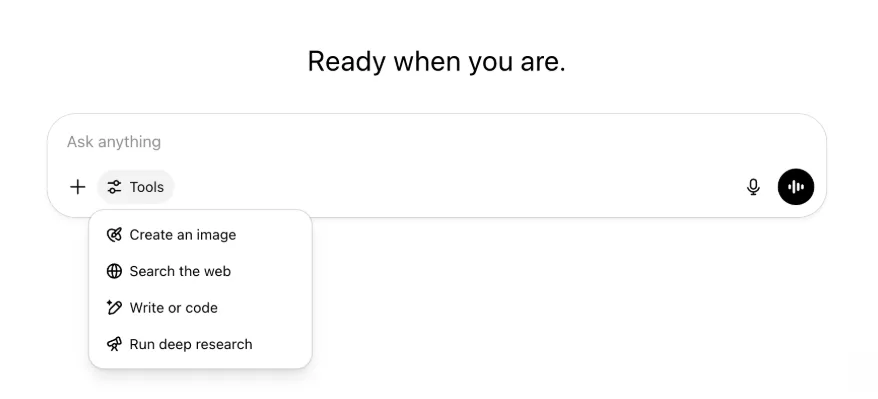
All the same capabilities and tools are still there—just tidier and easier to access in one menu.
May 22, 2025
Releasing GPT-4.1 in ChatGPT
Since its launch in the API in April, GPT-4.1 has become a favorite among developers—by popular demand, we’re making it available directly in ChatGPT.
GPT-4.1 is a specialized model that excels at coding tasks. Compared to GPT-4o, it's even stronger at precise instruction following and web development tasks, and offers an alternative to OpenAI o3 and OpenAI o4-mini for simpler, everyday coding needs.
Starting today, Enterprise and Edu users can access GPT-4.1 via the "more models" dropdown in the model picker. GPT-4.1 has the same rate limits as GPT-4o for paid users.
Introducing GPT-4.1 mini, replacing GPT-4o mini, in ChatGPT
GPT-4.1 mini is a fast, capable, and efficient small model, delivering significant improvements compared to GPT-4o mini—in instruction-following, coding, and overall intelligence. GPT-4.1 mini replaces GPT-4o mini in the model picker under "more models" for paid users, and will serve as the fallback model for free users once they reach their GPT-4o usage limits. Rate limits remain the same.
Evals for GPT-4.1 and GPT-4.1 mini were originally shared in the blog post accompanying their API release. They also went through standard safety evaluations. Detailed results are available in the newly launched Safety Evaluations Hub.
May 15, 2025
Export Deep Research as PDF
You can now export your deep research reports as well-formatted PDFs—complete with tables, images, linked citations, and sources.
To use, click the share icon and select 'Download as PDF.' It works for both new and past reports.
Mobile UI Composer Consolidation (iOS/Android)
We've removed the row of individual tool icons from the mobile composer and replaces it with the new sliders‑style icon to open the Skills menu; tapping that button opens a bottom‑sheet menu where users can choose tools like Create an image or Search the web.
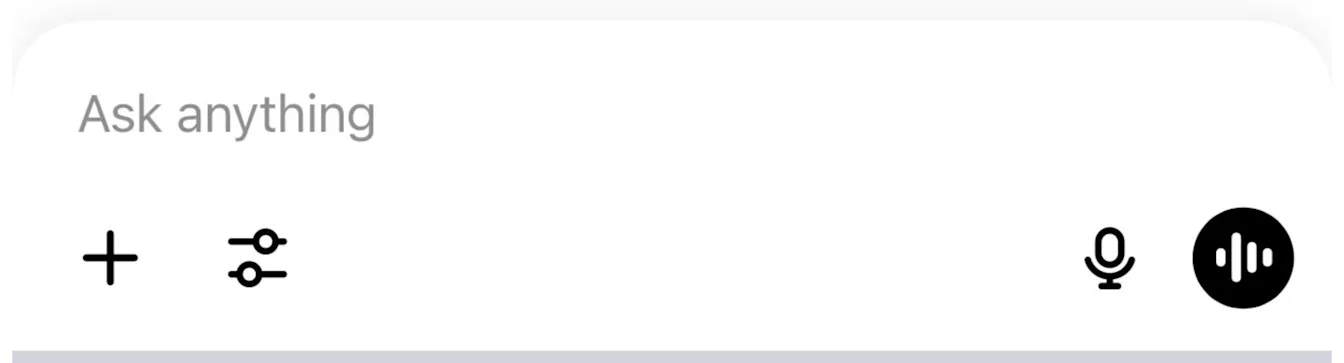
No tools are deprecated—access is simply consolidated to clear space and reduce on‑screen clutter.
May 8, 2025
User Analytics in ChatGPT - GA
The revamped User Analytics dashboard can be accessed in the Manage workspace console in the Analytics tab. It provides more comprehensive data on usage, adoption, and engagement than the original analytics tab.
This improved dashboard gives Admins a high-level view of how ChatGPT is being used across your organization—use it to track adoption and engagement, understand usage patterns for top tools and GPTs, and identify use cases and user trends.
See User Analytics for ChatGPT Enterprise and Edu and Compliance API vs User Analytics in ChatGPT Enterprise/Edu.
May 2, 2025
4o Image Generation in GPTs
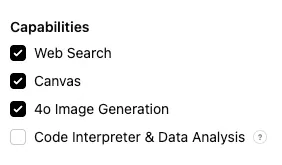
GPTs can now leverage ChatGPT’s image-generation capabilities to produce images on demand for users.
GPT creators can enable "4o Image Generation" in the Configure section of the GPT editor, under Capabilities.
May 1, 2025
Deep research
Users that reach their monthly limit (10 tasks/month) with the standard deep research model will now receive 15 additional requests automatically for that month with our lightweight, cost-effective version until the monthly limit resets.
Learn more about deep research.
Tasks in o3 and o4-mini
You can now create scheduled tasks that enable ChatGPT to run automated prompts and proactively reach out to you on a scheduled basis with o3 and o4-mini. The “ChatGPT with Schedules Tasks” option in the model selector has been removed.
Learn more about scheduled tasks in ChatGPT.
April 24, 2025
o3 and o4-mini
With the introduction of o3 and o4-mini / o4-mini-high, they will supersede o1 and o3-mini / o3-mini-high respectively within ChatGPT.
OpenAI o3 is our most powerful reasoning model that pushes the frontier across coding, math, science, visual perception, and more. It sets a new SOTA on benchmarks including Codeforces, SWE-bench (without building a custom model-specific scaffold), and MMMU. It’s ideal for complex queries requiring multi-faceted analysis and whose answers may not be immediately obvious. It performs especially strongly at visual tasks like analyzing images, charts, and graphics. In evaluations by external experts, o3 makes 20 percent fewer major errors than OpenAI o1 on difficult, real-world tasks—especially excelling in areas like programming, business/consulting, and creative ideation. Early testers highlighted its analytical rigor as a thought partner and emphasized its ability to generate and critically evaluate novel hypotheses—particularly within biology, math, and engineering contexts.
OpenAI o4-mini is a smaller model optimized for fast, cost-efficient reasoning—it achieves remarkable performance for its size and cost, particularly in math, coding, and visual tasks. It is the best-performing benchmarked model on AIME 2024 and 2025. In expert evaluations, it also outperforms its predecessor, o3‑mini, on non-STEM tasks as well as domains like data science. Thanks to its efficiency, o4-mini supports significantly higher usage limits than o3, making it a strong high-volume, high-throughput option for questions that benefit from reasoning.
April 10, 2025
ChatGPT images
Image generation in GPT-4o is now available to all users as the default image generator in ChatGPT. Users who prefer to continue with DALL·E can still access it through the DALL·E GPT.
You can generate images with ChatGPT by simply asking the model to create an image with the details you want, or by selecting the Create image option in the composer. Learn more.
March 31, 2025
User Analytics in ChatGPT - public beta
The revamped User Analytics dashboard can be accessed in the Manage workspace console in the Analytics tab. It provides more comprehensive data on usage, adoption, and engagement than the original analytics tab.
This improved dashboard gives Admins a high-level view of how ChatGPT is being used across your organization—use it to track adoption and engagement, understand usage patterns for top tools and GPTs, and identify use cases and user trends.
See User Analytics for ChatGPT Enterprise and Edu (public beta) for details.
March 20, 2025
Shared Projects Update
We’re holding off on launching shared projects with View and Edit access so that we can work on a more collaborative version that will be valuable to users.
March 13, 2025
Coding with Work with Apps on macOS
When working with IDEs, you can ask ChatGPT to edit open files directly—no copy-pasting required. When you ask for an edit, ChatGPT will generate a diff that you can review and apply, and there’s also an option to automatically apply edits. Diffs are easy to revert in the ChatGPT UI, or by using CMD+Z in your editor.
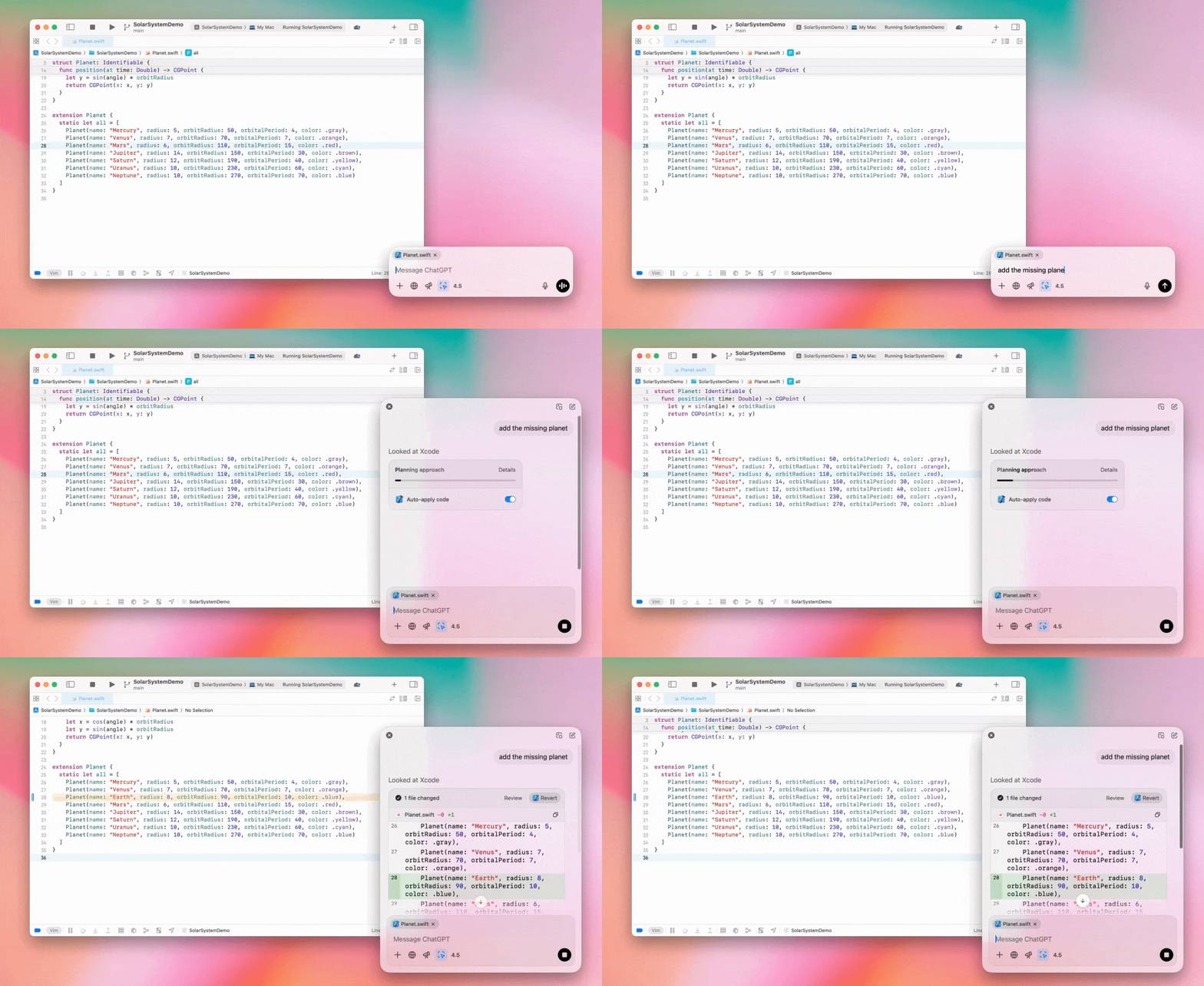
Enterprise admins can flip the "Work with Apps" toggle off in their Admin Settings to disable this functionality for their workspace members.
GPT-4.5 in ChatGPT
As of March 13, 2025, users in Enterprise and Edu plans will now be able to use our GPT-4.5 model in ChatGPT!
See GPT-4.5 in ChatGPT for details.
March 10, 2025
Deep research in Compliance API ChatGPT
As of March 10th, 2025, for Enterprise customers using the Compliance API your options include:
Search for the "deep research global prompt".
Look for the tool name in the response look for
{"tool_name":"deep_research"}.
February 25, 2025
Deep research in ChatGPT
In ChatGPT deep research is now available to users on the Enterprise plan.
Deep Research allows ChatGPT to agentically and asynchronously browse the web to complete your professional or personal work.
Enterprise, and Edu users will have 10 deep research queries per month.
See our Deep research FAQ for details.
February 13, 2025
o1 pro mode and o3-mini in ChatGPT
In ChatGPT o1 pro mode is now available to Enterprise and o3-mini to Enterprise Edu!
o3-mini: OpenAI o3-mini has replaced o1-mini in the model picker. It’s more cost effective and offers higher rate limits at lower latency. It’s a reasoning model, making it a great choice for coding, STEM, and logical problem-solving tasks. o3-mini shows its chain of thought, and can browse the web.
o1 pro mode: Also available in the model picker this week is o1 pro mode. Designed for accuracy and depth, it excels in research, engineering, business, and law—ideal for professionals tackling highly complex challenges. O1 pro mode will take longer to think through a problem. So responses can take some time. Due to its computational intensity, each user is limited to five queries per month. For most tasks, o1, o3-mini, or GPT-4o will remain optimal choices.
Re: File Uploads
Images, docs, and pdfs are supported in the o1, o3-mini, and o3-mini-high models. No spreadsheets (csv/excel).
Only images are supported in o1 pro mode. No docs/pdf and no spreadsheets (csv/excel).
Canvas Sharing
ChatGPT Enterprise and Edu users can now share a Canvas asset such as rendered React/HTML code, document, or code with another user, similar to how you share a conversation. You can do this from the Canvas toolbar when Canvas is open.
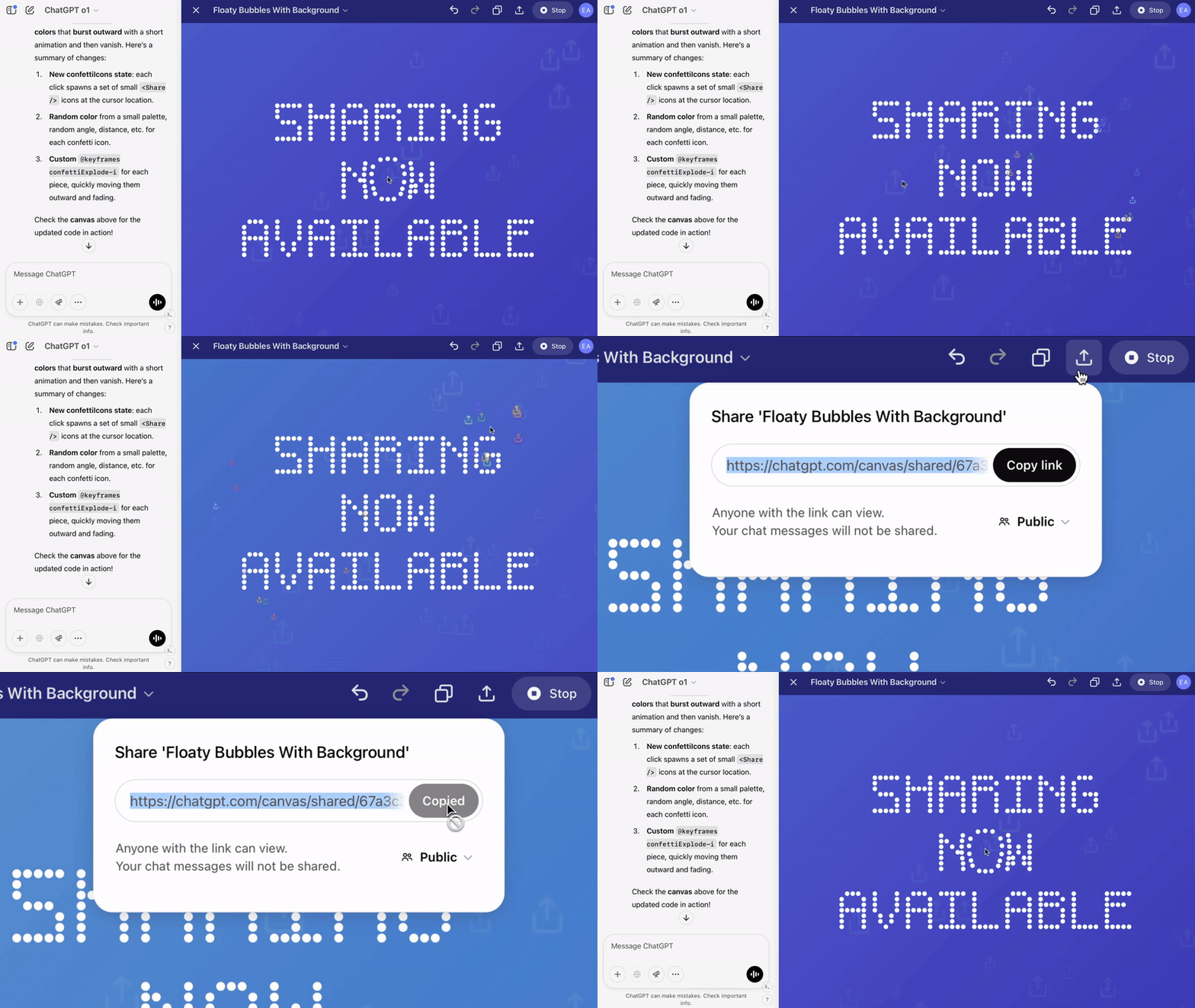
For more details about the canvas feature in ChatGPT, check out the following Help Center article!
January 23, 2025
Projects
Projects are now available for all paid plans including Enterprise and Edu.
See Using projects in ChatGPT for details.
January 16, 2025
Visual Retrieval (PDFs) for ChatGPT Enterprise
ChatGPT Enterprise now supports reading and understanding visuals (images, graphs, diagrams, etc.) embedded in PDF files. Users can upload a PDF, and ChatGPT can interpret the text and any visual elements within that file.
For details see Visual Retrieval with PDFs FAQ.
December 12, 2024
o1
Starting today, all ChatGPT Enterprise customers will be able to access o1 through the model selector, replacing o1-preview.
o1 can now be used to reason about image uploads, opening up new applications by analyzing and explaining visual representations with more detail and accuracy. We have also trained the model to be more concise in its thinking, resulting in faster response times than o1-preview.
December 11, 2024
Apple Intelligence with ChatGPT
ChatGPT admins can now enable and disable access to Apple Intelligence from their workspace admin settings, under Connections.
If this setting is toggled off, users cannot select their ChatGPT Enterprise/Edu workspace when logging in with their OpenAI credentials.
December 10, 2024
Canvas
Today we made Canvas available in 4o by default for all users, Free and Paid. Additionally, we launched a number of new capabilities for canvas, including:
Canvas in GPTs: Canvas can now be used with GPTs when enabled in the GPT creator. This toggle will be enabled for newly created GPTs by default.
Python code execution: You can now execute Python code in a canvas. ChatGPT will take a pass on fixing bugs in your code and provide comments on errors. Please note that executing Python can make external network requests, and Enterprise workspace admins can disable Python code execution by toggling the Canvas code execution setting in their Admin settings. This is turned off by default for all Enterprise accounts.
Canvas shortcut: You can now paste content into ChatGPT and instantly open it in canvas via a shortcut in the upper right corner of the composer.
Canvas in Toolbox: Canvas has been added as an option in the toolbox.
Workspace admins can now use the Compliance API to get, list, and delete canvas text documents.
Please note that the Admin Setting to disable canvas has been removed, as this feature is now out of beta. If this was previously disabled, we will continue to honor that setting. Please contact support@openai.com if you would like to update this setting for your Enterprise/Edu workspace
December 3, 2024
Work with Apps on macOS
ChatGPT can now read content from your coding apps, bringing you smarter, more accurate answers tailored to your work by using Work with Apps on macOS. Learn more about Work with Apps on macOS.
Enterprise admins can flip the "Work with Apps" toggle off in their Admin Settings to disable this functionality for their workspace members.
November 22, 2024
Updates to the ChatGPT Web experience
We are rolling out the following updates over the next two weeks to all ChatGPT users.
Sidebar redesign
New floating mode added with soft dismiss behavior
Recent conversations are now limited in the sidebar, with an unlimited infinite scroll flyout for all conversations
Recent GPTs & Pinned GPT's are now displayed below conversations
Settings are now always in the bottom of the sidebar
A small settings icon was added in larger viewports when the sidebar is not open
New transitions were added to create a more immersive feel
Other updates for ChatGPT on Web
The core underpinnings of the site were revamped, offering much better support for a larger variety of devices and sizes
Initiating a new conversation now scrolls it into view at the top of the screen
Initiating a new conversation no longer auto scrolls to the bottom while the message is generating
The sidebar when pinned can now stay open with an active Canvas if enough space is available
A new composer bar layout now fades content underneath it as you scroll with an updated look & feel
The new chat button has been moved to the left of the Model Picker to be easier to access
The system icon in conversations has been removed to make additional horizontal space
Dall-E focused view has an updated layout
GPT Creator has an updated layout
Improved Mobile Web Experience
The experience with the on-screen keyboard on mobile devices has been greatly improved across iOS & Android devices
The new sidebar is always in floating mode and auto closes when switching threads
We no longer focus the composer on mobile web when switching conversations
An issue causing scroll to get stuck in certain situations should be resolved
November 20, 2024
Update to GPT-4o
We’ve updated GPT-4o for ChatGPT users on all paid tiers. This update to GPT-4o includes improved writing capabilities that are now more natural, audience-aware, and tailored to improve relevance and readability. This model is also better at working with uploaded files, providing deeper insights and more thorough responses.
November 19, 2024
Advanced Voice for ChatGPT Web
Starting today, we’re beginning to roll out Advanced Voice Mode on web (already available on mobile and desktop apps). Users can now start a voice chat on chatgpt.com on their desktop and have real-time, natural conversations with ChatGPT while doing tasks like, planning, writing, and brainstorming.
November 14, 2024
Windows App
The improved Windows app is now available through the Microsoft Store for ChatGPT Enterprise and Edu workspaces. ChatGPT users that are familiar with our experience on the web can seamlessly integrate the Windows app into anything they’re doing on their computer.
User access to the ChatGPT Windows app will follow your IT admin’s policies for apps in the Microsoft Store. In the coming weeks, IT admins will also have the option to deploy the app to employee devices via MDM/MAM, rather than allowing direct downloads from the Store.
As with any ChatGPT Enterprise experience, user chat history is secure and will not be used to improve OpenAI's services.
Learn more about the ChatGPT Windows app.