
2026 年 8 月 20 日
企业功能更新
工作空间所有者和管理员可以使用新的工作空间级管理 API,自动处理邀请和成员管理。邀请 API 支持列出、检索、创建、重新发送和删除邀请。用户 API 支持检索已接受邀请的成员;工作空间所有者还可以更新内置角色或席位,以及移除工作空间成员。由 SCIM 管理的变更仍需通过身份提供商进行,并且最后一位所有者会受到保护。有关设置和权限的信息,请参阅管理管理员密钥。有关端点路径和架构的信息,请参阅管理 API 参考文档。
全局管理控制台现在会更清楚地显示您当前操作的租户或工作空间,并为支持的页面提供工作空间专属 URL。工作空间成员可以查看仅限其本人活动的分析数据;跨用户视图仍仅向获得授权的角色开放。ChatGPT 工作空间设置仍位于当前位置。详细了解全局管理控制台。
个人分析功能可在符合条件的 Enterprise 和 Edu 工作空间中用于工作和 Codex。管理员启用插件后,成员可以在 ChatGPT 桌面版中安装该插件,并询问与其登录身份相关的活动,以及经过隐私保护的工作空间总体趋势。该功能仅供查看,无法显示其他用户的个人活动或其他工作空间的数据。详细了解个人分析。
在 ChatGPT 站点中协作(仅限 Enterprise)。在 Enterprise 工作空间中,站点所有者可以将同一工作空间的活跃成员添加为编辑者。编辑者可以更新并保存站点;所有者首次发布后,编辑者还可以将后续版本发布到同一站点 URL。所有者仍可控制共享、站点设置、分析、所有权、版本恢复和编辑者访问权限。协同编辑沿用现有的站点工作空间控制,不会新增单独的 RBAC 开关;公开发布默认仍处于关闭状态,并由管理员控制。详细了解如何为工作空间管理 ChatGPT 站点。
通过 Codex 和 ChatGPT 工作使用 Apple 信息。在搭载 Apple 芯片的 Mac 上,ChatGPT 桌面应用中的 Apple 信息插件可以读取和搜索 iMessage、短信及 RCS 对话,并通过“信息”起草或发送消息。默认情况下,ChatGPT 会在发送前要求用户确认消息内容和收件人。受管理工作空间的管理员可以通过现有的“使用电脑”控制项禁用 Apple 信息。详细了解 Apple 信息插件。
在更多地区使用电脑历史记录(仅限 Enterprise)。欧洲经济区、瑞士和英国的 Enterprise 用户现在可以在 macOS 版 ChatGPT 桌面应用中使用电脑历史记录。该功能默认关闭,需要启用记忆功能,并且必须先由工作空间管理员启用,成员才能选择加入。详细了解电脑历史记录。
共享 Codex 聊天的只读快照。工作空间共享链接仅供源工作空间中已通过身份验证的成员访问,管理员可以关闭工作空间共享链接。原始聊天发生变化时,快照不会随之更新。Codex 会隐去已知的机密信息模式,但用户仍应检查快照,因为其中可能保留敏感路径、差异内容、图像或其他内容。详细了解如何共享 Codex 聊天。
导出公共插件目录。符合条件的 ChatGPT Enterprise 工作空间所有者和管理员可以从管理 > 插件 > 公共 > 导出 CSV中导出 CSV。导出的数据可能最多滞后 48 小时,且不包含工作空间创建的插件。详细了解如何导出公共目录。
August 13, 2026
Chat model defaults
Workspace owners and admins can configure the starting Chat model and reasoning level from Workspace settings > Models. Owners and admins can apply an admin default or allow User’s last choice for new chats - note that defaults do not grant access to unavailable models or override enforced workspace requirements.
The ChatGPT Desktop app should be upgraded to version 26.812.10818 or later for the new controls to take effect.
Updated model picker for Enterprise and Edu
Members in the Enterprise/Edu workspaces have updated model-picker and composer experience. The picker makes the available intelligence choices easier to compare while preserving workspace model availability and access controls.
Audit logs in the Global Admin Console
Workspace owners and admins can now review supported audit events from the Global Admin Console. Access and event coverage depend on the selected workspace and admin role. Read more.
Additive role-based access controls
Workspace owners in Enterprise and Edu workspaces can now configure eligible permissions in ordinary custom roles with Default, On, or Off. Default inherits the workspace setting, On explicitly grants the permission, and Off explicitly denies access. ChatGPT evaluates all applicable ordinary roles together: at least one role must grant the permission, and an explicit Off in any applicable role prevents access. Lockdown Mode is evaluated separately and can further restrict network-enabled capabilities. Learn more about role-based access controls.
Codex thread-level cost data
Members of eligible Enterprise workspaces with credit-based billing can review per-chat lifetime credit usage in Codex. Note that numbers present are estimates are planning aids and are not invoices. Members can also view their usage from the Settings pane in ChatGPT Desktop and by accessing the Usage & billing tab. This feature requires ChatGPT Desktop version 26.812.10818 or later. Read more.
Personal Analytics plugin
The Personal Analytics plugin is available for eligible workspaces. After a workspace owner or admin enables the plugin, members can install it in ChatGPT Desktop and ask questions about their own Codex activity and available aggregated workspace trends. Read more.
Codex service accounts
Eligible workspaces can create non-human service accounts for Codex automation. Workspace owners and admins can assign roles and groups, configure plugins, share account management, and issue scoped access tokens for CI runners and scheduled jobs. Read more.
Windows desktop performance improvements
The ChatGPT desktop app for Windows includes performance improvements. These improvements require ChatGPT Desktop version 26.803.41515 or later.
Computer History for ChatGPT Enterprise
Computer History is an optional feature in the ChatGPT macOS app that lets Enterprise members bring context from selected apps and websites into ChatGPT and Codex. It records interaction events—not screenshots, screen recordings, microphone input, or system audio—and private browsing is not included.
Computer History is off by default, and Enterprise admins can grant access by role before each member chooses whether to opt in. Members can pause Computer History, choose included apps and sites, and inspect or delete timeline items. Note that Computer History is not currently available in the EEA, UK or Switzerland.
2026年8月10日
停用已连接应用的单用户同步
从8月10日起,将不再支持新建由个人授权的同步连接。8月14日,现有单用户同步连接将被停用,并开始删除关联的同步数据。管理员管理的同步不受影响。请在8月14日前检查工作空间的连接器设置,并视情况采取以下措施:
| 连接器 | 管理员必须执行的操作 |
|---|---|
| Google Drive | 启用 Google Drive 插件。如需同步知识,请使用全域委派配置管理员管理的 Google Drive 同步。 |
| SharePoint | 启用 SharePoint 插件。如需同步知识,请配置管理员同步。 |
| GitHub | 启用非同步 GitHub 插件。 |
| GitLab Issues | 我们将很快公布替代插件的可用信息。 |
| Azure Boards (Azure DevOps) | 我们将很快公布替代插件的可用信息。 |
| Basecamp | 我们将很快公布替代插件的可用信息。 |
| Help Scout | 找出受影响的用户和工作流,并通知他们同步访问即将终止。我们正积极与合作伙伴合作提供替代方案。 |
| Zoho Desk | 找出受影响的用户和工作流,并通知他们同步访问即将终止。我们正积极与合作伙伴合作提供替代方案。 |
| Teamwork | 找出受影响的用户和工作流,并通知他们同步访问即将终止。我们正积极与合作伙伴合作提供替代方案。 |
| Aha! | 找出受影响的用户和工作流,并通知他们同步访问即将终止。我们正积极与合作伙伴合作提供替代方案。 |
| Zoho CRM | 找出受影响的用户和工作流,并通知他们同步访问即将终止。我们正积极与合作伙伴合作提供替代方案。 |
| Pipedrive | 找出受影响的用户和工作流,并通知他们同步访问即将终止。我们正积极与合作伙伴合作提供替代方案。 |
2026年8月7日
ChatGPT 语音中的文件和项目
ChatGPT 语音中的 GPT-Live 现已支持文件上传和项目。你现在可以在语音对话中上传文件、分析其内容或提出问题。你还可以在项目中使用语音,并引用近期的项目聊天、来源和项目指令。
Live 现已成为默认语音体验
对于 Enterprise、Edu 和 Healthcare 工作空间,当工作空间所有者启用语音后,Live 现已成为默认语音体验,不再需要启用“早期模型访问”设置。工作空间所有者可在工作空间设置中禁用语音,将其关闭。
详细了解 ChatGPT 语音。
2026年8月6日
桌面应用更新的新控制项
ChatGPT Enterprise、ChatGPT 医疗保健版和 ChatGPT Edu 管理员现在可以在支持的 macOS 和 Windows 版本中关闭 ChatGPT 桌面应用的应用内更新。这让组织可以在用户收到新版本前进行审核,并通过现有设备管理流程部署已批准的版本。
应用内置更新程序默认保持启用。关闭该程序的组织有责任及时部署新版本和安全修复;OpenAI 不提供版本锁定、单独的稳定版渠道或旧版本延长支持。详细了解。
2026 年 8 月 4 日
所有套餐现均将大量粘贴内容作为附件处理
从今天起,ChatGPT Enterprise 和教育版用户在 ChatGPT 中粘贴长文本时,系统将采用不同的处理方式。
如果您在消息输入框中粘贴超过 1 万个字符,ChatGPT 会自动将内容转换为附件,而不是直接插入文本字段。这样可以让消息输入框更整洁,并有助于避免大量粘贴内容占满整个上下文窗口。
您仍可随时点击在文本字段中显示,将附件重新转换为直接粘贴的内容并移回消息中。
所有其他套餐的用户已可使用此功能。
用于教学与学习的教育插件
ChatGPT Edu 工作空间现在可以在 ChatGPT 工作和 Codex 中使用三个引导式插件:高校教师、K–12 教师和大学生。通过学区域名认领进行管理的 ChatGPT 教师版工作空间可以使用 K–12 教师插件。这些插件可帮助教育工作者根据课程材料创建课程、评估和沟通内容,也能帮助大学生制定学习计划并练习课程概念。
高校教师:帮助教师设计和更新课程与教学大纲、创建互动式学习材料和多媒体评估、针对不同学习者调整材料,并将内容打包以供其 LMS 使用。
K–12 教师:帮助教师创建课程材料、作业、评分量规和教学资源,并结合学习共享空间提供的背景信息,使材料与州级标准及学习进阶保持一致。
大学生:帮助学生利用课程材料和学习目标,获取有来源依据的讲解、引导式练习、学习计划、测验、抽认卡和可视化讲解。
这些插件可在插件目录中找到,但默认不会安装。请注意,Enterprise 账户无法使用这些插件。工作空间管理员可以管理插件的可用性和权限。请参阅《ChatGPT 和 Codex 中的插件》了解详情。
将每周用量限制迁移为每月限制
工作空间所有者现在可以便捷地将“权限与角色”中配置的每周限制迁移为每月限制。打开“工作空间设置”→“权限与角色”,选择任意角色,滚动到“每周限制”,选择迁移,然后确认。从任意角色启动迁移,都会迁移工作空间中所有剩余的按角色设置的每周限制;迁移可能需要几分钟,具体取决于工作空间规模。
按照计划,仍在使用按角色设置的每周支出限制的其余 ChatGPT Enterprise 工作空间将于 8 月 15 日自动迁移到每月用量限制。详细了解如何管理用量限制和超额用量。
2026 年 7 月 23 日
更自然的 ChatGPT 语音体验
ChatGPT 语音正逐步向 Enterprise 和 Edu 工作空间推出,提供两种不同的体验:
聊天中的语音:通过自然的实时对话提问、集思广益和探索想法。聊天中的语音由 GPT-Live 提供支持,支持打断、追问,并可在适用情况下使用网页搜索等功能。该功能可在桌面版聊天以及受支持的网页、iOS 和 Android 体验中使用。
工作和 Codex 中的语音:ChatGPT 语音将率先在桌面应用中推出,可控制您的计算机,并协调多个智能体、进行中的对话和项目之间的工作。您可以用它启动任务、查看进度、打断任务或调整其方向,并在任务继续后台运行时接收最新动态。适用于 macOS 和 Windows,并支持配对的 iOS 远程访问。独立的工作和 Codex 语音体验不支持网页端或移动端。
在最初两周内,工作空间所有者必须同时启用语音和早期模型访问权限,成员才能在语音设置中选择 Live。在此期间,现有的高级语音对话不会自动切换到 Live。
抢先体验期结束后,对于已启用语音的工作空间,Live 将成为默认语音体验。工作空间所有者可以通过停用语音来完全关闭语音功能。
对于采用灵活定价的工作空间,聊天中的语音每分钟使用 5 个额度。对于按额度计费的 Enterprise 工作空间,工作和 Codex 中的语音每分钟约使用 6 个额度。旧版 Enterprise 工作空间在每五小时的时段内可使用一小时语音、两小时 Voice Mini,以及约 45 分钟的工作和 Codex 语音。通过工作或 Codex 委派的任务按标准费率从现有共享用量池中扣除。
详细了解 ChatGPT 语音以及Business、Enterprise 和 Edu 的语音定价。
启用 ChatGPT 工作
对于 ChatGPT/Edu Enterprise 工作空间,成员默认启用工作模式,除非工作空间所有者或管理员将其关闭。工作空间设置和基于角色的访问控制仍决定每位成员的访问权限,这也适用于已启用企业密钥管理的符合条件的 Enterprise 工作空间。
更多信息,请参阅 ChatGPT 工作和 Codex以及在 ChatGPT Enterprise 中管理工作空间设置。
模型默认设置
在“工作空间设置”→“模型”中,工作空间所有者和管理员可以为工作和 Codex 设置初始模型、推理级别、速度和新聊天行为。这些设置决定初始体验。它们不会授予对不可用模型的访问权限,也不会取代可用模型控制、基于角色的访问权限或强制执行的工作空间要求。
更多信息,请参阅在 ChatGPT Enterprise 中管理工作空间设置以及 ChatGPT 工作和 Codex。
用量限制
我们正将“用量限制”从“工作空间设置”移至“全局管理控制台”。所有者和管理员可以设置工作空间默认值、为群组和用户创建覆盖设置、查看实际生效的限制,以及管理增加用量的请求。在“用量限制”→“工作空间”中,管理员可以保留默认的“每月”周期(于每个日历月第一天按 UTC 重置),也可以在相应选项可用时选择“与账单周期一致”。
更多信息,请参阅管理用量限制和超额用量以及全局管理控制台。
用量估算和群组分析
对于符合条件的工作空间,“分析”“账单”、用量限制编辑器、Cost API 和 Codex 分析 API 中的额度旁可能会显示估算的美元金额。估算值采用所选工作空间的超额用量费率,仅供规划参考。“账单”→“发票”仍是已出账费用的权威依据。“分析”排行榜现在还新增了“群组”标签页,可按产品、计量项目和模型查看群组级明细。
更多信息,请参阅全局管理控制台和工作空间分析。
July 22, 2026
OpenAI Presence and AI phone support updates
OpenAI Presence is now available in limited general availability as a managed platform for organizations building and operating governed AI agents for high-volume workflows. Presence supports voice or chat deployments with controls for testing, permissions, monitoring, and human escalation. Availability depends on workflow fit, implementation readiness, and delivery capacity. Contact your OpenAI account team to discuss access. Learn more about OpenAI Presence.
AI phone support, which uses OpenAI Presence, is no longer experimental. Users in the United States, Canada, and Australia can call without a ChatGPT account for routine product, account, and troubleshooting questions. This automated support channel cannot submit reports or requests, connect users with a live agent, initiate an escalation or account review, or guarantee follow-up. Learn more about AI phone support.
2026 年 7 月 16 日
管理员 API 与分析功能扩展
管理员现在可以在全球管理员控制台的“凭据 > 管理员密钥”下创建和管理限定于工作空间的管理员密钥。这些密钥可用于受支持的 ChatGPT 和 Codex 管理 API,包括群组管理、支出控制 API、成本报告和分析功能。可用权限取决于管理员的工作空间角色,且管理员密钥不能用于模型推理。
全球管理员控制台现在包含最多 120 天的额度和 Codex 分析历史记录。支出控制和“用量限制”标签页仍保留在 ChatGPT 中,不属于本次全球管理员控制台发布的一部分。管理员可以继续在“工作空间设置 → 用量限制”中管理用量限制,包括在可用时选择“无限制”选项。了解更多,请参阅管理 ChatGPT Enterprise 和 ChatGPT Edu 中的用量限制和超额用量以及全球管理员控制台。
ChatGPT 桌面应用体验更新
我们更新了 ChatGPT 桌面应用,让你更轻松地在聊天和工作之间选择、查找你的对话和项目,并在不同设备上继续工作。这些更新现已面向 macOS 和 Windows 上的所有套餐推出。
macOS 和 Windows
更清晰的桌面布局: 全局切换器让你可以在 ChatGPT 和 Codex 之间选择。在 ChatGPT 中,选择“聊天”可快速提问并获得对话式帮助,选择“工作”可端到端完成任务。
统一的“最近”列表: “聊天”和“工作”对话现在会一起显示在“最近”中,你可以对它们进行排序、筛选和固定。
桌面应用中的项目: 你现有的 ChatGPT 项目现在会显示在应用中。你可以在项目内开始聊天对话,或使用项目上下文开启工作线程。
跨设备继续工作: 云端工作对话现在会在网页端、移动端和桌面端之间同步,因此你可以在一个界面上开始,再到另一个界面继续。本地对话会保留在你的电脑上。
Codex 保持不变: 在本次更新中,Codex 仍是单独的视图,其工作流和历史记录保持不变。快速聊天仍可用于快速对话。
工作空间控制不变: 现有的工作空间访问权限、安全设置、治理和支出控制均保持不变。
2026年7月15日
具备同步功能的应用现已支持 EKM 工作空间
具备同步功能的应用现在可用于启用了企业密钥管理 (EKM) 的 ChatGPT Enterprise 和 Edu 工作空间。此更新适用于所有具备同步功能的应用。
要了解更多信息,请参阅 具备同步功能的 ChatGPT 应用和 OpenAI 企业密钥管理 (EKM) 概览。
2026年7月9日
推出 ChatGPT 工作
ChatGPT 工作是一款面向耗时更长、更复杂任务的智能体。它可以研究和分析信息,跨已连接的应用和文件开展工作,并创建完整的文档、电子表格、演示文稿、报告和站点。它工作时,你可以跟踪进度、回答问题、调整方向,并批准重要操作。
工作还可以通过“计划任务”持续推进项目;任务既可运行一次,也可按计划或触发条件重复运行,还可监测变化。
工作正逐步面向网页端和移动端的付费方案推出,免费版和 ChatGPT Go 除外。Pro、Pro Lite、Enterprise 和 Edu 用户将率先获得使用权限;Plus 和 Business 用户将在未来几天内陆续获得权限。所有受支持地区均可使用工作。
网页端和移动端的 Enterprise 与 Edu 工作空间可享受为期两周的预览期。预览期间,工作默认关闭;管理员可以选择不启用,否则预览期结束时将自动开启。
我们还将用插件目录取代应用目录。现有应用连接不受影响。插件可针对特定工作流整合技能、应用和应用模板,并可在 ChatGPT 网页端和桌面端的工作与 Codex 中使用。
技能现已正式发布
Enterprise 和 Edu 用户可以在侧边栏的“插件”下,通过插件目录中的“技能”选项卡找到技能。
全新 ChatGPT 桌面应用整合聊天、工作和 Codex
全新 ChatGPT 桌面应用现已在全球推出,支持 macOS 和 Windows。它将用于提问和对话的聊天、用于研究和制作完整成果的工作,以及用于软件开发的 Codex 整合到一个应用中。
在桌面端,获得你的许可后,工作可以使用本地文件和桌面应用。内置浏览器让 ChatGPT 能够从网站收集信息,并使用受支持的网页工具和文件。Codex 还新增了差异对比中的行内编辑、侧面板中的 pull request 审查、更快的计算机操作,以及在一个项目中支持多个代码仓库。
如果你已在使用 Codex 应用,只需照常更新,即可迁移到全新的 ChatGPT 桌面应用。如果你使用旧版 ChatGPT 桌面应用,请按照应用内的提示下载新版本。旧版应用可能会以 ChatGPT Classic 的名称继续保留在设备上。ChatGPT Classic 将继续获得模型更新、错误修复、安全补丁以及对现有 Enterprise 功能的支持;工作和 Codex 等新的智能体功能则可在新应用中使用。
推出 ChatGPT 站点公开测试版
ChatGPT 站点让你无需离开 ChatGPT,即可将工作成果或想法转化为交互式网站或轻量级应用。你可以创建仪表板、项目跟踪器、发布日历、原型、内部门户和报告,然后在分享前使用 ChatGPT 预览并完善成果。
Business 和 Enterprise 客户已可使用站点。从今天起,他们还可以公开发布站点,并通过 URL 与任何人分享,让工作空间之外的用户也能访问站点。
若要创建站点,请从网页端的 ChatGPT 工作入手,或在 ChatGPT 桌面应用中使用工作或 Codex。描述你想构建的内容,添加所有相关内容、文件、数据、链接或限制条件,并在发布前查看私密预览。
在 Enterprise 工作空间中,公开发布功能默认关闭,必须由管理员启用。站点公开测试版也正逐步向 Pro、Pro Lite 和 Edu 用户推出,Plus 用户将在未来几天内陆续获得使用权限。免费版或 ChatGPT Go 方案不提供站点。公开发布和扩大的测试版推出范围在首发时不包括欧洲经济区、瑞士或英国。
停用 ChatGPT 群聊
从7月9日起,网页端、iOS 和 Android 用户将无法再新建群聊、将现有对话转为群聊,或通过邀请链接加入群聊。
现有群聊将暂时保留并可继续使用。现有群聊变为只读后,用户仍可访问其中已分享的消息、文件和图像。ChatGPT 的个人对话不受影响。
停用 Atlas
随着我们将基于浏览器的智能体功能引入 ChatGPT 和 Codex,我们将逐步停用 Atlas。Atlas 计划于2026年8月9日停止运行。
我们希望尽可能简化此次迁移。在此之前,请迁移你希望保留的所有 Atlas 数据。Atlas 浏览器数据(包括书签、打开的标签页和浏览历史记录)不会自动迁移。你可以将 Cookie 和密码导出到 ChatGPT 桌面应用,并将书签导出到 Chrome。请务必在8月9日前保存打开的标签页和浏览历史记录中的所有重要页面或 URL。
你的 ChatGPT 对话历史记录单独存储,并将根据你的方案、工作空间设置和账户访问权限继续保留在 ChatGPT 中。
我们正借鉴从 Atlas 获得的经验,为 ChatGPT 打造功能更强大的浏览器体验,包括多个标签页、下载、改进的导航,以及在支持的情况下登录账户。如需开展更深入的浏览器智能体工作,请尝试 ChatGPT 桌面应用。如需在 Chrome 中浏览时获得帮助,请尝试 ChatGPT Chrome 扩展程序或侧边栏(如可用)。
你可以参阅我们的帮助中心文章,详细了解如何从 Atlas 迁移。
2026年7月6日 ChatGPT for PowerPoint 现已正式推出
ChatGPT for PowerPoint 现已面向 Enterprise 和 Edu 工作空间正式推出。用户可以直接在 Microsoft PowerPoint 中创建和修改可编辑的演示文稿,分析幻灯片的叙事和结构,并使用获批的技能和应用基于授权来源开展工作。高级编辑和模板匹配可能仍需人工审核。
管理员可以通过工作空间设置启用该加载项,也可以通过 Microsoft 365 进行部署,包括在适用情况下启用基于 RBAC 的访问权限。对于符合条件的工作空间,ChatGPT for PowerPoint 支持执行工作空间策略、限定范围的来源访问、通过合规 API 覆盖提示和响应、欧盟推理驻留以及企业密钥管理。进一步了解 ChatGPT for PowerPoint。
Excel/Sheets 和工作空间智能体定价
ChatGPT for Excel/Sheets 任务现在对 Enterprise 和 Edu 工作空间采用基于 Token 的额度计价。工作空间智能体运行也对 Enterprise 工作空间采用基于 Token 的额度计价。额度使用量按输入 Token、缓存输入 Token 和输出 Token 计算,而不是固定的额度成本。
ChatGPT for PowerPoint 对 Enterprise 客户在 2026 年 8 月 6 日之前仍免费。该日期之后,将按与 ChatGPT for Excel/Sheets 相同的基于 Token 的定价模型开始收费。在 ChatGPT 费率表中了解更多信息。
2026 年 6 月 26 日
模型选择器中的控制项已简化
我们正在面向 Web、iOS 和 Android 上的 ChatGPT Enterprise 和 ChatGPT Edu 推出更新后的模型选择器。它让用户更容易根据任务需要,在速度和推理投入之间选择最合适的平衡,同时不会改变工作空间可用的底层模型。
选择器现在包括:
即时
中等
高
超高
Pro 标准
Pro 扩展
中等取代 Thinking 标准,高取代 Thinking 扩展,超高取代 Thinking 重度。Pro 标准和 Pro 扩展将继续使用 GPT-5.5 Pro。Thinking 轻量不再可用。
所有六个选项均面向 Enterprise 和 Edu 工作空间开放,具体取决于工作空间访问设置。推理模型访问权限控制中等、高和超高。Pro 模型访问权限控制 Pro 标准和 Pro 扩展。成员无法访问的选项会在选择器中隐藏。
将自动路由器重定向到 Thinking mini设置保持不变,并且仍仅适用于自动推理。在 iOS 和 Android 上,选择器会显示在对话顶部。在 Web 上,它会显示在消息输入框中。
ChatGPT Enterprise 和 ChatGPT Edu 的插件管理员控制项
工作空间管理员和所有者现在可以从工作空间设置 > 插件管理插件。此页面将插件发现和治理集中到一个界面中,包括按状态、安装策略、角色、类别和目录进行搜索与筛选。此外,工作空间所有者可以从工作空间设置 > 权限和角色为其工作空间或选定角色启用或停用插件。
管理员和所有者可以为工作空间或特定角色设置插件是否可供成员安装,或是否默认安装。管理员还可以查看插件使用的应用,并在此视图中管理该插件。了解更多:Codex 中的插件
2026 年 6 月 25 日
ChatGPT Enterprise 和 ChatGPT Edu 的记忆改进
我们正在为 ChatGPT Enterprise 和 ChatGPT Edu 推出改进版记忆。启用记忆后,ChatGPT 可以使用过往聊天中的相关上下文来保持记忆更新,并随着工作变化提供更相关的回复,而不是只依赖手动保存的细节。
用户现在可以:
查看记忆摘要,了解 ChatGPT 可能用于个性化回复的信息。
在个性化回复下方查看“来源”,了解来自记忆、过往聊天和自定义指令的相关上下文。
更正记忆、删除被引用的聊天、将某个来源标记为不相关、关闭记忆,或返回旧版已保存记忆。
记忆摘要是相关上下文的高层级视图,可能不包含 ChatGPT 能记住或引用的所有内容。
对于 ChatGPT Enterprise,改进后的体验将先进入约两周的抢先体验期。在抢先体验期间,管理员可以在工作空间设置中开启“使用改进版记忆”。抢先体验结束后,符合条件的工作空间将默认开启此功能,除非管理员选择退出。管理员和用户可以切换回旧版已保存记忆。
此次更新不会影响 Codex 记忆。仅限项目的记忆仍会保留在各自项目内,不会使用该项目之外的记忆或对话。这些改进无需额外付费。
了解 ChatGPT 中这些记忆改进背后的研究。
Codex Remote 正式发布及 DigitalOcean 工作空间
Codex Remote 现已面向 ChatGPT Enterprise 和 ChatGPT Edu 工作空间中的用户正式开放。用户可以通过 ChatGPT 移动应用,在已连接的 Mac 或 Windows 主机上开始或继续工作,查看进度,并在手机上批准操作。Remote Control 现在会在每台受支持的移动设备与每台主机之间使用经过身份验证的一对一二维码配对。自 6 月 8 日以来使用过的连接会保持配对;更早且处于非活动状态的连接需要重新配对。退出登录会关闭 Remote Control,但不会移除现有配对。
新的 DigitalOcean Droplet 工作空间插件也已面向 ChatGPT Enterprise 和 ChatGPT Edu 用户开放。它可让 Codex 预配 DigitalOcean Droplet、配置 SSH 访问,并将其作为远程工作空间连接到 Codex 应用。用户在连接前应将 ChatGPT 移动应用和 Codex 应用更新到最新版本。了解如何通过 ChatGPT 方案使用 Codex。
2026年6月19日
Slack 连接器操作和 OAuth 范围审批
Enterprise 和 Edu 工作空间现在可以在 ChatGPT 中启用 Slack 连接器操作。除了搜索 Slack 之外,在连接器和相关操作启用后,ChatGPT 还可以执行受支持的操作,例如加入频道、创建提醒、上传文件,或更新用户的 Slack 个人资料。
管理员可以在 ChatGPT 的“应用”下查看 Slack,并使用“操作控制”来管理可用的操作。某些操作可能需要额外的 Slack OAuth 范围,或需要 Slack 工作空间或 Enterprise Grid 管理员批准。如果额外范围未获批准,不需要新范围的现有 Slack 功能仍会继续工作。在 ChatGPT Slack 应用文章中了解更多。
2026年6月18日
使用限制、全局管理控制台账单和分析
Enterprise 和 Edu 管理员现在可使用新工具来管理额度使用情况并查看与账单相关的活动。工作空间设置中的使用限制允许管理员和所有者按工作空间、群组和用户设置每月额度上限,审核提额请求,并从“权限与角色”中的现有每周限制迁移。
对于符合条件的工作空间,全局管理控制台现在还包含更新后的“分析”和“账单”区域,包括额度分析、Codex 和 ChatGPT 使用情况视图、计划详情、额度余额、赠款活动、发票、使用提醒和超额限制设置。管理员、所有者和分析查看者可以查看使用数据,并按不同功能和维度导出数据,例如 Codex 和 ChatGPT 使用的额度、用户和智能体排行榜,以及按功能细分的 Codex 和 ChatGPT 使用情况。
了解更多:在 ChatGPT Enterprise 和 Edu 中设置使用限制、全局管理控制台。
Codex 中的录制与回放
录制与回放是 Codex 应用面向 macOS 的一项新功能,符合条件的 Enterprise 和 Edu 用户可以演示一次工作流,并将其转化为可重复使用的技能。它专为稳定、可重复且演示起来比描述更容易的工作流而设计;生成的技能之后可以通过可用工具指导 Codex 完成类似任务,例如计算机使用、浏览器操作和已安装插件。
录制与回放要求计算机使用功能可用且已启用,初始可用范围不包括欧盟、英国和瑞士。对于托管的 Codex 部署,停用计算机使用功能也会停用录制与回放及相关启用流程。在录制与回放指南中了解更多。
2026年6月17日
ChatGPT Edu 工作空间的数据导出
未配置数据驻留的 ChatGPT Edu 工作空间成员现在可以在工作空间管理员启用数据导出后导出其工作空间数据。成员可以从设置 > 数据控制请求导出,从收到的电子邮件中下载导出文件,并将其中包含的对话 JSON 上传到个人 ChatGPT 账户中的新对话以供参考。
数据导出默认关闭,且该设置适用于所有工作空间成员。了解更多。
2026年6月11日
面向 Enterprise、Edu 和 Healthcare 工作空间的资料库
资料库正逐步向 Enterprise、Edu 和 Healthcare 工作空间推出,为成员提供专门位置,以查找和复用他们上传到 ChatGPT 或在其中创建的文件。保存到资料库的文件遵循工作空间保留政策。
工作空间所有者可控制 ChatGPT 回复时是否自动引用资料库文件。关闭自动引用不会移除资料库,也不会阻止成员自行浏览、搜索、打开或附加文件。Healthcare 工作空间默认关闭自动引用。
还提供资料库专用的合规 API 端点,用于导出和删除资料库文件。资料库不会引入新的外部分享或多人协作功能。
详细了解 ChatGPT 中的文件存储和资料库。
全局管理控制台更新
云控制台现为“使用 ChatGPT 登录”提供外部应用访问控制。管理员可为组织开启或关闭外部应用访问,要求应用在成员使用前获得批准,并可批准或停用单个应用。
Codex 更新
我们发布了多项 Codex 更新,包括:
在可用地区,为 Chrome 中的浏览器使用功能和 Codex 应用内浏览器提供开发者模式。开发者模式允许 Codex 通过受控的 Chrome DevTools Protocol (CDP) 访问进行性能分析,并深入调试网络流量、控制台输出、运行时错误、DOM 状态和已应用样式。该功能在用户层面默认关闭,可在 Codex 应用设置中启用。管理员和所有者可访问 Policies & Configurations 窗格,在 Codex 云端设置中为工作空间关闭该功能。了解详情。
此次发布还在应用消息输入框中新增了 /init,用于生成 AGENTS.md 脚手架;支持为 Windows 计算机使用功能配置每个应用的访问控制;改进了用量上限错误提示,在可用时提供工作空间指引和重置时间;并在命令菜单中新增未读聊天部分。了解详情。
2026 年 6 月 8 日
已连接应用的应用权限
工作空间管理员现在可以在可用时使用“应用权限”,选择 ChatGPT 在使用已连接应用前何时询问成员。管理员可以设置工作空间范围的默认值,并为单个应用选择不同权限,可选项包括 始终询问、任何更改 和 重要操作。
“重要操作”为默认设置,允许 ChatGPT 自动从应用读取信息,同时在可能对 ChatGPT 之外产生实质影响、暴露敏感信息或难以撤销的操作之前询问。在可用时,应用权限会取代之前的操作同意设置,而应用访问权限、RBAC 和操作控制仍是独立的管理员控制项。
了解更多:ChatGPT 中的应用;应用中的管理员控制、安全性和合规性。
2026年6月5日
Enterprise 工作空间的插件分享
Codex 现已为符合条件的 ChatGPT Enterprise 工作空间默认启用插件分享。用户可与工作空间分享本地插件,让团队成员从 Codex 插件目录安装和使用共享插件。
工作空间管理员可使用 MDM 或云托管配置,在 requirements.toml 中停用插件分享。了解详情:与工作空间分享本地插件。
2026年6月2日
使用站点构建和部署内部工作空间应用
ChatGPT 站点现以预览版形式向符合条件的 ChatGPT Enterprise 和 Edu 工作空间开放。该功能以插件形式提供。用户可让 Codex 创建、迭代和部署轻量级全栈 JavaScript/TypeScript Web 应用,获得托管站点 URL、“使用 ChatGPT 登录”访问和数据/文件存储,同时将访问范围限制在工作空间内部。
ChatGPT 站点在 Enterprise/Edu 工作空间中默认关闭,管理员和所有者可通过工作空间设置和 RBAC 管理启用状态及访问权限。可从工作空间设置 > 权限与角色启用 ChatGPT 站点。管理员和所有者可从**工作空间设置 > 站点停用已发布的站点。
**有关构建、部署、存储、访问和限制的详情,请参阅 Codex 站点开发者指南。
Codex 中的角色专属插件
角色专属插件正逐步向受支持的 ChatGPT Enterprise 工作空间推出。首批插件包括销售、数据分析、产品设计、创意制作、投资银行和公开股票投资。这些插件整合了角色专属技能、应用集成、入门提示词和工作流指南,让团队可使用 Codex 进行销售准备、分析和仪表板制作、原型设计、创意资产制作及金融研究。
此次发布还新增 66 个单应用插件,扩展了 Codex 中可用的集成,包括 Databricks、Salesforce、Hex 和 Clay 等工具。用户可从 Codex 插件目录添加可用插件,Codex 也可帮助完成设置。工作空间管理员可在工作空间设置中控制底层应用权限。对于某些工作流,例如在数据分析中使用 Databricks 或 Snowflake,管理员可能需要先完成连接器设置,用户才能使用插件。
了解详情:Codex 中的插件。
活跃账户会话控制
我们正在 ChatGPT 中推出新的安全功能活跃会话,帮助用户查看与其账户关联的会话,并退出无法识别的会话。可用性:此功能不适用于与组织 SSO 登录关联的账户,包括 SAML 或 OIDC。即使组织并未要求每次登录都使用 SSO,或用户当前会话采用其他方式登录,也可能受此限制。
有权访问的用户现在可以:
从设置 > 安全 > 活跃会话查看 OpenAI 第一方会话,以及设备、应用、大致位置、登录时间、受信任设备状态及是否为当前会话等可用详情。
从活跃会话退出单个会话或所有会话
“活跃会话”会显示会话管理系统已知的会话,包括可用的 ChatGPT、Codex 和 API 平台会话。它不管理第三方应用会话、已连接应用、仅用于第三方服务的“使用 ChatGPT 登录”会话或 Codex CLI 会话。
了解详情:管理 ChatGPT 中的活跃会话
2026 年 5 月 29 日
Codex 更新:Windows 的计算机使用和远程控制、GitHub Enterprise 应用模板支持
Codex 现在在 Codex 应用中支持 Windows 上的计算机使用。拥有 Codex 访问权限的用户可以使用“计算机使用”,让 Codex 在 Windows 应用程序中查看、点击和输入。借助远程控制,用户还可以从 iOS 或 Android 上的 ChatGPT,或从 Mac 上的 Codex 继续 Windows 工作流,以便在离开桌面时检查进度、响应提示并进行引导,同时 Windows 机器仍作为项目文件、shell、应用服务器和本地上下文的主机。
Windows 计算机使用和远程控制对 Enterprise 用户默认禁用。如需启用,请联系你的 OpenAI 账号代表以加入抢先体验。
对于客户托管的 GitHub Enterprise Server 仓库,工作空间管理员可以通过 ChatGPT 应用模板设置并发布 GitHub Enterprise 应用,以便 Codex 可将工作空间专用连接器用于 Codex Web、代码审查和安全审查。
了解更多:计算机使用、远程控制、在 ChatGPT 中设置 GitHub Enterprise 应用模板。
2026年5月28日
ChatGPT 工作空间智能体的新控制和功能
我们正在为 Enterprise 和 Edu 中的 ChatGPT 工作空间智能体推出新的模型、管理员、应用访问和回复功能。
工作空间智能体现支持:
GPT-5.5 和推理强度控制:构建智能体时,创建者可选择 GPT-5.5,并设置智能体使用的推理强度。我们还提高了各类智能体的回复速度。
基于角色的发布权限:工作空间管理员可控制哪些角色能将智能体发布到共享工作空间目录。
引导式智能体设置:ChatGPT 现在会提出设置问题,帮助用户更快创建实用的智能体。
语音输出:智能体现在可将音频文件作为回复的一部分。
更智能的 Slack 讨论串回复:在 Slack 中使用的智能体被首次提及后,可回复讨论串中相关的后续消息。创建者可选择让智能体回复相关讨论串消息,或仅在被提及时回复。
GitHub Enterprise、Snowflake 和 Databricks 应用模板
Enterprise 和 Edu 方案的工作空间管理员及所有者现在可使用 ChatGPT 应用模板,为 GitHub Enterprise、Snowflake 和 Databricks 创建工作空间专属应用。应用模板提供引导式设置流程,管理员可在向成员发布应用前配置服务商专属设置,例如 OAuth 凭据、回调 URL、Webhook 详情、托管 MCP 服务器 URL 和工作空间访问控制。
使用新的设置指南了解应用模板的一般流程和各模板的服务商专属步骤:ChatGPT 应用模板、GitHub Enterprise 应用模板、Snowflake 应用模板和 Databricks 应用模板。
发布后,管理员可从工作空间设置 > 应用 > 已启用中管理生成的应用,包括角色访问、操作控制和操作确认。
May 22, 2026
Workspace agents are now generally available in ChatGPT Business, Enterprise, and Edu.
Workspace agents help teams get more done together across tools. They can own entire workflows on their own, follow team processes, and be shared across your team so people can build once and use together.
We’ve also added new admin controls and visibility:
Agent builders can set safeguards on which actions agents can take for each app enabled in their workspace.
Business, Enterprise, and Edu admins can view workspace agent activity and usage in the
.
We’ve extended the free period for workspace agents until July 6, 2026. Credit-based pricing will begin on that date. (edited)
2026年5月21日
Codex 更新:目标模式、浏览器改进、锁定后远程使用、管理员分析和插件分享状态
Codex 现在为 Enterprise 和 Edu 用户提供更多方式来处理长期目标并在浏览器中持续迭代,同时符合条件的管理员将获得更新后的使用情况分析:
macOS 应用中的 Appshots 可让用户通过快捷键将应用窗口附加到 Codex 讨论串,其中包括屏幕截图和可用文本。Appshots 现已面向 ChatGPT Edu 账户开放,并将很快支持 ChatGPT Enterprise 账户。
目标模式现已在 Codex 应用、IDE 扩展和 CLI 中全面推出。用户可定义成果和成功标准,让 Codex 持续为之努力。
应用内浏览器注释可为浏览器和前端工作提供更精确的样式反馈。
锁定后使用计算机可让 Mac 锁定后,Codex 仍能安全地远程工作,但需遵守现有地区限制。管理员和所有者可在 Codex 云端的政策与配置设置中,将 remote_computer_use = false 以关闭此功能。更多详情请查看配置参考。
浏览器使用改进包括高级注释模式、更快的资产提取、只读 JavaScript 上下文、更便捷的标签页分组、更少的 Chrome 扩展标签页干扰,以及可靠性改进。
全局管理控制台现为 Enterprise 管理员提供 Codex 分析,包括活跃用户、额度和 Token、讨论串和轮次、用户排行榜、插件用量、接受的代码行数、模型用量,以及与控制台一致的界面。
插件分享可让团队通过 Codex 应用与工作空间成员分享本地构建的插件。ChatGPT Enterprise 默认停用插件分享,有关如何启用该功能的详情,请联系你的 OpenAI 客户联系人。ChatGPT Edu 账户默认启用插件分享。
了解详情:目标模式、锁定后使用计算机、应用内浏览器注释和插件分享。
工作空间智能体现已在 ChatGPT Business、Enterprise 和 Edu 中全面推出。
工作空间智能体帮助团队跨工具协作,完成更多工作。它们可独立负责整个工作流、遵循团队流程,并在团队内分享,让团队成员一次构建、共同使用。
我们还新增了管理员控制和可见性:
智能体构建者可针对工作空间中启用的每个应用,为智能体可执行的操作设置安全保护措施。
Business、Enterprise 和 Edu 管理员可在以下位置查看工作空间智能体的活动和使用情况:
管理控制台。
我们已将工作空间智能体的免费期延长至2026年7月6日。基于额度的定价将于当日开始。
2026年5月18日
Apps Directory 和应用创建流程已移除 Beta 标签
我们已从网页端和桌面端 ChatGPT 的 Apps Directory,以及新的应用创建流程中移除 Beta 标签。
这仅是标签更新。它不会改变 Apps Directory 体验、应用创建工作流、开发者模式能力,或开发者模式现有的高风险指导。
2026年5月15日
ChatGPT 中带管理员管理同步的 Microsoft Teams 应用
带管理员管理同步的Microsoft Teams 应用现已面向符合条件的 ChatGPT Enterprise 和 Edu 工作空间开放。所有者和管理员可为整个工作空间一次性连接 Microsoft Teams,使 ChatGPT 可引用成员已有权限访问的受支持 Teams 消息和对话元数据。
所有者和管理员可在“工作空间设置 → 应用”中启用同步,使用范围选择器和可选的 Microsoft Purview 敏感度标签筛选器选择要包含的 Teams 内容,然后通过“部署到你的团队”进行部署。同步体验为只读,设置后可能需要一些时间才能完全填充,并且与常规自助式 Microsoft Teams 应用保持分离。
2026年5月14日
Codex 远程访问与自动化访问令牌
Codex 现支持通过 ChatGPT 移动应用进行远程访问,让用户在 Codex 持续于底层 Mac 主机或已连接远程环境中运行时,仍可连接长期任务、回答问题、重定向执行、批准操作、审查输出,并在已连接主机之间切换。移动端体验会展示该环境的实时状态,包括项目上下文、审批、截图、终端输出、差异和测试结果。Enterprise 工作空间还可将 Codex 访问令牌用于受信任、非交互式的本地工作流,这些工作流需要 ChatGPT 工作空间身份和企业控制,但无需浏览器登录。
如需试用,请同时更新 ChatGPT 移动应用和 macOS 上的 Codex 应用。移动端设置可能需要工作空间启用的 Remote Control 访问,并可能涉及 SSO、多因素身份验证或通行密钥步骤。
此外,ChatGPT Enterprise 工作空间现可使用访问令牌;管理员可管理工作空间级可用性,拥有允许角色的成员可创建自己的令牌,并且在可用时,治理界面会反映访问令牌活动。
2026年5月7日
ChatGPT 工作空间智能体现支持启用 EKM 的 Enterprise 工作空间
ChatGPT 工作空间智能体现已面向启用企业密钥管理(EKM)且符合条件的 ChatGPT Enterprise 工作空间开放。
工作空间智能体让组织能够在包括 ChatGPT 和 Slack 在内的已连接应用间,为可重复任务和业务工作流构建并使用智能体。智能体可基于模板创建,也可从零开始构建;可在发布前预览、在工作空间内共享,并按计划运行。
符合条件的 EKM 工作空间现可创建和使用工作空间智能体、连接受支持的工具和应用、添加技能、文件和自定义 MCP 服务器、安排周期性运行、在已连接的 Slack 频道中使用智能体,并查看版本历史和分析。
工作空间智能体默认仍处于关闭状态。管理员可通过管理控制为符合条件的工作空间启用智能体构建、发布和 Slack 使用。
2026年5月6日
适用于 iOS 和 iPadOS 的 ChatGPT for Intune
我们已在 Apple App Store 上架 ChatGPT for Intune。ChatGPT for Intune 是一款独立的 iOS 应用,面向通过 Microsoft Intune 和 Microsoft Entra 管理移动访问的 ChatGPT Enterprise 组织。该应用允许 IT 团队将 Microsoft 应用保护政策和条件式访问政策应用于 iOS 和 iPadOS 上的 ChatGPT 移动体验。
ChatGPT for Intune 仅面向 Enterprise 账户开放,使用前需通过 OpenAI 完成组织上线。Enterprise 所有者和管理员应联系其 OpenAI 客户总监开始上线,然后在推出前配置所需的 Microsoft Entra 和 Intune 设置。
完成上线后,用户可从 Apple App Store 下载应用,并使用企业 Microsoft 身份验证登录。请参阅设置 ChatGPT for Intune 了解详情。
在 ChatGPT 中更轻松地选择模型
我们将帮助你在发送消息前更轻松地选择合适的模型。模型选择现显示在消息输入框中,因此你可以在输入提示词的位置直接查找和切换模型。
我们还将思考强度控制移入模型选择器。选择思考或 Pro 模型时,可直接从模型选择器选择思考强度级别。
全局管理控制台中的分析和智能体
全局管理控制台现已新增“分析”和“智能体”区域。“分析”为管理员提供采用情况和使用情况的综合视图,包括活跃用户和消息活动的趋势视图,以及 GPT、项目、技能、用户、工具交互、连接器交互和工作空间健康状况的下钻分析。
“智能体”为管理员提供整个组织内工作空间智能体的综合视图。管理员可打开智能体,查看智能体 ID、近期活动、已连接应用、记忆文件、计划,以及一段时间内的独立用户数和运行次数等智能体分析,也可进入构建器进行编辑。工作空间所有者可从全局管理控制台访问这些视图。了解详情。
2026年5月5日
适用于 Excel 和 Google Sheets 的 ChatGPT
适用于 Excel 和 Google Sheets 的 ChatGPT 现已在全球面向 Enterprise、Edu 和 K-12 工作空间推出,为 Excel 和 Google Sheets 带来原生电子表格侧边栏,可用于构建、更新、解释和审查多标签电子表格。在可用时,它支持技能和应用,因此电子表格工作可基于已批准的文件、系统和数据源。
Enterprise、Edu 和 K-12 客户可免费预览至 2026年6月2日;此后使用将遵循额度和使用条款。该体验支持工作空间控制,包括 RBAC、适用时的数据和推理驻留、企业密钥管理以及合规 API 覆盖。管理员可在工作空间设置中启用适用于 Excel 和 Sheets 的 ChatGPT。了解更多。
2026年4月30日
管理员管理的 SharePoint 同步更新
对于由管理员管理的“部署到你的团队”同步选项,我们正将 ChatGPT SharePoint 应用的权限范围请求从委派权限范围迁移至 Microsoft 应用程序权限范围。此次迁移有助于 ChatGPT 同步选定的 SharePoint 内容并评估 SharePoint 权限,包括旧版 SharePoint 站点群组成员身份,而不再仅依赖完成设置的管理员可见的文件。此外,管理员和所有者可从应用设置中配置 Microsoft Purview 敏感度标签。
这些新权限范围需要由 Microsoft Entra 管理员批准,新功能集才能生效。管理员和所有者可前往工作空间设置 > 应用,找到视图顶部的“重新连接 SharePoint 以改善同步”提示;或搜索 SharePoint 应用并点击“需要重新授权”按钮,以便捷地重新验证 SharePoint 应用并获取新功能集。这样便无需断开后重新连接,避免触发索引重新同步。
详细了解 ChatGPT 中的 SharePoint 应用,并查看管理员管理的同步选项常见问题解答以获取更多信息。
2026年4月22日
面向 Enterprise 和 Business 的 ChatGPT 工作空间智能体
在接下来的几周内,ChatGPT 工作空间智能体将逐步向 ChatGPT Business 和 Enterprise 工作空间推出。
工作空间智能体让组织能够利用所有已连接应用构建并使用智能体来处理可重复任务并自动化业务工作流,且可在 ChatGPT 和/或 Slack 中运行。工作空间智能体可创建、在发布前预览、在工作空间内共享,并按计划运行。
符合条件的工作空间现在可以:
从模板创建智能体或从零开始构建。
将智能体连接到 Google Drive、Google 日历、Slack 和 SharePoint 等工具和应用。
添加技能、文件和自定义 MCP 服务器。
以私密、链接或工作空间目录方式共享智能体。
在 ChatGPT 中安排周期性运行。
在已连接的 Slack 频道中使用智能体。
查看智能体的版本历史和分析。
工作空间管理员还可通过管理员控制来管理智能体构建、发布和 Slack 使用的访问权限。ChatGPT 工作空间智能体在发布时默认关闭,管理员可为符合条件的工作空间启用。
注意:发布时,启用 EKM 的 ChatGPT Enterprise 工作空间暂不支持 ChatGPT 工作空间智能体。
日本支持带同步功能应用的数据驻留
所有带同步功能的应用现已在日本为 ChatGPT Enterprise/Edu 工作空间提供区域内数据驻留支持。此前,在日本,带同步功能应用的数据驻留仅限 Google Drive 和 GitHub。此次发布将日本的数据驻留支持扩展到所有同步连接器。进一步了解数据驻留。
2026年4月9日
ChatGPT 中的 GPT-5.3 Instant mini
今天,我们在 ChatGPT 中发布 GPT-5.3 Instant Mini。它将取代 GPT-5 Instant Mini,成为用户达到 GPT-5.3 Instant 速率限制后使用的后备模型。由于它是后备模型,因此不会显示在模型选择器中。
与 GPT-5 Instant Mini 相比,GPT-5.3 Instant Mini 的对话更加自然,写作能力和整个聊天过程中的上下文感知能力也更强。它在多种使用场景中的表现均优于 GPT-5 Instant Mini。
控制分享流程中 SCIM 群组的可发现性
工作空间所有者现在可控制 SCIM 管理的群组是否可在项目和 GPT 等分享流程中被发现。可被工作空间用户发现这一新设置位于身份与预配 > 目录同步 (SCIM) 下,默认启用以保留现有行为。
当此设置停用时:
SCIM 管理的群组将不再显示在分享流程中。
如果项目或 GPT 已与一个或多个 SCIM 管理的群组分享,则下次更新该项目或 GPT 时,这些群组将从分享列表中移除。
此设置有助于减少意外过度分享,并确保基于群组的分享始终符合集中管理的访问政策。
有关详情,请参阅:SCIM 集成常见问题解答。
2026年4月8日
Outlook 共享邮箱和共享日历操作
适用于 ChatGPT 的 Outlook 邮件和日历应用现已支持更多面向团队的委派式 Outlook 工作流。在具备适当 Microsoft 权限的情况下,用户可要求 ChatGPT 列出并读取共享邮箱邮件、浏览共享邮箱文件夹、将共享邮件标记为已读或未读、移动共享邮件,以及以共享邮箱身份或代表其发送纯文本邮件。ChatGPT 还可在共享 Outlook 日历上创建、更新、响应、取消、删除事件,并为事件附加小文件。
工作空间所有者和管理员在启用新添加的操作前,应审查 Microsoft Entra 权限、RBAC 访问以及 Outlook 应用的操作控制。此前已连接 Outlook 的用户,在工作空间启用新操作后可能需要重新连接;也可能仍需要 Microsoft Entra 批准。了解更多。
2026年4月2日
ChatGPT Enterprise 中新的 Codex 席位
我们为 ChatGPT Enterprise 推出一种新的席位类型:基于灵活定价的Codex 席位。Codex 席位仅提供 Codex 访问——不包含 ChatGPT 工作空间访问,且没有固定的每用户每月费用。使用 Codex 需要工作空间额度,而标准 ChatGPT 席位仍包含 ChatGPT 和 Codex 的基础访问,并可选择灵活定价以支持超出已含速率限制的使用。
点击此处阅读更多关于 Codex 席位及席位类型行为的信息。关于成员管理、SCIM 预配以及如何更改成员席位类型,请参阅管理 ChatGPT Enterprise 中的成员、席位类型、角色和访问权限。
我们还更新了Codex 费率卡。新的 ChatGPT Enterprise 工作空间采用基于 Token 的费率,而现有 Enterprise 以及新的/现有的ChatGPT Edu、ChatGPT for Teachers 和 ChatGPT for Healthcare 工作空间,在迁移前将继续使用旧版按消息计费费率。如果你对新费率或迁移时间有疑问,请联系你的 OpenAI 代表。
2026年3月27日
更新 Box、Notion、Linear 和 Dropbox 应用
我们正在 ChatGPT Enterprise 和 Edu 中推出更新后的 Box、Notion、Linear 和 Dropbox 应用。这些更新新增了应用操作,包括在支持的情况下提供新的写入功能,并将最新的应用体验引入 ChatGPT。
新应用默认停用。工作空间管理员/所有者可在工作空间设置 > 应用中查看应用及其操作,并启用符合工作空间需求的项目。新操作(如写入操作)可能涉及更新后的权限范围。管理员/所有者应查看 Box、Notion、Linear 和 Dropbox 应用页面了解详情,并授权任何必要的权限范围。在完成权限范围授权,或根据已授权范围启用/停用操作之前,新用户可能无法连接这些应用。
此前已连接这些应用的成员可能需要在管理员审核后重新连接应用,才能开始使用更新后的体验。
随时随地向项目添加来源
项目现在可通过添加应用、对话和快速文本输入中的来源,更轻松地构建持续更新的知识库。你可以粘贴 Slack 频道或 Google Drive 文件/文件夹的链接,直接将其添加为项目来源;将实用的 ChatGPT 回复保存到项目中,使优质输出成为可复用知识;也可将笔记、简报或参考资料直接粘贴到项目中。
在 Enterprise 和 Edu 工作空间中,应用访问遵循工作空间控制。管理员和所有者可在工作空间设置 > 应用中管理应用可用性,并可使用 RBAC 为特定角色分配应用访问权限。详细了解 ChatGPT 中的项目。
2026年3月26日
Codex 中的插件
Codex 现包含一个精选插件目录,允许用户直接在 Codex 中发现、安装并使用由应用和技能构建的打包工作流。插件是适用于可复用 Codex 工作流的可安装捆绑包,让跨项目或团队共享相同设置变得更容易。插件可在一个位置打包技能、可选应用集成以及 MCP 服务器配置。了解更多。
插件访问遵循工作空间应用控制。Enterprise 和 Edu 管理员可在“工作空间设置 → 应用”中管理已启用应用,并可使用RBAC将应用访问分配给特定角色。
2026年3月25日
统一 Google Drive 连接器
ChatGPT 中的 Google 文件连接器现已统一归入 Google Drive,通过单一应用体验使用 Google Drive 上的 Google Docs、Sheets 和 Slides。
Enterprise/Edu 工作空间默认关闭新的 Google Drive 操作。管理员/所有者可从工作空间设置 > 应用查看和管理操作。找到 Google Drive 条目,然后点击管理操作。
Google Drive、Docs、Sheets 和 Slides 应用的现有用户不受影响,此前连接的应用可继续使用。管理员/所有者启用新操作后,现有用户可重新连接 Google Drive 应用,开始在 ChatGPT 中使用这些新操作。新用户只需连接 Google Drive 应用即可使用 Docs、Sheets 和 Slides 操作,无需连接单独的应用。
Google Workspace 管理员可能需要重新授权与应用操作对应的 Google 权限范围,否则用户尝试连接时可能遇到连接错误。阅读更多。
2026年3月20日
工作空间分析中的影响调查更新
ChatGPT Edu
除 Enterprise 外,ChatGPT Edu 现也可使用影响调查,并提供 Edu 专属问题集。
导出
现在可以导出影响调查结果。
管理员创建的调查
工作空间所有者现在可从影响标签页发起管理员创建的调查。与 OpenAI 定期创建的调查不同,此类调查让工作空间所有者能够按需为其工作空间发起影响调查。
请注意,目前不支持自定义问题和答案集。
调查开始日期变更
OpenAI 创建的影响调查现将于 2026年3月31日或之后开始,而非此前公布的2026年3月26日。
要详细了解影响调查,请参阅:管理工作空间分析中的影响调查。
2026年3月19日
旧版深度研究模式弃用通知
旧版深度研究模式将于 2026 年 3 月 26 日星期四移除。此更改仅影响旧版模式;当前深度研究体验将保持不变。
历史对话和结果仍可访问。
要了解更多关于深度研究的信息,请参阅:ChatGPT 中的深度研究。
2026年3月18日
ChatGPT 中的 GPT-5.4 mini
我们正在 ChatGPT 中推出 GPT-5.4 mini。Free 和 Go 用户可通过 + 菜单中的“Thinking”功能使用 GPT-5.4 mini。对所有其他用户,GPT-5.4 mini 将作为 GPT-5.4 Thinking 的速率限制后备模型。
对于 Plus、Pro 和其他付费用户,当达到速率限制时,GPT-5.4 mini 将作为 GPT-5.4 Thinking 的后备,帮助在高使用量期间继续访问推理能力。Enterprise 客户仍可选择将 Auto 路由默认到 GPT-5.4 mini(如有偏好)。
GPT-5.4 mini 不会作为可选模型出现在模型选择器中。在我们的博客文章中了解更多。
2026年3月17日
ChatGPT 模型选择器更新
我们简化了模型选择器,让你更轻松地选择合适的推理级别。
Plus、Pro、Business、Enterprise 和 Edu 账户的用户将根据其方案看到一组模型选项,包括:
即时 – 快速回答日常问题
思考 – 为更复杂的任务进行更深入的推理
Pro – 最先进的推理模型
要使用自动功能,请在模型选择器菜单中点击配置,然后选择“自动切换到思考”。如果上一次聊天设为自动,此设置将自动开启。
配置更多高级设置
如需更多控制,请点击配置以:
开启或关闭即时与思考之间的自动切换
访问旧版模型
选择思考或 Pro 时设置思考强度
我们还简化了重试菜单。点击回复下方的三个点,即可更轻松地使用思考或 Pro 模型重新生成回复。
2026年3月13日
ChatGPT 中 Google 和 Microsoft 应用的写入操作
我们更新了 ChatGPT 中 Google 和 Microsoft 应用的权限范围和操作,以支持写入操作。现在可以使用 Microsoft Outlook 邮件等应用起草电子邮件,使用 Google Docs 和 Sheets 创建电子表格或文档,或通过相应的日历应用安排会议。
在工作空间管理员按应用于设置 > 应用 > 管理操作中启用前,写入操作仍默认停用。对于 Microsoft 应用,部分客户还可能需要 Microsoft Entra 管理员批准更新后的权限范围,新用户才能成功连接。在帮助中心了解详情:ChatGPT 中的应用、适用于 ChatGPT 的 Microsoft Outlook 应用、适用于 ChatGPT 的 Microsoft Calendar 应用和适用于 ChatGPT 的 Microsoft Teams 应用。
2026年3月12日
工作空间分析
名为工作空间分析的全新分析体验现已面向 ChatGPT Enterprise 和 Edu 开放。工作空间分析取代了用户分析,并引入工作空间级分析,帮助管理员了解整个组织中的采用情况、参与度以及团队使用 ChatGPT 的方式。
主要亮点:
焕新的分析体验:更新视觉设计和导航,包括新增标签页,以呈现团队如何使用 ChatGPT 及其带来的成果。
基准比较:将采用率和参与度指标与行业中位数进行比较。
影响:通过向用户发送调查,了解其自报的生产力、节省时间、工作质量和工作满意度等成果。
任务洞察:查看 ChatGPT 中汇总的工作模式,包括任务类别和对话主题。
此外,新的用户类型分析查看者允许指定的工作空间成员与工作空间所有者和管理员一起查看工作空间分析。
注意:* 任务洞察和向用户分发的影响调查*默认启用。* 工作空间管理员和所有者可选择退出其中一项或两项功能。工作空间在功能首次发布后*约有 2 周时间*选择退出,之后调查可能会发送给用户。
要详细了解工作空间分析* 功能并查看概览,请参阅:ChatGPT Enterprise 和 Edu 的工作空间分析。
有关如何将这些洞察付诸实践的指导(行动手册、推广举措、倡导者计划),请参阅 Academy 指南:ChatGPT Enterprise 工作空间分析指南。
2026年3月11日
Microsoft 应用权限范围更新
我们更新了 Outlook 日历、Outlook 邮件、Microsoft SharePoint 和 Microsoft Teams 应用请求的权限范围,以支持更多操作。Microsoft Entra 管理员需要先审查并批准更新后的应用权限范围,新用户才能连接——否则用户可能会遇到连接问题。
请注意,新权限范围不会自动使这些应用的新操作(包括任何写入操作)可用或启用。工作空间管理员和所有者需要在工作空间设置 > 应用中找到相应应用条目,然后点击管理操作,以审查可用的应用操作。
新操作在可用时默认禁用——管理员/所有者可先审查,再根据工作空间情况启用操作。
GPT-5.1 模型下线
自 2026年3月11日 起,GPT-5.1 模型已不再在 ChatGPT 中提供。
这适用于 GPT-5.1 Instant、GPT-5.1 Thinking 和 GPT-5.1 Pro。此前使用 GPT-5.1 的现有对话将自动继续使用相应的当前模型:GPT-5.3 Instant、GPT-5.4 Thinking 或 GPT-5.4 Pro。
2026年3月6日
面向 ChatGPT Enterprise 和 Edu 的技能测试版
我们推出了技能,这是一种让团队将已验证工作流转化为可复用指令,并由 ChatGPT 自动应用的新方式。技能定义了何时使用某个工作流、应遵循的步骤以及结果格式——这样团队无需在每个提示中重复相同说明,也能获得一致输出。
技能可在整个工作空间中共享,并在相关时自动应用于对话。对于 Enterprise 和 Edu,管理员可使用基于角色的控制来管理谁可以创建、共享和安装技能。技能目前仍处于测试阶段,在 Enterprise 和 Edu 工作空间中默认关闭。管理员可随时启用。
2026年3月4日
Windows 版 Codex 应用
Codex 应用现已面向包含 Codex 的 ChatGPT Enterprise 和 Edu 工作空间推出 Windows 版本。成员可在 Windows 桌面上并行运行多个 Codex 智能体,使用隔离工作树和可审查的差异,并与 CLI 和 IDE 中的 Codex 保持互操作。
管理员无需为该应用设置单独的应用专属权限。Codex Local 权限继续管理本地使用,Codex Cloud 权限则管理来自该应用及其他基于云的 Codex 界面的委派云任务。了解更多:在你的 ChatGPT 套餐中使用 Codex。
2026年3月3日
GPT-5.3 Instant 更新
GPT‑5.3 Instant 提供更准确的回答、更丰富且更符合上下文的网页搜索结果,并减少会打断对话流畅性的无谓死胡同、保留说明和过于武断的措辞。对于 ChatGPT Enterprise 和 Edu 工作空间,GPT-5.3 Instant 默认关闭——管理员可在工作空间设置“模型”部分中的抢先模型访问开关启用它。
此次更新聚焦于人们每天都能感受到的 ChatGPT 体验部分:语气、相关性和对话流畅度。这些是细微问题,不一定会在基准测试中体现,但会决定 ChatGPT 用起来是有帮助还是令人沮丧。GPT‑5.3 Instant 直接体现了用户在这些方面的反馈。
2026年2月27日
ChatGPT 网页版和 Android 版更新:编辑图像提示词、更快分享、更流畅对话
网页端
编辑含图像的消息。现在可以编辑含图像附件的消息,因此调整提示词或重新生成结果时无需从头开始。
在新标签页中打开搜索结果。现在,在搜索面板中按住 Cmd 并点击即可在新标签页中打开结果,方便你继续探索而不丢失当前位置。
更快分享。聊天分享现已更加轻松快捷,分享菜单的加载速度也更快。
从代码块导出视觉内容。现在可将代码块中创建的流程图、示意图和数据可视化导出为图像,方便重复使用。
Android
自动滚动至最新消息。现有对话现在会自动滚动到底部,方便你立即继续对话。
更快的侧边栏操作。重命名聊天等侧边栏交互现在速度更快、响应更灵敏。
改进听写界面。听写界面现在更加清晰简洁,可让文本保持可见并随你的讲话实时更新。
附加文件时自动打开键盘。附加文件后,键盘现在会自动打开,帮助你顺畅地继续输入消息。
错误修复
修复了 GPT-5.2 Thinking 中消息流式传输错误增多的问题
修复了打开对话时语音模式按钮闪烁的问题
移动网页端的侧边栏操作在滚动时不再卡住
2026年2月23日
项目:聊天和来源标签页
我们正在为项目更新标签页布局,方便你在查看聊天的同时轻松访问来源:
项目现在有两个标签页:聊天和来源
项目文件已从项目设置移至来源标签页。
来源中的文件现在可按最新、最早或字母顺序排序。
2026年2月20日
支持同步的 Google Drive 和 GitHub 应用的数据驻留
带同步功能的 Google Drive 和 GitHub 应用现已在所有受支持的数据驻留地区,为 ChatGPT Enterprise/Edu 提供区域内数据驻留支持。此前,这些应用的数据驻留仅在美国受支持。此次发布同时包括 Google Drive 用户认证同步和工作空间认证同步。进一步了解数据驻留。
2026年2月19日
GPT-5 旧版模型下线
正如此前宣布的那样,我们也将下线 GPT-5(Instant 和 Thinking), 此前已宣布。目前 API 没有变化。详情请参阅我们的博客文章和帮助中心。
ChatGPT 中的交互式代码块
我们改进了 ChatGPT 中的代码块,使其更具交互性。
你现在可以在 ChatGPT 中一站式编写、编辑和预览代码:
内联编写和编辑文本
直接在聊天中预览图表和迷你应用
在分屏视图中审查代码
2026年2月10日
深度研究更新
我们正在为 ChatGPT 中的深度研究引入改进,以帮助生成更准确、更可信、且控制力更强的报告。你现在可以将研究聚焦于特定网站和更大范围的已连接应用集合,并将其作为可信来源。
重新设计的侧边栏入口和全屏报告视图,让你更容易在一个地方开始、审查和管理研究。在研究开始前创建并编辑研究计划,并在运行过程中跟踪进度且可中途调整方向。
对于 Enterprise 和 Edu 工作空间,此次更新不会修改你当前的基于角色的访问控制(RBAC)或默认深度研究配置。
更多信息请参阅我们的帮助中心文章:ChatGPT 中的深度研究
2026年2月2日
Codex 应用现已推出
今天,我们发布了适用于 macOS 的 Codex 应用。它是一个可并行管理多个编程智能体的指挥中心。该应用可让你运行长期和后台任务、查看隔离工作树中的简洁差异、了解智能体的进度和决策,以及执行可复用的技能和自动化流程。
Codex 应用采用与 Codex 本地版和 Codex 云端版相同的管理员控制。必须为成员启用 Codex 本地版,他们才能使用 Codex 应用。管理员/所有者可在工作空间设置 -> 权限与角色中控制 Codex 访问权限,也可使用 RBAC;还可通过合规 API 管理和记录 Codex 使用情况。
限时活动期间,未采用灵活定价的 Enterprise/Edu 用户可获得 2 倍 Codex 速率限制。采用灵活定价的 Enterprise/Edu 用户可参加特别促销活动,请联系销售团队了解详情。
立即下载 macOS 应用开始使用,并详细了解 Codex。
2026年1月30日
支持更多带自定义操作的 GPT 模型
带有自定义操作的 GPT 现在可在模型选择器中使用更多模型,包括 GPT-5.2 Instant 和 GPT-5.2 Thinking。o 系列和 Pro 模型不支持自定义操作。模型可用性取决于管理员为你的工作空间启用了哪些模型。
此前,带有自定义操作的 GPT 只能使用 GPT-4o、GPT-4.1 和 GPT-5 Instant。
2025年12月18日
在 ChatGPT 中推出应用目录
你现在可以在新的应用目录中浏览并添加已批准的应用。应用让你可直接在对话中使用工具和数据——从交互式聊天内体验,到允许 ChatGPT 搜索并引用第三方服务信息的安全连接。
作为本次更新的一部分,连接器现在会在目录中显示为应用,让你更容易在一个地方管理所有工具。帮助中心中的相关表述也已更新,以反映这一新术语。
对于 ChatGPT Enterprise 和 Edu,应用默认处于禁用状态。管理员和所有者可通过基于角色的访问控制来控制哪些应用对用户可用,并通过工作空间设置设置每个应用可执行的操作。
应用面向所有已登录的 ChatGPT 用户开放,具体可用性和功能因套餐与地区而异。某些应用或功能可能在部分地区(包括 EEA、英国或瑞士)不可用,或需要特定套餐层级。
此外,开发者现在可以提交应用进行审核和发布到应用目录中,让获批应用可供更多 ChatGPT 用户使用。
2025年12月15日
应用与连接器管理员界面更新
我们为管理员和所有者更新了工作空间设置中的“应用与连接器”部分,布局更加清晰:设有“已启用”“可用”和“草稿”标签页、简化的列表视图、搜索和筛选功能,以及选择多个应用以管理角色或停用等批量操作。启用操作(包括受支持的同步)现在可直接在各连接器的条目中完成。
ChatGPT Enterprise/Edu 管理员可在工作空间设置中使用。请注意,Enterprise/Edu 方案默认停用应用和连接器。请从可用标签页启用连接器,并根据应用/连接器设置同步、RBAC 和 MCP 操作。
详细了解 应用和 连接器。
2025年12月11日
GPT-5.2 面向 Enterprise 开放抢先体验
本周,我们将推出 GPT-5.2。这是迄今最强大的专业知识工作模型系列,在创建电子表格等工作成果、使用工具和检索较长上下文方面均有提升。与 GPT-5.1 一样,我们会继续定期改进面向所有人的主要模型,使其更实用、更易用。
我们正以抢先体验形式向 Enterprise 和 Edu 工作空间推出 GPT-5.2。你现在即可在管理员设置中为工作空间启用它,也可在此管理旧版模型的访问权限。我们将在 2026 年 1 月 12 日把自定义 GPT 迁移到 GPT-5.2,建议 GPT 创建者尽早切换。详细了解自定义 GPT。
GPT-5.2 消耗的额度将与 GPT-5 相同。定价信息请参阅当前的 ChatGPT 费率表。
ChatGPT 合规 API 现已成为 OpenAI 合规日志平台的一部分
OpenAI 合规日志平台是一种全新的统一方式,企业可通过不可变且按时间窗口划分的 JSONL 日志文件导出可观测性和合规数据。合规日志平台现在还提供审计、身份验证和 Codex 日志。
它有助于提高可靠性,将延迟降至分钟级,并为多个日志类别提供统一的摄取模式,包括全新的 ChatGPT 审计与身份验证日志以及 Codex 使用日志。借助这些日志,可以审计工作空间变更、跟踪身份验证活动并了解 Codex 使用情况。详细了解。
2025年12月3日
新增 Atlassian Rovo MCP 连接器
我们正将 Atlassian Rovo 加入 MCP 连接器列表。它可引入 Jira、Compass 和 Confluence 信息,为聊天提供相关项目上下文。此连接器让你可以直接从 ChatGPT 在 Jira 中执行受支持的写入操作,例如根据你的请求和项目数据中识别出的模式创建问题、触发工作流程。所有操作均可直接在聊天中发起、批准和完成。
管理员可在工作空间设置 → 应用中查看操作和连接器的其他基本信息,并使用 RBAC 设置用户权限。用户可前往设置 → 应用和连接器添加 Atlassian Rovo。
Atlassian Rovo 连接器面向已为工作空间启用连接器的 Enterprise、Edu、Business、Pro 和 Plus 客户提供。
2025年11月25日
Enterprise 和 Edu 模型更新
GPT-5.1 Instant 现已上线 ChatGPT Enterprise 和 Edu 工作空间的模型选择器;GPT-5.1 Auto 和 GPT-5.1 Thinking 不再作为抢先体验选项提供。
GPT-5.1 Pro 现已面向 Enterprise 和 Edu 开放抢先体验。管理员和所有者可在工作空间设置中启用访问权限。GPT-5.1 Pro 适用于可受益于更多推理的复杂任务。
Enterprise 和 Edu 中新建的自定义 GPT 将开始默认使用 GPT-5.1。现有自定义 GPT 不受影响,创建者仍可选择其他模型(具体取决于工作空间和角色启用的模型)。
2025年11月24日
全新 MCP 连接器今日上线
我们正在推出一批由合作伙伴构建并经 OpenAI 审核的全新 MCP 访问连接器,包括 Amplitude、Fireflies、Vercel、Monday.com、Stripe、Hex、Egnyte、Alpaca、BioRender、Semrush 和 Jam.dev。该功能面向已为工作空间启用连接器的 Enterprise、Edu、Business、Pro 和 Plus 客户提供。这些连接器扩展了客户可引入 ChatGPT 的工具范围,未来还会持续推出更多连接器。
今天发布的是使用 MCP 构建的访问连接器,可在用户提问时提取内容。管理员仍可使用 RBAC 管理连接器访问权限。Enterprise 方案默认关闭连接器,Business 方案则默认开启。
管理员可在工作空间设置 → 应用中查看操作以及这些连接器的其他基本信息。
2025年11月19日
公司知识中的自定义连接器
从今天起,公司知识将支持具备搜索/获取功能的自定义 MCP 连接器。为组织启用且符合这些条件的自定义连接器将显示在获准用户的公司知识体验中,让团队使用该功能时获得更完整、准确且符合公司实际情况的上下文。
管理员/所有者仍可通过工作空间设置中的 RBAC 管理自定义连接器的访问权限。
详细了解公司知识和自定义 MCP 连接器。
2025年11月12日
ChatGPT 中的 GPT-5.1
我们正在将 GPT-5 更新为 GPT-5.1 Instant 和 GPT-5.1 Thinking,让答案更加智能、更具对话感。GPT-5.1 Instant 现在会针对较难问题进行轻量级自适应推理,同时保持快速;GPT-5.1 Thinking 则能更精准地调整复杂任务的思考时间,回复更清晰、术语更少。
GPT-5.1 Auto 会继续将每个查询路由至最佳模型;GPT-5 模型将在“旧版模型”下拉菜单中保留三个月,方便你按自己的节奏比较和过渡。
请注意,ChatGPT Enterprise 工作空间默认禁用 GPT-5.1 访问权限。管理员和所有者可在工作空间设置中启用访问权限。
2025年11月13日
应用和 Apps SDK 现已面向 Enterprise/Edu 方案推出
ChatGPT Enterprise/Edu 客户现在可以使用 ChatGPT 应用。应用包含演示文稿、地图和播放列表等交互式界面,可响应自然语言并根据对话动态调整。你可以从项目符号大纲开始,让 Canva 将其制作成专业演示文稿,也可以将草图转换为 FigJam 图表,全程无需离开 ChatGPT。
Figma、Canva、Booking.com、Coursera、Expedia、Spotify 和 Zillow 等试点合作伙伴的应用,将在其提供服务的市场面向 Enterprise/Edu 客户推出,初期支持英语,未来还会增加更多应用。
你还可以使用 Apps SDK 构建自己的应用,然后通过开发者模式为团队测试和部署应用。请参阅文档,开始使用。详细了解:ChatGPT 中的应用和 Apps SDK以及使用 Apps SDK 构建应用
同步连接器更新
ChatGPT Enterprise/Edu 工作空间现在可以使用适用于 Azure Boards、Basecamp 和 Zoho CRM 的 ChatGPT 连接器。这些连接器可提供更快、更优质的答案,尤其适合战略摘要、政策查询和内部研究等知识密集型提示。
Enterprise/Edu 工作空间默认禁用连接器。管理员和所有者可随时在工作空间连接器设置中启用特定连接器,并通过 RBAC 配置访问权限。个人用户可前往设置 > 应用和连接器,连接自己想使用的已启用连接器。启用后,ChatGPT 会在相关情况下自动引用已索引的内容。在此处详细了解连接器的使用方法。
2025年11月6日
自定义连接器操作控制
管理员和所有者现在可以启用或禁用自定义连接器的单项操作(例如允许读取但不允许写入),还可手动刷新操作以获取开发者更新。这样可以更精细地控制连接器在 ChatGPT 中的行为,并在新增连接器功能时提供简单的审核流程。可在工作空间设置 → 连接器 → 管理操作中或发布时找到这些控制项。
面向使用自定义连接器的 ChatGPT Enterprise 和 Edu 工作空间提供。开关设置在工作空间层级生效;新操作默认禁用,获批后方可使用;已修改的操作会保留原有状态。要使用“刷新”,管理员/所有者必须以用户身份连接到该连接器。
在帮助中心文章中详细了解这些控制项。
2025年10月27日
同步连接器更新
Enterprise 和 Edu 工作空间现在可以使用适用于 Aha! 的 ChatGPT 连接器、Asana、ClickUp、GitLab Issues、Help Scout、Teamwork.com 和 Zoho Desk。同步连接器可提供更快、更优质的答案,尤其适合战略摘要、政策查询和内部研究等知识密集型提示。
管理员和所有者可在工作空间连接器设置中启用连接器,并使用 RBAC 配置用户访问权限。在管理员或所有者开启之前,连接器默认保持关闭。个人用户可前往“设置 > 应用和连接器”,连接自己想使用的已启用连接器。启用后,ChatGPT 会在相关情况下自动引用已索引的内容。在此处详细了解连接器的使用方法。
2025年10月23日
ChatGPT 中的公司知识
公司知识是一种全新方式,可汇集所有已连接工具中的上下文,提供了解你业务的答案,并附上引文及指向应用内来源的链接(例如 Slack、SharePoint、Google Drive、GitHub、Notion、HubSpot、Zendesk、Azure DevOps、Asana 等)。
公司知识会遵循你公司现有的权限,因此 ChatGPT 只能访问每位用户已获授权查看的内容。它会遵循管理员为各连接器设置的基于角色的权限。默认情况下,OpenAI 绝不会使用你的数据进行训练。详细了解 OpenAI's 企业级安全、合规和数据隐私计划。
管理员可为工作空间启用连接器,并通过 RBAC 管理访问权限。必须至少启用一个连接器,用户才能看到公司知识。
要使用此功能,请开始聊天,在消息输入框下方选择公司知识,然后提出问题,即可查看来自获批连接器且附有引文的结果。请参阅我们的帮助中心文章,了解详情。
2025年10月17日
在 ChatGPT 中构建、上传和发布 MCP 连接器[测试版]
我们正通过开发者模式推出完整的模型上下文协议 (MCP) 支持,让贵组织能够构建、测试和发布由 MCP 驱动且具备读写能力的连接器,使 ChatGPT 可在你的工具中执行操作。启动工作流程、创建项目管理任务、更新 CRM,或组合多个连接器实现更复杂的编排。
管理员可以审核连接器并将其发布到工作空间,还可使用 RBAC 控制谁能开发、测试和使用各个连接器。构建自己的 MCP 连接器,或上传可信的第三方连接器。
请参阅我们的帮助中心文章,了解详情。
2025年10月16日
工作空间设置更新
我们更新了工作空间设置,使管理工作更清晰、更高效。新的常规选项卡集中管理工作空间自定义设置(名称、徽标、外观和工作空间级指令),并新增可配置的 AI 政策弹窗,用于定期提醒用户遵守贵组织的 AI 政策。
我们还简化了导航:将“身份与配置”和“IP 允许列表”合并为新的身份与访问选项卡,并将“设置与权限”重命名为权限与角色。
详情请参阅我可以控制工作空间的哪些设置。
企业密钥管理 (EKM)
企业密钥管理 (EKM) 现已面向 Enterprise 和 Edu 客户推出。此功能允许组织使用自己的外部密钥管理系统 (KMS) 加密所有客户内容,从而加强对数据安全和合规的控制。
EKM 支持与 Google Cloud Platform (GCP)、Amazon Web Services (AWS) 和 Microsoft Azure 集成。
阅读我们的 OpenAI 企业密钥管理 (EKM) 概述,开始使用。
请注意,EKM 初期将面向 ChatGPT Enterprise 和 Edu 工作空间提供,并将在未来几周内支持 OpenAI API。
2025年10月13日
推出适用于 Slack 的 ChatGPT 应用和连接器
我们正在推出两种连接 Slack 与 ChatGPT 的新方式:一种是将 Slack 上下文引入 ChatGPT 的连接器;另一种是适用于 Slack 的 ChatGPT 应用,让你可以直接在 Slack 中与 ChatGPT 聊天。
借助适用于 Slack 的 ChatGPT 应用,你可以在专用的 Slack 侧边栏中与 ChatGPT 一对一聊天,在这里提问、将长讨论串总结为行动项、起草回复,以及搜索你已有权访问的消息和文件。你在 Slack 中发起的聊天也会显示在 ChatGPT 侧边栏中,方便稍后通过网页端或移动端继续。Business+ 或 Enterprise+ 方案中已启用 AI 的 Slack 客户可使用语义搜索;其他所有方案均使用关键词搜索。
借助适用于 Slack 的 ChatGPT 连接器,你可以安全地引入 Slack 频道和私信中的上下文,使回复更有帮助。可用于聊天、深度研究和智能体模式。管理员可在工作空间连接器设置中启用连接器,并通过 RBAC 配置用户访问权限。用户可在设置 > 应用与连接器中启用连接器。
应用和连接器均面向 Plus、Pro、Business 和 Enterprise/Edu 客户开放。此外,适用于 Slack 的 ChatGPT 应用需要付费 Slack 账户;可用性和工作空间安装可能取决于你的 Slack 工作空间设置。
安装应用前,必须为你的账户启用连接器。
访问适用于 Slack 的 ChatGPT 应用页面,开始安装。
我们还新增了 Intercom 同步连接器,让你能够访问并使用 Intercom 数据,包括对话、工单和帮助中心内容。
2025年10月9日
连接器更新
Enterprise 和 Edu 工作空间现在可以使用由管理员管理的 SharePoint 同步连接器。管理员只需认证一次,即可在整个工作空间部署,并可通过文件选择器选择同步所有站点或特定文件夹;同时,ChatGPT 会强制执行现有 SharePoint 权限。用户通过电子邮件进行匹配,只能看到已有权访问的文件,无需逐个用户设置。连接可随时启用、更新或移除。请参阅我们的 SharePoint 连接器帮助中心文章,了解详情。
我们还新增了 Notion 和 Linear 同步连接器,让团队可以安全地将 Notion 页面以及 Linear 问题/讨论引入聊天,快速获取答案和摘要。
这三个连接器均可在 ChatGPT 工作空间的管理员连接器设置中,通过同步连接器部分进行管理(支持 RBAC)。启用后,ChatGPT 会在相关情况下自动引用已索引的内容。
2025年10月6日
Codex 更新
我们正推出新的 Codex 功能,帮助团队更好地工作和构建:Codex 现在可在 Slack 中使用,并支持通过 Codex SDK 进行编程控制。我们还新增了管理员控制和分析功能,让工作空间管理员能够管理 Codex Cloud 环境、为 CLI/IDE 使用设置安全默认值,并通过改进后的仪表板监控使用情况。此外,Codex 费率也已更新。
如需更多信息,请查看关于 Codex 的帮助中心文章和 Codex 开发者文档。
2025年10月3日
GPT-5 Auto 推理路由控制
采用灵活定价的企业现在可以调整 GPT-5 Auto 处理推理请求的方式。启用后,这些请求将路由至 GPT-5 Thinking Mini,而不是 GPT-5 Thinking。
如果工作空间或自定义角色已启用 GPT-5 Thinking,成员仍可随时从模型选择器中手动选择它。
请参阅 ChatGPT Enterprise 和 Edu:模型与限制,详细了解如何启用此设置。
2025年9月25日
推出项目共享
今天,我们宣布对 ChatGPT 中的项目进行更新。现在,你可以与工作空间中的团队成员共享项目,共同添加文件和指令,引导 ChatGPT 围绕共同目标作答。成员可以结合项目上下文聊天,在新增信息时保持同步,并创建语气一致的工作成果。
共享项目非常适合客户管理、内容创作、报告和研究等持续性工作。
你可以通过个人电子邮件、群组电子邮件或共享链接邀请工作空间成员;添加或移除项目成员;设置项目访问权限;创建新聊天;添加或移除文件;还可允许成员将现有聊天移入项目。记忆仅限项目使用,确保敏感数据安全地留在项目内。
如需更多信息,请参阅帮助中心关于项目共享的文章。
注意:共享项目将提供为期 4 周的抢先体验,截止 2025 年 10 月 23 日。在此期间,该功能默认关闭。你可以随时通过基于角色的访问控制 (RBAC) 为特定角色启用访问权限,也可以在“设置”中为整个工作空间保持关闭。如果你不采取任何操作,抢先体验结束后,该功能将按照你设置的 RBAC 配置向所有人开放。点击此处了解详情。
2025年9月15日
Codex 更新
我们正在 Codex 中加入 GPT-5-codex,这是针对智能体编程优化的 GPT-5 变体。无论在哪里使用 Codex,都可使用该模型:它是云端任务和代码审查的默认模型,也可通过 Codex CLI 和 IDE 扩展为本地工作流程选择。在 Codex 或类似 Codex 的环境中进行编程工作时,请使用 GPT-5-codex;对于非编程的常规任务,请使用 GPT-5。更多信息请查看公告博客。
注意:ChatGPT 和 API 目前不支持 GPT-5-Codex。
要详细了解 Codex,请访问开发者网站,并参阅常规帮助文章:通过 ChatGPT 方案使用 Codex。
2025年9月4日
ChatGPT 智能体网站屏蔽功能
Enterprise 和 Edu 工作空间所有者现在可以申请阻止 ChatGPT 智能体浏览特定网站或整个域(包括所有子域)并在其中执行操作。
如需为工作空间设置屏蔽列表,请联系你的 OpenAI 客户总监或客户成功经理。
如果你没有客户团队,请联系 OpenAI 支持团队。
详细了解 ChatGPT 智能体的网站屏蔽功能。
2025年9月3日
SharePoint 同步连接器
Enterprise 和 Edu 工作空间现在可使用 SharePoint 同步连接器,让工作空间成员能够安全地直接根据其 OneDrive 和 SharePoint 文件提问并获取答案。可以随时创建、删除或修改连接。启用后,ChatGPT 会在相关时自动引用你的 SharePoint 内容。
ChatGPT Enterprise 工作空间管理员必须在工作空间的管理员连接器设置中启用 SharePoint 连接器和 SharePoint 同步连接器的访问权限。启用后,每位用户都可通过 OAuth 流程登录 SharePoint,连接自己的账户。管理员还可使用 RBAC 进一步配置访问设置。
详细了解如何为工作空间设置 SharePoint 同步连接器。
IP 允许列表
Enterprise 和 Edu 工作空间现在可启用 IP 允许列表,控制哪些 IP 地址可访问 ChatGPT 和合规 API。启用后,只有来自指定 IP 的用户才能访问。来自未列出 IP 的任何请求都将被阻止,即使用户拥有有效凭据。
此功能适用于所有 ChatGPT 端点,包括经过身份验证的文件下载和合规 API 密钥。对于合规 API 流量,IP 允许列表始终强制执行,无法关闭。
注意:IP 允许列表仅适用于 ChatGPT。它不适用于 API 平台(platform.openai.com)。
工作空间所有者和管理员可在工作空间设置中名为 IP 允许列表的新标签页管理允许列表。
请参阅我们的文章,了解如何设置和管理 IP 允许列表:ChatGPT 的 IP 允许列表
2025年8月28日
Enterprise 和 Edu 的 GitHub 连接器访问权限
除 GitHub 深度研究连接器外,全球 Enterprise 和 Edu 工作空间现在还可在 ChatGPT 中使用 GitHub 同步连接器和聊天连接器。
同步连接器会预先索引贵组织的 GitHub 代码库,从而针对代码、提交和拉取请求提供更快、更优质的情境化回复,因此是提升质量的推荐选项。
有关详细设置步骤,包括如何排除特定代码库,请参阅将 GitHub 连接到 ChatGPT。可通过 ChatGPT 的连接器 RBAC 控制项管理连接器访问权限。
详细了解连接器。
连接器 RBAC
基于角色的访问控制 (RBAC) 现已扩展至连接器。Enterprise 和 Edu 工作空间可直接为自定义角色分配连接器访问权限,让管理员在管理跨团队权限时更加灵活。
有关如何为连接器配置 RBAC 的分步说明,请参阅文章:连接器中的管理员控制、安全和合规
详细了解 RBAC。
ChatGPT 中的 Gmail、Google Calendar 和 Google Contacts 连接器
Gmail、Google Calendar 和 Google Contacts 现已可连接并用于聊天。启用后,ChatGPT 会在相关情况下自动引用这些工具,无需每次手动选择,即可更快捷地将其中的信息引入对话。
如果你已为深度研究启用 Gmail 或 Google Calendar,现在也可以在聊天中使用它们。要在深度研究中使用它们,你仍需单独启用各连接器,并在每次发起新的深度研究请求时选择连接器。
详细了解连接器。
2025年8月27日
Codex 更新
从今天起,无论你在哪里进行构建,Codex 都可与你协作:终端或 IDE、网页端、GitHub,甚至 ChatGPT iOS 应用。你的 ChatGPT 账户会将这一切连接起来,让你在本地环境和 Codex 云端之间无缝切换,同时保留状态。
我们很高兴推出 Codex 的最新更新:
IDE 扩展:新扩展将 Codex 引入 VS Code、Cursor 和其他 VS Code 分支,让你可以无缝预览本地更改并编辑代码
使用 ChatGPT 登录:IDE 和 CLI 均支持此功能,无需设置 API 密钥,即可通过现有 ChatGPT 方案直接访问
本地 ↔ 云端无缝交接:开发者可以先在本地与 Codex 协作,再将任务委派到云端异步执行,同时保留状态
升级后的 Codex CLI:焕新的界面、新命令和错误修复
在 GitHub 中进行代码审查:将 Codex 设置为自动审查代码库中的新 PR,或在 PR 中提及 @codex 以获取审查意见和修复建议
此外,今后所有 Codex 产品信息和更新都将在我们的新网站发布:developers.openai.com/codex。Codex Enterprise 管理员指南现也已在此网站提供:developers.openai.com/codex/chatgpt-enterprise
欢迎浏览该网站,详细了解这些新功能以及入门指南。
要详细了解 Codex,请访问新的开发者网站,并参阅常规帮助文章通过 ChatGPT 方案使用 Codex。
2025年8月22日
仅限项目的记忆
项目现已迎来一项改进。创建项目时,用户可以选择启用仅限项目的记忆。
启用仅限项目的记忆后,ChatGPT 可以使用该项目中的其他对话来补充上下文,但不会使用项目外的已保存记忆来影响回复。此外,项目中的任何内容都不会带入项目外的后续聊天。
这会创建一个专注且独立的空间,适合长期或敏感工作,让 ChatGPT 始终围绕该项目的语气、上下文和历史展开。
注意:
必须启用个人记忆才能使用此功能。
设置 -> 个性化 -> 记忆
必须启用工作空间记忆才能使用此功能。
工作空间所有者可通过工作空间设置 -> 记忆启用此功能
此功能初期仅在 ChatGPT 网站和 Windows 应用中提供。未来几周内将支持移动端(iOS 和 Android)及 macOS 应用。
详细了解项目中的记忆。
2025年8月14日
学习模式
学习模式现已面向 ChatGPT Enterprise 用户推出。学习模式支持 ChatGPT 在 iOS、Android、网页端和桌面端提供的所有模型。
学习模式是 ChatGPT 中的一种全新学习体验,旨在帮助你深入理解任何主题。开启后,ChatGPT 会通过互动式提问了解你的目标和水平,然后与你共同探索答案。
启用学习模式后,ChatGPT 可以:
通过苏格拉底式提问引导理解。
将概念分解为易于理解的部分,从简单内容入手,并随着你的学习进度逐步增加难度。
如果已开启记忆,系统会根据你过去的聊天提供个性化回复,并给出为你量身定制的示例和建议。
通过开放式提示和反馈检验你的理解程度。
引用你上传的图像或 PDF,结合你的材料进行学习。
你可以随时启用学习模式:在提示窗口中选择工具,然后从下拉菜单中选择学习,或访问 chatgpt.com/studymode。
学习模式由自定义系统指令驱动,在不同对话中可能会出现行为不一致或错误。通过持续迭代和收集用户反馈确定最佳方式后,我们计划将这种行为直接训练到主要模型中。
详细了解学习模式。
2025年8月12日
GPT-5
ChatGPT 中的 GPT-5 是我们的下一代旗舰模型,也是所有已登录用户的新默认模型。它将 ChatGPT 简化为一个自动切换的统一系统,汇集以往模型的优势,打造出一款既智能又快速的模型。
ChatGPT Enterprise 和 Edu 工作空间可灵活决定如何提供旧版模型。工作空间管理员可在管理员设置中为整个工作空间启用其他旧版模型(GPT-4.1、GPT-4.5、OpenAI o3、o3-pro 和 o4-mini)。这些模型会消耗额度,因此是否可用由管理员控制。
详细了解 ChatGPT Enterprise 限制。
2025年8月11日
更多连接器
现在可在 ChatGPT 中连接更多工具,在聊天中获得实用、相关的回复。
除深度研究外,Microsoft Teams、Outlook 邮件和日历连接器现在也可用于聊天搜索。
要启用,请前往设置 → 连接器,然后在相应应用上选择连接。请注意,连接器仍处于测试阶段,Enterprise 和 Edu 方案默认关闭。管理员可在设置中为工作空间启用连接器。
详细了解连接器。
2025年8月8日
ChatGPT 智能体
ChatGPT 智能体现已面向 Enterprise 和 Edu 方案推出。该功能此前已于 2025 年 7 月 17 日面向 Plus、Pro 和 Team 用户推出。
ChatGPT 智能体可代表你完成复杂的在线任务。它可在推理与行动之间无缝切换:深入研究公共网站、上传的文件以及已连接的第三方来源(如电子邮件和文档存储库),并执行填写表单、编辑电子表格等操作,同时始终由你掌控。
请参阅 ChatGPT 智能体常见问题解答,了解详情。
2025年8月6日
学习模式
学习模式现已面向 ChatGPT Edu 用户推出。学习模式支持 ChatGPT 在 iOS、Android、网页端和桌面端提供的所有模型。
学习模式是 ChatGPT 中的一种全新学习体验,旨在帮助你深入理解任何主题。开启后,ChatGPT 会通过互动式提问了解你的目标和水平,然后与你共同探索答案。
启用学习模式后,ChatGPT 可以:
通过苏格拉底式提问引导理解。
将概念分解为易于理解的部分,从简单内容入手,并随着你的学习进度逐步增加难度。
如果已开启记忆,系统会根据你过去的聊天提供个性化回复,并给出为你量身定制的示例和建议。
通过开放式提示和反馈检验你的理解程度。
引用你上传的图像或 PDF,结合你的材料进行学习。
你可以随时启用学习模式:在提示窗口中选择工具,然后从下拉菜单中选择学习,或访问 chatgpt.com/studymode。
学习模式由自定义系统指令驱动,在不同对话中可能会出现行为不一致或错误。通过持续迭代和收集用户反馈确定最佳方式后,我们计划将这种行为直接训练到主要模型中。
详细了解学习模式。
2025年7月24日
Canva 和 Notion 连接器
Enterprise 和 Edu 用户现在可以连接 Canva 和 Notion,用于聊天搜索和深度研究。
详细了解连接器,以及面向管理员的控制、安全和合规信息。
HubSpot 和自定义连接器 (MCP) 的聊天搜索
除深度研究外,Enterprise 和 Edu 用户现在还可通过 HubSpot 和自定义连接器 (MCP) 使用聊天搜索。
详细了解连接器以及如何使用 MCP 创建自定义连接器。
2025年7月17日
管理员设置中新增基于角色的访问控制 ('RBAC')
从今天起,新的基于角色的访问控制将开始向 Enterprise/Edu 工作空间逐步推出。
工作空间所有者将可在 chatgpt.com/admin/settings 中使用 RBAC 功能,以便:
为未分配一个或多个自定义角色的成员设置默认角色
创建具有精细权限的自定义角色,以覆盖工作空间默认角色
向群组分配一个或多个自定义角色
在集中式选项卡中查看和管理自定义角色
2025年6月24日
API 中的优先处理
我们正为 Enterprise API 用户推出优先处理。优先处理可提供与规模层级相同的高级延迟和正常运行时间 SLA,同时采用灵活的即用即付定价,且无需预配。它专为对延迟敏感、面向用户且需要始终保持快速响应的工作负载而设计。
发布时,优先处理支持以下模型:
GPT-4o、GPT-4o mini
GPT-4.1、GPT-4.1 mini、GPT-4.1 nano
o3
o4-mini
Enterprise 客户可使用 service_tier="priority" 参数,按请求选择优先处理。使用量将与规模层级承诺分开计费。为在流量快速增长时保障性能,将实施爬坡速率限制。
详细了解优先处理并阅读常见问题解答。
项目文件上限提高
Enterprise 和 Edu 用户的项目现在最多支持上传 40 个文件,高于此前的 20 个。
2025年6月18日
ChatGPT macOS 桌面应用中的录制模式
录制会议、头脑风暴或语音笔记。
ChatGPT 会转录、总结这些内容,并将其转化为后续事项、计划甚至代码等实用输出。
仅适用于 macOS 桌面应用
所有 Enterprise 和 Edu 工作空间均默认停用录制模式,必须由工作空间所有者在工作空间设置 -> 录制下启用。
详细了解 ChatGPT 录制模式。
请注意,录制模式已于6月4日向 Team 用户推出。今天,该功能也已面向 Enterprise 和 Edu 方案启用。
模型选择器中 OpenAI o3-pro 取代 o1-pro
对于 ChatGPT Enterprise 和 Edu 用户,模型选择器中的 OpenAI o3-pro 将取代 o1-pro。o3-pro 是我们最新的专业模型,在复杂的科学、编程、商业和教育问题上表现更强。
支持网页浏览、Python、文件分析和图像推理
不支持图像生成、画布或临时聊天。如需使用这些功能,请继续选择 GPT-4o、o3 或 o4-mini
详细了解 o3-pro。
为项目添加更多功能
我们将为 ChatGPT 中的项目推出多项更新,帮助你更专注地工作。
支持深度研究和语音模式
分享项目中的聊天
直接从聊天创建新项目
在移动端上传文件并访问模型选择器
详细了解 ChatGPT 中的项目。
请注意,这些改进已于6月12日向 Plus、Pro 和 Team 用户推出。今天,它们也已面向 Enterprise 和 Edu 方案启用。
自定义 GPT 支持所有模型
不含操作的自定义 GPT 将支持 ChatGPT 中所有可用模型。GPT 创建者可为其 GPT 指定推荐模型,用户也可在使用时切换模型。
包含自定义操作的 GPT 将继续仅支持 GPT-4o 和 GPT-4.1。
详细了解 GPT。
2025年6月16日
自定义 GPT 扩展模型支持
Enterprise 和 Edu 用户在构建自定义 GPT 时,现可从完整的 ChatGPT 模型系列(GPT-4o、o3、o4-mini 等)中进行选择,从而更轻松地针对不同任务、行业和工作流程优化性能。创建者还可以设置推荐模型,为用户提供指引。
主要详情:
没有自定义操作的 GPT 可使用模型选择器,从用户可用的所有模型中进行选择。
带有自定义操作的 GPT 目前支持 GPT-4o 和 4.1
可在网页端使用
2025年6月4日
ChatGPT 中的连接器(测试版)
客户现在可以启用连接器,将内部工具和内容引入 ChatGPT。
支持的连接器:Google Drive、SharePoint、Dropbox 和 Box
实时访问并提供内嵌引文
管理员可在管理员设置中控制连接器访问权限(默认关闭)
详细了解 ChatGPT 中的连接器。
深度研究中的连接器(测试版)
在深度研究中使用连接器,结合公司的内部工具生成附有引文的长篇回复。
支持的连接器:Google Drive、SharePoint、Dropbox、Box、Outlook、Gmail、Google Calendar、Linear、GitHub、HubSpot 和 Teams
综合内部来源和网络来源
详细了解 ChatGPT 中的连接器。
Google Drive 同步连接器
同步连接器会预先索引贵组织的 Drive 内容,从而快速提供高质量的情境化回复。
在 ChatGPT 中对 Docs、Slides、Sheets 等内容进行语义搜索
支持 o4-mini、o3 和 GPT-4o
管理员可按用户设定范围
详细了解 Google Drive 同步连接器。
通过模型上下文协议使用自定义连接器(测试版)
管理员现在可以使用模型上下文协议 (MCP) 为专有系统构建和部署自定义连接器。
需要远程 MCP 服务器
仅在深度研究中可用
管理员发布的连接器会显示在所有用户的连接器列表中
详细了解如何使用 MCP 构建自定义连接器。
ChatGPT Enterprise 方案全新灵活定价
Enterprise 方案的灵活定价引入基于额度的访问方式,可用于高级 ChatGPT 模型和功能。Enterprise 工作空间可在合同层面购买共享额度池。工作空间中的所有用户在使用高级功能时都会消耗此额度池。不设个人速率限制。所有用户仍可无限使用 ChatGPT 核心模型和功能。
2025年5月29日
网页端消息输入框界面变更
我们正在简化消息输入框。“搜索”“深度研究”等功能将不再使用单独按钮,左下角现在会显示一个统一的工具下拉菜单。
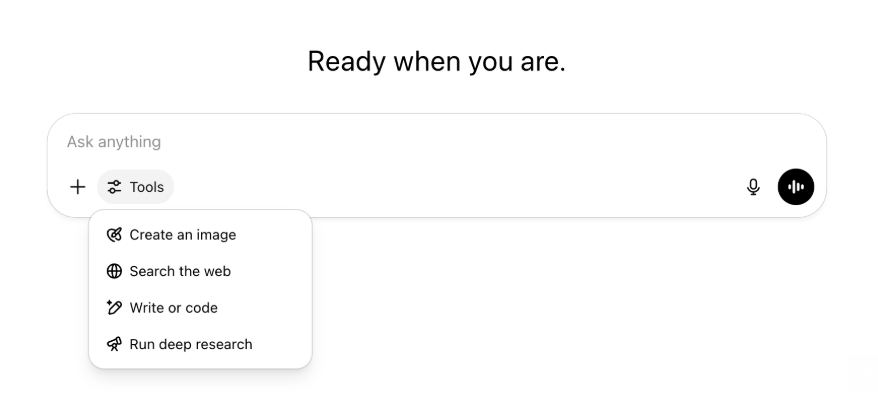
所有原有功能和工具仍然可用,只是统一到一个菜单中,界面更整洁,访问更方便。
2025年5月22日
在 ChatGPT 中发布 GPT-4.1
自 4 月在 API 中发布以来,GPT-4.1 深受开发者喜爱。应广大用户要求,我们将其直接引入 ChatGPT。
GPT-4.1 是一款专用模型,尤其擅长编程任务。与 GPT-4o 相比,它在精确遵循指令和 Web 开发任务方面更强;对于简单的日常编程需求,它也是 OpenAI o3 和 OpenAI o4-mini 之外的另一种选择。
从今天起,Enterprise 和 Edu 用户可通过模型选择器中的“更多模型”下拉菜单访问 GPT-4.1。对于付费用户,GPT-4.1 的速率限制与 GPT-4o 相同。
在 ChatGPT 中推出 GPT-4.1 mini,取代 GPT-4o mini
GPT-4.1 mini 是一款快速、强大且高效的小型模型,在遵循指令、编程和整体智能方面均比 GPT-4o mini 显著提升。对于付费用户,GPT-4.1 mini 将取代模型选择器“更多模型”中的 GPT-4o mini;免费用户达到 GPT-4o 使用上限后,它将作为备用模型。速率限制保持不变。
GPT-4.1 和 GPT-4.1 mini 的评估结果最初发布于 API 上线时配套的博客文章中。它们也接受了标准安全评估。详细结果可在新上线的安全评估中心中查看。
2025年5月15日
将深度研究导出为 PDF
现在可以将深度研究报告导出为格式精美的 PDF,其中包含表格、图像、带链接的引用和来源。
使用时,请点击分享图标并选择“下载为 PDF”。新旧报告均可使用。
整合移动端 UI 消息输入框(iOS/Android)
我们已移除移动端消息输入框中的单独工具图标行,改用新的滑块样式图标打开技能菜单。点击该按钮会打开底部菜单,用户可从中选择“创建图像”或“搜索网页”等工具。
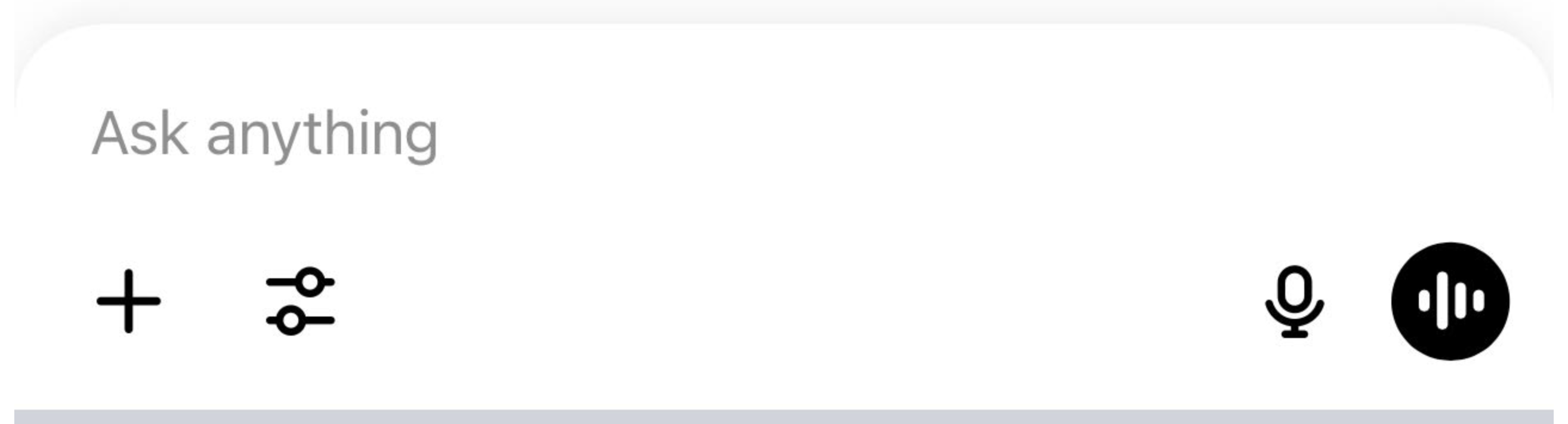
没有任何工具被弃用,只是整合了访问入口,以腾出空间并减少屏幕杂乱。
2025年5月8日
ChatGPT 用户分析正式发布
可在管理工作空间控制台的分析选项卡中访问焕新后的用户分析仪表板。与原来的分析选项卡相比,它提供了更全面的使用情况、采用率和参与度数据。
改进后的仪表板让管理员可以从宏观层面了解整个组织使用 ChatGPT 的情况,用于跟踪采用率和参与度、了解热门工具和 GPT 的使用模式,以及发现用例和用户趋势。
请参阅ChatGPT Enterprise 和 Edu 用户分析以及ChatGPT Enterprise/Edu 中的合规 API 与用户分析对比。
2025年5月2日
GPT 中的 4o 图像生成
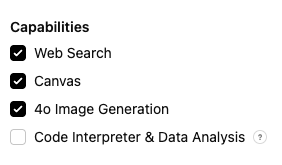
GPT 现在可利用 ChatGPT 的图像生成能力,按用户要求生成图像。
GPT 创建者可在 GPT 编辑器的“配置”部分,在功能下启用“4o 图像生成”。
2025年5月1日
深度研究
使用标准深度研究模型达到每月上限(每月 10 项任务)的用户,当月将自动获得 15 次额外请求,使用我们的轻量、经济高效版本,直至月度限额重置。
详细了解深度研究。
o3 和 o4-mini 中的任务
现在可以使用 o3 和 o4-mini 创建定时任务,让 ChatGPT 按计划运行自动提示并主动与你联系。模型选择器中的“带定时任务的 ChatGPT”选项已移除。
详细了解 ChatGPT 中的定时任务。
2025年4月24日
o3 和 o4-mini
随着 o3 和 o4-mini/o4-mini-high 推出,它们将在 ChatGPT 中分别取代 o1 和 o3-mini/o3-mini-high。
OpenAI o3 是我们最强大的推理模型,在编程、数学、科学和视觉感知等领域不断拓展前沿。它在 Codeforces、SWE-bench(未构建专门针对该模型的自定义脚手架)和 MMMU 等基准测试中创造了新的业界最佳成绩。它非常适合需要多维分析且答案并不显而易见的复杂问题。它在分析图像、图表和图形等视觉任务上表现尤为出色。外部专家评估显示,在高难度真实任务中,o3 的严重错误比 OpenAI o1 少 20%,尤其擅长编程、商业/咨询和创意构思等领域。早期测试者称赞它作为思考伙伴所具备的严谨分析能力,并强调它能够提出并批判性评估新颖假设,尤其是在生物学、数学和工程领域。
OpenAI o4-mini 是一款针对快速、经济高效的推理进行优化的小型模型,以其规模和成本而言性能卓越,尤其擅长数学、编程和视觉任务。它是 AIME 2024 和 2025 基准测试中表现最佳的模型。专家评估还显示,它在非 STEM 任务以及数据科学等领域均优于前代模型 o3‑mini。得益于高效率,o4-mini 的使用上限显著高于 o3,是处理需要推理的大批量、高吞吐量问题的理想选择。
2025年4月10日
ChatGPT 图像
GPT-4o 图像生成功能现已面向所有用户推出,并成为 ChatGPT 的默认图像生成器。希望继续使用 DALL·E 的用户仍可通过 DALL·E GPT 访问它。
只需让模型按照你指定的细节创建图像,或在消息输入框中选择“创建图像”,即可使用 ChatGPT 生成图像。详细了解。
2025年3月31日
ChatGPT 用户分析公开测试版
可在“管理工作空间”控制台的“分析”选项卡中访问焕新后的用户分析仪表板。与原来的分析选项卡相比,它提供了更全面的使用情况、采用率和参与度数据。
改进后的仪表板让管理员可以从宏观层面了解整个组织使用 ChatGPT 的情况,用于跟踪采用率和参与度、了解热门工具和 GPT 的使用模式,以及发现用例和用户趋势。
详情请参阅ChatGPT Enterprise 和 Edu 用户分析(公开测试版)。
2025年3月20日
共享项目更新
我们将暂缓推出具备“查看”和“编辑”访问权限的共享项目,以便开发更具协作性、能为用户创造价值的版本。
2025年3月13日
在 macOS 上使用“与应用协作”进行编程
使用 IDE 时,你可以让 ChatGPT 直接编辑已打开的文件,无需复制粘贴。当你请求编辑时,ChatGPT 会生成可供查看和应用的差异,也可以选择自动应用编辑。可在 ChatGPT 界面中轻松还原差异,也可以在编辑器中使用 CMD+Z。
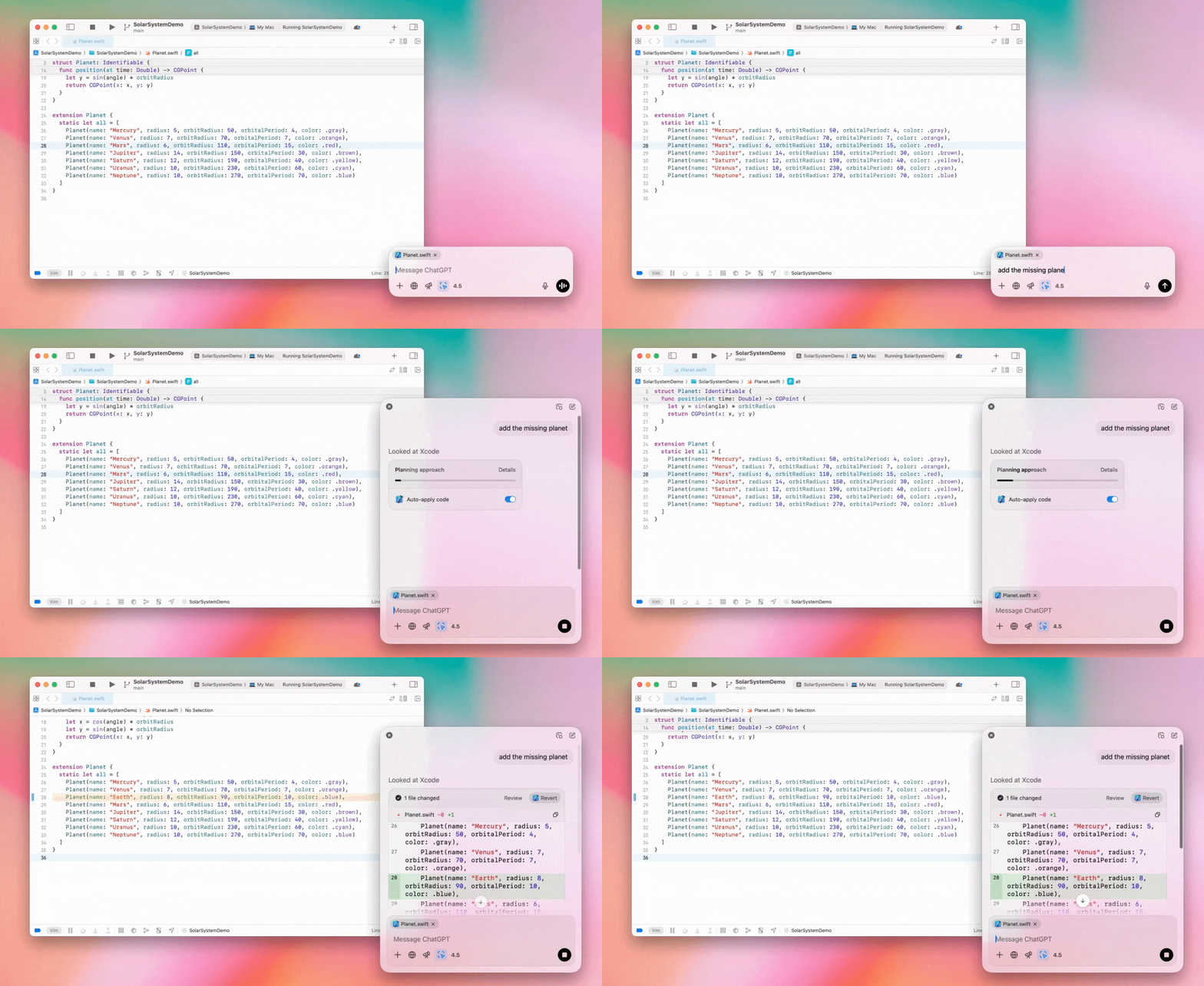
Enterprise 管理员可以在管理员设置中关闭“与应用协作”开关,为工作空间成员禁用此功能。
ChatGPT 中的 GPT-4.5
自 2025 年 3 月 13 日起,Enterprise 和 Edu 方案用户可在 ChatGPT 中使用 GPT-4.5 模型!
详情请参阅“ChatGPT 中的 GPT-4.5”。
2025年3月10日
ChatGPT 合规 API 中的深度研究
自2025年3月10日起,使用合规 API 的 Enterprise 客户可选择:
搜索“深度研究全局提示词”。
在回复中查找工具名称 {"tool_name":"deep_research"}。
2025年2月25日
ChatGPT 中的深度研究
ChatGPT 深度研究现已面向 Enterprise 方案用户开放。
深度研究可让 ChatGPT 以智能体方式异步浏览网页,帮助你完成专业或个人工作。
Enterprise 和 Edu 用户每月可进行 10 次深度研究查询。
详情请参阅深度研究常见问题解答。
2025年2月13日
ChatGPT 中的 o1 pro 模式和 o3-mini
ChatGPT o1 pro 模式现已面向 Enterprise 开放,o3-mini 现已面向 Enterprise Edu 开放!
o3-mini:OpenAI o3-mini 已在模型选择器中取代 o1-mini。它更具成本效益,延迟更低,速率限制也更高。它是一款推理模型,非常适合编程、STEM 和逻辑问题求解任务。o3-mini 会显示思维链,并可浏览网页。
o1 pro 模式:本周,模型选择器中还将提供 o1 pro 模式。它专为准确性和深度而设计,在研究、工程、商业和法律领域表现出色,非常适合处理高度复杂挑战的专业人士。O1 pro 模式需要更长时间来深入思考问题。因此,生成回复可能需要一些时间。由于计算量较大,每位用户每月最多可查询五次。对于大多数任务,o1、o3-mini 或 GPT-4o 仍是最佳选择。
关于文件上传
o1、o3-mini 和 o3-mini-high* 模型支持图像、文档和 PDF。不支持电子表格(CSV/Excel)。*
o1 pro 模式仅支持图像。不支持文档/PDF,也不支持电子表格(CSV/Excel)。
画布分享
ChatGPT Enterprise 和 Edu 用户现在可以像分享对话一样,与其他用户分享渲染后的 React/HTML 代码、文档或代码等画布资产。打开画布后,可从画布工具栏执行此操作。
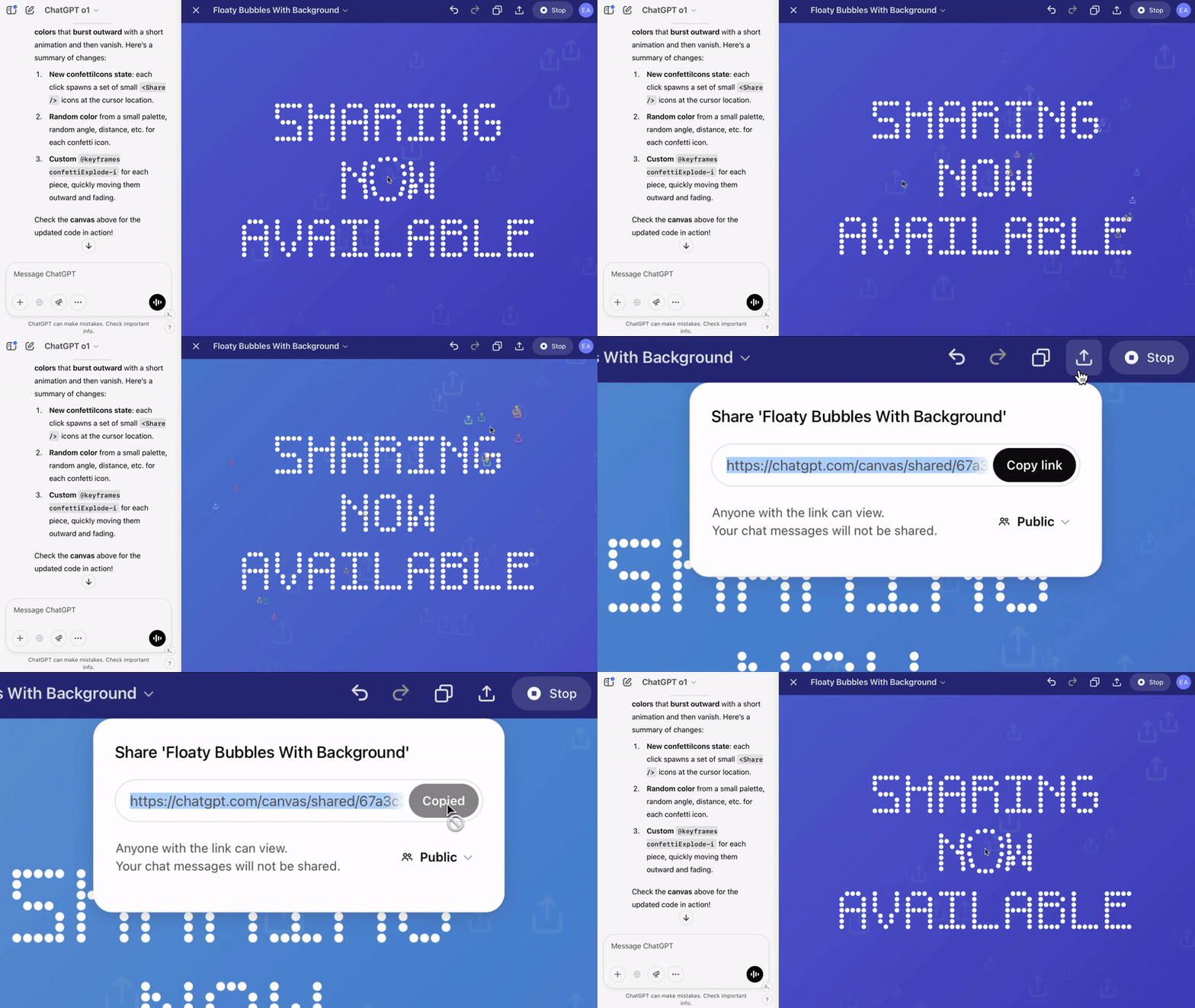
有关 ChatGPT 画布功能的更多详情,请查看以下帮助中心文章!
2025年1月23日
项目
项目现已面向包括 Enterprise 和 Edu 在内的所有付费方案推出。
详情请参阅“在 ChatGPT 中使用项目”。
2025年1月16日
ChatGPT Enterprise 的视觉检索 (PDF)
ChatGPT Enterprise 现已支持读取和理解 PDF 文件中嵌入的视觉内容(图像、图表、示意图等)。用户可以上传 PDF,ChatGPT 能够解读文件中的文字和所有视觉元素。
详情请参阅“PDF 视觉检索常见问题解答”。
2024年12月12日
o1
从今天起,所有 ChatGPT Enterprise 客户都可通过模型选择器访问 o1,它将取代 o1-preview。
o1 现在可对上传的图像进行推理,以更细致、准确地分析和解释视觉呈现形式,开启更多新应用。我们还对模型进行了训练,使其思考更加简洁,因此响应速度比 o1-preview 更快。
2024年12月11日
结合 ChatGPT 的 Apple Intelligence
ChatGPT 管理员现在可以在工作空间管理员设置的“连接”下启用或禁用 Apple Intelligence 访问权限。
如果关闭此设置,用户使用 OpenAI 凭据登录时将无法选择其 ChatGPT Enterprise/Edu 工作空间。
2024年12月10日
画布
今天,我们在 4o 中面向所有免费和付费用户默认开放了画布功能。此外,我们还为画布推出了多项新功能,包括:
GPT 中的画布:在 GPT 创建器中启用后,画布现在可与 GPT 配合使用。新创建的 GPT 将默认启用此开关。
执行 Python 代码:现在,你可以在画布中执行 Python 代码。ChatGPT 会尝试修复代码中的错误,并针对错误提供注释。请注意,执行 Python 代码可能会发起外部网络请求。企业版工作空间管理员可以前往管理员设置,关闭画布代码执行开关以禁用 Python 代码执行。所有企业版账户均默认关闭此功能。
画布快捷方式:现在,你可以将内容粘贴到 ChatGPT 中,然后通过输入框右上角的快捷方式立即在画布中打开。
工具箱中的画布:画布现已作为一个选项添加到工具箱中。
工作空间管理员现在可以使用合规 API 获取、列出和删除画布文本文档。
请注意,由于画布功能现已结束测试阶段,用于禁用画布的管理员设置已被移除。如果此前已禁用此功能,我们将继续沿用该设置。请使用本页面右下角的聊天气泡联系我们的支持团队。
2024年12月3日
macOS 上的“与应用协作”
通过 macOS 上的“与应用协作”,ChatGPT 现在可以读取编程应用中的内容,结合你的工作提供更智能、更准确的答案。详细了解 macOS 上的“与应用协作”。
Enterprise 管理员可以在管理员设置中关闭“与应用协作”开关,为工作空间成员禁用此功能。
2024年11月22日
ChatGPT 网页体验更新
未来两周内,我们将向所有 ChatGPT 用户逐步推出以下更新。
侧边栏重新设计
新增浮动模式,并支持轻触外部关闭
侧边栏现仅显示有限数量的近期对话,并提供可无限滚动的弹出面板来查看所有对话
近期 GPT 和置顶 GPT 现显示在对话下方
设置现始终位于侧边栏底部
在较大视口中,侧边栏未打开时会显示一个小型设置图标
新增过渡动画,带来更具沉浸感的体验
ChatGPT 网页版的其他更新
网站核心架构经过全面改造,可更好地支持更多种类和尺寸的设备
发起新对话时,现在会将其滚动到屏幕顶部以便查看
发起新对话后,消息生成期间不再自动滚动到底部
空间足够时,固定的侧边栏现在可在画布处于活动状态时保持打开
新的消息输入栏采用更新后的外观,并会在滚动时让其下方内容渐隐
新聊天按钮已移至模型选择器左侧,更便于访问
已移除对话中的系统图标,以腾出更多横向空间
DALL-E 专注视图已更新布局
GPT 创建器已更新布局
改进移动网页体验
大幅改进了 iOS 和 Android 移动设备上的屏幕键盘体验
新侧边栏始终采用浮动模式,并会在切换讨论串时自动关闭
在移动网页端切换对话时,我们不再自动聚焦消息输入框
已修复在某些情况下滚动卡住的问题
2024年11月20日
GPT-4o 更新
我们已为所有付费层级的 ChatGPT 用户更新 GPT-4o。此次 GPT-4o 更新提升了写作能力,表达更加自然,更能顾及受众,并可针对性地提高相关性和可读性。该模型也能更好地处理上传的文件,提供更深入的洞见和更详尽的回复。
2024年11月19日
ChatGPT 网页版高级语音
从今天起,我们开始在网页端逐步推出高级语音模式(移动和桌面应用已支持)。用户现在可在桌面设备上通过 chatgpt.com 发起语音聊天,在规划、写作和头脑风暴等任务中与 ChatGPT 进行实时、自然的对话。
2024年11月14日
Windows 应用
改进后的 Windows 应用现已通过 Microsoft Store 面向 ChatGPT Enterprise 和 Edu 工作空间提供。熟悉网页端体验的 ChatGPT 用户,可将 Windows 应用无缝融入电脑上的各项工作。
用户对 ChatGPT Windows 应用的访问将遵循 IT 管理员针对 Microsoft Store 应用制定的政策。未来几周内,IT 管理员还可以选择通过 MDM/MAM 将应用部署到员工设备,而不是允许员工直接从商店下载。
与所有 ChatGPT Enterprise 体验一样,用户聊天记录将受到安全保护,不会用于改进 OpenAI's 服务。
详细了解 ChatGPT Windows 应用。